1. Kako začeti
1.1 Vsebina paketa
Verify that all items are present in your Ultimate Ears Boom 2 package:
- Ultimate Ears Boom 2 Bluetooth Speaker
- Micro-USB polnilni kabel
- Napajalnik (lahko se razlikuje glede na regijo)
1.2 Polnjenje vašega zvočnika
Before initial use, fully charge your Ultimate Ears Boom 2 speaker. Connect the micro-USB cable to the charging port on the speaker and the other end to the power adapter, then plug into a wall outlet. The LED indicator will show charging status.

The Ultimate Ears Boom 2 speaker, ready for charging.
1.3 Bluetooth seznanjanje
Če želite zvočnik povezati z napravo, ki podpira Bluetooth:
- Press and hold the Power button on the top of the speaker until you hear a tone and the LED flashes white.
- V mobilni napravi se pomaknite do nastavitev Bluetooth.
- Select 'UE Boom 2' from the list of available devices.
- Once connected, you will hear a confirmation tone from the speaker.

Vrh view of the speaker, highlighting the power and Bluetooth pairing buttons.
1.4 Ultimate Ears App
For enhanced control and additional features, download the Ultimate Ears app from your device's app store (iOS 9.0 or later required for Apple devices, Android compatible). The app allows for remote power control, equalizer adjustments, and PartyUp mode.
2. Speaker Operation
2.1 Vklop/izklop
Press the Power button located on the top of the speaker to turn it on or off. A distinct sound will indicate the power status.
2.2 Nadzor glasnosti
Adjust the volume using the large '+' and '-' buttons located on the side of the speaker. You can also control the volume from your connected Bluetooth device.
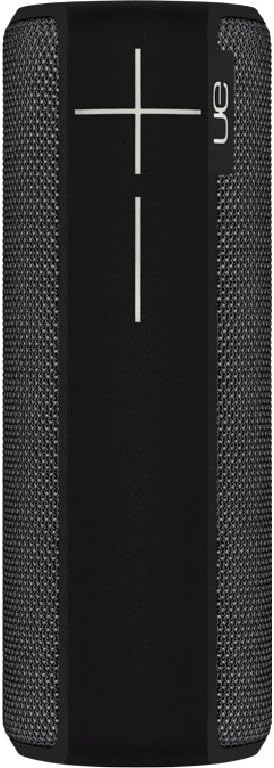
Stran view of the speaker, featuring the prominent volume control buttons.
2.3 Music Control (Tap Gestures)
The Boom 2 features tap controls for music playback:
- Enkratni dotik: Tap the top of the speaker once to play or pause the current track.
- Dvojni dotik: Tap the top of the speaker twice to skip to the next track.
2.4 Stanje baterije
To check the battery level, press both the '+' and '-' volume buttons simultaneously. The speaker will announce the remaining battery percentage.
2.5 Waterproof and Durability Features
The Ultimate Ears Boom 2 is designed to be waterproof (IPX7 rated) and shockproof. It can be immersed in water up to 1 meter for 30 minutes. Ensure the charging port cover is securely closed before exposing the speaker to water.

The speaker's waterproof design allows for use in various environments.

The Ultimate Ears Boom 2 demonstrating its water resistance.
2.6 PartyUp Mode (Connecting Multiple Speakers)
Use the Ultimate Ears app to connect multiple Boom speakers together for a more expansive sound experience. Follow the instructions within the app to activate PartyUp mode.
3. Nega in vzdrževanje
3.1 Navodila za čiščenje
Za čiščenje zvočnika uporabite mehko,amp krpo. Izogibajte se uporabi agresivnih kemikalij ali abrazivnih čistil, saj lahko poškodujejo površino zvočnika ali vodoodporna tesnila. Pred polnjenjem se prepričajte, da je polnilna vrata suha.
3.2 Življenjska doba baterije
To maximize battery life, avoid fully discharging the speaker frequently. Charge the speaker regularly, and if storing for an extended period, ensure it has at least a 50% charge.
3.3 Shranjevanje
Store the speaker in a cool, dry place away from direct sunlight and extreme temperatures. Ensure the charging port cover is closed to prevent dust and debris from entering.
4. Vodnik za odpravljanje težav
4.1 Brez napajanja
- Ensure the speaker is charged. Connect it to the power adapter and allow it to charge for at least 15 minutes before attempting to power on.
- Press and hold the Power button firmly for a few seconds.
4.2 Težave s povezavo Bluetooth
- Ensure the speaker is in pairing mode (flashing white LED).
- Izklopite in vklopite Bluetooth na mobilni napravi.
- Forget 'UE Boom 2' from your device's Bluetooth list and attempt to re-pair.
- Move the speaker closer to your device; the maximum range is approximately 33 meters (100 feet).
4.3 Ni zvoka ali nizka glasnost
- Povečajte glasnost tako na zvočniku kot na povezani napravi.
- Prepričajte se, da je zvočnik pravilno povezan prek Bluetootha.
- Check if the audio source on your device is playing correctly.
4.4 Popačenje zvoka
- Lower the volume on both the speaker and your connected device.
- Zagotovite zvok file ali kakovost pretakanja ni nizka.
- Move away from potential sources of interference (e.g., Wi-Fi routers, other Bluetooth devices).
4.5 Težave s povezljivostjo aplikacij
- Ensure your mobile device's operating system meets the app's requirements (iOS 9.0+).
- Znova zaženite aplikacijo ali jo ponovno namestite.
- Ensure the speaker's firmware is up to date via the app.
5. Tehnične specifikacije
| Funkcija | Specifikacija |
|---|---|
| Ime modela | Boom 2 |
| Številka modela | 984-000557 |
| ASIN | B0141208EA |
| Tehnologija povezljivosti | Bluetooth, USB |
| Brezžična komunikacijska tehnologija | Bluetooth |
| Združljive naprave | Computers, Smartphones (Android, iOS) |
| Življenjska doba baterije | Do 15 ur |
| Ocena vodotesnosti | IPX7 (up to 1 meter for 30 minutes) |
| Največji doseg | 33 metra (100 čevljev) |
| Izhodna moč zvočnika | 25 vatov |
| Dimenzije izdelka | 6.7D x 6.7W x 18H cm (approx. 15 x 5 x 5 cm; 0.54 grams) |
| Način avdio izhoda | Surround |
| Vir napajanja | Napajanje na baterije (priložena je 1 litij-polimerna baterija) |
6. Garancija in podpora strankam
6.1 Omejena garancija
The Ultimate Ears Boom 2 comes with a Limited Warranty. For specific details regarding warranty coverage, terms, and conditions, please refer to the warranty documentation included with your product or visit the official Ultimate Ears webmesto.
6.2 Podpora strankam
If you encounter any issues not covered in this manual or require further assistance, please contact Ultimate Ears customer support through their official website. For return policies or issues related to your purchase, consult the retailer's (e.g., Amazon.it) help pages.


