Uvod
Thank you for choosing the Technoline WT 745 Radio Controlled Alarm Clock. This digital alarm clock features precise timekeeping, dual alarms with snooze, date and weekday display, and indoor temperature monitoring. Please read this manual carefully to ensure proper setup and operation.
Vsebina paketa
- Technoline WT 745 Radio Controlled Alarm Clock
- Uporabniški priročnik
Note: 2x AAA batteries are required and not included.
Konec izdelkaview
Familiarize yourself with the main components of your WT 745 alarm clock.
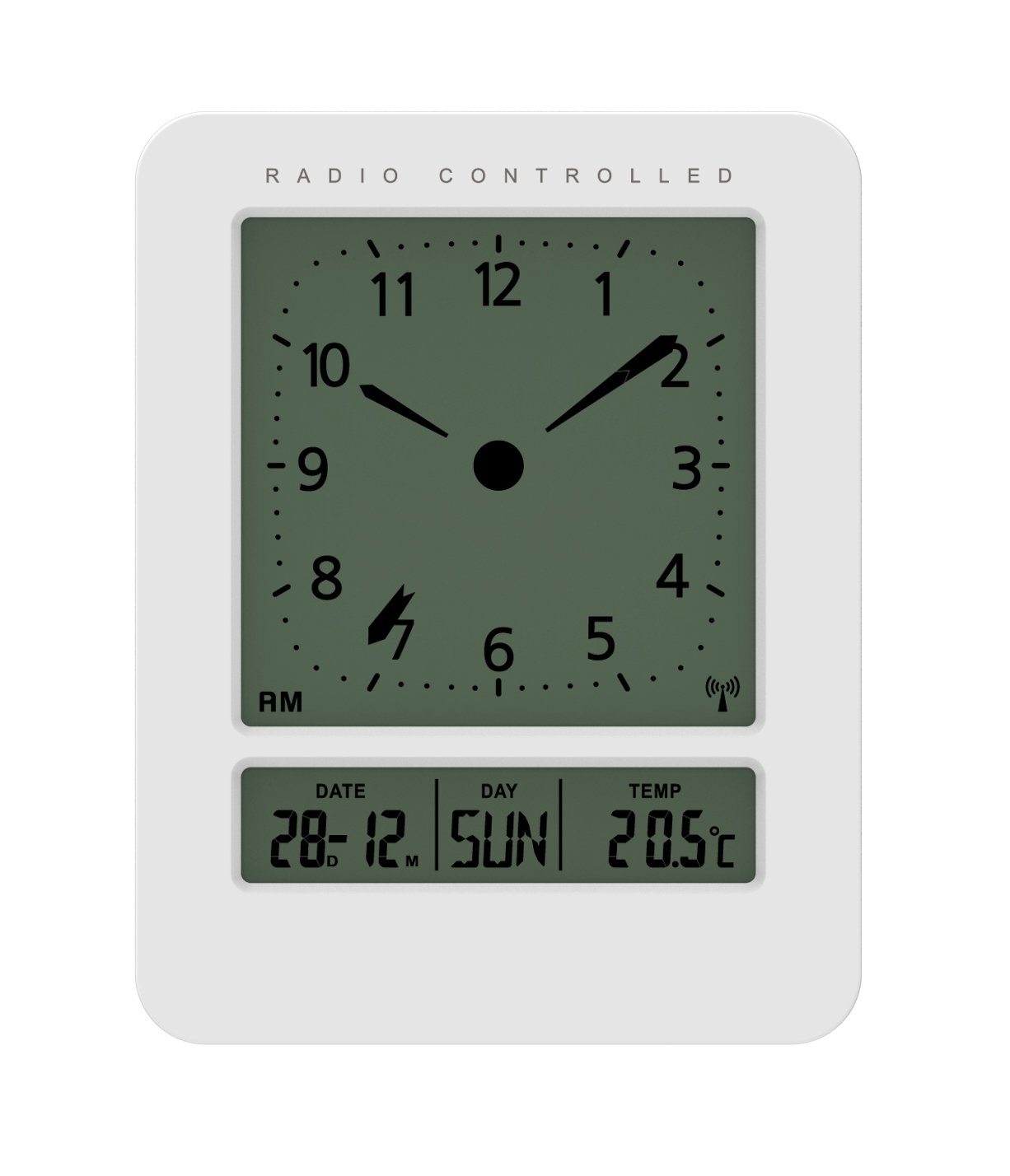
Slika: Spredaj in ob strani view of the Technoline WT 745 Radio Controlled Alarm Clock, showing the digital display with time, date, day, and temperature, and the analog clock face. The clock is white with a light grey display.
- Analog Clock Face: Displays current time with hour, minute, and second hands.
- Digitalni zaslon: Shows date, day of the week, and indoor temperature.
- Radio Controlled Indicator: Symbol indicating successful radio signal reception.
- Gumbi za upravljanje: Buttons for setting time, alarm, and other functions, typically located on the back or side.
- Predal za baterije: Nahaja se na zadnji strani za 2x AAA bateriji.
Nastavitev
1. Vstavljanje baterij
- Odprite pokrov predalčka za baterije na zadnji strani budilke.
- Insert 2 new AAA batteries, observing the correct polarity (+/-).
- Trdno zaprite pokrov prostora za baterije.
Note: The clock will automatically start searching for the radio time signal after battery insertion. This process may take several minutes.
2. Initial Radio Signal Reception
- Za optimalen sprejem signala postavite uro blizu okna.
- Izogibajte se postavljanju v bližino elektronskih naprav, ki lahko povzročajo motnje.
- Once the signal is received, the time, date, and day will be automatically set. The radio controlled indicator will appear on the display.
If the signal is not received within 10 minutes, try repositioning the clock or manually setting the time (see "Manual Time Setting").
Navodila za uporabo
Nastavitev alarma
- Pritisnite ALARM NASTAVLJEN button (location not specified, assume standard placement). The alarm time will flash.
- Uporabite UP or DOL gumbi za nastavitev ure.
- Pritisnite ALARM NASTAVLJEN again to confirm the hour and move to minutes.
- Uporabite UP or DOL gumbe za nastavitev minut.
- Pritisnite ALARM NASTAVLJEN za shranjevanje časa alarma.
- Za vklop/izklop alarma pritisnite VKLOP / IZKLOP ALARMA gumb. Na zaslonu se bo prikazala/izginila ikona alarma.
The WT 745 supports two independent alarms. Repeat the steps above to set the second alarm.
Funkcija dremeža
- Ko se oglasi alarm, pritisnite tipko DREMEŽ button (usually a large button on top). The alarm will pause for approximately 5 minutes and then sound again.
- To stop the alarm completely, press any other button (e.g., ALARM ON/OFF) or let it ring for its full duration.
Aktivacija osvetlitve ozadja
- Pritisnite SVETLOBA or DREMEŽ button to temporarily illuminate the display for easy viewv slabih svetlobnih pogojih.
Viewing Date, Day, and Temperature
- The digital display continuously shows the current date, day of the week, and indoor temperature. No specific action is required to view te.
Manual Time Setting (if radio signal is unavailable)
- Pritisnite in držite ČAS NAST button for a few seconds until the hour digits flash.
- Uporabite UP or DOL gumbi za nastavitev ure.
- Pritisnite ČAS NAST again to confirm the hour and move to minutes.
- Uporabite UP or DOL gumbe za nastavitev minut.
- Nadaljujte s pritiskom ČAS NAST to cycle through and adjust year, month, and day as needed.
- Pritisnite ČAS NAST one last time to exit manual setting mode.
Vzdrževanje
- Čiščenje: Uro obrišite z mehko, suho krpo. Ne uporabljajte abrazivnih čistil ali topil.
- Zamenjava baterije: Replace batteries when the display dims or functions become erratic. Always replace both batteries simultaneously with new ones.
- Shranjevanje: Če uro shranjujete dlje časa, odstranite baterije, da preprečite puščanje.
- Okolje: Uro hranite stran od neposredne sončne svetlobe, ekstremnih temperatur in visoke vlažnosti.
Odpravljanje težav
| Težava | Možen vzrok | rešitev |
|---|---|---|
| Zaslon je prazen ali temen. | Baterije so prazne ali nepravilno vstavljene. | Baterije zamenjajte z novimi baterijami AAA in pri tem pazite na pravilno polarnost. |
| Clock does not receive radio signal. | Interference, poor location, or signal too weak. | Move the clock closer to a window, away from electronic devices. Try manual time setting. |
| Alarm se ne oglasi. | Alarm ni aktiviran ali je napačno nastavljen. | Ensure the alarm icon is visible on the display. Recheck alarm time settings. |
| Prikazan je napačen čas. | Radio signal lost or manual time set incorrectly. | Allow the clock to resynchronize with the radio signal. If persistent, manually set the time. |
Specifikacije
- Model: Wt745
- Znamka: Tehnolinija
- Dimenzije: 7.1 x 4.5 x 9.2 cm (D x Š x V)
- Teža: 150 g
- Material: Plastika
- Vrsta zaslona: Digital with Analog Clock Face
- vir energije: 2 x AAA baterije (niso vključene)
- Posebne lastnosti: Radio Controlled Time, Dual Alarms, Snooze Function, Date Display, Day of Week Display, Indoor Temperature Display, Backlight.
- Uporaba: Notranja
Garancija in podpora
For warranty information or technical support, please refer to the warranty card included with your product or visit the official Technoline webspletno mesto. Shranite račun kot dokazilo o nakupu.
Uradno Webspletno mesto: www.technoline.eu


