Uvod
Hvala za nakupasing the Audioengine A2+ Powered Desktop Speakers. These speakers are designed to provide clear, full audio and can easily connect to various devices. This manual provides essential information for setting up, operating, and maintaining your speakers.

Image: A pair of red Audioengine A2+ powered desktop speakers, showcasing njihovo kompaktno zasnovo.
Kaj je vključeno
Vaš paket Audioengine A2+ vključuje naslednje komponente:
- Pair of Audioengine A2+ Powered Speakers (one active, one passive)
- 2m Speaker Wire for connecting the active and passive speakers
- Napajalnik in kabel
- USB cable for digital audio input
- 1.5m Mini-Jack Audio Cable for analog audio input
- Microfiber Speaker bags and Cable Bags for protection
- Setup Guide and Brochure

Image: All cables and the power supply unit included with the Audioengine A2+ speakers.
Nastavitev
Follow these steps to set up your Audioengine A2+ speakers:
- Umestitev: Position the active (left) speaker and passive (right) speaker on your desktop or desired location. Ensure adequate space for ventilation.
- Priključitev zvočnikov: Use the included speaker wire to connect the active speaker's "Out to Right" terminals to the passive speaker's input terminals. Match the positive (+) and negative (-) terminals.
- Priključite napajanje: Connect the power supply to the active speaker's "Power" input, then plug the power cord into a wall outlet.
- Avdio vhod: Izberite želeni način vnosa zvoka:
- USB zvok: Connect the USB cable from your computer to the "USB Input" on the active speaker.
- Mini-Jack Audio: Use the 1.5m mini-jack cable to connect your device's headphone output to the "Input" mini-jack on the active speaker.
- RCA Audio: Use RCA cables (not included) to connect your device's RCA outputs to the "Input" RCA jacks on the active speaker.
- Vklop: Turn the volume knob on the active speaker clockwise to power on the unit.
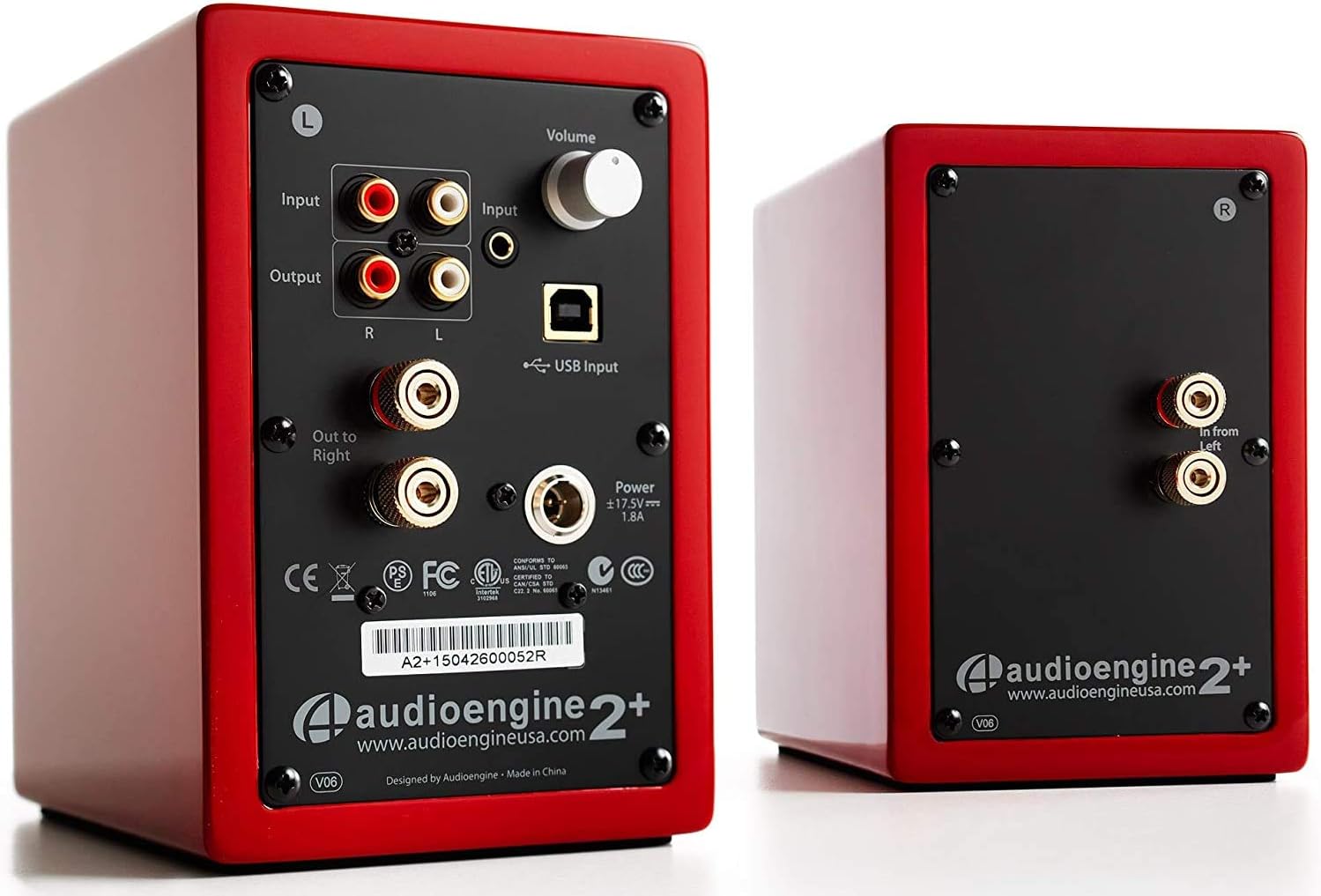
Image: Rear panel of the active speaker, highlighting various input and output connections.

Image: A detailed diagram of the A2+ speaker connections, including volume, inputs, and outputs.
Video: Prekoračitevview of the Audioengine A2+ speakers, demonstrating setup and features.
Upravljanje zvočnikov
Once set up, operating your A2+ speakers is straightforward:
- Nadzor glasnosti: Adjust the volume using the knob on the active speaker. You can also control volume from your connected device.
- Izbira vnosa: The A2+ automatically detects and prioritizes active inputs. If multiple inputs are connected, ensure only one is playing audio at a time for optimal performance.
- Bluetooth povezljivost: The A2+ features Bluetooth for wireless audio streaming. Refer to your device's Bluetooth pairing instructions and select "Audioengine A2+" from the available devices.
- Izhod za nizkotonec: The variable audio output allows for easy connection to a subwoofer (e.g., Audioengine S8) for enhanced bass.

Image: Versatile playback options for the A2+ speakers, illustrating connections for phone, USB, and turntable.
Video: Demonstrates various ways to play music through Audioengine speakers, highlighting different connectivity options.
Vzdrževanje
Za zagotovitev dolge življenjske dobe in optimalne zmogljivosti vaših zvočnikov Audioengine A2+ upoštevajte ta navodila za vzdrževanje:
- Čiščenje: Use a soft, dry cloth to clean the speaker cabinets. Avoid using harsh chemicals or abrasive cleaners.
- Zaščita pred prahom: When not in use, consider covering the speakers with the included microfiber bags to protect them from dust.
- Prezračevanje: Ensure the speakers have adequate airflow around them to prevent overheating. Do not block the rear panel.
- Izogibajte se vlagi: Keep the speakers away from water and excessive humidity.
Odpravljanje težav
If you encounter issues with your A2+ speakers, try the following common troubleshooting steps:
- Ni zvoka:
- Check all cable connections (power, speaker wire, audio input).
- Ensure the volume knob on the active speaker is turned up.
- Verify the volume on your connected device is not muted or too low.
- If using USB, ensure your computer's audio output is set to the A2+ speakers.
- Popačen zvok:
- Reduce the volume on both the speakers and your source device.
- Preverite, ali so kabli zrahljani ali poškodovani.
- Prepričajte se, da zvočni vir ni preobremenjen.
- Težave s povezovanjem Bluetooth:
- Ensure the speakers are in pairing mode (refer to your device's Bluetooth settings).
- Napravo premaknite bližje zvočnikom.
- Forget the device on your source and re-pair.
Za podrobnejše informacije o odpravljanju težav se obrnite na uradno Uporabniški priročnik (PDF).
Specifikacije
| Funkcija | Podrobnost |
|---|---|
| Ime modela | A2+ Red |
| Vrsta zvočnika | Knjižna polica |
| Posebna funkcija | Brezžično |
| Priporočene uporabe | Glasba |
| Združljive naprave | Pametni telefon, tablični računalnik, predvajalnik MP3, namizni računalnik, televizor, prenosni računalnik |
| Največja izhodna moč zvočnika | 60 vatov |
| Tehnologija povezljivosti | Bluetooth - Wired |
| Način avdio izhoda | Stereo |
| Dimenzije izdelka | 5.25"D x 4"Š x 6"V |
| Teža predmeta | 3.6 funta |
| Premer nizkotonca | 2 palcev |
| Razmerje med signalom in hrupom | 95 dB |
Garancija in podpora
Audioengine stands behind the quality of their products. All Audioengine products come with a 3-letna prenosljiva garancija. For warranty claims or technical support, please refer to the official Audioengine webspletnega mesta ali kontaktnih podatkov, navedenih na embalaži izdelka.
Additional resources can be found in the comprehensive Uporabniški priročnik (PDF).


