1. Uvod
This manual provides detailed instructions for the setup, operation, and maintenance of your EMOS E0114 Digital Thermometer and Hygrometer. This device accurately measures indoor temperature and humidity, and also functions as a quartz clock with an alarm, snooze feature, and date display. Please read this manual thoroughly before using the product to ensure correct operation and to prevent damage.
2. Varnostne informacije
- Napravo hranite stran od ekstremnih temperatur, neposredne sončne svetlobe in visoke vlažnosti.
- Naprave ne izpostavljajte vodi ali drugim tekočinam.
- Naprave ne poskušajte razstavljati ali spreminjati. S tem boste razveljavili garancijo.
- Izrabljene baterije zavrzite odgovorno v skladu z lokalnimi predpisi.
- Baterije hranite izven dosega otrok.
3. Vsebina paketa
Po razpakiranju preverite vsebino paketa:
- EMOS E0114 Digital Thermometer and Hygrometer
- Uporabniški priročnik
Note: 1 AA Mignon 1.5 V battery is required and not included in the package.

Figure 3.1: EMOS E0114 device in its retail packaging.
4. Izdelek je končanview
Familiarize yourself with the components of your EMOS E0114 device.
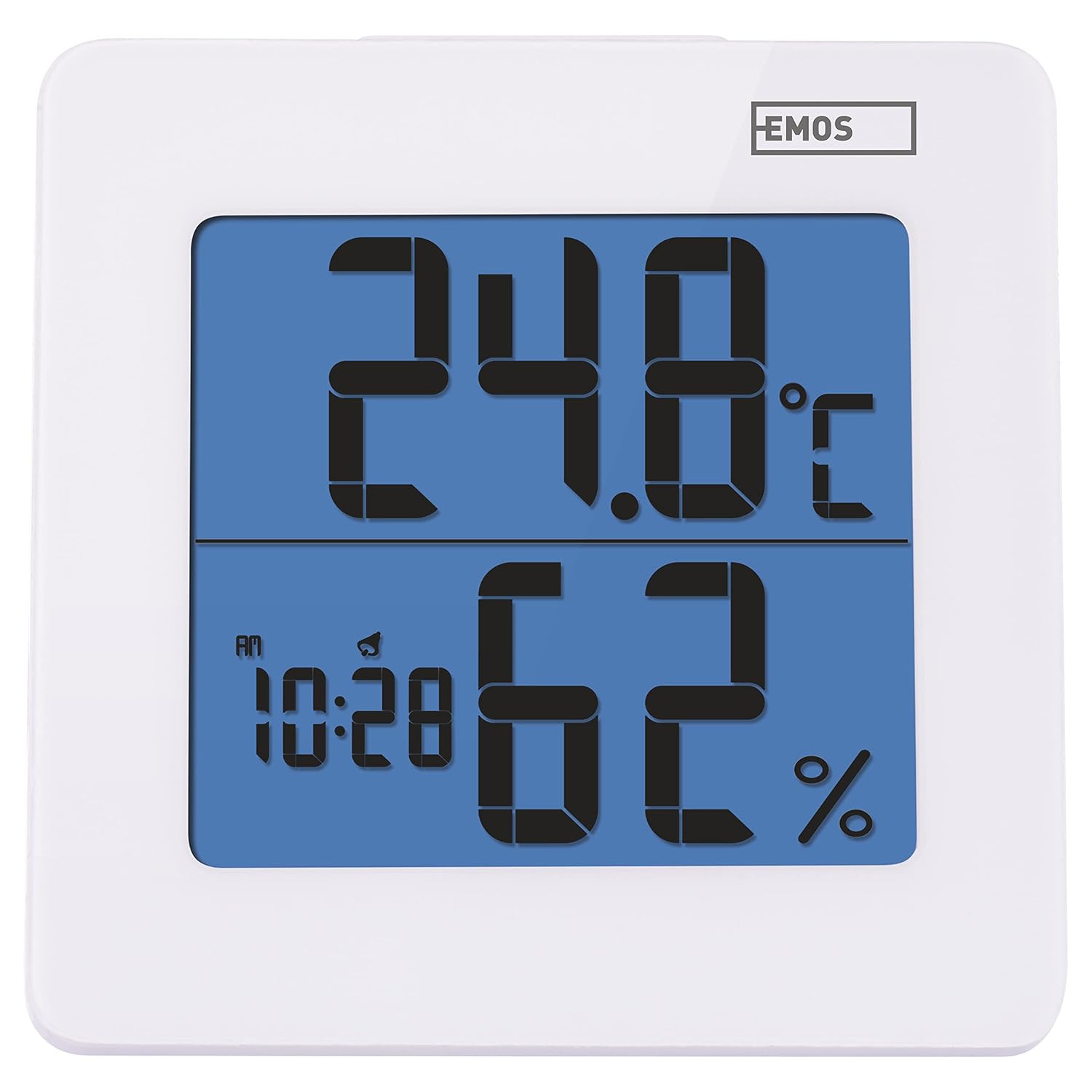
Slika 4.1: Spredaj view of the EMOS E0114 display, showing temperature, humidity, and time.

Slika 4.2: Zadaj view of the EMOS E0114, highlighting the control buttons and battery compartment.
Gumbi za upravljanje:
- NAVODILA: Switches between time display, alarm setting, and date setting.
- UP: Increases values during setting, activates/deactivates alarm.
- MEM: Displays maximum and minimum temperature/humidity records.
- C/Ž: Preklaplja med temperaturnimi enotami Celzija in Fahrenheita.
- PONASTAVITI: Ponastavi napravo na tovarniške nastavitve.
- DREMEST/LUČ (zgornja vrstica): Activates snooze function during alarm, illuminates the display backlight.
5. Nastavitev
5.1 Namestitev baterije
- Poiščite predal za baterijo na zadnji strani naprave (glejte sliko 4.2).
- Odprite pokrov prostora za baterije.
- Insert one (1) AA Mignon 1.5 V battery, ensuring correct polarity (+/-).
- Trdno zaprite pokrov prostora za baterije.
5.2 Začetni vklop
Upon battery installation, the device will power on automatically and display the current time (default 12:00 AM), temperature, and humidity. The backlight will briefly illuminate.
6. Navodila za uporabo
6.1 Nastavitev časa in datuma
- V običajnem načinu prikaza časa pritisnite NAČIN enkrat pritisnite gumb za vstop v način nastavitve časa. Številke za ure bodo utripale.
- Uporabite UP gumb za nastavitev ure.
- Pritisnite NAČIN again to set the minutes. The minute digits will flash. Use the UP gumb za prilagoditev minut.
- Pritisnite NAČIN again to set the year. The year digits will flash. Use the UP gumb za nastavitev leta.
- Nadaljujte s pritiskom NAČIN to set the month and then the day, adjusting each with the UP gumb.
- Po nastavitvi dneva pritisnite NAČIN to exit setting mode and return to normal time display.
6.2 Nastavitev alarma
- V običajnem načinu prikaza časa pritisnite NAČIN button twice to enter alarm setting mode. The alarm time will be displayed, and the hour digits will flash.
- Uporabite UP gumb za nastavitev budilke.
- Pritisnite NAČIN again to set the alarm minutes. The minute digits will flash. Use the UP gumb za nastavitev minut alarma.
- Pritisnite NAČIN za izhod iz načina nastavitve alarma.
- Za vklop ali izklop alarma pritisnite UP button once in normal time display mode. An alarm icon will appear on the display when activated.
6.3 Using Snooze and Backlight
- Ko se oglasi alarm, pritisnite tipko SNOOZE / LUČ bar on top of the device to activate the snooze function. The alarm will pause for approximately 5 minutes and then sound again.
- To turn off the alarm completely, press any other button (MODE, UP, MEM, C/F) on the back of the device.
- Pritisnite SNOOZE / LUČ bar at any time to briefly illuminate the display backlight for better visibility in low light conditions.
6.4 Preklapljanje temperaturnih enot (°C/°F)
V običajnem načinu prikaza pritisnite C / Ž button on the back of the device to toggle between Celsius (°C) and Fahrenheit (°F) temperature readings.
6.5 Viewing Maximum and Minimum Records
The device stores the maximum and minimum temperature and humidity values recorded since the last reset or battery change.
- Pritisnite MEM button once to display the maximum recorded temperature and humidity.
- Pritisnite MEM button again to display the minimum recorded temperature and humidity.
- Pritisnite MEM tretjič, da se vrnete na prikaz trenutne temperature in vlažnosti.
- To clear the maximum/minimum records, press and hold the MEM gumb za približno 3 sekundi, medtem ko viewsnemanje zapisov.
7. Vzdrževanje
7.1 Čiščenje
- Napravo obrišite z mehko, suho krpo.
- Do not use abrasive cleaners, solvents, or chemical agents, as these may damage the display or casing.
7.2 Zamenjava baterije
When the display becomes dim or the device stops functioning, it is time to replace the battery.
- Odprite pokrov prostora za baterije na zadnji strani naprave.
- Odstranite staro baterijo AA.
- Insert a new AA Mignon 1.5 V battery, observing correct polarity.
- Zaprite pokrov prostora za baterije.
- You may need to reset the time and date after battery replacement.
8. Odpravljanje težav
| Težava | Možen vzrok | rešitev |
|---|---|---|
| Brez zaslona ali zatemnjen zaslon | Prazna ali prazna baterija; nepravilna namestitev baterije. | Replace the battery with a new AA 1.5V battery. Ensure correct polarity. |
| Napačen čas/datum | Time/date not set correctly after battery installation or reset. | Follow instructions in Section 6.1 to set the time and date. |
| Temperature/humidity readings seem inaccurate | Device placed in an unsuitable location (e.g., near heat source, vent, direct sunlight). | Relocate the device to a stable indoor environment away from direct influences. Allow 30 minutes for readings to stabilize. |
| Alarm se ne oglasi | Alarm ni aktiviran. | Ensure the alarm icon is visible on the display (refer to Section 6.2). |
| Naprava se ne odziva | Začasna elektronska napaka. | Pritisnite PONASTAVI button on the back of the device using a thin object (e.g., paperclip). Note: This will clear all settings. |
9. Specifikacije
- Model: E0114
- Znamka: EMOS
- Območje merjenja temperature: 0 °C do +50 °C (32 °F do 122 °F)
- Temperaturna ločljivost: 0.1 °C / 0.1 °F
- Območje merjenja vlažnosti: 20% do 90% relativne vlažnosti (RH)
- Ločljivost vlažnosti: 1 % RH
- Ura: Quartz with 12/24 hour format
- Alarm: Yes, with Snooze function
- Zaslon: Osvetljen LCD
- Funkcija pomnilnika: Največja/najmanjša temperatura in vlažnost
- Napajanje: 1 x AA Mignon 1.5 V battery (not included)
- Dimenzije (D x Š x V): 3.7 x 9.3 x 9.3 cm (približno 1.46 x 3.66 x 3.66 palca)
- Dimenzije zaslona: 60 x 65 mm (approximately 2.36 x 2.56 inches)
- Teža: 109 gramov (približno 3.84 unče)
- Vrsta pritrditve: Wall mountable (integrated stand)
- barva: White (with blue display backlight)

Figure 9.1: Dimensions of the EMOS E0114 device.
10. Garancija in podpora
EMOS products are designed for reliability and performance. For warranty information or technical support, please refer to the warranty card included with your purchase or visit the official EMOS webspletnega mesta. Prosimo, shranite dokazilo o nakupu za morebitne garancijske zahtevke.


