Uvod
The DigiTech TRIO is an innovative electric guitar multi-effect pedal designed to be your personal band. It listens to your guitar playing and automatically generates accompanying bass and drum parts. This manual provides comprehensive instructions for setting up, operating, and maintaining your TRIO pedal, ensuring you get the most out of its unique features.
Ključne značilnosti
- Seven Music Genres and Twelve Song Styles Per Genre to Choose From
- The TRIO can learn up to three different song parts that can be recalled on-the-fly
- Adjustable Tempo & Alternate Half Time/Double Time Variants Bass & Drum Level Controls
- Hands-Free Control Using a DigiTech FS3X Footswitch (optional)
- Amp & Mixer Outputs Headphone Output w/Level Control Power Supply Included
Vodnik za namestitev
Follow these steps to set up your DigiTech TRIO pedal:
- Connect the included 9V DC power supply to the MOČ input on the pedal and plug it into a power outlet.
- Priključite električno kitaro na KITARA IN vtičnico s standardnim 1/4-palčnim instrumentalnim kablom.
- Povežite AMP VEN priključek za tvojo kitaro amplifier's input using another 1/4-inch instrument cable.
- For connecting to a mixer or PA system, use the ZMESALNIK IZH jack.
- Za zasebno prakso priključite slušalke na NA SLAF jack.
- Optionally, connect a DigiTech FS3X Footswitch to the KONTROLA V jack for extended hands-free control.
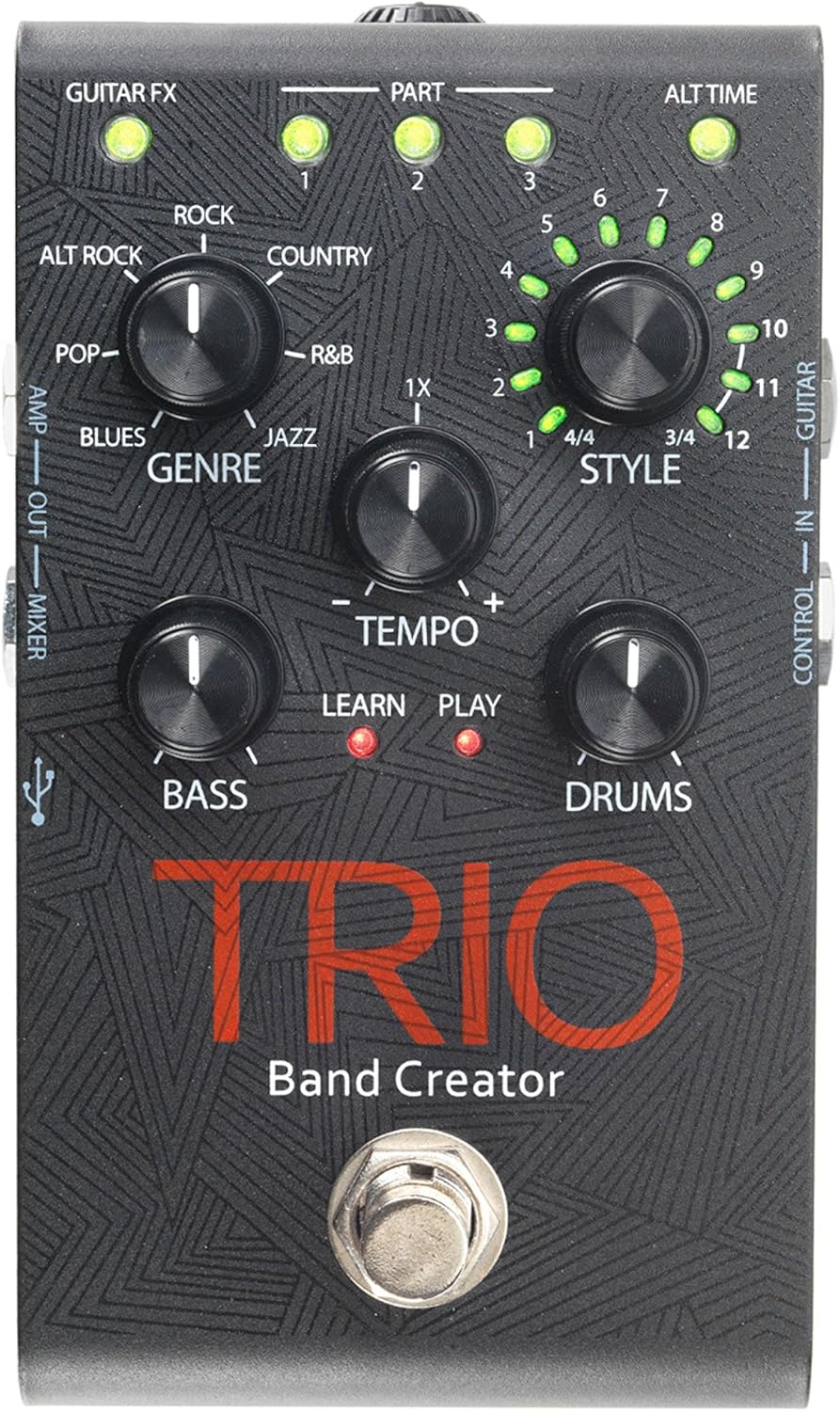
Slika 1: Zgornji del view of the DigiTech TRIO pedal, showing the main controls and footswitch.
Navodila za uporabo
Basic Operation: Teaching the TRIO a Song
- Pritisnite BAND footswitch once to enter 'Listen' mode. The NAUČITE SE LED bo zasvetila.
- Play your desired chord progression and rhythm clearly. The TRIO will analyze your playing.
- Pritisnite BAND footswitch again to stop 'Listen' mode. The IGRAJ LED will illuminate, and the TRIO will immediately begin playing generated bass and drum parts.
- You can now play along with your virtual band.
Genre and Style Selection
- Uporabite ŽANR knob to select from Blues, Pop, Alternative Rock, Rock, Country, R&B, and Jazz. The genre affects the overall feel of the generated bass and drum parts.
- Uporabite SLOG knob to choose from twelve different song styles available for each genre. This allows for further customization of the rhythm and feel.
- The ALTERNATIVNI ČAS button allows you to switch between 3/4 and 4/4 time signatures.
Looping and Song Parts
- The TRIO can learn up to 3 different song parts. To record a new part, select an empty DEL slot (1, 2, or 3) using the corresponding buttons.
- Follow the 'Basic Operation' steps to teach the TRIO the new song part.
- During playback, you can switch between learned song parts on-the-fly by pressing the corresponding DEL gumb.
- The ZEMLJA footswitch allows you to record and playback your own guitar loops. Press once to start recording, press again to stop recording and start playback, and press and hold to clear the loop.
Adjusting Levels and Tempo
- The TEMPO knob adjusts the playback speed of the band and loops.
- The BASS knob controls the volume level of the generated bass line.
- The BOBNI knob controls the volume level of the generated drum track.
- The ZANKA knob controls the volume level of your recorded guitar loop.

Slika 2: Pod kotom view of the DigiTech TRIO pedal, highlighting the control knobs and input/output jacks.
Kontrole in povezave
The DigiTech TRIO pedal features a user-friendly layout with clearly labeled controls and versatile connection options:
Nadzor sprednje plošče:
- GUITAR FX: Activates built-in guitar effects tailored to the selected genre.
- PART 1, 2, 3: Buttons to select and recall different learned song parts.
- ALT TIME: Toggles between 3/4 and 4/4 time signatures.
- TEMPO Knob: Adjusts the overall playback speed.
- GENRE Knob: Selects the musical genre (Blues, Pop, Alt Rock, Rock, Country, R&B, Jazz).
- STYLE Knob: Selects one of twelve styles within the chosen genre.
- Gumb LOOP: Controls the volume of your recorded guitar loop.
- Gumb BASS: Nadzira glasnost ustvarjene basovske linije.
- DRUMS Knob: Nadzira glasnost ustvarjene bobnarske skladbe.
- LOOPER Footswitch: Records/plays/clears guitar loops.
- BAND Footswitch: Enters 'Listen' mode to learn chords/rhythm, or starts/stops band playback.
Side and Rear Panel Connections:
- KITARA V: 1/4-inch input for your electric guitar.
- AMP IZHOD: 1/4-inch output to your guitar amplifier.
- MIXER OUT: 1/4-inch output for connecting to a mixer or PA system.
- IZLAZ ZA SLUŠALKE: 1/8-inch stereo output for headphones.
- NADZOR V: 1/4-inch input for optional DigiTech FS3X Footswitch.
- MOČ: 9V DC input for the included power supply.
- USB: Mini-USB port for firmware updates.

Slika 3: Zadaj view of the DigiTech TRIO pedal, showing the power input and headphone jack.
Specifikacije
| Funkcija | Podrobnost |
|---|---|
| Teža predmeta | 10.6 unč (0.3 kg) |
| Dimenzije izdelka | 4.63 x 3.19 x 2.13 palcev (11.76 x 8.10 x 5.41 cm) |
| Številka modela artikla | TRIO |
| Baterije | 1 9V battery required (for internal use, not primary power) |
| Strojni vmesnik | 1/4-palčni avdio |
| Format signala | Analogni |
| Vir napajanja | Corded Electric (9V DC adapter included) |
| voltage | 9 volta |
| Ampstarost | 300 milliamps |
Vzdrževanje
- Pedal vzdržujte čist tako, da ga obrišete z mehko, suho krpo. Izogibajte se uporabi abrazivnih čistil ali topil.
- Pedal shranjujte na hladnem in suhem mestu, stran od neposredne sončne svetlobe in ekstremnih temperatur.
- Prepričajte se, da so vsi kabli varno priključeni, da preprečite izgubo ali poškodbo signala.
- Pazite, da vam pedal ne bo padel ali da ga ne boste izpostavljali močnim udarcem.
Odpravljanje težav
- Ni zvoka: Check all cable connections (guitar, amp, power). Ensure the pedal is powered on and the volume knobs are not set to zero.
- Slaba kakovost zvoka: Verify that your instrument and amplifier are functioning correctly. Check for damaged cables.
- Band Not Generating Correctly: Ensure you are playing clear, distinct chords during the 'Listen' phase. Try different genres and styles to see if a different setting better interprets your playing.
- Nožno stikalo se ne odziva: Disconnect and reconnect the power supply. If using an optional FS3X footswitch, ensure it is properly connected.
Garancija in podpora
Za informacije o garanciji in tehnično podporo se obrnite na uradno spletno stran DigiTech. webspletno mesto ali se obrnite na njihovo službo za stranke. Shranite dokazilo o nakupu za uveljavljanje garancije.


