Uvod
The Logitech UE Boom is a 360-degree wireless Bluetooth speaker designed for portable audio. It features a durable, go-anywhere shape and is equipped with a water and stain resistant acoustic skin. This speaker allows for wireless music playback, phone calls, and can be paired with another UE Boom for stereo sound.

Slika: spredaj view of the Logitech UE Boom Wireless Bluetooth Speaker in Northern Light color.
Ključne značilnosti
- 360-stopinjski zvok: Delivers immersive audio in all directions.
- Prenosna zasnova: Versatile, cylindrical shape for easy transport.
- Water and Stain Resistant: Features a colorful acoustic skin with plasma coating for durability against water and stains.
- Brezžična povezljivost: Connects via Bluetooth from up to 50 feet away. Easy pairing via NFC for compatible devices.
- Double Up Feature: Wirelessly connect two UE BOOM speakers in stereo using the UE BOOM app for enhanced sound.
- Dolga življenjska doba baterije: Rechargeable battery provides up to 15 hours of playback.
- Zvočnik: Integrated crystal-clear speakerphone for calls.
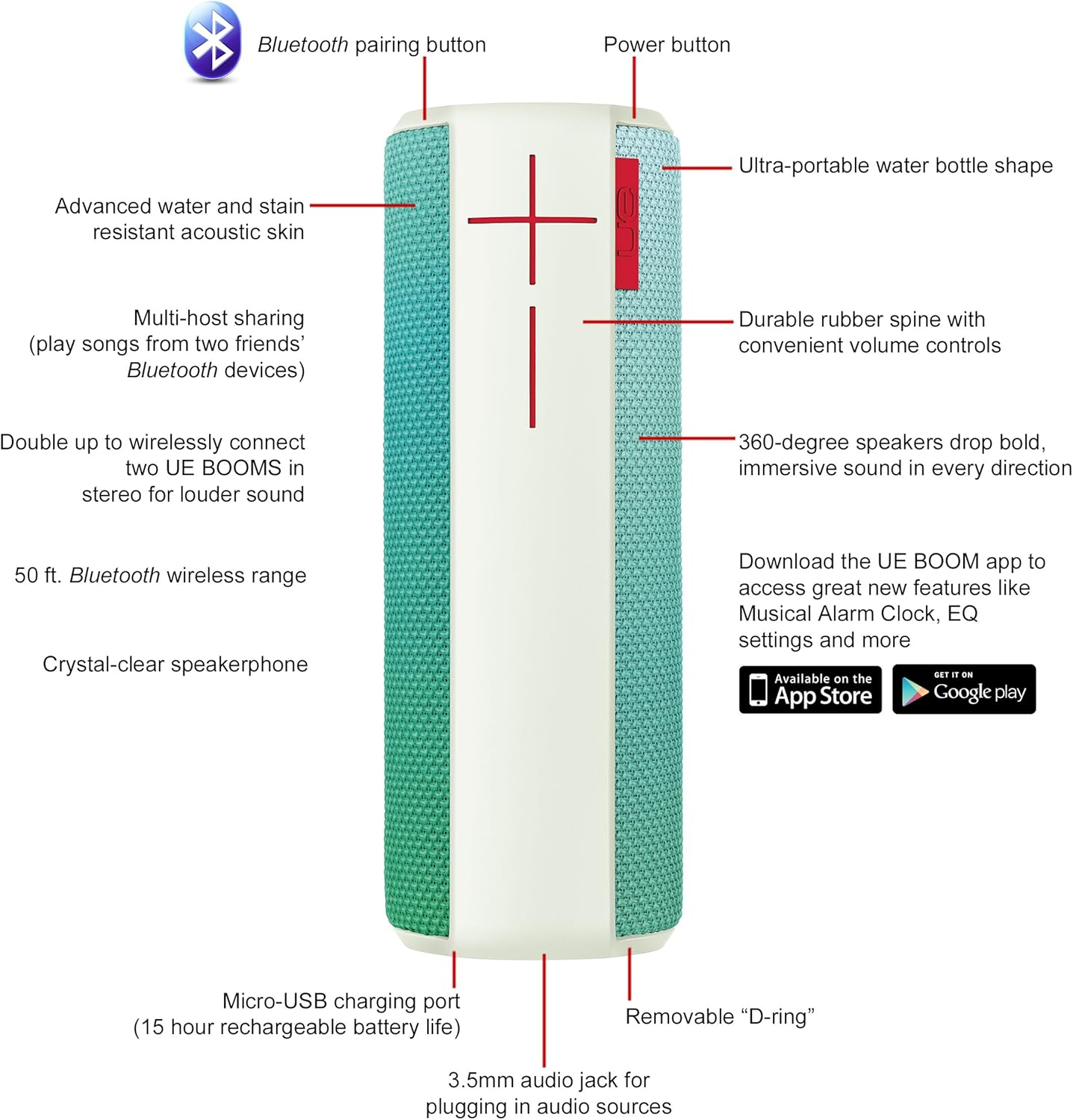
Image: Diagram highlighting key features and controls of the UE Boom speaker, including Bluetooth pairing button, power button, volume controls, micro-USB charging port, and 3.5mm audio jack.
Nastavitev
Polnjenje zvočnika
Before initial use, fully charge your UE Boom speaker. Connect the provided micro-USB cable to the charging port located at the bottom of the speaker and plug the other end into a USB power source. The speaker's battery provides approximately 15 hours of playback on a full charge.
Bluetooth združitev
- Power on your UE Boom speaker by pressing the power button.
- Press and hold the Bluetooth pairing button (usually indicated by a Bluetooth icon) until you hear an audible tone and the LED indicator flashes rapidly.
- On your mobile device (smartphone or tablet), navigate to the Bluetooth settings.
- Select "UE Boom" from the list of available devices to pair.
- Once paired, you will hear a confirmation tone from the speaker.
For NFC-enabled devices, simply tap your device to the NFC area on the speaker for quick pairing.
Navodila za uporabo
Osnovne kontrole
- Gumb za vklop: Located on the top of the speaker to turn it on or off.
- Nadzor glasnosti: Large '+' and '-' buttons on the side of the speaker adjust the volume.
- Gumb Bluetooth: Zažene način seznanjanja Bluetooth.
Using the UE BOOM App
Download the official UE BOOM app from your device's app store (available on App Store and Google Play) to unlock additional features:
- Musical Alarm Clock: Wake up to your favorite music.
- Aktivacija na daljavo: Turn your speaker on/off from your device.
- Nastavitve EQ: Prilagodite sound profile po vaših željah.
- Podvoji: Connect two UE BOOM speakers for a stereo sound experience.
Funkcionalnost zvočnika
When connected to a smartphone, the UE Boom can be used as a speakerphone. Incoming calls will be routed through the speaker, allowing for hands-free communication.
Vzdrževanje
The UE Boom speaker features a water and stain resistant acoustic skin. To clean, gently wipe the speaker with a damp cloth. Avoid using harsh chemicals or abrasive cleaners. Ensure all ports are dry before charging or connecting other devices.
Odpravljanje težav
- Brez napajanja: Ensure the speaker is charged. Connect it to a power source using the micro-USB cable.
- Seznanitev prek Bluetootha ni mogoča:
- Prepričajte se, da je zvočnik v načinu seznanjanja (utripajoča LED lučka).
- Preverite, ali je Bluetooth omogočen v vaši napravi.
- Napravo premaknite bližje zvočniku (do 50 metrov).
- Poskusite prekiniti seznanitev in ponovno seznaniti napravo.
- Nizka glasnost ali popačen zvok:
- Prilagodite glasnost zvočnika in povezane naprave.
- Prepričajte se, da je zvočnik popolnoma napolnjen.
- Check for any obstructions around the speaker.
- Aplikacija se ne povezuje: Ensure the speaker is powered on and connected via Bluetooth to your device. Update the app to the latest version.
Specifikacije izdelka
| Ime modela | Logitech UE Boom Wireless Bluetooth Speaker |
| Številka modela | 980-001023 |
| Znamka | Logitech |
| barva | Northern Light |
| Vrsta zvočnika | Na prostem |
| Tehnologija povezljivosti | Bluetooth, brezžično |
| Brezžično Domet | Do 50 čevljev (15.24 metrov) |
| Vir napajanja | Napajanje na baterije (priložena je 1 litij-ionska baterija) |
| Povprečna življenjska doba baterije | 15 ur |
| Stopnja vodoodpornosti | Vodotesen |
| Teža predmeta | 2.2 funta |
| Dimenzije izdelka (DxŠxV) | 2.6 x 2.6 x 7.1 palcev |
| Material | Plastika |
| UPC | 097855112125 |
Uradni videoposnetek izdelka
Video: Prekoračitevview of the Logitech UE Boom speaker's features, including 360-degree sound, water resistance, wireless connectivity, and the ability to pair two speakers for louder sound. This video demonstrates the speaker's durability and portability in various environments.
Garancija in podpora
The Logitech UE Boom Wireless Bluetooth Speaker comes with a Limited Warranty. For specific warranty details, please refer to the documentation included with your product or visit the official Logitech webmesto.
For technical support or customer service, you may contact Logitech at: 646-454-3200.


