Uvod
This manual provides comprehensive instructions for the HCDZ Replacement Remote Control, model HCDZ-X16004. This remote is designed to be compatible with various Sony TV models, including KV-32S35, KV-32S36, KV-32S45, KV-32S522, and KV-32S56. It functions immediately upon battery insertion, requiring no additional programming.
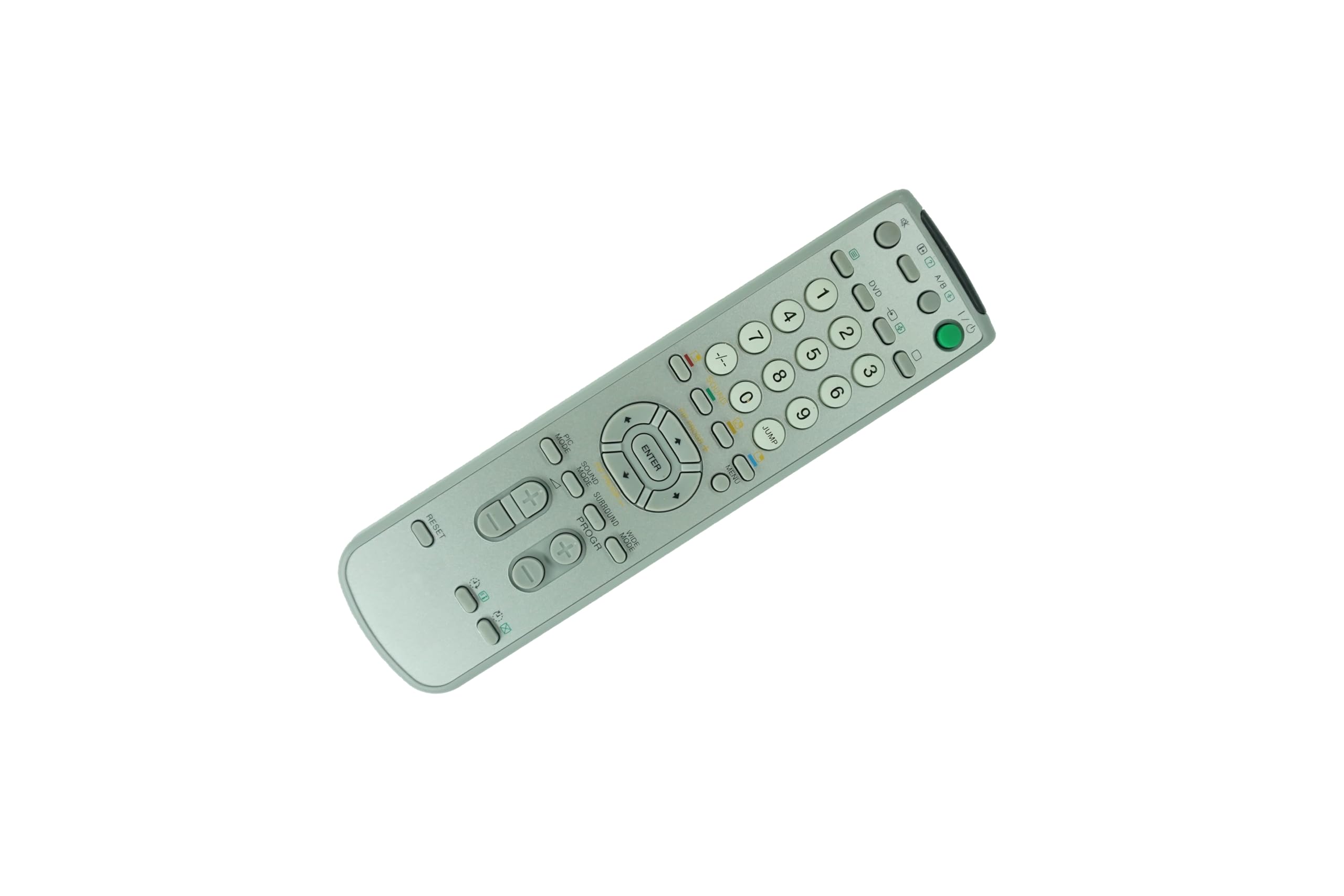
Image: The HCDZ replacement remote control, gray in color, featuring a standard layout of numerical, navigation, and function buttons.
Nastavitev
The package includes one HCDZ replacement remote control. Please note that 2 AA batteries are required for operation and are not included in the package. Follow these steps to install the batteries:
- Poiščite pokrov prostora za baterije na zadnji strani daljinskega upravljalnika.
- Potisnite pokrov navzdol ali pritisnite zapah, da ga odprete.
- Vstavite dve bateriji AA in pazite, da se pozitivni (+) in negativni (-) pol pravilno poravnata z oznakami v predalu.
- Namestite pokrov predalčka za baterije in ga potisnite nazaj na svoje mesto, dokler se ne zaskoči.
The remote control is now ready for use with your compatible Sony TV.
Navodila za uporabo
This remote control is designed for intuitive operation. Point the remote directly at your television's infrared (IR) sensor for optimal performance. No programming is required; simply insert batteries and begin use.
Funkcije gumbov:
- moč (Zeleni gumb): Vklopi ali izklopi televizor.
- Številski gumbi (0-9): Directly select channels or input numerical values.
- -/--: Switches between single-digit and double-digit channel input.
- SKOČI: Quickly switch between the current channel and the previously viewed kanal.
- DVD: Selects the DVD input source.
- A/B: Likely for selecting audio channels or specific functions on compatible devices.
- Navigacijske puščice (gor, dol, levo, desno): Krmarjenje po menijih in možnostih.
- ENTER: Potrjuje izbire v menijih.
- MENI: Dostopi do glavnega menija televizorja.
- NAČIN PIC: Adjusts picture settings (e.g., Standard, Dynamic, Movie).
- ZVOČNI NAČIN: Adjusts audio settings (e.g., Standard, Music, Movie).
- PROSTORSKI NAČIN: Activates or deactivates surround sound effects.
- ŠIROK NAČIN: Changes the screen aspect ratio (e.g., Normal, Zoom, Wide).
- PROGR (+/-): Changes television channels up or down.
- Glasnost (+/-): Adjusts the audio volume level.
- Izklopi zvok (): Izklopi ali vklopi zvok televizorja.
- Input/Source (): Cycles through available input sources (e.g., HDMI, AV).
- PONASTAVI: Resets certain settings or functions, depending on the TV model.
Vzdrževanje in nega
To ensure the longevity and proper functioning of your remote control, please observe the following guidelines:
- Avoid exposing the remote control to extremely hot or humid environments.
- Do not mix new batteries with old ones; always replace all batteries simultaneously with new ones.
- Keep the remote control's infrared (IR) sensor away from direct sunlight or strong artificial lighting, as this can interfere with its operation.
- If the remote control will not be used for an extended period, remove the batteries to prevent potential damage from leakage and corrosion.
- Clean the remote control with a soft, dry cloth. Avoid using liquid cleaners or abrasive materials.
Odpravljanje težav
If your remote control is not functioning as expected, please follow these troubleshooting steps:
- Preverite baterije: Reinstall the batteries, ensuring the contacts are clean and the polarity (+/-) is correct. If the issue persists, replace both batteries with new AA batteries.
- Check Device Power: Confirm that your television is powered on and functional. Test its operation using the physical buttons on the TV panel.
- Odstranite ovire: Ensure there are no objects blocking the path between the remote control's IR emitter and the television's IR sensor.
- Oddaljeni doseg: Move closer to the television to ensure the remote is within effective operating range.
- Test the Remote's IR Signal:
- Open the camera app on your smartphone.
- Point the front (LED end) of the remote control directly at your phone's camera lens.
- Press and hold any button on the remote.
- If the remote is working, you should see a faint white or purple light flashing on your phone's screen. This indicates the remote is emitting an IR signal.
- If no light is visible, there may be an issue with the batteries or the remote control itself.
- TV napajalni kabel: Verify that the power cord to your television is securely plugged in and the TV is turned on.
Specifikacije
| Funkcija | Podrobnost |
|---|---|
| Številka modela | HCDZ-X16004 |
| Znamka | HCDZ |
| Združljive naprave | Television (Sony models: KV-32S35, KV-32S36, KV-32S45, KV-32S522, KV-32S56) |
| Potrebne baterije | 2 x AA baterije |
| Posebna funkcija | Programiranje ni potrebno |
| barva | siva |
| Največ podprtih naprav | 1 |
| Dimenzije paketa | 5.91 x 3.94 x 1.18 palcev |
| Teža predmeta | 1 funtov |
| Proizvajalec | HCDZ |
Garancija in podpora
For warranty information or technical support regarding your HCDZ Replacement Remote Control, please contact the manufacturer directly. Refer to the product packaging or the HCDZ official webspletno mesto za kontaktne podatke.