Uvod
This manual provides detailed instructions for the setup, operation, and maintenance of your Astrum ELETE Combe UB USB Keyboard and Mouse Combo KC110. Please read this manual thoroughly before using the product to ensure proper functionality and longevity.
The Astrum ELETE Combe UB is designed for comfort and efficiency, featuring low-profile Quiet Touch keys and a spill-resistant design. It is a plug-and-play device, making it easy to set up for both home and office environments.
Lastnosti izdelka
- Udobno tipkanje: Designed with low-profile Quiet Touch keys for a comfortable typing experience.
- Zasnova, odporna proti polivanju: Protects the keyboard from accidental liquid spills.
- Eleganten dizajn: Suitable for various home and office setups.
- Plug and Play USB: Simple USB connection for immediate use without driver installation.
- Večpredstavnostne tipke: Features 7 hot multimedia keys for easy access to common functions and web brskanje.
- Optical Mouse: Includes a 1000dpi optical mouse for precise and smooth cursor control.
- US Layout: Keyboard features a standard US layout.
Vsebina paketa
- Astrum ELETE Combe UB USB Keyboard
- Astrum ELETE Combe UB USB Mouse

Image: The Astrum ELETE Combe UB Keyboard and Mouse Combo as packaged in its retail box.
Navodila za namestitev
- Razpakirajte kombinacijo: Previdno vzemite tipkovnico in miško iz embalaže.
- Priključite tipkovnico: Locate an available USB port on your computer. Insert the USB connector of the keyboard into the USB port.
- Povežite miško: Poiščite druga prosta vrata USB na računalniku. Vstavite priključek USB miške v vrata USB.
- Prepoznavanje sistema: Your operating system (Windows, macOS, Linux) should automatically detect and install the necessary drivers. This process typically takes a few seconds. No additional software installation is required.
- Testna funkcionalnost:
- Open a text editor (e.g., Notepad, WordPad) and type to ensure the keyboard is functioning correctly.
- Move the mouse cursor around the screen and click to verify mouse functionality.

Image: The Astrum ELETE Combe UB USB Keyboard and Mouse Combo, ready for connection.
Navodila za uporabo
Uporaba tipkovnice
The Astrum ELETE Combe UB keyboard operates like a standard USB keyboard. Its low-profile tipke zagotavljajo udobno in tiho tipkanje.
Multimedijske hitre tipke
The keyboard features 7 dedicated multimedia hotkeys located at the top right. These keys provide quick access to common functions:
- Predvajanje/pavza: Upravljajte predvajanje medijev.
- Ustavite: Ustavi predvajanje predstavnosti.
- Prejšnja skladba: Go to the previous media track.
- Naslednja skladba: Go to the next media track.
- Povečaj glasnost: Increase system volume.
- Znižaj glasnost: Decrease system volume.
- Mute: Mute/unmute system volume.
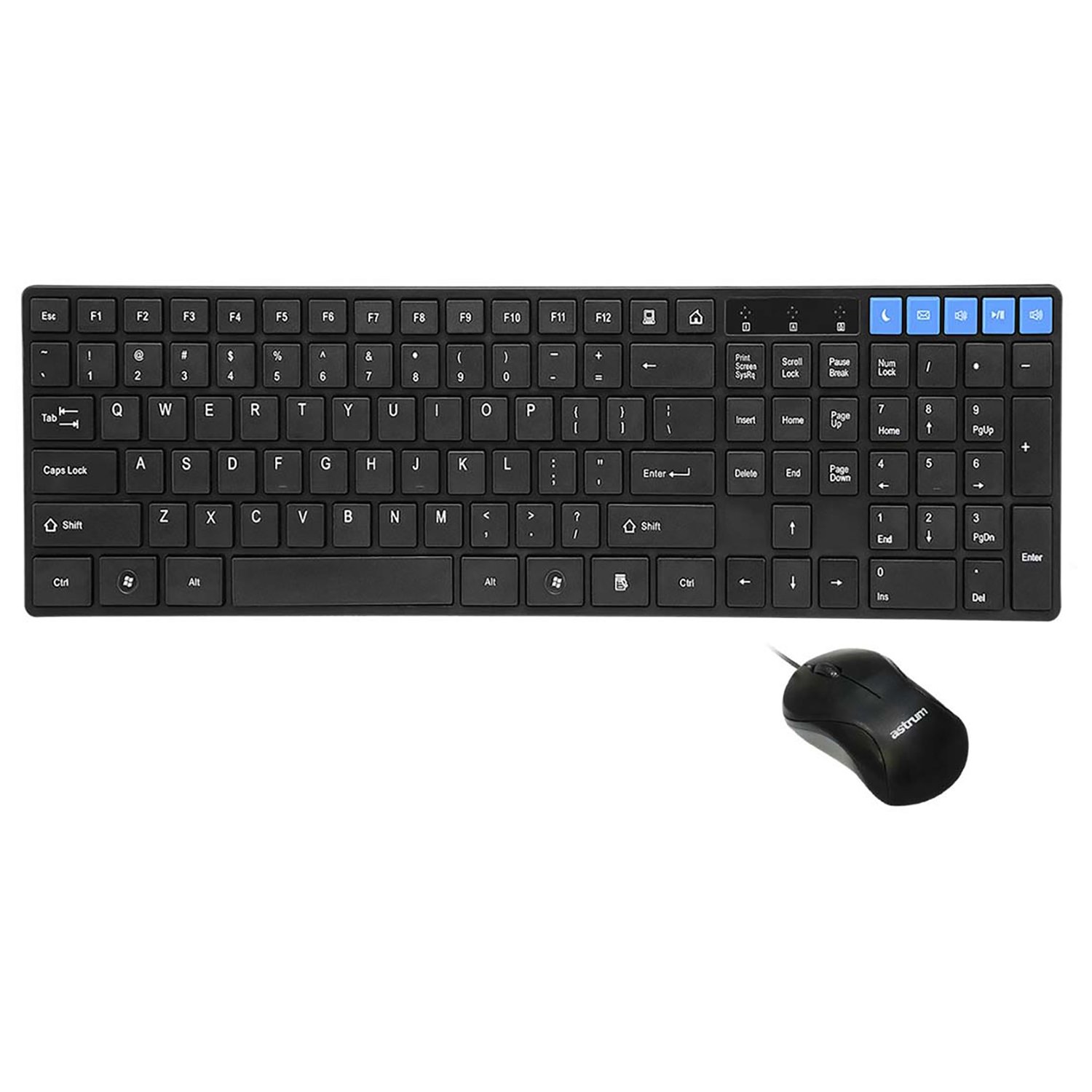
Slika: Od zgoraj navzdol view of the keyboard and mouse, showing the layout and multimedia keys.
Uporaba miške
The included optical mouse provides precise cursor control. It features standard left-click, right-click, and scroll wheel functionality.
- Levi klik: Primary action, selection, opening items.
- Desni klik: Odpre kontekstne menije.
- Kolesce za pomikanje: Pomikajte se po dokumentih in web pages. Can also function as a middle-click button.
Vzdrževanje in nega
To ensure the longevity and optimal performance of your Astrum ELETE Combe UB combo, follow these maintenance guidelines:
- Čiščenje:
- Pred čiščenjem odklopite tipkovnico in miško iz računalnika.
- Uporabite mehko krpo, ki ne pušča vlaken, dampened with water or a mild cleaning solution. Avoid harsh chemicals, abrasives, or solvents.
- Za tipkovnico lahko s stisnjenim zrakom odstranite prah in umazanijo med tipkami.
- For the mouse, clean the optical sensor area periodically to ensure smooth tracking.
- Odpornost proti razlitju: While the keyboard is spill-resistant, it is not waterproof. In case of a spill, immediately disconnect the keyboard, wipe off the liquid, and allow it to dry completely before reconnecting.
- Shranjevanje: Store the combo in a cool, dry place away from direct sunlight and extreme temperatures when not in use for extended periods.
- Ravnanje: Avoid dropping the devices or subjecting them to strong impacts. Do not attempt to disassemble the keyboard or mouse, as this will void the warranty.
Odpravljanje težav
If you encounter issues with your Astrum ELETE Combe UB combo, please refer to the following common solutions:
- Tipkovnica ali miška se ne odziva:
- Ensure both USB connectors are firmly plugged into the computer's USB ports.
- Poskusite priključiti tipkovnico in miško v različna vrata USB na računalniku.
- Znova zaženite računalnik.
- If using a USB hub, try connecting directly to the computer's USB ports.
- Tipke ne delujejo ali tipkate napačno:
- Preverite, ali so pod tipkami kakšne fizične ovire.
- Ensure the keyboard layout in your operating system settings matches a US layout.
- Preizkusite tipkovnico na drugem računalniku, da izključite težavo, specifično za sistem.
- Kazalec miške poskakuje ali je neenakomeren:
- Očistite optični senzor na spodnji strani miške.
- Miško uporabljajte na čisti, nebleščeči in enakomerni površini. Priporočljiva je uporaba podlog za miško.
- Poskusite miško priključiti na drug USB vhod.
- Multimedijske tipke ne delujejo:
- Ensure your media player or browser is active and supports standard multimedia key commands.
- Some operating systems may require specific settings for multimedia keys; consult your OS documentation if issues persist.
If the problem persists after trying these steps, please contact Astrum customer support.
Specifikacije
| Znamka | Astrum |
| Številka modela | ELETE-COMBE-UB |
| Proizvajalec | Astrum |
| Platforma strojne opreme | USB |
| Razporeditev tipkovnice | US Layout, Chocolate Keys Flat |
| DPI miške | 1000 dpi Optical |
| Dimenzije izdelka (DxŠxV) | 52.1 x 14 x 4.4 Centimeters (approx. 52.07 x 13.97 x 4.45 cm) |
| Teža predmeta | 680 g |
| Potrebne baterije | št |
| Prvi razpoložljivi datum | 5. marec 2015 |
Garancija in podpora
Astrum products are designed for reliability and performance. For information regarding warranty coverage and terms, please refer to the warranty policy provided with your purchase or visit the official Astrum webmesto.
For technical support, troubleshooting assistance beyond this manual, or inquiries about replacement parts, please contact Astrum customer service through their official channels. Details can typically be found on the product packaging or the Astrum brand webmesto.
Legal Disclaimer: The information provided in this manual is for general guidance. Specifications and features are subject to change without notice.


