1. Uvod
This manual provides comprehensive instructions for the proper use, setup, operation, and maintenance of the WTW pH 3310 ProfiLine Meter Kit, which includes the SenTix 41 pH Electrode. The WTW pH 3310 is a robust and reliable instrument designed for accurate pH measurements in various applications, from laboratory to field use. Please read this manual thoroughly before operating the device to ensure optimal performance and longevity.
2. Izdelek je končanview
2.1 Ključne lastnosti
- Trpežna in vodoodporna zasnova: The meter features a 100% waterproof keypad and housing, making it suitable for demanding environments.
- Jasen zaslon: A large graphic LCD ensures excellent readability under various lighting conditions.
- Extended Data Memory: Capable of logging up to 5000 compliant data sets.
- Time-Controlled Datalogging: Adjustable data collection intervals for long-term monitoring.
- Način varčevanja z energijo: A special "sleep" mode extends battery life during prolonged monitoring.
- Nehlapni pomnilnik: All stored data is retained even if battery power is lost.
- USB vmesnik: Waterproof mini-USB for simple data transfer to a PC.
- Broad Buffer Recognition: Supports DIN, NIST, and USA pH buffer standards for calibration.
2.2 Komponente kompleta
The WTW pH 3310 ProfiLine Meter Kit includes the following items:
- WTW pH 3310 ProfiLine Meter
- SenTix 41 pH Electrode
- Rešitve za umerjanje
- Trda torbica
- Štiri (4) baterije AA
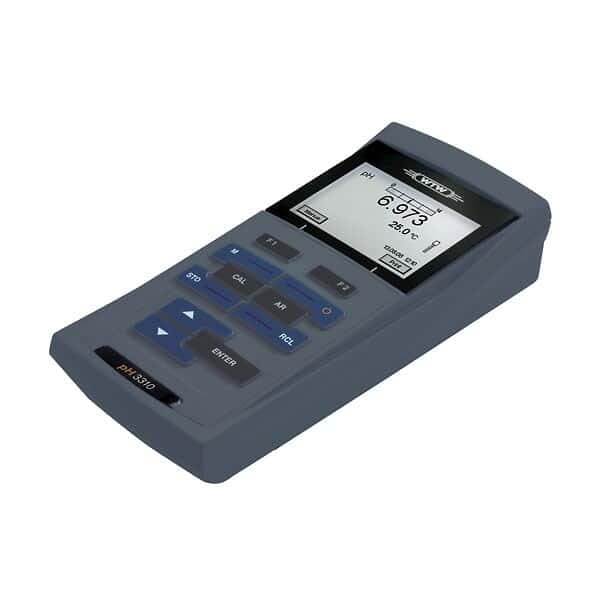
Slika 1: The WTW pH 3310 ProfiLine Meter, a handheld device with a large LCD screen showing a pH reading of 6.973 and a temperature of 25.0°C. The keypad features buttons for functions such as 'STO' (Store), 'CAL' (Calibration), 'AR' (AutoRead), 'RCL' (Recall), and 'ENTER', along with navigation arrows. The model name 'pH 3310' is visible on the lower left of the device.
3. Nastavitev
3.1 Namestitev baterije
- Poiščite predal za baterije na zadnji strani merilnika.
- Odprite pokrov predala.
- Vstavite štiri (4) baterije tipa AA in pri tem pazite na pravilno polarnost, kot je označeno v notranjosti predala.
- Close the battery compartment cover securely to maintain the waterproof seal.
3.2 Priključitev elektrod
- Carefully remove the protective cap from the SenTix 41 pH Electrode.
- Connect the electrode cable to the designated port on the WTW pH 3310 meter. Ensure the connection is firm and secure.
- Rinse the electrode with distilled water before initial use.
3.3 Začetni vklop
Pritisnite VKLOP/IZKLOP button to power on the meter. The display will illuminate, and the device will perform a self-test before entering measurement mode.
4. Navodila za uporabo
4.1 Kalibracija
Regular calibration is essential for accurate pH measurements. The WTW pH 3310 supports up to 5-point calibration using DIN, NIST, or USA buffer recognition.
- Prepare fresh calibration buffer solutions (e.g., pH 4.01, 7.00, 10.00).
- Pritisnite KAL gumb za vstop v način kalibracije.
- Rinse the electrode with distilled water and immerse it in the first buffer solution.
- Wait for the reading to stabilize, then confirm the calibration point as prompted by the meter.
- Repeat for subsequent buffer solutions.
- The meter will automatically recognize the buffer and store the calibration data.
4.2 Merjenje
- Prepričajte se, da je merilnik kalibriran.
- Rinse the electrode with distilled water and immerse it in the sample rešitev.
- Wait for the reading to stabilize on the LCD. The AutoRead (AR) function can assist in determining when the reading is stable.
- Record the pH and temperature values displayed.
4.3 Beleženje podatkov
The pH 3310 meter offers advanced data logging capabilities:
- Ročno shranjevanje: Pritisnite STO button to manually store the current measurement. The meter can store up to 5000 data sets.
- Time-Controlled Datalogging: Access the menu to set adjustable intervals for automatic data collection. This is ideal for long-term field monitoring.
- Spanje: During long-term monitoring, the special "sleep" mode conserves battery power.
- Nehlapni pomnilnik: All logged data is saved permanently, even if the batteries are depleted or removed.
4.4 Prenos podatkov v računalnik
To transfer stored data to a computer:
- Connect the WTW pH 3310 meter to a PC using a mini-USB cable.
- The meter's waterproof USB interface ensures reliable connection.
- Follow the instructions in the accompanying software (if applicable) or the meter's menu to initiate data transfer.
5. Vzdrževanje
5.1 Nega merilnika
- Clean the meter's keypad and housing with a damp krpo. Izogibajte se abrazivnim čistilom.
- Ensure the battery compartment and USB port covers are securely closed when not in use to maintain waterproofing.
- Store the meter in its hard carrying case when not in use to protect it from damage.
5.2 Electrode Care (SenTix 41 pH Electrode)
- Always keep the electrode tip moist. Store it in its protective cap filled with appropriate storage solution (e.g., 3 mol/L KCl solution) when not in use. Never store in distilled water.
- Rinse the electrode with distilled water before and after each measurement.
- If the electrode becomes sluggish or readings are unstable, refer to the electrode's specific manual for cleaning and regeneration procedures.
- Replace the electrode when it no longer calibrates correctly or provides stable readings.
6. Odpravljanje težav
This section addresses common issues you might encounter with your WTW pH 3310 meter. For more detailed troubleshooting, refer to the full product manual or contact customer support.
| Težava | Možen vzrok | rešitev |
|---|---|---|
| Merilnik se ne vklopi. | Prazne ali nepravilno vstavljene baterije. | Preverite polarnost baterij; zamenjajte z novimi baterijami AA. |
| Unstable pH readings. | Dirty or damaged electrode; insufficient sample immersion; air bubbles. | Clean electrode; ensure proper immersion; gently stir to remove bubbles; recalibrate. |
| Calibration fails or is inaccurate. | Expired or contaminated buffer solutions; dirty electrode; incorrect buffer recognition setting. | Use fresh buffer solutions; clean electrode; check buffer recognition settings in the menu. |
| Data transfer to PC not working. | Loose USB connection; driver issues; incorrect software settings. | Ensure USB cable is securely connected; check PC device manager for drivers; consult software manual. |
7. Specifikacije
- Model: WTW pH 3310 ProfiLine Meter (Model Number: 2AA312)
- pH elektroda: SenTix 41
- Napajanje: 4 x AA baterije (priložene)
- Buffer Recognition: DIN, NIST, and USA
- Kalibracijske točke: Do 5 točk
- Vrsta zaslona: LCD (Graphic)
- Vmesnik: Waterproof Mini-USB
- Podatkovni pomnilnik: Up to 5000 data sets
- Dimenzije (paket): Približno 16.2 x 14.4 x 7 palca
- Teža (paket): Približno 6.2 funtov
- Proizvajalec: Cole-Parmer (for distribution/packaging)
8. Garancija in podpora
For warranty information, technical support, or service inquiries regarding your WTW pH 3310 ProfiLine Meter Kit, please refer to the documentation provided with your purchase or contact WTW customer service directly. Contact details can typically be found on the manufacturer's official webspletnem mestu ali na embalaži izdelka.
For additional resources and product information, visit the official WTW webspletno mesto: www.wtw.com


