Uvod
This manual provides comprehensive instructions for the setup, operation, and maintenance of your Genius SW-2.1 355 Speaker System. Please read this manual thoroughly before using the product to ensure proper functionality and to maximize your listening experience.
Varnostne informacije
Da preprečite poškodbe naprave ali telesne poškodbe, upoštevajte naslednje varnostne ukrepe:
- Zvočnikov ne izpostavljajte vodi ali vlagi.
- Zvočnikov ne postavljajte v bližino virov toplote ali na neposredno sončno svetlobo.
- Zagotovite ustrezno prezračevanje okoli nizkotonca, da preprečite pregrevanje.
- Uporabljajte samo napajalnik, ki je priložen enoti.
- Ne poskušajte sami odpirati ali popravljati enote. Vsa servisna dela prepustite usposobljenemu osebju.
- Hraniti izven dosega otrok.
Vsebina paketa
Preverite, ali so v paketu prisotni vsi elementi:
- 1 x Subwoofer unit
- 2 x Satelitski zvočniki
- 1 x Audio input cable (3.5mm stereo jack)
- 1 x napajalnik
- 1 x Uporabniški priročnik (ta dokument)
Konec izdelkaview
The Genius SW-2.1 355 Speaker System consists of a subwoofer and two satellite speakers designed to deliver clear audio and powerful bass for your multimedia needs.
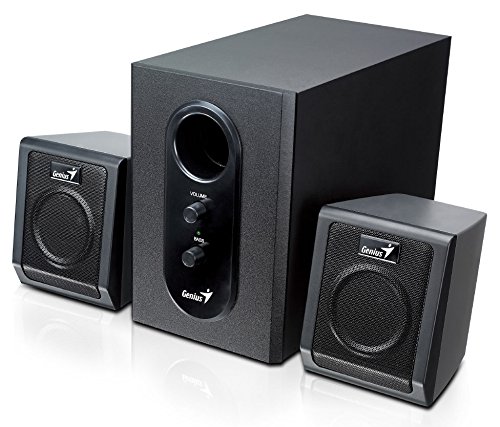
This image displays the Genius SW-2.1 355 Speaker System. It features a central, larger subwoofer unit with volume and bass control knobs on its front panel, and two smaller satellite speakers positioned on either side. All components are black.
Sestavine:
- Nizkotonski zvočnik: The main unit housing the bass driver and control panel.
- Satelitski zvočniki: Two compact speakers for mid-range and high-frequency audio.
- Nadzorna plošča: Located on the subwoofer, featuring Volume and Bass adjustment knobs.
Nastavitev
- Pozicioniranje zvočnikov: Place the subwoofer on the floor or a sturdy surface. Position the satellite speakers on either side of your listening area, facing towards you for optimal stereo separation.
- Priključitev satelitskih zvočnikov: Connect the cables from the two satellite speakers to the corresponding output jacks on the rear of the subwoofer unit. Ensure a secure connection.
- Priključitev avdio vira: Connect one end of the 3.5mm audio input cable to the "Audio In" jack on the subwoofer. Connect the other end to the audio output jack (e.g., headphone jack) of your computer, MP3 player, smartphone, or other audio source.
- Priključna moč: Plug the power adapter into the DC input jack on the subwoofer. Then, plug the power adapter into a standard electrical outlet.
- Vklop: Turn on the speaker system using the power switch, usually integrated with the volume knob.
Delovanje
- Vklop/izklop in nadzor glasnosti: The main knob on the subwoofer controls both power and overall volume. Rotate clockwise to turn on and increase volume; rotate counter-clockwise to decrease volume and turn off.
- Prilagoditev nizkih tonov: Use the "Bass" knob on the subwoofer to adjust the level of low-frequency sound. Rotate clockwise to increase bass, and counter-clockwise to decrease it, according to your preference.
- Audio Source Volume: For optimal sound quality, set the volume on your audio source (computer, phone, etc.) to about 75% and then use the speaker system's volume control for fine adjustments.
Vzdrževanje
- Čiščenje: Za čiščenje površin zvočnikov uporabite mehko, suho krpo. Ne uporabljajte tekočih čistil ali abrazivnih materialov.
- Shranjevanje: Če zvočnike shranjujete dalj časa, jih izključite iz električnega omrežja in shranite na hladnem in suhem mestu.
- Upravljanje kablov: Ensure cables are not tangled or pinched to prevent damage.
Odpravljanje težav
| Težava | Možen vzrok | rešitev |
|---|---|---|
| Brez zvoka |
|
|
| Popačen zvok |
|
|
| Šibek bas |
|
|
Specifikacije
| Funkcija | Podrobnost |
|---|---|
| Ime modela | SW-2.1 355 |
| Vrsta zvočnika | 2.1 Channel Multimedia Speaker System (Bookshelf, Satellite, Subwoofer) |
| Skupna izhodna moč | 10 Watts RMS (5W Subwoofer + 2.5W x 2 Satellites) |
| Material | Wood (Subwoofer) |
| Tehnologija povezljivosti | Žično (3.5 mm avdio vhod) |
| Združljive naprave | MP3 Player, Personal Computer, Smartphones, Tablets, Televisions |
| Kontrole | Glasnost, bas |
| Vir napajanja | DC |
| Teža predmeta | 2.78 kg |
| Dimenzije paketa | 39.6 x 25 x 18.4 cm |
Garancija in podpora
Genius products are designed for reliability and performance. For information regarding warranty coverage, technical support, or service inquiries, please refer to the warranty card included with your product or visit the official Genius webspletno mesto. Shranite račun kot dokazilo o nakupu.


