1. Uvod
This manual provides instructions for the installation, operation, and maintenance of your Cisco SG100-24-NA 24-Port Gigabit Switch. This unmanaged switch is designed to provide high-performance network connectivity for small to medium-sized businesses, offering ease of use and simple setup without complex configuration.
Please read this manual thoroughly before using the device to ensure proper setup and to maximize its performance and longevity.
2. Izdelek je končanview
2.1 Ključne lastnosti
- 24 gigabitnih ethernetnih vrat: Provides high-speed wired connections for multiple devices.
- 2 Combo Mini-GBIC Ports: Offers flexible uplink options using fiber optic or copper connections.
- Neupravljano stikalo: Plug-and-play operation requires no software configuration.
- Visoka zmogljivost: Supports a switching capacity of 48 Gbps and a forwarding capacity of 35.7 mpps for efficient data transfer.
- Energijsko učinkovit: Designed for optimal power consumption.
- Kompaktna zasnova: Suitable for desktop or rack-mount installations.
2.2 Vsebina paketa
The Cisco SG100-24-NA package typically includes:
- Cisco SG100-24-NA 24-Port Gigabit Switch
- Napajalni kabel
- Mounting Kit (for rack-mount, if applicable)
- Vodnik za hiter začetek
Note: Contents may vary slightly depending on the region and specific product bundle.
2.3 Fizični opis
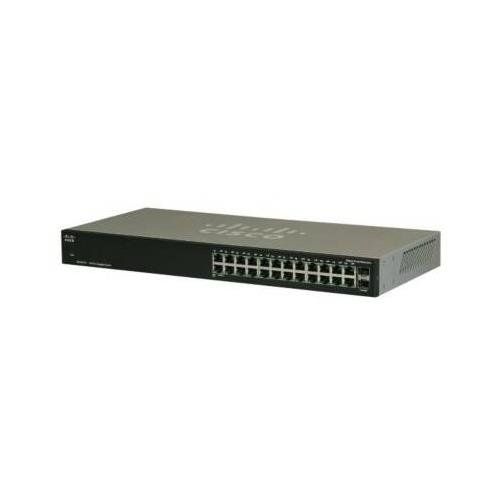
Slika 1: Spredaj View of the Cisco SG100-24-NA Switch. This image shows the front panel of the switch, featuring 24 RJ-45 Gigabit Ethernet ports and status indicator LEDs for each port. The Cisco logo is visible on the left.

Slika 2: Zadaj View of the Cisco SG100-24-NA Switch. This image displays the rear panel, including the power input connector and product label with serial number and regulatory information.

Slika 3: stran View of the Cisco SG100-24-NA Switch. This image illustrates the side panel, highlighting the ventilation grilles designed for heat dissipation to ensure optimal performance.
3. Navodila za nastavitev
Follow these steps to set up your Cisco SG100-24-NA Gigabit Switch:
3.1 Priprava mesta
- Lokacija: Place the switch on a flat, stable surface or mount it in a standard 19-inch equipment rack. Ensure adequate ventilation around the device.
- moč: Connect the switch to a grounded power outlet. Ensure the power source meets the switch's electrical requirements.
- Okolje: Avoid placing the switch near heat sources, in direct sunlight, or in areas with excessive dust or moisture.
3.2 Priključitev stikala
- Priključite napajanje: Plug the provided power cord into the power input on the rear panel of the switch and then into a suitable electrical outlet.
- Povežite omrežne naprave: Use standard Ethernet cables (Cat5e or higher) to connect your network devices (computers, servers, access points, routers) to any of the 24 RJ-45 Gigabit Ethernet ports on the front panel.
- Povežite se z vzhodno povezavo (neobvezno): If using the Mini-GBIC ports for fiber or copper uplinks, insert the appropriate SFP module (not included) into one of the combo Mini-GBIC slots and connect the corresponding cable.
- Preverite povezave: Once devices are connected, check the LED indicators on the front panel. A solid green LED typically indicates a valid link, and a blinking LED indicates network activity.
The Cisco SG100-24-NA is an unmanaged switch, meaning it operates automatically without requiring any software configuration. Once powered on and connected, it will begin forwarding network traffic.
4. Navodila za uporabo
The Cisco SG100-24-NA is designed for simple, plug-and-play operation. No user configuration is required for basic functionality.
4.1 Vklop/izklop
- Vklop: Connect the power cord to the switch and a power outlet. The switch will power on automatically.
- Ugasniti: Disconnect the power cord from the switch or the power outlet.
Note: There is no dedicated power button on this model.
4.2 LED indikatorji
Each RJ-45 port has an associated LED indicator:
- Svetlo zeleno: Indicates a valid network link at Gigabit (1000 Mbps) speed.
- Trden jantar: Označuje veljavno omrežno povezavo s hitrostjo 10/100 Mbps.
- Utripajoča zelena/oranžna: Indicates network activity (data transmission/reception) on that port.
- Izklop: No link detected or port is inactive.
A system LED (usually on the far left) indicates the overall status of the switch. Refer to the Quick Start Guide for specific system LED behavior.
5. Vzdrževanje
The Cisco SG100-24-NA switch requires minimal maintenance to ensure optimal performance and longevity.
5.1 Čiščenje
- Periodically clean the exterior of the switch with a soft, dry, lint-free cloth.
- Ne uporabljajte tekočih ali aerosolnih čistil, saj lahko poškodujejo napravo.
- Prepričajte se, da so prezračevalne odprtine brez prahu in ovir.
5.2 Okoljski vidiki
- Operate the switch within its specified temperature and humidity ranges (refer to specifications).
- Zagotovite ustrezen pretok zraka, da preprečite pregrevanje.
6. Odpravljanje težav
If you encounter issues with your Cisco SG100-24-NA switch, refer to the following common troubleshooting steps:
6.1 Brez napajanja
- Prepričajte se, da je napajalni kabel varno priključen tako na stikalo kot na delujočo električno vtičnico.
- Preverite, ali vtičnica deluje, tako da vanjo priključite drugo napravo.
- Check the system LED on the switch; if it's off, there might be a power issue.
6.2 No Link Light on Port
- Prepričajte se, da je ethernetni kabel varno priključen tako na vrata stikala kot na priključeno napravo.
- Poskusite z drugim ethernetnim kablom, da izključite možnost okvarjenega kabla.
- Napravo priključite na druga vrata na stikalu.
- Preverite, ali je priključena naprava vklopljena in deluje pravilno.
6.3 Slow Network Connection
- Ensure all connected devices and cables support Gigabit Ethernet for optimal speed.
- Preverite, ali je v omrežju preobremenjen promet ali ali so v uporabi aplikacije, ki intenzivno uporabljajo pasovno širino.
- Verify that the link light for the port is solid green (Gigabit speed) and not amber (10/100 Mbps).
- Ponovno zaženite stikalo in priključene naprave.
7. Specifikacije
| Model | SG100-24-NA |
| Pristanišča | 24 x 10/100/1000 Mbps RJ-45, 2 x Combo Mini-GBIC (shared with 2 RJ-45 ports) |
| Preklopna zmogljivost | 48 Gbps |
| Zmogljivost posredovanja | 35.7 mpps |
| Podpora za okvir Jumbo | 9216 bajtov |
| Velikost tabele naslovov MAC | 8000 vnosov |
| Dimenzije (D x Š x V) | Približno 21.75 x 12.25 x 4 cm (dimenzije paketa) |
| Teža | Približno 6.74 funtov |
| Moč | 100-240V AC, 50-60 Hz, internal universal power supply |
| Delovna temperatura | 0° do 40°C (32° do 104°F) |
| Temperatura shranjevanja | -20° do 70°C (-4° do 158°F) |
| Delovna vlažnost | 10% do 90% brez kondenzacije |
Note: Specifications are subject to change without notice. For the most current information, please refer to the official Cisco product page or documentation.
8. Garancija in podpora
8.1 Garancija izdelka
Cisco products typically come with a limited hardware warranty. The exact terms and duration of the warranty may vary by region and product. Please refer to the warranty information included with your product packaging or visit the official Cisco website for detailed warranty statements.
8.2 Tehnična podpora
For technical assistance, product documentation, software downloads, and community forums, please visit the official Cisco Support website. You may need your product's serial number for support inquiries.
Podpora Cisco Webspletno mesto: https://www.cisco.com/c/en/us/support/index.html


