1. Uvod
This manual provides comprehensive instructions for the installation, operation, and maintenance of your Swann SWDVK-163208S-US 3200S 16-Channel 960H DVR Security System. Please read this manual thoroughly before using the product to ensure proper setup and functionality. Keep this manual for future reference.
The system includes a 16-channel 960H Digital Video Recorder (DVR) with a pre-installed 1TB hard drive and eight 700TVL security cameras designed for both indoor and outdoor use. It supports continuous recording, motion detection, and remote viewzmogljivosti.
2. Varnostne informacije
- Prepričajte se, da so vse napajalne povezave varne in pravilno dimenzionirane za napravo.
- Do not expose the DVR or cameras to water or excessive moisture.
- Izogibajte se postavljanju DVR-ja na neposredno sončno svetlobo ali v bližino virov toplote.
- Use only the power adapters supplied with the system.
- Do not attempt to open or service the DVR or cameras yourself. Refer all servicing to qualified personnel.
- Keep cables organized to prevent tripping hazards and ensure proper ventilation.
3. Vsebina paketa
Verify that all items listed below are present in your package. If any items are missing or damaged, contact Swann customer support.
- Swann SWDVK-163208S-US 16-Channel 960H DVR with 1TB HDD
- 8 x 700TVL Security Cameras
- 8 x BNC Cables (60ft/18m)
- Napajalniki za DVR in kamere
- Ethernet kabel
- HDMI kabel
- Miška USB
- Montažni vijaki in mozniki
- Vodnik za hiter začetek
- Nalepke za preprečevanje kraje
4. Sistem je končanview
4.1 DVR Front Panel
The front panel of the DVR provides access to essential controls and indicators.
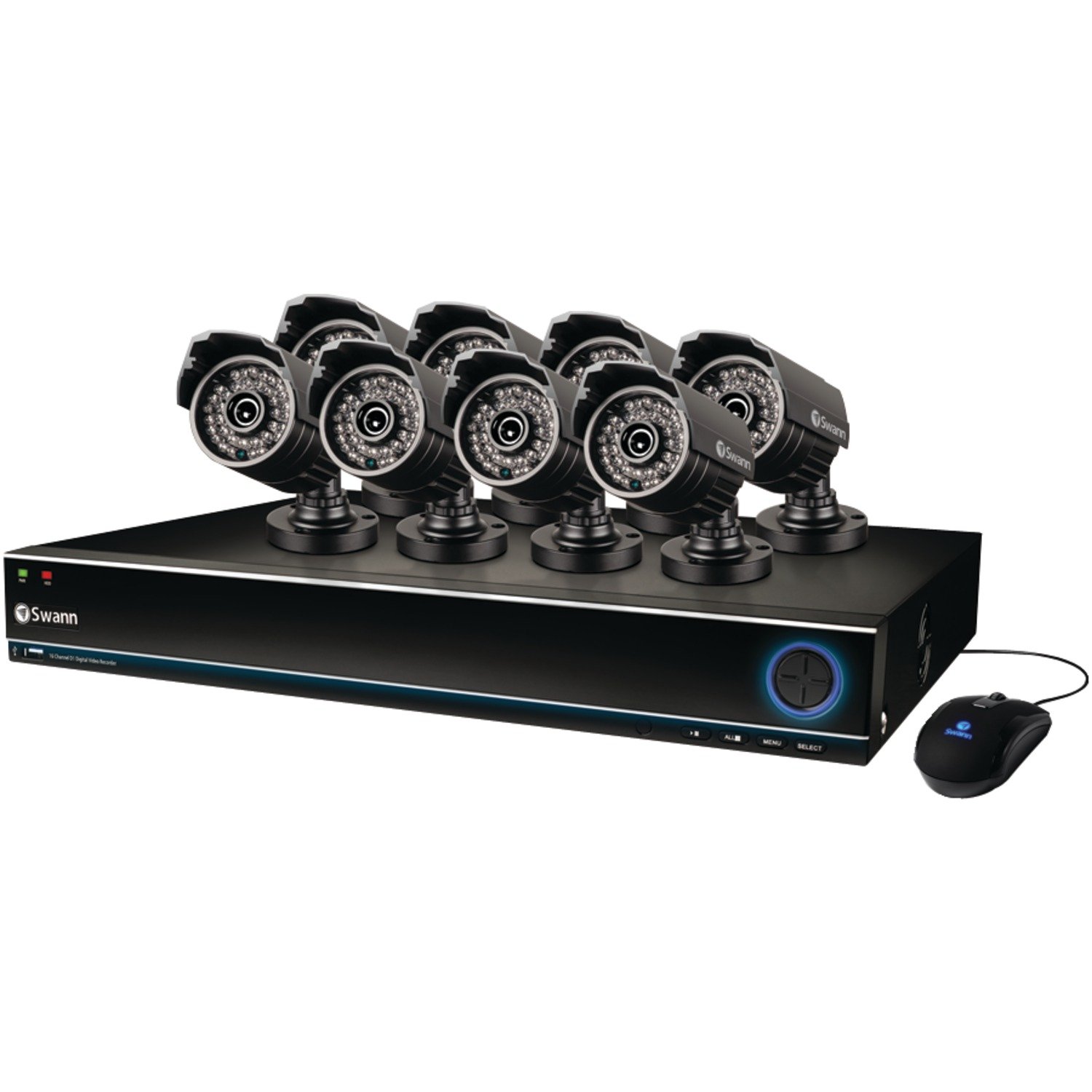
Image: The Swann SWDVK-163208S-US security system, showing the DVR unit and several cameras. The DVR features a blue-lit front panel with control buttons and status indicators.
- Indikator moči: Sveti, ko je DVR vklopljen.
- Indikator HDD: Utripa, ko je trdi disk aktiven.
- Omrežni indikator: Označuje omrežno povezljivost.
- Vrata USB: Za priklop miške USB ali za varnostno kopiranje podatkov.
- Gumbi za upravljanje: Navigacija po menijih in upravljanje predvajanja.
4.2 DVR Rear Panel
The rear panel contains all the necessary ports for connecting cameras, monitors, and network cables.
- Video vhod (BNC): 16 ports for connecting security cameras.
- Video Output (HDMI/VGA): For connecting a monitor or TV.
- Avdio vhod/izhod (RCA): For connecting microphones and speakers (if supported).
- Ethernet vrata (RJ45): Za omrežno povezavo.
- Vrata USB: Dodatna vrata USB za periferne naprave.
- Vrata eSATA: For connecting an external hard drive for expanded storage.
- Vhodna moč: For connecting the DVR power adapter.
4.3 Funkcije kamere
The included 700TVL cameras offer clear video surveillance with night vision capabilities.
- Resolucija: 700TVL (Television Lines) for detailed images.
- Nočni vid: Infrared LEDs provide visibility up to 82ft (25m) in low light or complete darkness.
- Odporen na vremenske vplive: Designed for both indoor and outdoor installation.
- Montaža: Adjustable brackets for flexible positioning.
5. Nastavitev
5.1 Priključitev DVR-ja
- Connect the included USB mouse to one of the USB ports on the DVR.
- Connect the HDMI cable from the DVR's HDMI output to an HDMI input on your TV or monitor. Alternatively, use a VGA cable for VGA connections.
- Za daljinsko viewing, connect an Ethernet cable from the DVR's Ethernet port to your router or network switch.
5.2 Povezovanje kamer
- Mount each camera in your desired location using the provided screws and plugs. Ensure the camera has a clear field of view in je zaščiten pred neposrednimi udarci.
- Connect one end of the BNC cable to the camera's video output.
- Connect the other end of the BNC cable to a video input port on the DVR (e.g., Video In 1, Video In 2, etc.).
- Connect the camera's power input to the power splitter cable, then connect the power adapter to the splitter and a power outlet.
5.3 Vklop
- Priključite napajalnik DVR-ja na vhod za napajanje DVR-ja in nato na električno vtičnico.
- The DVR will power on automatically. The power indicator light on the front panel will illuminate.
- Wait for the system to boot up. The Swann logo will appear on your connected monitor, followed by the live view zaslon.
5.4 Začetna konfiguracija
Upon first boot-up, the DVR will guide you through an initial setup wizard.
- Izbira jezika: Izberite želeni jezik.
- Datum in čas: Set the correct date, time, and time zone. This is crucial for accurate recording timestamps.
- Nastavitve omrežja: Configure network settings (DHCP is usually sufficient for automatic setup).
- Nastavitev gesla: Create a strong password for the administrator account to secure your system.
- Format trdega diska: The system may prompt to format the hard drive. Confirm to proceed.
6. Delovanje sistema
6.1 V živo View
Po začetni nastavitvi bo DVR prikazal sliko v živo view iz vseh povezanih kamer. Preklapljate lahko med eno kamero view, multi-camera grids (e.g., 4-channel, 8-channel, 16-channel), and sequence modes using the on-screen menu or front panel controls.
6.2 Načini snemanja
DVR podpira različne načine snemanja:
- Nenehno snemanje: Zapisi 24/7, prepis najstarejših datotektage, ko je trdi disk poln.
- Snemanje zaznavanja gibanja: Snema samo, ko je v kameri zaznano gibanje view. This conserves hard drive space. Sensitivity and detection areas can be configured for each camera.
- Predvideno snemanje: Posnetki v določenih urah dneva ali tedna.
- Ročno snemanje: Start and stop recording manually from the DVR interface.
Access recording settings via the DVR's main menu: Menu > Record > Record Schedule.
6.3 Predvajanje
Za ponovnoview posnet footage:
- Od v živo view, right-click with the mouse to open the main menu.
- Izberite Predvajanje.
- Izberite želeni datum in kanal(e) kamere.
- Use the timeline to navigate through recorded events. Different colors on the timeline indicate different recording types (e.g., continuous, motion).
- Za ponovno predvajanje uporabite gumbe za predvajanje (predvajanje, premor, hitro previjanje naprej, previjanje nazaj)view footage.
NIKOLI Varnostno kopiranje
You can back up important video footage to a USB flash drive or external hard drive.
- Insert a USB storage device into a USB port on the DVR.
- Pojdi na Menu > Backup.
- Select the camera channel, date, and time range for the footage you wish to back up.
- Choose the backup device and file format (e.g., AVI).
- Kliknite Začetek to begin the backup process.
6.5 Daljinski upravljalnik Viewing (SwannLink & SwannView)
The SwannLink and SwannView applications allow you to view your cameras remotely from a smartphone or tablet.
- Ensure your DVR is connected to the internet via the Ethernet port.
- Prenesite SwannView aplikacijo iz trgovine z aplikacijami v vaši napravi.
- Open the app and follow the on-screen instructions to add your DVR. This typically involves scanning a QR code displayed on the DVR's monitor (Menu > Network > SwannLink) ali ročnim vnosom ID-ja naprave.
- Enter the DVR's username and password when prompted.
- Sedaj bi morali biti sposobni view v živo footage and access playback remotely.
7. Vzdrževanje
7.1 Upravljanje trdega diska
1TB trdi disk bo samodejno prepisal najstarejšo datotekotage when full. To ensure optimal performance, it is recommended to periodically check the hard drive status via Menu > HDD > Disk Manage. You can also connect an external hard drive to the eSATA port for additional storage capacity.
7.2 Cleaning Cameras
Leče fotoaparata občasno čistite z mehko krpoamp krpo, da odstranite prah, umazanijo ali vodne madeže, ki lahko zakrijejo viewNe uporabljajte agresivnih kemikalij ali abrazivnih materialov.
7.3 Posodobitve vdelane programske opreme
Swann may release firmware updates to improve system performance or add new features. Check the Swann support website for the latest firmware for your model. Follow the instructions provided with the firmware update carefully to avoid damaging the DVR.
8. Odpravljanje težav
| Težava | Možen vzrok | rešitev |
|---|---|---|
| Na monitorju ni slike | Ohlapno priklopljen video kabel, na monitorju izbran napačen vhod, DVR ni vklopljen. | Preverite povezave kabla HDMI/VGA. Prepričajte se, da je monitor na pravilnem vhodu. Preverite napajanje DVR-ja. |
| Ni slike kamere | Loose BNC cable, camera power issue, faulty camera. | Check BNC and power connections for the specific camera. Test camera with a known working cable/power supply. |
| DVR not recording | Recording schedule not set, hard drive full or faulty, motion detection not configured. | Check recording schedule. Verify hard drive status. Ensure motion detection is enabled and configured correctly. |
| Ne morem view na daljavo | No network connection, incorrect network settings, app configuration error. | Verify DVR has internet access. Check network settings (DHCP). Reconfigure the DVR in the SwannView aplikacija |
| Purple image on camera | IR filter stuck, camera malfunction. | Power cycle the camera. If the issue persists, the camera may be faulty and require replacement. |
9. Specifikacije
- Številka modela: SWDVK-163208S-US
- Video vhodi: 16 kanalov BNC
- Video izhod: HDMI, VGA
- Ločljivost zaslona: Up to 1080p (HDMI)
- Ločljivost snemanja: 960H (960x576/960x480)
- trdi disk: 1TB SATA HDD (expandable via eSATA)
- Format stiskanja: H.264
- Omrežni vmesnik: RJ45 Ethernet vrata
- USB vmesnik: 3 x USB 2.0 vrata
- Ločljivost kamere: 700TVL
- Camera Night Vision: Do 82 ft (25 m)
- Camera Weatherproof Rating: IP66 (za zunanjo uporabo)
- Dimensions (DVR): 22.5 x 15.3 x 8.1 palcev (približno)
- Weight (DVR): 14 funta (približno)
- vir energije: DC 12V
10. Informacije o garanciji
Swann products are covered by a limited warranty. The specific terms and duration of your warranty may vary by region and product. Please refer to the warranty card included with your product or visit the official Swann webZa podrobne informacije o garanciji in postopke registracije obiščite spletno mesto. Shranite dokazilo o nakupu za uveljavljanje garancije.
11. Podpora
For technical assistance, product support, or to download the latest software and manuals, please visit the official Swann support website. You can typically find FAQs, troubleshooting guides, and contact information for customer service there. Have your product model number (SWDVK-163208S-US) ready when contacting support.
Swannova podpora Webspletno mesto: https://www.swann.com/us/support


