1. Uvod
This manual provides detailed instructions for the installation, operation, and maintenance of your Advance Darkside 8303B30 Micro ATX PC Case. Please read this manual thoroughly before beginning installation to ensure proper setup and to maximize the performance and longevity of your system components.
The Advance Darkside ATX Mid-Tower PC case features a top panel with a 2.5/3.5 inch SATA HDD docking station, 2 USB 3.0 ports, and 1 USB 2.0 port. It is designed to accommodate Micro ATX motherboards and offers efficient cooling solutions.
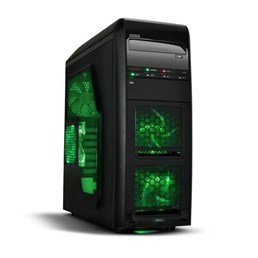
Slika 1: Spredaj view of the Advance Darkside 8303B30 PC Case, showcasing its design and front panel features.
2. Značilnosti izdelka
- Model: Advance Darkside 8303B30
- Material šasije: SGCC Steel
- barva: Black (interior and exterior)
- Združljivost matične plošče: Mikro ATX
- Povezljivost sprednje plošče: 2 x USB 3.0, 1 x USB 2.0, Audio Jacks
- Lastnosti shranjevanja: Top panel 2.5/3.5 inch SATA HDD docking station
- Hladilni sistem: Five 120mm fans included (two LED fans at the front, one LED fan on the side, one fan at the rear, and one fan at the top). Water cooling ready.
- Podpora za grafične kartice: Designed for King Size graphics cards
- Stranska plošča: Plexiglass window
3. Navodila za nastavitev
3.1. Priprava primera
- Unpack the PC case carefully and remove all packaging materials.
- Ohišje postavite na stabilno, ravno površino.
- Remove the side panels by unscrewing the thumbscrews at the rear of the case and sliding the panels backward.
3.2. Namestitev napajalnika
- Locate the power supply mounting area at the rear bottom of the case.
- Secure the power supply unit (PSU) using the provided screws. Ensure the PSU fan faces the bottom or top, depending on your PSU and case design for optimal airflow.
3.3. Namestitev matične plošče
- Namestite V/I zaščito v izrez na zadnji strani ohišja.
- Align the motherboard with the standoffs inside the case. Ensure all standoffs match the motherboard's screw holes.
- Matično ploščo pritrdite z ustreznimi vijaki.
3.4. Namestitev pogona za shranjevanje
- For 3.5-inch HDDs, slide the drive into the drive bay trays. The trays are designed to flex slightly to accommodate the drive without screws in some configurations.
- For 2.5-inch SSDs/HDDs, secure them to the designated mounting points or use adapters if necessary.
- Utilize the top panel SATA docking station for quick access to 2.5/3.5 inch SATA drives. Simply insert the drive into the slot until it clicks into place.
3.5. Namestitev grafične kartice in razširitvene kartice
- Odstranite potrebne pokrove razširitvenih rež na zadnji strani ohišja.
- Insert the graphics card or other expansion cards into the appropriate PCIe slots on the motherboard.
- Secure the cards with screws or retention clips.
3.6. Upravljanje kablov
Route all cables (power, SATA, front panel connectors) through the designated cutouts and tie-down points behind the motherboard tray to ensure clean airflow and an organized interior.
4. Navodila za uporabo
4.1. Vklop sistema
- Prepričajte se, da so vse komponente pravilno nameščene in da so kabli varno priključeni.
- Napajalni kabel priključite na napajalnik in stensko vtičnico.
- Press the power button located on the front panel of the case.
4.2. Using Front Panel Ports
- Vrata USB 3.0/2.0: Connect USB devices such as keyboards, mice, external drives, or flash drives.
- Avdio priključki: Connect headphones, microphones, or speakers.
- HDD Docking Station: Insert a 2.5-inch or 3.5-inch SATA HDD/SSD into the top docking slot for quick data access. Ensure the drive is properly seated.
5. Vzdrževanje
5.1. Čiščenje ohišja
- Zunanjost ohišja redno čistite z mehko krpoamp krpo. Izogibajte se abrazivnim čistilom.
- Use compressed air to remove dust from fan filters and internal components.
5.2. Vzdrževanje ventilatorja
- Periodically check the case fans for dust buildup. Clean them gently with compressed air or a soft brush.
- Prepričajte se, da noben kabel ne ovira lopatic ventilatorja.
6. Odpravljanje težav
6.1. Sistem se ne vklopi
- Preverite, ali je napajalni kabel varno priključen tako na napajalnik kot na stensko vtičnico.
- Prepričajte se, da je stikalo napajalnika v položaju »VKLOP«.
- Verify that the front panel power button cable is correctly connected to the motherboard.
6.2. Težave s pregrevanjem
- Ensure all case fans are spinning correctly and are not obstructed.
- Check for excessive dust buildup on fans and heatsinks.
- Verify proper cable management to allow for unobstructed airflow.
6.3. USB/zvok na sprednji plošči ne deluje
- Confirm that the front panel USB and audio cables are correctly connected to the corresponding headers on the motherboard.
- Check motherboard drivers for USB and audio.
7. Specifikacije
| Funkcija | Podrobnost |
|---|---|
| Znamka | Vnaprej |
| Številka modela | 8303B30 |
| barva | Črna |
| Material ohišja | Alloy Steel (SGCC Steel) |
| Združljivost matične plošče | Mikro ATX |
| Dimenzije (D x Š x V) | 48 x 19.5 x 48.2 cm |
| Teža izdelka | 5.8 kg |
| Vrata na sprednji plošči | 2 x USB 3.0, 1 x USB 2.0, Audio Jacks |
| Storage Dock | Top panel 2.5/3.5 inch SATA HDD docking station |
| Vključeni navijači | 5 x 120mm (2 front LED, 1 side LED, 1 rear, 1 top) |
| Podpora za hlajenje | Water cooling ready |
| Stranska plošča | Pleksi steklo |
| Priporočena uporaba | Igranje |
8. Garancija in podpora
8.1. Garancija proizvajalca
This product comes with a manufacturer's warranty of 1 year from the date of purchase. Please retain your proof of purchase for warranty claims. The warranty covers defects in materials and workmanship under normal use.
8.2. Podpora strankam
For technical assistance, troubleshooting, or warranty inquiries, please contact Advance customer support. Refer to the official Advance webspletno mesto za najnovejše kontaktne podatke in vire za podporo.


