1. Izdelek je končanview
The VEMER AST2 VE343000 is an advanced digital astronomical timer designed for precise control of lighting systems. It automatically manages switching operations between sunset and sunrise, adapting to your specific geographical location. This makes it an ideal solution for shop window lighting, illuminated signs, and other applications requiring automatic twilight-dependent control.
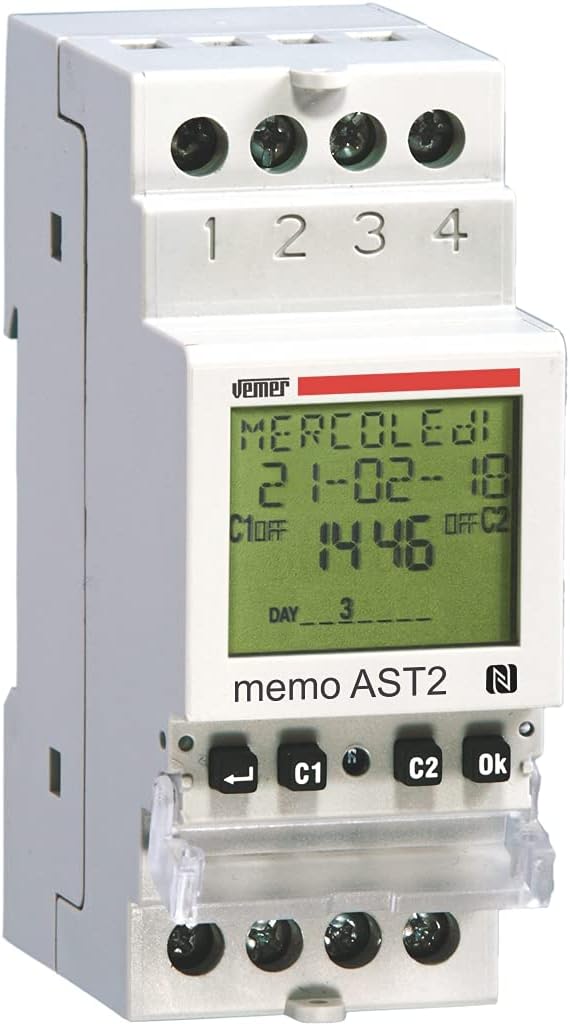
Slika 1: Spredaj view of the VEMER AST2 VE343000 Digital Astronomical Timer.
Ključne značilnosti:
- Astronomical time switch with night programming capabilities.
- Automatic programming: Switches 'On' at sunset and 'Off' at sunrise.
- Flexible programming options: Manual configuration via keypad or automatic setup using the NFC interface.
- Integrated backup battery ensures settings are retained during power outages.
- Free dedicated app available for smartphones and tablets for convenient programming.
- Backlit LCD screen displays current date, time, and relay status for easy monitoring.
- Napajanje: 230V.
2. Namestitev in začetna nastavitev
2.1 Montaža
The VEMER AST2 VE343000 is designed for DIN rail mounting. Ensure the device is securely clipped onto a standard DIN rail within an electrical enclosure. Proper ventilation should be maintained around the device.
2.2 Napajalni priključek
Connect the timer to a 230V power supply using the screw terminals provided. Ensure all connections are secure and comply with local electrical safety regulations. It is recommended that installation be performed by a qualified electrician.
2.3 Začetna konfiguracija
Upon initial power-up, the device may require basic time and location settings. These can be configured manually using the device's keypad or more conveniently via the NFC app on a smartphone or tablet. Refer to the 'Operation and Programming' section for detailed instructions.
3. Operation and Programming
3.1 Astronomska funkcija
The primary function of the AST2 VE343000 is its astronomical programming. Once your geographical location is set, the timer automatically calculates sunset and sunrise times daily, adjusting for seasonal changes. This allows for precise 'On at sunset - Off at sunrise' control without manual adjustments.
3.2 Ročno programiranje
The device can be programmed directly using the buttons on its front panel. The backlit LCD screen guides you through setting the date, time, and specific switching programs. Consult the detailed German instruction manual for step-by-step manual programming procedures.

Slika 2: Npramples of programming diagrams for the timer, illustrating various ON/OFF cycles relative to sunset and sunrise.
3.3 NFC App Programming
For ease of use, download the free VEMER memo app to your smartphone or tablet. The device's NFC interface allows you to create, transfer, and acquire programs directly from your mobile device. This method simplifies complex programming tasks and allows for quick adjustments.

Figure 3: The VEMER memo app interface on a smartphone, showing options for program creation and settings.
3.4 Funkcija zaklepanja tipk
The timer includes a password-protected 'key lock' function. This feature is particularly useful in public installations to prevent unauthorized personnel from making changes to the programmed settings. Activate this function through the device menu or the NFC app.
4. Vzdrževanje
4.1 Zamenjava rezervne baterije
The VEMER AST2 VE343000 is equipped with a backup battery to preserve settings during power interruptions. If the display shows a low battery indicator or settings are lost after a power outage, the backup battery may need replacement. The battery compartment is accessible by removing the device cover.

Slika 4: Zadaj view of the timer, highlighting the accessible backup battery compartment.
Če želite zamenjati baterijo:
- Ensure the device is disconnected from the main power supply.
- Carefully remove the device cover to access the battery compartment.
- Replace the old battery with a new, compatible backup battery (e.g., CR2032, as indicated on the battery itself).
- Securely reattach the device cover.
- Ponovno priključite napravo na napajanje.
5. Odpravljanje težav
If you encounter issues with your VEMER AST2 VE343000, consider the following general troubleshooting steps:
- Brez zaslona/napajanja: Check the main power supply to the device. Ensure all wiring connections are secure.
- Nepravilni časi preklopa: Verify that the geographical location and current time are correctly set. Ensure the astronomical function is enabled if desired.
- Nastavitve niso shranjene: The backup battery may be depleted. Refer to Section 4.1 for replacement instructions.
- Težave s povezljivostjo aplikacije: Ensure NFC is enabled on your smartphone/tablet and that the device is placed correctly for NFC communication.
- Nepooblaščene spremembe: If settings are being altered without permission, ensure the 'key lock' function is activated and secured with a strong password.
For more detailed troubleshooting or specific error codes, please refer to the comprehensive instruction manual provided with the product, which is available in German.
6. Tehnične specifikacije
| Specifikacija | Vrednost |
|---|---|
| Znamka | VEMER |
| Številka modela | VE343000 |
| Ime vrste izdelka | Digital Timer with Astronomical Programming, DIN Rail Mount, Two Channels |
| Način delovanja | Samodejno |
| Napajalnik | 230 V |
| Vrsta vezja | 2-smerni |
| Vrsta namestitve | DIN nosilec na tirnico |
| Nadzorna metoda | Via App / Manual |
| Komunikacijski protokol | NFC |
| Zaslon | Osvetljen LCD |
| Vrsta povezave | Običajno odprto |
| Vrsta priključka | Clamp |
| Tip stikala | TRIAC |
| Terminal | Vijak |
| Material | Kunststof (plastika) |
| Kontaktni material | Baker |
| barva | Bela |
| Dimenzije artikla (DxŠxV) | 36 x 65 x 90 mm |
| Teža predmeta | 150 gramov |
| Skladnost | CE, RoHS |
| GTIN | 08007951121312 |
7. Garancija in podpora
For warranty information, technical support, or service inquiries, please contact VEMER customer service or your authorized dealer. Detailed contact information can typically be found on the manufacturer's official webspletnem mestu ali v embalaži izdelka.
Please note that the comprehensive instruction manual is available in German. It contains detailed information on installation, programming, and advanced features not covered in this summary. Always refer to the official manual for complete and up-to-date information.


