1. Uvod
Thank you for choosing the Antec HCG-850M 850W Power Supply. This manual provides essential information for the safe and efficient installation, operation, and maintenance of your power supply unit. Please read this manual thoroughly before installation and retain it for future reference.
2. Varnostne informacije
Always observe the following safety precautions to prevent injury or damage to your system:
- ne open the power supply casing. Visoka količinatages are present inside, even when the unit is unplugged.
- ne insert any objects into the power supply's ventilation openings.
- Prepričajte se, da je napajalnik nameščen v dobro prezračevanem prostoru.
- Use only the modular cables provided with this power supply. Using incompatible cables can cause damage.
- Disconnect the AC power cord from the wall outlet before installing or removing the power supply.
- This product is designed for use in personal computers only.
3. Vsebina paketa
Preverite, ali so v paketu vsi elementi:
- Antec HCG-850M 850W Power Supply
- Modular Cable Set (PCI-E, SATA, Peripheral, CPU)
- AC napajalni kabel
- Montažni vijaki
- Uporabniški priročnik (ta dokument)
4. Izdelek je končanview
The Antec HCG-850M is an 850-watt, 80 PLUS Bronze certified, semi-modular power supply designed for high-performance personal computers. It features a quiet 135mm fan for efficient cooling and robust protection circuits to ensure stable power delivery.
4.1 Ključne lastnosti
- 850 Watts Continuous Power
- 80 PLUS Bronze Certified Efficiency
- Semi-Modular Cable Management
- 135 mm tihi ventilator
- Faktor oblike ATX
- Multiple Protection Circuits (OCP, OVP, UVP, SCP, OPP, OTP)
4.2 Napajalna enota
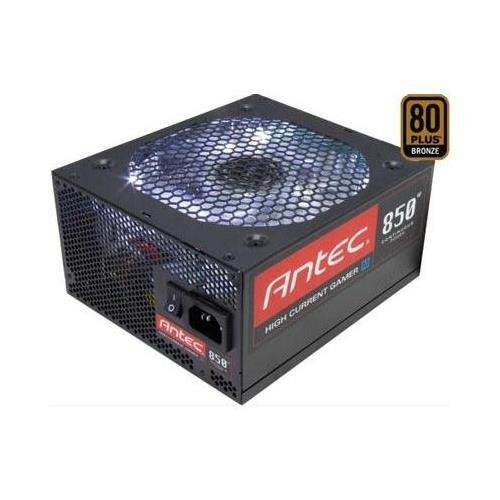
Slika 1: Spredaj view of the Antec HCG-850M 850W Power Supply, showing the fan grille and modular cable connectors. This unit provides stable power to your computer components.
5. Nastavitev in namestitev
Follow these steps to install your Antec HCG-850M power supply:
- Pripravite svoj sistem: Prepričajte se, da je računalnik popolnoma izklopljen in izklopljen iz stenske vtičnice. Odprite ohišje računalnika.
- Odstranite stari napajalnik (če je primerno): Iz starega napajalnika odklopite vse kable. Odvijte vijake in odstranite stari napajalnik iz ohišja.
- Namestitev novega napajalnika: Carefully place the Antec HCG-850M into the power supply bay of your computer case. Secure it with the provided mounting screws. Ensure the fan is oriented correctly for optimal airflow (typically facing down if there's a bottom vent, or up if not).
- Priključite bistvene kable:
- Connect the 24-pin ATX motherboard power cable.
- Connect the 4+4-pin or 8-pin EPS/CPU power cable to your motherboard.
- Priključite modularne kable: Attach the necessary modular cables for your components (e.g., PCI-E for graphics cards, SATA for hard drives/SSDs, Peripheral for fans/accessories). Connect them securely to both the power supply and the respective components.
- Upravljanje kablov: Kable napeljite lepo, da izboljšate pretok zraka in estetiko.
- Zaprite ohišje in vklopite napravo: Close your computer case. Connect the AC power cord to the power supply and then to a wall outlet. Flip the power switch on the PSU to the 'ON' position. Power on your computer.
6. Navodila za uporabo
Once installed, the Antec HCG-850M operates automatically. Here are some general operating guidelines:
- Vklop/izklop: Use your computer's power button to turn the system on or off. The switch on the power supply itself should generally remain in the 'ON' position during normal operation.
- Stabilnost sistema: Ensure your system is stable. If you experience unexpected shutdowns or reboots, refer to the troubleshooting section.
- Prezračevanje: Maintain good airflow around your computer case to prevent overheating of components, including the power supply.
7. Vzdrževanje
Proper maintenance can extend the lifespan of your power supply:
- Čiščenje prahu: Periodically clean dust from the power supply's fan grille and the interior of your computer case using compressed air. Always disconnect the AC power cord before cleaning.
- Preverjanje kabla: Occasionally check that all power cables are securely connected to the power supply and components.
- Okolje: Operate the power supply in a clean, dry environment with stable temperatures.
8. Odpravljanje težav
If you encounter issues with your power supply, try the following steps:
8.1 No Power to System
- Ensure the AC power cord is securely plugged into both the wall outlet and the power supply.
- Check that the power supply's ON/OFF switch is in the 'ON' position.
- Verify all internal power cables (24-pin ATX, CPU, PCI-E) are correctly and firmly connected.
- Preizkusite stensko vtičnico z drugo napravo, da se prepričate, da ima napajanje.
- If possible, test the power supply in another known working system or with a PSU tester.
8.2 System Instability or Random Shutdowns
- Prepričajte se, da potrebe po napajanju vašega sistema ne presegajo 850 W zmogljivosti napajalnika.
- Check for overheating components. Ensure proper case ventilation and clean any dust buildup.
- Verify all power connections are secure. Loose connections can cause intermittent power delivery.
- If the issue persists, it may indicate a fault with the power supply or another component. Consider professional diagnosis.
9. Specifikacije
| Funkcija | Podrobnost |
|---|---|
| Številka modela | HCG-850M |
| Izhodna vattage | 850 vatov |
| Certifikat učinkovitosti | 80PLUS bronasti |
| Faktor oblike | ATX |
| Metoda hlajenja | Air (135mm Fan) |
| Modularni tip | Polmodularno |
| Združljive naprave | Osebni računalnik |
| Teža predmeta | 9 funta (približno 4.08 kg) |
| ASIN | B00ESAI3M0 |
10. Garancija in podpora
Izdelki Antec imajo garancijo proizvajalca. Za posebne garancijske pogoje glejte garancijski list, ki je priložen izdelku, ali obiščite uradno spletno stran Antec. website. For technical support or customer service, please contact Antec directly through their official support channels.
Uradni Antec Webspletno mesto: www.antec.com


