Uvod
This manual provides essential instructions for the proper setup, operation, and maintenance of your Vivitar VX137-BLK 12.1MP Digital Touch Screen Camera. Please read this manual thoroughly before using your camera to ensure optimal performance and longevity.
Konec izdelkaview
The Vivitar VX137-BLK is a compact 12.1-megapixel digital camera featuring a 2.4-inch touchscreen display. It includes a 4x digital zoom and an anti-shake feature to assist in capturing clear images. This camera is designed for ease of use and portability.

Slika 1: Spredaj view of the Vivitar VX137-BLK Digital Camera.
Komponente kamere
- Objektiv: Zajame slike.
- Flash: Zagotavlja osvetlitev v slabih svetlobnih pogojih.
- Gumb za vklop: Vklopi ali izklopi kamero.
- Sprožilec: Fotografira.
- 2.4-palčni zaslon na dotik: Za viewing images, navigating menus, and controlling camera functions.
- Domov gumb: Vrne se v glavni meni ali začetni zaslon.
- Predal za baterije: Holds 3 AAA batteries.
- Reža za pomnilniško kartico: For inserting an SD or compatible memory card.
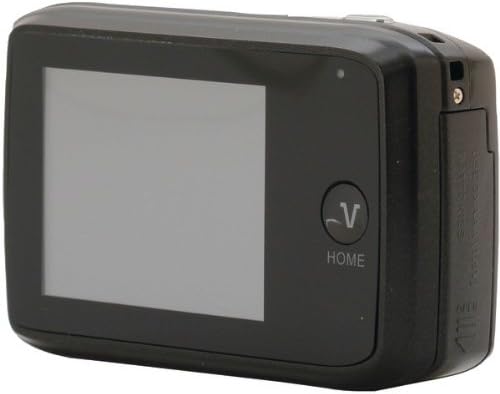
Slika 2: Zadaj view of the Vivitar VX137-BLK Digital Camera, showing the touchscreen and Home button.
Nastavitev
1. Namestitev baterije
- Locate the battery compartment door on the side or bottom of the camera.
- Potisnite zapah, da odprete predal.
- Vstavite tri (3) baterije AAA in pri tem pazite na pravilno polarnost (+/-), kot je označeno v notranjosti predala.
- Close the battery compartment door securely until it latches.
Opomba: Baterije niso priložene in jih je treba kupiti posebej.
2. Namestitev pomnilniške kartice
- Poiščite režo za pomnilniško kartico, običajno blizu predala za baterijo.
- Odprite pokrov reže za pomnilniško kartico.
- Insert a compatible SD or memory card into the slot with the metal contacts facing the correct direction, usually downwards or towards the front of the camera. Push gently until it clicks into place.
- Zaprite pokrov reže za pomnilniško kartico.
Note: A memory card is not included and is highly recommended for storing photos and videos.
Upravljanje kamere
1. Vklop/izklop
- Za vklop: Pritisnite in držite Gumb za vklop until the screen illuminates.
- Za izklop: Pritisnite in držite Gumb za vklop znova, dokler se zaslon ne izklopi.
2. Fotografiranje
- Turn on the camera. The camera will typically start in photo capture mode.
- Frame your shot using the 2.4-inch touchscreen display.
- To zoom in or out, use the digital zoom controls on the touchscreen.
- Pritisnite Sprožilec halfway to focus, then press it fully to capture the image.
- The anti-shake feature will automatically engage to help reduce blur.
3. Video snemanje
- From the main screen, tap the video icon on the touchscreen to switch to video recording mode.
- Pritisnite Sprožilec to start recording. A timer or indicator will appear on the screen.
- Pritisnite Sprožilec znova, da ustavite snemanje.
4. Način predvajanja
- From the main screen, tap the playback icon (usually an arrow in a rectangle) to enter playback mode.
- Swipe left or right on the touchscreen to browse through your captured photos and videos.
- Tap on a photo or video to view to na celotnem zaslonu.
- To exit playback mode, tap the Gumb Domov or the appropriate icon on the screen.
5. Touch Screen Usage
The 2.4-inch touchscreen allows for intuitive navigation. Tap icons to select functions, swipe to scroll through images, and use pinch-to-zoom gestures if supported for reviewnalaganje fotografij.
Vzdrževanje
Čiščenje kamere
- Telo kamere: Use a soft, dry cloth to wipe the camera body. Do not use liquid cleaners or solvents.
- Objektiv: Gently clean the lens with a lens cleaning cloth or a soft brush designed for camera lenses. Avoid touching the lens surface with your fingers.
- Zaslon na dotik: Use a microfiber cloth specifically designed for screens to gently wipe the display.
Shranjevanje
- When not in use for extended periods, remove the AAA batteries to prevent leakage.
- Store the camera in a cool, dry place, away from direct sunlight, extreme temperatures, and high humidity.
- Use a camera case to protect it from dust and scratches.
Odpravljanje težav
| Težava | Možen vzrok | rešitev |
|---|---|---|
| Kamera se ne vklopi. | Prazne ali nepravilno vstavljene baterije. | Zamenjajte z novimi baterijami AAA in pazite na pravilno polarnost. |
| Cannot take photos. | Memory card full or not inserted. | Insert a memory card or delete existing files to free up space. Ensure the card is properly inserted. |
| Slike so zamegljene. | Insufficient light, camera shake, or dirty lens. | Ensure adequate lighting. Hold the camera steady. Clean the lens. The anti-shake feature is automatic, but extreme movement can still cause blur. |
| Zaslon na dotik se ne odziva. | Začasna programska napaka ali umazanija zaslona. | Turn the camera off and on again. Gently clean the screen with a microfiber cloth. |
| Kamera se zamrzne. | Napaka programske opreme. | Remove and reinsert the batteries to reset the camera. |
Specifikacije
| Funkcija | Podrobnost |
|---|---|
| Številka modela | VX137-BLK |
| Slikovni senzor | 12.1 milijonov slikovnih pik |
| Zaslon | 2.4-inch Touch Screen LCD |
| Digitalni zoom | 4x |
| Stabilizacija slike | Optical (Anti-Shake) |
| Vir napajanja | 3 x AAA baterije (niso vključene) |
| Podprto File Oblika | JPEG |
| Tehnologija foto senzorja | CMOS |
| Razmerje stranic | 4:3 |
| Teža predmeta | 4.8 unč |
| Dimenzije izdelka | 7.09 x 8.94 x 1.69 palcev |
Informacije o garanciji
This product is sold AS-IS. Please refer to the original purchase documentation for any specific warranty details provided at the time of sale. For further inquiries regarding product functionality, please consult the support section.
Podpora
For technical assistance or further questions not covered in this manual, please visit the Vivitar official website or contact their customer support. Keep your purchase receipt and product model number (VX137-BLK) available when seeking support.


