1. Uvod
The Lorex LW2231 is a wireless real-time security camera equipped with an audio microphone, designed for both indoor and outdoor surveillance. This camera utilizes MPEG4 compression for clear video at 640 x 480 VGA resolution and features Lorex Signal Guard technology to maintain a stable connection. It includes night vision capabilities for low-light conditions and is built with weatherproof and vandal-resistant housing. This manual provides detailed instructions for the proper installation, operation, and maintenance of your LW2231 camera.
2. Vsebina paketa
Verify that all components are present in your package. If any items are missing or damaged, contact Lorex customer support.
- Lorex LW2231 Wireless Real-Time Security Camera with Audio Microphone
- Power Adapter for Camera
- Pritrdilni material (vijaki in stenski sidri)
- Vodnik za hiter začetek
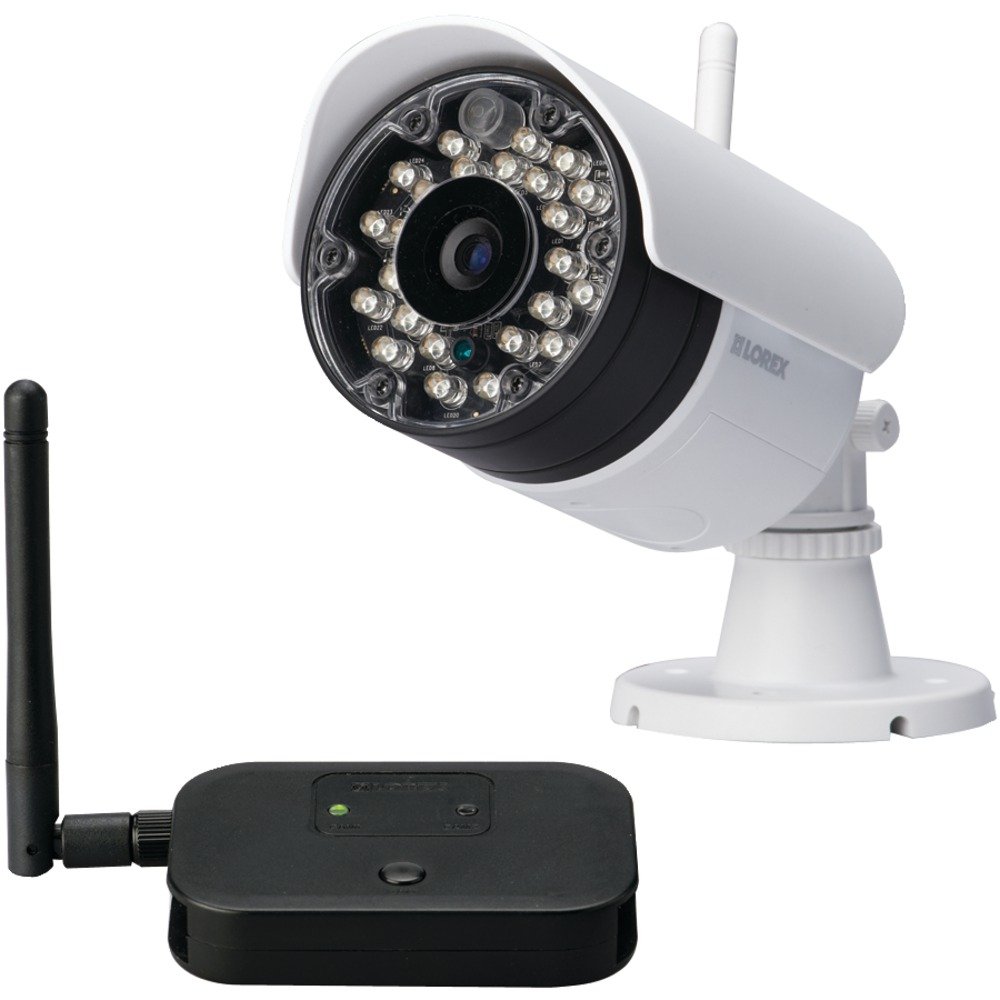
Slika 2.1: Lorex LW2231 Wireless Security Camera with Audio Microphone. This image shows the front view of the white camera unit, highlighting its compact design and integrated antenna.
3. Varnostne informacije
Please read and follow all safety instructions to prevent damage to the product and ensure user safety.
- Napajanje: Use only the power adapter supplied with the camera. Using an unauthorized power supply may damage the camera and void the warranty.
- Prezračevanje: Ne blokirajte prezračevalnih odprtin. Zagotovite ustrezen pretok zraka okoli kamere, da preprečite pregrevanje.
- Voda in vlaga: Although weatherproof, avoid submerging the camera in water. Do not install in areas where it may be exposed to extreme water pressure or prolonged submersion.
- Temperatura: Operate the camera within the specified temperature range. Extreme temperatures can affect performance and lifespan.
- Čiščenje: Pred čiščenjem izključite napajanje. Uporabite suho, mehko krpo. Ne uporabljajte tekočih ali aerosolnih čistil.
- Servisiranje: Tega izdelka ne poskušajte servisirati sami. Vsa servisna dela prepustite usposobljenemu servisnemu osebju.
4. Izdelek je končanview in funkcije
The LW2231 camera offers advanced features for reliable surveillance:
- MPEG4 Compression: Provides efficient video encoding with 640 x 480 VGA resolution.
- Auto-mechanical IR Camera Filter: Ensures accurate color reproduction during the day and enhanced night vision.
- Signal Guard Technology: Automatically re-establishes connection upon detecting low signal strength, ensuring continuous monitoring.
- Široko polje View: A 3.6mm lens provides a 55-degree field of view.
- Pretakanje videa v realnem času: Delivers smooth video with strong signal conditions at 30 frames per second.
- Audio Microphone: Integrated microphone for audio monitoring.
- Nočni vid: Infrared illumination for clear viewv pogojih slabe svetlobe.
- Vremensko odporen dizajn: Zaščita IP65 za zunanjo uporabo.
5. Nastavitev in namestitev
5.1 Načrtovanje namestitve
Before mounting, plan the camera's location. Consider the following:
- Območje pokritosti: Position the camera to cover the desired surveillance area effectively.
- Moč signala: For optimal wireless performance, minimize obstacles (walls, large metal objects) between the camera and its receiver. Test the signal strength before final mounting.
- Dostop do napajanja: Ensure a power outlet is within reach of the camera's power adapter cable.
- Okoljski dejavniki: While weatherproof, avoid direct exposure to extreme weather conditions if possible to prolong the camera's life.
5.2 Namestitev fotoaparata
- Choose a suitable mounting surface (wall or ceiling).
- Use the included mounting template (if provided) or mark the screw holes using the camera base as a guide.
- Drill pilot holes for the screws. If mounting on drywall or masonry, insert the provided wall anchors.
- Secure the camera base to the surface using the screws.
- Prilagodite kot in orientacijo kamere, da dosežete želeni view.
5.3 Priključitev napajanja
Connect the camera's power adapter to the camera's power input port, then plug the adapter into a standard electrical outlet. The camera will power on automatically.
5.4 Pairing with a Receiver (if applicable)
If your system requires manual pairing, refer to your Lorex receiver's manual for specific instructions. Typically, this involves activating a pairing mode on both the camera and the receiver within a short timeframe.
6. Upravljanje kamere
6.1 V živo View
Once the camera is powered and successfully connected to your Lorex receiver/system, you can view the live video feed. Consult your receiver's manual for instructions on selecting and viewkanali kamer.
6.2 Nočni vid
The LW2231 camera automatically activates its infrared (IR) LEDs in low-light conditions to provide black and white night vision. The auto-mechanical IR filter ensures optimal image quality during both day and night.
6.3 Zvočni nadzor
The integrated microphone captures audio from the camera's vicinity. Ensure your receiver or viewing device has audio output enabled to hear the sound. Audio recording capabilities depend on your connected recording device.
7. Vzdrževanje
7.1 Čiščenje fotoaparata
Občasno očistite objektiv in ohišje kamere, da zagotovite jasno kakovost slike. Uporabite mehko,amp cloth. Do not use harsh chemicals or abrasive cleaners, as these can damage the lens or finish.
7.2 Okoljski vidiki
While the camera is weatherproof (IP65 rated), extreme weather conditions such as heavy snow accumulation or direct, prolonged exposure to saltwater spray can affect its performance over time. Regularly check the camera's mounting for stability, especially after severe weather.
8. Odpravljanje težav
This section addresses common issues you might encounter with your LW2231 camera.
- Ni video signala:
- Ensure the camera is powered on and its power adapter is securely connected.
- Verify that the camera is within range of its receiver and that there are no significant obstructions.
- Check the receiver/DVR settings to ensure the correct camera channel is selected.
- If using a wireless system, try re-pairing the camera with the receiver.
- Poor Video Quality / Interference:
- Wireless interference can be caused by other 2.4 GHz devices (e.g., Wi-Fi routers, cordless phones, microwaves). Try repositioning the camera or receiver, or adjust Wi-Fi channels on other devices if possible.
- Prepričajte se, da je objektiv fotoaparata čist in brez umazanije ali madežev.
- Check for strong signal conditions; weak signals can lead to choppy or pixelated video.
- Brez zvoka:
- Prepričajte se, da mikrofon ni oviran.
- Check the audio settings on your receiver or viewing naprave.
- Nočni vid ne deluje:
- Ensure the area around the camera is sufficiently dark for IR LEDs to activate.
- Check for any obstructions directly in front of the IR LEDs.
9. Specifikacije
| Funkcija | Specifikacija |
|---|---|
| Ime modela | LW2231 |
| Notranja/zunanja uporaba | Notranji, zunanji |
| Protokol povezljivosti | Wi-Fi |
| Ločljivost zajema videa | 480p (640 x 480 VGA) |
| Hitrost sličic | 30 sličic na sekundo |
| Objektiv | 3.6mm (55 Degree field of view) |
| Tehnologija slabe svetlobe | Nočna barva (infrardeča) |
| Avdio | Integriran mikrofon |
| Ocena mednarodne zaščite | IP65 (odporen na vremenske vplive) |
| Mere predmeta (D x Š x V) | 10.5 x 10.1 x 4.3 palcev |
| Teža predmeta | 0.6 funta (9.6 unč) |
| Vir napajanja | Wired Electric (No Batteries Required) |
| Proizvajalec | Korporacija Lorex |
10. Garancija in podpora
Lorex products are designed for reliability and performance. For specific warranty information, please refer to the warranty card included with your product or visit the official Lorex webspletno mesto. Za tehnično podporo, registracijo izdelka ali dostop do dodatnih virov obiščite www.lorex.com/support or contact Lorex customer service directly.


