1. Uvod
This manual provides comprehensive instructions for the proper use and maintenance of your Horizon SF-400D Digital Precision Scale. Please read this manual thoroughly before operating the device to ensure accurate measurements and prolong its lifespan.
The Horizon SF-400D is a versatile digital precision scale designed for various weighing applications, including jewelry, coins, herbs, spices, and medication. It offers high accuracy and multiple weighing modes, along with a convenient counting function.

Slika 1: Horizon SF-400D Digital Precision Scale. This image shows the overall design of the scale, featuring a black body, a stainless steel weighing platform, and a blue backlit LCD display with control buttons.
2. Varnostni ukrepi
- Tehtnice ne preobremenjujte preko njene največje nosilnosti 500 g.
- Tehtnice ne izpostavljajte ekstremnim temperaturam, vlagi ali neposredni sončni svetlobi.
- Tehtnico hranite stran od močnih elektromagnetnih polj.
- Vodni kamen očistite z mehko damp krpo. Ne uporabljajte abrazivnih čistil in enote ne potapljajte v vodo.
- Ensure the scale is placed on a stable, level surface during operation to ensure accuracy.
3. Sestavni deli izdelka
Familiarize yourself with the main parts of your SF-400D scale:
- Platforma za tehtanje: Površina iz nerjavečega jekla za odlaganje predmetov.
- LCD zaslon: Backlit screen showing weight, units, and other indicators.
- Gumb za VKLOP/IZKLOP: Vklopi ali izklopi tehtnico.
- Gumb MODE: Changes weighing units (g, oz, ct, dwt, gn, T).
- Gumb TARE: Resets the display to zero, useful for weighing items in a container.
- Gumb PCS: Aktivira funkcijo štetja kosov.
- Gumb CAL: Uporablja se za kalibracijo.
- Nastavljive noge: Located on the bottom for leveling the scale.
- Raven mehurčkov: Integrated on the scale to assist with leveling.
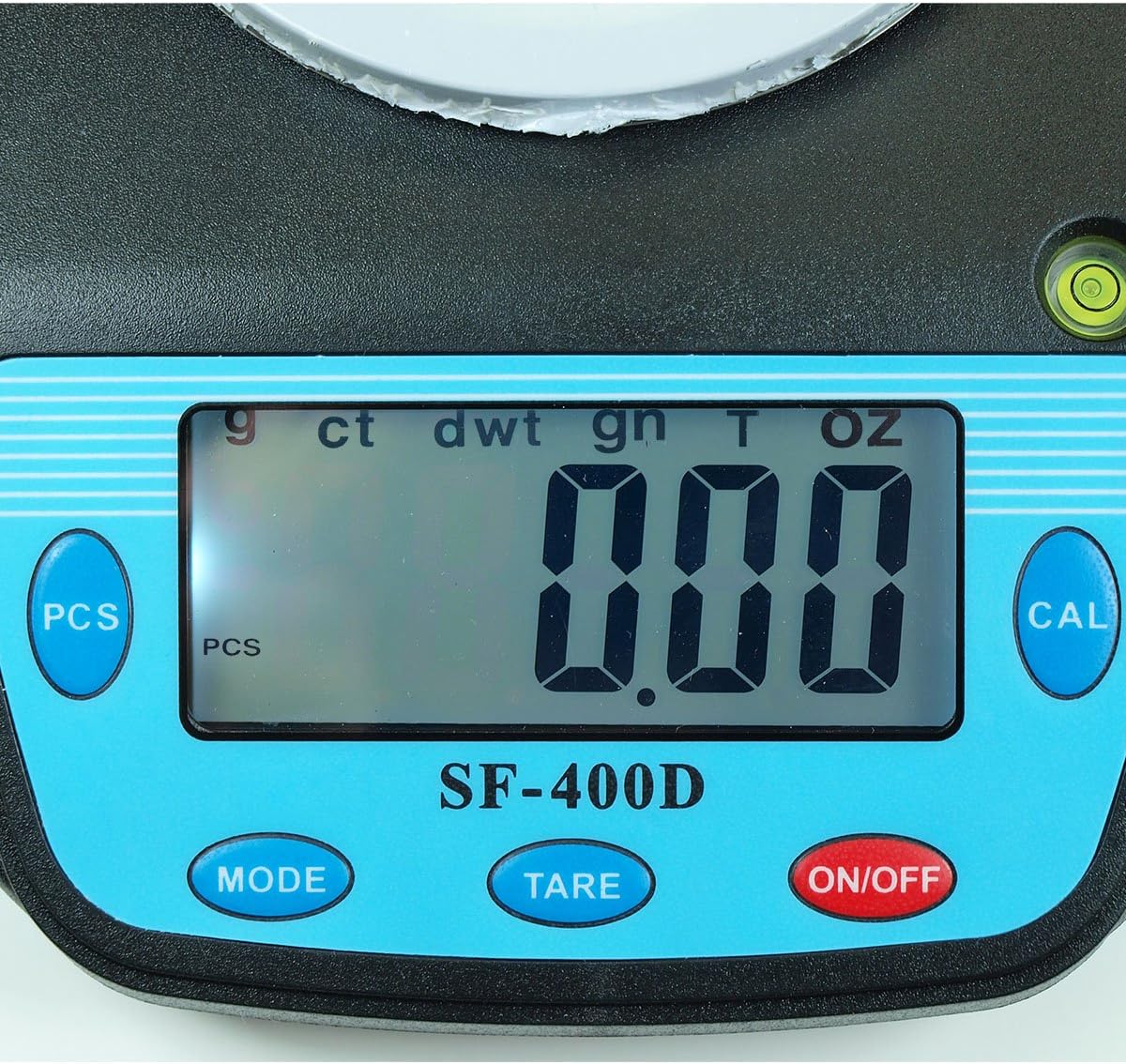
Slika 2: Close-up of the SF-400D display and control buttons. This image highlights the LCD screen, showing various unit indicators (g, ct, dwt, gn, T, oz), and the function buttons: PCS, MODE, TARE, ON/OFF, and CAL.

Slika 3: Underside of the SF-400D scale showing adjustable legs. Green arrows indicate the location of the four adjustable feet, which are used to level the scale for accurate measurements.
4. Nastavitev
4.1. Napajanje
The SF-400D scale operates on two AA batteries (included) or an optional AC power adapter (not included).
- Odprite pokrov predalčka za baterije na spodnji strani tehtnice.
- Vstavite dve bateriji AA in pazite na pravilno polarnost (+/-).
- Zaprite predal za baterije.
- Alternatively, connect a compatible AC power adapter (6V, amperage not specified in product details, consult manufacturer if needed) to the power port.
4.2. Postavitev in niveliranje
For optimal accuracy, the scale must be placed on a stable, flat, and level surface.
- Place the scale on your desired weighing surface.
- Observe the integrated bubble level.
- Adjust the four adjustable legs on the bottom of the scale by rotating them until the bubble is centered within the level indicator.
5. Navodila za uporabo
5.1 Osnovno tehtanje
- Pritisnite VKLOP/IZKLOP button to turn on the scale. The display will show "88888" and then "0.00" (or "0.0" depending on the unit).
- If the display does not show zero, press the TARA gumb za ničlo lestvice.
- Pritisnite NAČIN button to select your desired weighing unit (g, oz, ct, dwt, gn, T).
- Gently place the item(s) to be weighed on the center of the stainless steel platform.
- Odčitajte stabilno težo, prikazano na LCD-zaslonu.
- Za izklop tehtnice pritisnite in držite VKLOP/IZKLOP button for a few seconds. The scale also features an auto shut-off function to conserve battery power.
5.2. Funkcija tare
The Tare function allows you to subtract the weight of a container, so only the contents are weighed.
- Na tehtalno ploščad postavite prazno posodo.
- Wait for the display to stabilize and show the container's weight.
- Pritisnite TARA gumb. Prikaz se bo ponastavil na "0.00" (ali "0.0").
- Add the items you wish to weigh into the container. The display will now show only the net weight of the items.
- To clear the tare, remove all items from the platform and press TARA again if the display does not return to zero automatically.
5.3. Piece Counting Function (PCS)
This function is useful for counting multiple identical items.
- Turn on the scale and ensure it is zeroed.
- Pritisnite PCS button. The display will show "PCS" and a sample size (e.g., "25", "50", "75", "100").
- Pritisnite NAČIN button to cycle through the available sample sizes (25, 50, 75, 100 pieces). Select the sample size that matches the number of items you will place on the scale for sampling.
- Place the exact number of sample items (e.g., 25 pieces) onto the weighing platform according to your selected sample velikost.
- Pritisnite PCS ponovno pritisnite gumb za potrditevample. The display will now show the number of pieces.
- You can now add more items of the same type, and the scale will display the total count.
- To exit the counting mode, press the NAČIN gumb.
5.4. Umerjanje
Calibration ensures the accuracy of your scale. It is recommended to calibrate the scale periodically or if you suspect inaccurate readings. You will need a known calibration weight (e.g., 500g) for this process.

Slika 4: SF-400D display showing "CAL" during calibration mode. This image illustrates the scale's screen indicating it is in calibration mode, prompting the user to place a calibration weight.
- Ensure the scale is on a stable, level surface and turned off.
- Pritisnite in držite KAL in nato pritisnite VKLOP/IZKLOP button simultaneously. Release both buttons when the display shows "CAL".
- The display will then show a flashing weight value (e.g., "500.00g"). This is the required calibration weight.
- Place the exact calibration weight (e.g., 500g) onto the center of the weighing platform.
- Wait for the display to stabilize and show "PASS" or return to normal weighing mode. This indicates successful calibration.
- Remove the calibration weight. The scale is now calibrated and ready for use.
- If "FAIL" or an error message appears, repeat the calibration process.
6. Vzdrževanje
6.1. Čiščenje
- Površino tehtnice obrišite z mehko, rahloamp krpo.
- Ne uporabljajte agresivnih kemikalij, abrazivnih čistil in tehtnice ne potapljajte v vodo.
- Pred shranjevanjem ali naslednjo uporabo se prepričajte, da je tehtnica popolnoma suha.
6.2. Shranjevanje
- Tehtnico shranjujte na hladnem in suhem mestu, stran od neposredne sončne svetlobe in ekstremnih temperatur.
- Če napravo shranjujete dlje časa, odstranite baterije, da preprečite puščanje.
7. Odpravljanje težav
| Težava | Možen vzrok | rešitev |
|---|---|---|
| Tehtnica se ne vklopi. | Low or dead batteries; incorrect battery installation; no power from AC adapter. | Replace batteries; check battery polarity; ensure AC adapter is properly connected and functional. |
| Netočni odčitki. | Scale not level; unstable surface; needs calibration; overloaded; strong air currents or vibrations. | Ensure scale is level using adjustable legs and bubble level; place on stable surface; perform calibration; do not exceed 500g capacity; operate in a stable environment. |
| Prikazano je »O_Ld« ali »EEEE«. | Tehtnica je preobremenjena. | Remove excess weight immediately. Do not exceed 500g capacity. |
| Display shows "UNST". | Unstable environment or surface. | Move the scale to a more stable location, away from vibrations or drafts. |
| Counting function not working correctly. | Nepravilno sample size selected; sample items not identical in weight. | Zagotovite sample size matches the number of items placed for sampling; use identical items for accurate counting. |
8. Specifikacije
| Funkcija | Podrobnost |
|---|---|
| Model | SF-400D |
| Zmogljivost | 500 grams (g) / 17.5 ounces (oz) |
| Accuracy (Readability) | 0.01 grams (g) / 0.0005 ounces (oz) |
| Načini tehtanja | g (grams), oz (ounces), ct (carats), dwt (pennyweights), gn (grains), T (troy ounces), pcs (pieces) |
| Material platforme | Nerjaveče jeklo |
| Platform Diameter | 4.2 palcev |
| Zaslon | LCD z osvetlitvijo ozadja |
| Moč | 2 x AA batteries (included) or 6V AC adapter (not included) |
| Dimenzije (D x Š x V) | 8.25 cm x 6.0 cm x 1.75 cm |
| Lastnosti | Tare function, Piece Counting, Auto Shut-Off, Backlit Display, Adjustable Legs, Bubble Level |
9. Garancija in podpora
For warranty information or technical support, please refer to the documentation included with your purchase or contact the retailer. Specific warranty terms may vary by region and retailer.
For general inquiries or to explore other products, you may visit the Horizon Store on Amazon.


