1. Uvod
The AAXA P300 Pico Projector is a compact, high-definition projector designed for portability and versatility. It features a native 1280x800 HD resolution, 500 LED lumens, and a rechargeable battery, making it suitable for various applications including business presentations, home entertainment, and travel. This manual provides essential information for the proper setup, operation, and maintenance of your P300 projector.
2. Vsebina paketa
Prosimo, preverite, ali so v vašem paketu priloženi vsi spodaj navedeni artikli:
- AAXA P300 Pico Projector
- Napajalni adapter
- Daljinski upravljalnik
- Mini stojalo
- Uporabniški priročnik
3. Izdelek je končanview
Familiarize yourself with the physical components and ports of your P300 projector.

Slika 3.1: Spredaj in zgoraj view of the AAXA P300 Pico Projector, illustrating its compact size and dimensions (5.9 x 3.8 x 1.5 inches).
3.1 Rear and Side Panels
The projector features various input and output ports for connectivity.

Slika 3.2: Zadaj/stran view of the projector, showing the USB port for media playback and the Mini VGA port for computer connections.
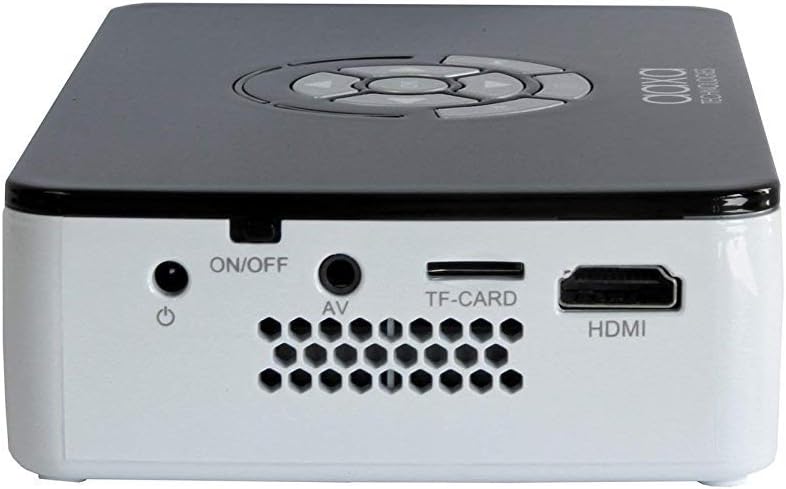
Slika 3.3: Right side panel, featuring the HDMI input, AV (composite) input, TF-CARD slot, and the power ON/OFF button.

Slika 3.4: Left side panel, highlighting the focus adjustment wheel for image clarity.
4. Nastavitev
4.1 Vklop/izklop
- Connect the power adapter to the projector's DC input and then to a power outlet.
- Pritisnite in držite VKLOP/IZKLOP button located on the side panel until the projector powers on.
- Za izklop pritisnite in držite tipko VKLOP/IZKLOP button again until the projector shuts down.
4.2 Povezovanje naprav
The P300 supports multiple input sources:
- HDMI: Connect an HDMI cable from your device (laptop, gaming console, streaming stick) to the projector's HDMI port.
- Mini VGA: Use a Mini VGA to VGA cable (sold separately) to connect to a computer's VGA output.
- Composite A/V: Use a 3.5mm to RCA composite A/V cable (sold separately) to connect to devices with RCA outputs.
- USB: Za neposredno predvajanje medijev vstavite USB-ključek v vrata USB.
- TF-CARD: Insert a MicroSD card into the TF-CARD slot for direct media playback.
4.3 Prilagoditev ostrenja
To achieve a clear image, adjust the focus wheel on the side of the projector until the projected image is sharp.
4.4 Positioning and Projection Size
Place the projector on a stable, flat surface. The included mini tripod can be used for angle adjustments. The P300 can project an image up to 120 inches diagonally in low-light conditions.

Slika 4.1: The AAXA P300 projector mounted on its mini tripod, demonstrating flexible positioning options.
5. Navodila za uporabo
5.1 Navigacija po meniju
Use the directional buttons on the projector or the remote control to navigate through the on-screen menu. Press the OK/Enter gumb za izbiro možnosti.
5.2 Predvajanje medijev
When a USB drive or TF-CARD is inserted, the projector's onboard media player can be accessed through the main menu. Select the desired file type (video, photo, music, text) and navigate to your content for playback.
5.3 Poraba baterije
The P300 features a built-in rechargeable lithium-ion battery providing approximately 60 minutes of operation. The battery charges automatically when the projector is connected to the power adapter. For optimal battery life, fully charge the projector before first use and avoid completely draining the battery frequently.
6. Vzdrževanje
6.1 Čiščenje
- Objektiv: Use a soft, lint-free cloth or lens cleaning wipes specifically designed for optical surfaces. Avoid abrasive materials.
- Casing: Zunanjost projektorja obrišite z mehko, suho krpo. Ne uporabljajte tekočih čistil ali topil.
- zračniki: Ensure the ventilation openings are clear of dust and debris to prevent overheating. Use compressed air if necessary.
6.2 Skrb za baterije
- Ko projektorja ne uporabljate, ga hranite na hladnem in suhem mestu.
- If storing for extended periods, charge the battery to approximately 50% every few months to maintain battery health.
7. Odpravljanje težav
-
Ni slike/signala:
Ensure the correct input source is selected in the projector's menu. Verify all cables are securely connected. Test with a different source device or cable if possible. -
Zamegljena slika:
Adjust the focus wheel on the side of the projector. Ensure the projection surface is flat and the projector is at an appropriate distance. -
Ni zvoka:
Check the volume settings on both the projector and the source device. Ensure external speakers are connected correctly if used. The internal speaker may have limited output. -
Pregrevanje projektorja:
Ensure ventilation vents are not blocked. Operate the projector in a well-ventilated area. -
Baterija se ne polni:
Preverite, ali je napajalnik pravilno priključen in ali vtičnica deluje.
8. Specifikacije
| Funkcija | Specifikacija |
|---|---|
| Ločljivost zaslona | 1280 x 800 (izvorno) |
| Svetlost | 500 LED lumnov |
| Tehnologija povezljivosti | HDMI, Mini VGA, Composite A/V (3.5mm Jack), 5 Pin Mini USB 2.0 |
| Dimenzije izdelka | 5.9 x 3.8 x 1.5 palcev |
| Teža predmeta | 15.5 unč |
| Baterije | 2 Lithium Ion batteries (included, internal) |
| Proizvajalec | AAXA |
| Številka modela | KP-600-01 |
9. Garancija in podpora
For warranty information, technical support, or service inquiries, please refer to the official AAXA Technologies webspletno mesto ali se obrnite neposredno na njihovo podporo strankam. Račun shranite kot dokazilo o nakupu za uveljavljanje garancije.
AAXA Technologies Contact Information:
Prosim obiščite www.aaxatech.com za najnovejše vire podpore in kontaktne podatke.


