Uvod
This manual provides essential instructions for the safe and efficient operation of your Sunstech XD TH-20 Home Cinema 5.1 Subwoofer System. Please read this manual thoroughly before using the product and retain it for future reference.
Pomembna varnostna navodila
- vir energije: Prepričajte se, da napajalnik ustreza voltage naveden na enoti.
- Prezračevanje: Ne blokirajte prezračevalnih odprtin. Namestite v skladu z navodili proizvajalca.
- Voda in vlaga: Naprave ne izpostavljajte dežju ali vlagi. Ne uporabljajte je v bližini vode.
- Toplota: Ne nameščajte v bližini virov toplote, kot so radiatorji, grelniki, peči ali druge naprave (vključno z amplifiers), ki proizvajajo toploto.
- Čiščenje: Čistite samo s suho krpo.
- Servisiranje: Vsa servisna dela prepustite usposobljenemu servisnemu osebju. Servis je potreben, če je naprava kakor koli poškodovana.
Vsebina paketa
Preverite, ali so v vašem paketu prisotni vsi spodaj navedeni elementi:
- 1 x Sunstech XD TH-20 Subwoofer Unit
- 5 x satelitska zvočnika
- 1 x daljinski upravljalnik (z baterijami)
- Kabli za zvočnike
- Audio Input Cables
- Uporabniški priročnik (ta dokument)
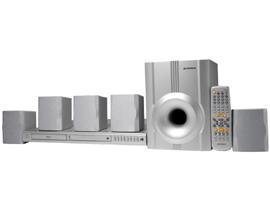
Image: Sunstech XD TH-20 Home Cinema 5.1 Subwoofer System components.
Navodila za namestitev
1. Postavitev zvočnikov
Za optimalno izkušnjo 5.1 prostorskega zvoka zvočnike postavite na naslednji način:
- Sredinski zvočnik: Place directly above or below your TV/monitor.
- Sprednji levi/desni zvočnik: Position to the left and right of your TV, equidistant from the listening position.
- Zadnji levi/desni zvočniki: Place behind the main listening position, slightly to the sides.
- Nizkotonski zvočnik: Can be placed anywhere in the room, typically near the front speakers. Experiment with placement for best bass response.
2. Priključitev zvočnikov
- Connect each satellite speaker to the corresponding output terminals on the subwoofer unit using the provided speaker cables. Ensure correct polarity (+ to + and - to -).
- Connect the subwoofer to your audio source (e.g., TV, DVD player, PC) using the appropriate audio input cables. The system supports MP3 playback.
3. Napajalni priključek
- Zagotovite, da so vse zvočne povezave varne.
- Plug the subwoofer's power cord into a wall outlet.
- Turn on the power switch on the subwoofer unit.
Navodila za uporabo
Osnovno delovanje
- Vklop/izklop: Use the power button on the front panel of the subwoofer or the remote control.
- Nadzor glasnosti: Adjust the master volume using the knob on the subwoofer or the VOL+/- buttons on the remote.
- Izbira vnosa: Press the "Input" or "Source" button on the remote or front panel to cycle through available audio inputs (e.g., AUX, MP3).
- Nadzor nizkih/visokih tonov: Use the dedicated controls on the remote or subwoofer to adjust bass and treble levels to your preference.
Predvajanje MP3
The Sunstech XD TH-20 supports MP3 audio playback. Connect your MP3 device to the designated MP3 input port on the subwoofer unit. Select the MP3 input source using the input selection button.
Vzdrževanje in nega
- Čiščenje: Disconnect the power before cleaning. Use a soft, dry cloth to wipe the surfaces of the speakers and subwoofer. Do not use liquid cleaners or aerosol sprays.
- Umestitev: Izogibajte se postavljanju enote na neposredno sončno svetlobo, v bližino virov toplote ali na mesta z visoko vlažnostjo ali prahom.
- Prezračevanje: Ensure adequate airflow around the subwoofer to prevent overheating. Do not cover ventilation openings.
- Kabli: Periodically check all cable connections for security and damage.
Vodnik za odpravljanje težav
| Težava | Možen vzrok | rešitev |
|---|---|---|
| Iz zvočnikov ni zvoka |
|
|
| Popačen zvok |
|
|
| Daljinski upravljalnik ne deluje |
|
|
Specifikacije
| Ime modela | TH-XD 20 |
| Znamka | Sunstech |
| Konfiguracija kanala za prostorski zvok | 5 + Subwoofer (5.1) |
| Posebna funkcija | predvajanje MP3 |
| Teža predmeta | 5.2 kilogramov |
| ASIN | B0055ZKOYW |
Garancija in podpora
For warranty information and technical support, please refer to the warranty card included with your product or contact Sunstech customer service directly. Keep your purchase receipt as proof of purchase.
For further assistance, visit the official Sunstech webspletno mesto ali se obrnite na njihove kanale za podporo.


