1. Uvod in konecview
The OSD Audio ATM-7 is a sophisticated 7-zone automatic speaker selector designed to distribute amplified audio signals to various zones within a home or commercial space. It allows users to select between two distinct music sources for each designated zone, providing flexible audio management. This passive device is engineered for seamless integration into existing audio systems, offering remote control capabilities for enhanced convenience.
For optimal performance and to prevent potential damage to your amplifier, it is highly recommended to use impedance matching in-wall volume controls in conjunction with the ATM-7, as this unit does not include built-in impedance protection.

Figure 1.1: OSD Audio ATM-7 Speaker Selector and its accompanying remote control, showcasing the front panel and rear connections.
2. Ključne značilnosti
- 7-Zone Audio Distribution: Distributes amplified audio signals to up to seven independent zones.
- Dual Source Selection: Allows selection between two distinct music sources (A or B) in each zone when operating in 2-input mode.
- Daljinski upravljalnik: Includes an IR remote control for convenient operation from a distance of up to 10 meters.
- Front Panel Controls & LEDs: Features status LEDs for Power, Multi-zone, Master/Slave, Zone In/Out Select, In/Out Mode, and Zone Out/In Selector.
- Master-Slave Functionality: A Master-Slave switch on the rear panel enables parallel connection of two ATM-7 units for expanded zone control.
- Funkcija pomnilnika: The remote control includes a backup memory function to retain settings.
- Pasivna zasnova: A passive device, requiring external impedance matching for amplifier zaščita.
3. Vsebina paketa
Prosimo, preverite, ali so vsi predmeti prisotni in v dobrem stanju ob razpakiranju.
- OSD Audio ATM-7 Speaker Selector Unit
- IR daljinski upravljalnik
- Napajalnik (DC 12V 1.5A)
- External IR Receiver (for remote placement)
- Uporabniški priročnik (ta dokument)
4. Varnostne informacije
Za zagotovitev varnega delovanja in preprečevanje poškodb upoštevajte naslednje varnostne ukrepe:
- vir energije: Uporabljajte samo priloženi napajalnik. Prepričajte se, da je glasnosttage ustreza vašemu lokalnemu napajalniku.
- Prezračevanje: Ne blokirajte prezračevalnih odprtin. Zagotovite zadosten pretok zraka okoli enote, da preprečite pregrevanje.
- Vlaga: Do not expose the unit to water, moisture, or excessive humidity. Avoid placing liquids near the device.
- Umestitev: Napravo postavite na stabilno, ravno površino. Izogibajte se postavljanju v bližino virov toplote ali na neposredno sončno svetlobo.
- Servisiranje: Ne poskušajte sami servisirati enote. Vsa servisna dela prepustite usposobljenemu osebju.
- Ujemanje impedance: As a passive device, the ATM-7 does not provide impedance protection. Always use impedance matching volume controls or ensure your amplifier can handle the combined speaker load to prevent damage to your amplifier.
5. Nastavitev in namestitev
Follow these steps to connect your OSD Audio ATM-7 speaker selector:
- Izklopite vso opremo: Preden vzpostavite kakršne koli povezave, se prepričajte, da amplifier and all audio sources are powered off and unplugged from the wall outlet.
- Povežite se Amplifier Izhod: Priključite izhodne priključke za zvočnike iz vašega amplifier to the "ZONE IN/OUT" terminals on the rear of the ATM-7. The ATM-7 supports two input modes: 2-input (for dual source selection) or 7-input (for individual zone control). Refer to the rear panel diagram for correct wiring.
- Priključitev zvočnikov: Connect your speakers to the corresponding "ZONE OUT" terminals on the rear of the ATM-7. Ensure correct polarity (+ to + and - to -) for all connections.
- Install Impedance Matching Volume Controls (Recommended): For optimal performance and amplifier protection, install impedance matching in-wall volume controls between the ATM-7 and your speakers. This is crucial to maintain a safe impedance load for your amplifier, especially when multiple zones are active.
- Priključite IR sprejemnik: If the ATM-7 unit will be placed out of direct line of sight for the remote control, connect the external IR receiver to the "EXT IR Receiver" port on the rear panel. Position the IR receiver in a location where it can receive signals from the remote.
- Priključite napajanje: Plug the provided DC 12V 1.5A power adapter into the "DC 12V 1.5A" input on the rear of the ATM-7, then plug the adapter into a wall outlet.

Figure 5.1: Rear panel connections of the ATM-7, including speaker terminals, IR receiver port, and power input.

Slika 5.2: Podrobno view of the speaker wire terminals on the rear of the ATM-7, showing positive and negative connections for a zone.
6. Navodila za uporabo
The ATM-7 can be operated using the front panel controls or the included IR remote control.
6.1 Kontrole sprednje plošče

Figure 6.1: Front panel of the ATM-7, displaying power button, status LEDs, and zone selectors.
- Gumb za prižig: Press to turn the unit On or Off. The "ON" LED indicates power status.
- Multi Zone Enable: Activates or deactivates multi-zone operation.
- Gumb MUTE: Mutes all active audio outputs.
- Master/Slave Control Select (M/S): Toggles between Master and Slave mode when chaining two ATM-7 units.
- Zone In/Out Select: Toggles individual zones between input and output modes.
- IN/OUT Mode (2 IN / 7 IN): Selects between 2-input mode (allowing selection of Source A or B for each zone) or 7-input mode (where each zone acts as an independent input/output).
- ZONE OUT/IN SELECTOR (ZONE1-ZONE7): Buttons to individually activate or deactivate each of the seven zones. Corresponding LEDs indicate active zones.
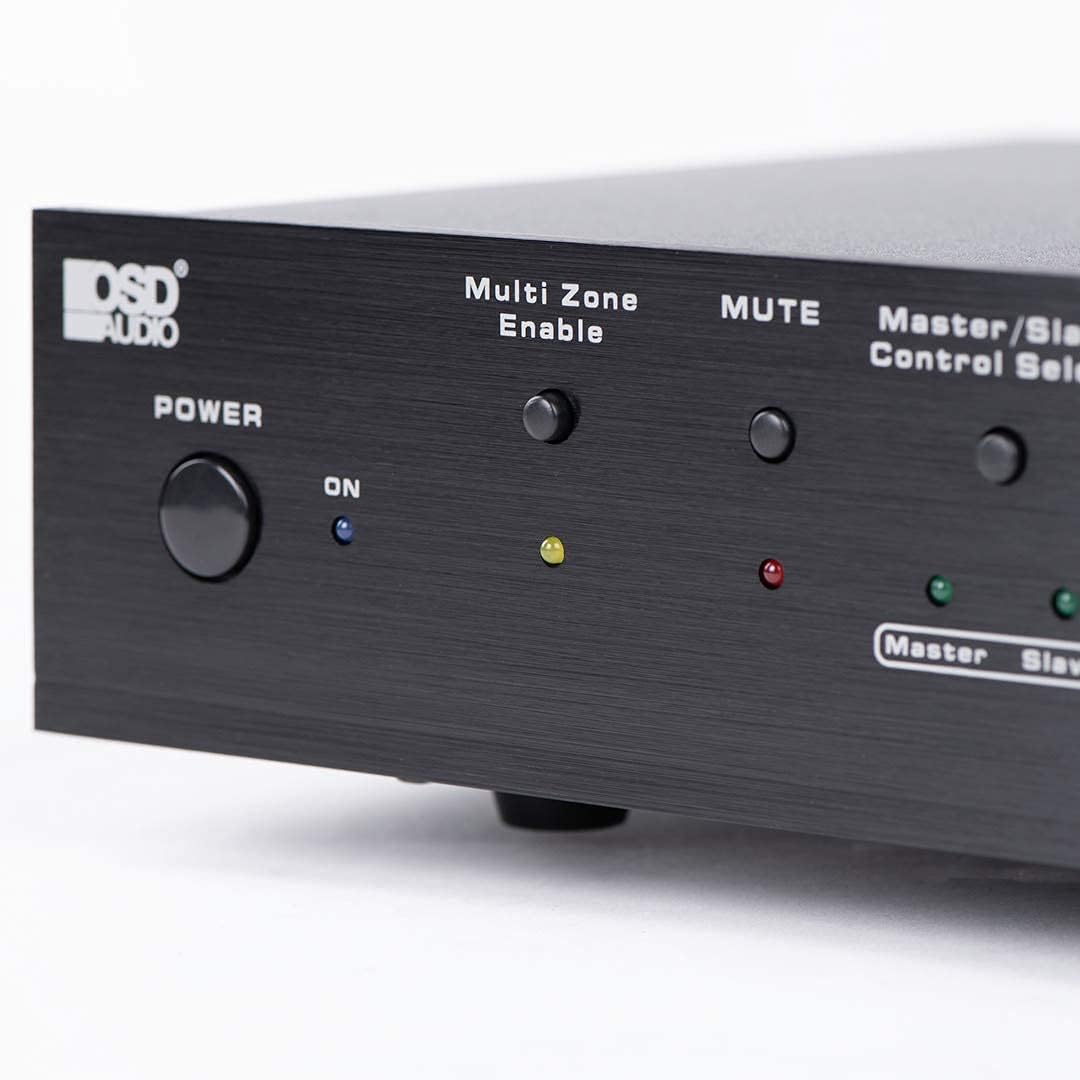
Figure 6.2: Detail of the Power and Multi Zone Enable buttons on the ATM-7 front panel.

Figure 6.3: Detail of the IN/OUT Mode (2 IN / 7 IN) and individual Zone Selector buttons on the ATM-7 front panel.
6.2 IR daljinski upravljalnik
The included IR remote control provides full functionality for the ATM-7. Point the remote towards the unit's IR sensor or the external IR receiver.
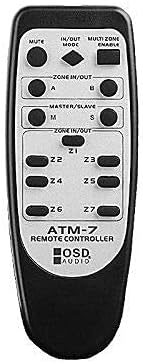
Figure 6.4: The ATM-7 remote control, featuring buttons for mute, input/output mode, master/slave, and individual zone selection.
- MUTE: Utiša ves zvočni izhod.
- IN/OUT MODE: Toggles between 2-input and 7-input modes.
- MULTI ZONE ENABLE: Activates or deactivates multi-zone operation.
- ZONE IN/OUT (A/B): In 2-input mode, selects between Source A and Source B for the active zones.
- MASTER/SLAVE (M/S): Selects Master or Slave mode for multi-unit configurations.
- Z1-Z7 Buttons: Individually activate or deactivate each of the seven zones.
The remote control has a backup memory function, retaining the last settings even after power cycling the unit. This allows for integration with smart plugs or switched outlets.
7. Vzdrževanje
The OSD Audio ATM-7 requires minimal maintenance. Follow these guidelines to ensure longevity:
- Čiščenje: Za čiščenje zunanjosti enote uporabite mehko, suho krpo. Ne uporabljajte tekočih čistil ali abrazivnih kemikalij.
- Prezračevanje: Občasno preverite, ali so prezračevalne odprtine čiste od prahu in umazanije.
- Povezave: Ensure all speaker wire connections remain secure and free from corrosion.
8. Odpravljanje težav
| Težava | Možen vzrok | rešitev |
|---|---|---|
| No audio output from speakers. |
|
|
| Daljinski upravljalnik ne deluje. |
|
|
| Sound distortion or low volume. |
|
|
9. Specifikacije
| Funkcija | Specifikacija |
|---|---|
| Številka modela | ATM-7 |
| Dimenzije izdelka | 21.5 x 12 x 5.5 palcev |
| Teža predmeta | 7 funtov |
| barva | Črna |
| Vrsta priključka | Speaker Wire (Banana Plugs compatible) |
| Vrsta kabla | Žica za zvočnike |
| Proizvajalec | OSD zvok |
| Vhodna moč | DC 12V 1.5A |
| Remote Operating Distance | Do 10 metre |
10. Informacije o garanciji
Warranty information for the OSD Audio ATM-7 Speaker Selector is typically provided with the product at the time of purchase or can be found on the official OSD Audio website. Please retain your proof of purchase for warranty claims. For detailed terms and conditions, please visit the OSD Audio official webali se obrnite na njihovo podporo strankam.
11. Podpora strankam
For technical assistance, troubleshooting, or general inquiries regarding your OSD Audio ATM-7, please contact OSD Audio customer support. You can find contact information, FAQs, and additional resources on the official OSD Audio webspletno mesto:


