1. Uvod
This manual provides detailed instructions for the installation, operation, and maintenance of your JVC KDR820BT Wireless Bluetooth Dual USB-CD Receiver. Please read this manual thoroughly before using the unit to ensure proper operation and to prevent damage.
The JVC KDR820BT is designed to provide versatile audio playback and communication features in your vehicle. It includes built-in Bluetooth for hands-free calling and audio streaming, dual USB ports for device connectivity, and CD playback capabilities. The unit also features a customizable display with variable color options.
2. Vsebina paketa
Pred začetkom namestitve preverite, ali so v paketu prisotni vsi elementi:
- JVC KDR820BT Head Unit
- Wireless Remote Control (RM-RK52)
- USB vmesnik Bluetooth
- Žični mikrofon
- snopu
- Montažna oprema
- Priročnik za lastnika (ta dokument)
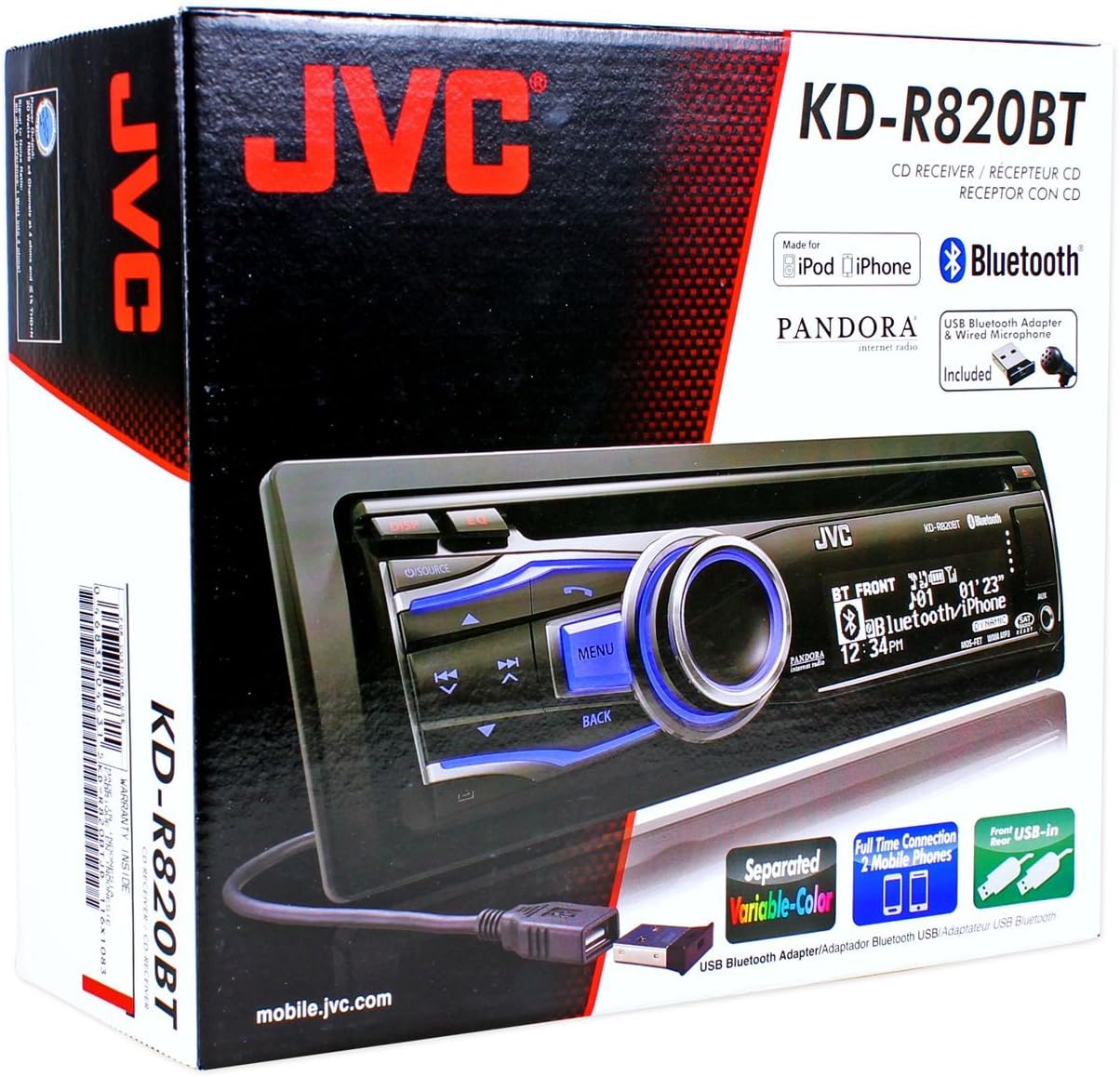
Figure 2.1: JVC KDR820BT Product Packaging. The box illustrates the main unit, remote, USB Bluetooth adapter, and wired microphone.
3. Namestitev
Professional installation is recommended. Ensure the vehicle's battery is disconnected before starting installation to prevent electrical damage.
3.1 Žične povezave
Connect the wiring harness to the vehicle's electrical system and speakers. Refer to your vehicle's wiring diagram for specific connections.
- rumena žica: Priključite na stalno napetost 12 V.
- Rdeča žica: Connect to switched 12V accessory power.
- Črna žica: Priključite na ozemljitev šasije vozila.
- Modra/bela žica: Priključite na napajanje anteno oz ampkabel za daljinski vklop lifier.
- Zvočniške žice: Priključite na zvočnike vozila (pazite na pravilno polarnost).
- RCA Pre-out Jacks: Za priklop zunanjih amplifiers (Front, Rear, Subwoofer).
- Vhod za mikrofon: Connect the supplied wired microphone for hands-free calling.
- Vrata USB: Front USB for general connectivity, Rear USB for additional devices or the Bluetooth adapter.

Figure 3.1: Rear Panel Connections. This image displays the rear of the receiver with its wiring harness, RCA pre-outs, and antenna input.
3.2 Namestitev enote
Install the mounting sleeve into the vehicle's dashboard opening. Secure the unit by sliding it into the sleeve until it locks into place. Attach the trim ring.
3.3 Connecting the Bluetooth Adapter
The supplied USB Bluetooth adapter must be connected to one of the USB ports (front or rear) for Bluetooth functionality. For a cleaner installation, the rear USB port is often preferred.
4. Začetna nastavitev
After installation, reconnect the vehicle battery. The unit will power on. Follow these steps for initial configuration:
- Začetni vklop: Pritisnite VIR gumb za vklop enote.
- Nastavitev ure: Access the system menu to set the current time.
- Nastavitve zvoka: Adjust basic audio settings such as bass, treble, balance, and fader.
- Barva zaslona: Customize the display and button illumination colors using the variable color settings.
5. Navodila za uporabo

Slika 5.1: Sprednja plošča zgorajview. This image shows the main controls and display of the JVC KDR820BT.

Figure 5.2: Receiver with Remote Control. The image displays the head unit and the included wireless remote control (RM-RK52).
5.1 Osnovne kontrole
- Gumb za vklop/izklop: Press to turn on/off or change audio source (FM/AM, CD, USB, Bluetooth Audio, AUX).
- Gumb za glasnost: Rotate to adjust volume. Press to mute/pause audio.
- Gumb menija: Access system settings and advanced options.
- Gumb za nazaj: Return to the previous menu or display.
- Skip/Seek Buttons: Navigate tracks, radio stations, or menu options.
5.2 Delovanje radia (AM/FM)
- Pritisnite VIR to select FM or AM.
- Uporabite Iskanje buttons to find stations automatically.
- Za ročno uglaševanje pritisnite in držite Iskanje gumbi.
- To store a preset, tune to the desired station, then press and hold a preset number button (1-6).
5.3 Predvajanje CD-ja
- Vstavite CD v režo za diske. Naprava bo samodejno preklopila na vir CD in začela predvajati.
- Uporabite Preskoči gumbi za menjavo skladb.
- Pritisnite Gumb za glasnost to pause/play.
- Pritisnite Izvrzi gumb za odstranitev CD-ja.
5.4 USB Device Playback
- Connect a USB device (flash drive, iPod/iPhone, digital audio player) to either the front or rear USB port.
- Pritisnite VIR da izberete USB.
- Uporabite Preskoči gumbi za navigacijo po skladbah.
- Pritisnite meni button to browse folders and files.
5.5 Bluetooth funkcije
Ensure the USB Bluetooth adapter is connected to the unit.
5.5.1 Seznanjanje naprave Bluetooth
- V mobilni napravi vklopite Bluetooth.
- On the JVC KDR820BT, select the Bluetooth source.
- Iskanje available devices on your mobile phone. Select "JVC unit" (or similar) from the list.
- Enter the PIN code (usually "0000") if prompted.
- Once paired, the Bluetooth indicator on the receiver will illuminate. The unit supports connecting two phones simultaneously.
5.5.2 Prostoročno klicanje
- Klicanje: Use your phone's voice dial feature (if supported) or dial directly from your phone. The audio will transfer to the receiver.
- Sprejem klica: Pritisnite Telefon button on the receiver when an incoming call is detected.
- Končanje klica: Pritisnite Telefon znova, da končate klic.
- Dostop do telefonskega imenika: The unit supports Phone Book Access Profile (PBAP) for transferring contacts.
5.5.3 Pretakanje zvoka prek Bluetootha
- Select Bluetooth Audio as the source.
- Play audio from your paired mobile device. The receiver will stream the audio wirelessly.
- Uporabite Preskoči buttons on the receiver to control playback (play/pause, skip track).
- The unit supports Pandora Internet Radio control from an iPhone.
5.6 Nastavitve zvoka
- 3-Band Parametric iEQ: Access the sound menu to adjust the equalizer settings for customized audio output.
- MOS-FET 50 W x 4 Ampdvigalo: Provides powerful audio output.
- TI/Burr-Brown 24-bit DAC: Ensures high-quality digital-to-analog audio conversion.
5.7 Nastavitve zaslona
- Separated Variable Color: Customize the illumination color of the keys and LCD panel from over 30,000 choices. Access this setting through the system menu.
- Nadzor svetlosti: Adjust display brightness for day and night viewing.
6. Vzdrževanje
- Čiščenje enote: Za brisanje sprednje plošče uporabite mehko, suho krpo. Za trdovratno umazanijo dampkrpo sperite z vodo. Izogibajte se abrazivnim čistilom ali topilom.
- Nega predvajalnika CD-jev: Keep the disc slot free of dust and debris. Use only clean, scratch-free CDs.
- Odstranitev prednje plošče: The detachable faceplate can be removed for security. Store it in a protective case.
7. Odpravljanje težav
Review the following common issues and solutions before seeking service.
| Težava | Možen vzrok/rešitev |
|---|---|
| Brez moči | Check power and ground wiring connections. Ensure the vehicle's ignition is on. Check vehicle fuses. |
| Brez zvoka | Check speaker wiring. Ensure volume is not muted or too low. Verify the power antenna/remote wire is connected if using an external amplifier. |
| Bluetooth echo during calls | Adjust microphone gain settings. Reposition the microphone away from reflective surfaces (e.g., windshield). Reduce the receiver's volume during calls. |
| Naprave Bluetooth ni mogoče seznaniti | Ensure the USB Bluetooth adapter is securely connected. Make sure Bluetooth is enabled on your mobile device and the receiver is in pairing mode. Delete previous pairings from your phone and try again. |
| Unit loses settings after power off | The yellow constant 12V power wire may not be connected correctly or is losing power. This can also occur if the vehicle battery is disconnected. |
| Display text is truncated or difficult to read | The display has limited character space. Some long names may be truncated. There is no option to increase scroll speed for folder/file imena. |
| Buttons or rotary knob are unresponsive | Ensure the faceplate is securely attached. Clean around the buttons to remove any debris. If the issue persists, it may indicate a hardware malfunction. |
8. Specifikacije
| Funkcija | Specifikacija |
|---|---|
| Številka modela | KDR820BT |
| Izhodna moč | MOS-FET 50W x 4 (20W RMS x 4) |
| DAC | TI/Burr-Brown 24-bit |
| Izenačevalnik | 3-Band Parametric iEQ |
| Povezljivost | Bluetooth, Dual USB (Front & Rear), AUX Input |
| Funkcije Bluetooth | Hands-Free Call, Audio Streaming, Phone Book Access Profile, Text Message Receipt Notification, Connects 2 Phones |
| Predvajanje medijev | CD, MP3, WMA, WAV |
| Vrsta zaslona | LCD with Separated Variable Color |
| Prejamp voltage | 2 volta |
| Velikost ohišja | Full-DIN |
| Dimenzije (Š x V x G) | 7.19 x 2.06 x 6.25 palcev (približno) |
| Teža | 4 funta (približno) |
| Podprte internetne storitve | Pandora Internet Radio |
| Nadzorna metoda | Remote Control, Android (via USB) |
9. Garancija in podpora
Izdelki JVC so izdelani po visokokakovostnih standardih. Za posebne informacije o garanciji glejte garancijski list, ki je priložen izdelku, ali obiščite uradno spletno stran JVC. webspletnega mesta. Račun shranite kot dokazilo o nakupu za uveljavljanje garancije.
For technical support, service, or inquiries regarding your JVC KDR820BT receiver, please contact JVC customer service or visit their official support channels. Contact information can typically be found on the JVC webmestu ali v embalaži izdelka.


