Uvod
The Microsoft LifeCam HD-3000 is a high-definition webcam designed for clear video communication and recording. It offers a true HD-quality experience with 720p video chat and cinematic 16:9 widescreen recording. Featuring TrueColor Technology, it automatically adjusts to deliver bright and colorful video in various lighting conditions. Its universal attachment base allows for versatile placement on desktops, laptops, or notebooks.
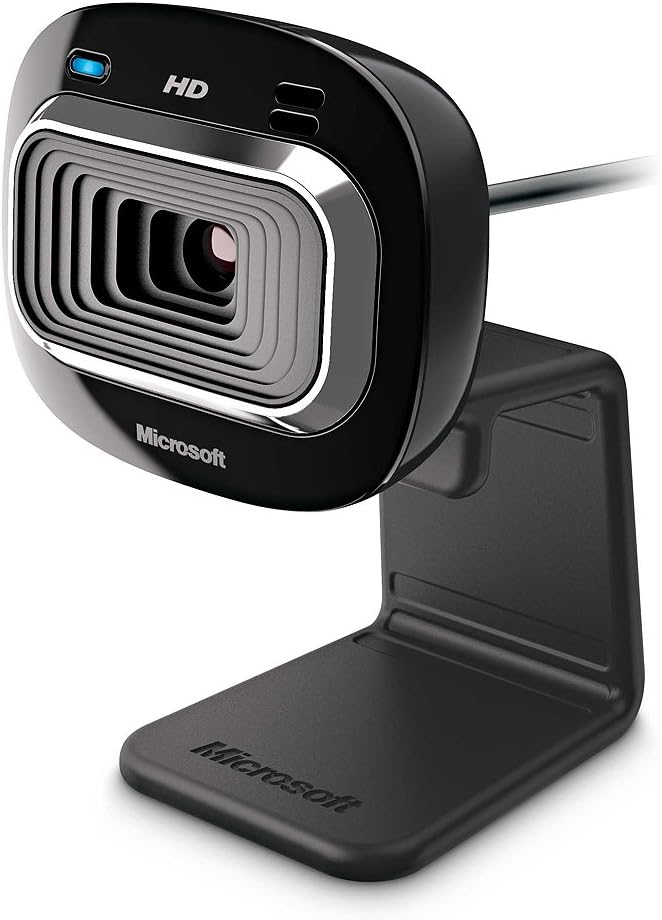
Slika 1: Spredaj view of the Microsoft LifeCam HD-3000.
Nastavitev in namestitev
Setting up your LifeCam HD-3000 is straightforward. Follow these steps for quick installation:
- Razpakirajte Webkamera: Carefully remove the LifeCam HD-3000 from its packaging. Ensure all components, including the USB cable and mounting buckle, are present.
- Povežite se z računalnikom: Plug the USB 2.0 connector of the LifeCam into an available USB port on your desktop, laptop, or notebook. The webcam is designed for plug-and-play functionality on compatible Windows operating systems (Windows 8, Windows 7, Windows Vista, Windows XP SP2 or higher).
- Postavite Webkamera: The universal attachment base is flexible and can be securely placed on top of your monitor, laptop screen, or directly on your desk. Adjust the webcam's angle as needed for optimal viewing. The rubberized base helps prevent scratches on your screen.
- Namestitev gonilnika (če je potrebno): In most cases, your operating system will automatically detect and install the necessary drivers. If prompted, follow the on-screen instructions to complete the driver installation. You may also visit the official Microsoft support webspletno mesto za najnovejše gonilnike.
- Konfiguracija programske opreme: For full functionality and advanced settings, it is recommended to install the Microsoft LifeCam software (if not pre-installed or automatically downloaded). This software allows for customization of video settings, photo capture, and special effects.

Figure 2: The flexible base allows for easy mounting on various surfaces.
Operating Your LifeCam HD-3000
Once installed, your LifeCam HD-3000 is ready for use with various communication and recording applications.
- Video klepet: The webcam is optimized for 720p HD video chat, providing clear and vibrant visuals for your online conversations. It is compatible with popular video conferencing applications like Skype, Zoom, and Microsoft Teams.
- Widescreen Recording: Utilize the 16:9 widescreen format for cinematic video recording. This is ideal for creating content for online video platforms.
- TrueColor Technology: The TrueColor Technology automatically adjusts exposure and white balance to ensure your video remains bright and colorful, even in challenging lighting conditions. This feature operates in the background, providing optimal image quality without manual intervention.
- Vgrajen mikrofon: The LifeCam HD-3000 includes a digital microphone for clear audio capture during video calls and recordings. Ensure your communication software is configured to use the LifeCam's microphone as the input device.
- Zajem fotografije: Use the dedicated LifeCam software or your preferred application to capture still images.
Vzdrževanje
To ensure the longevity and optimal performance of your Microsoft LifeCam HD-3000, follow these simple maintenance guidelines:
- Čiščenje leče: Nežno obrišite webobjektiv kamere obrišite z mehko krpo, ki ne pušča vlaken. Za trdovratne madeže rahloampen the cloth with a small amount of lens cleaning solution. Avoid using abrasive materials or harsh chemicals.
- Skrb za kabel: Izogibajte se pretiranemu upogibanju ali stiskanju kabla USB. Ko kabel ne uporabljate, ga lepo shranite, da preprečite poškodbe.
- Shranjevanje: Ko naprave dalj časa ne uporabljate, jo shranite webkamero na hladnem in suhem mestu, stran od neposredne sončne svetlobe in ekstremnih temperatur.
- Posodobitve programske opreme: Periodically check for software and driver updates from the official Microsoft support website to ensure compatibility and access to the latest features and performance improvements.
Odpravljanje težav
If you encounter issues with your LifeCam HD-3000, try the following troubleshooting steps:
- WebKamera ni zaznana:
- Ensure the USB cable is securely plugged into a working USB 2.0 port. Try a different USB port.
- Znova zaženite računalnik.
- Check Device Manager (Windows) to see if the webcam is listed and if there are any driver issues (indicated by a yellow exclamation mark). Reinstall drivers if necessary.
- Poor Video Quality (Grainy, Dark, Washed Out):
- Ensure adequate lighting in your environment. While TrueColor Technology helps, sufficient ambient light is crucial for best results.
- Check your application's video settings to ensure 720p resolution is selected.
- Verify that the lens is clean and free of smudges.
- Ni zvoka iz mikrofona:
- Check your computer's sound settings and ensure the LifeCam HD-3000 microphone is selected as the default recording device.
- Verify microphone settings within your video conferencing application.
- Ensure the microphone is not muted in your system settings or application.
- Video Freezes or Lags:
- Close other applications that might be consuming significant system resources (CPU, RAM, network bandwidth).
- Ensure your internet connection is stable and has sufficient bandwidth for HD video streaming.
- Posodobite svoje grafične gonilnike.
Specifikacije
| Funkcija | Podrobnost |
|---|---|
| Dimenzije izdelka | 1.75 x 1.55 x 4.29 palcev |
| Teža predmeta | 3.2 unč |
| Številka modela artikla | T3H-00001 |
| Proizvajalec | Microsoft |
| Tehnologija foto senzorja | CMOS |
| Ločljivost zajema videa | 720p (1280x720) |
| Največja zaslonka | 1.2 f |
| Format za zajem videa | MP4 |
| Podprt zvočni format | PCM |
| Tehnologija povezljivosti | USB |
| barva | Črna |
| Sistemske zahteve | Windows 8, Windows 7, Windows Vista, Windows XP (with Service Pack 2 (SP2) or higher); VGA video calling: Intel Dual-Core 1.6 GHz or higher, 1 GB of RAM; 720p HD recording: Intel Dual-Core 3.0 GHz or higher, 2GB of RAM; 1.5 GB free space; USB 2.0; Windows-compatible speakers or headphones. |

Figure 3: Dimensions of the LifeCam HD-3000.
Garancija in podpora
Microsoft products typically come with a limited warranty. For detailed warranty information, product registration, and technical support, please visit the official Microsoft support webspletnega mesta. Shranite dokazilo o nakupu za uveljavljanje garancije.
For further assistance, you can also refer to the Microsoft Store on Amazon.
Uradni videoposnetki izdelkov
Trenutno ni na voljo nobenih uradnih videoposnetkov izdelkov, ki jih je ustvaril prodajalec.


