Sunstech XD TH-35 Home Cinema 5.1 Subwoofer System User Manual
Model: TH-XD 35
1. Uvod
This manual provides essential information for the safe and efficient operation of your Sunstech XD TH-35 Home Cinema 5.1 Subwoofer System. Please read this manual thoroughly before using the product and retain it for future reference.
The Sunstech XD TH-35 is a 5.1 channel home cinema system designed to deliver an immersive audio experience for movies, music, and games. It includes a main unit (DVD/CD/DivX player), a subwoofer, and five satellite speakers.
2. Varnostne informacije
OPOZORILO: Za zmanjšanje nevarnosti električnega udara ne odstranjujte pokrova (ali zadnje strani). V notranjosti ni delov, ki bi jih lahko servisiral uporabnik. Za servisiranje se obrnite na usposobljeno servisno osebje.
- vir energije: Prepričajte se, da je napajalnik voltage se ujema z nalepko z nazivnimi vrednostmi na enoti.
- Prezračevanje: Ne blokirajte prezračevalnih odprtin. Namestite v skladu z navodili proizvajalca.
- Voda in vlaga: Naprave ne izpostavljajte dežju ali vlagi. Na napravo ne postavljajte predmetov, napolnjenih s tekočinami, kot so vaze.
- Toplota: Ne nameščajte v bližini virov toplote, kot so radiatorji, grelniki, peči ali druge naprave (vključno z amplifiers), ki proizvajajo toploto.
- Čiščenje: Unplug this apparatus during lightning storms or when unused for long periods of time. Clean only with a dry cloth.
- Servisiranje: Za vse servise se obrnite na usposobljeno servisno osebje. Servis je potreben, če je bil aparat kakor koli poškodovan, na primer poškodovan je napajalni kabel ali vtič, je bila polita tekočina ali so v aparat padli predmeti, je bil aparat izpostavljen dežju ali vlagi, ne deluje normalno , ali je bil opuščen.
3. Vsebina paketa
Prosimo, preverite, ali so v vašem paketu priloženi vsi spodaj navedeni artikli:
- Main Unit (DVD/CD/DivX Player)
- Nizkotonec
- Front Left Satellite Speaker
- Front Right Satellite Speaker
- Center Satellite Speaker
- Rear Left Satellite Speaker
- Rear Right Satellite Speaker
- Daljinski upravljalnik
- Avdio/video kabli
- Uporabniški priročnik (ta dokument)
4. Izdelek je končanview
The Sunstech XD TH-35 system comprises a central player unit, a powerful subwoofer, and five compact satellite speakers, along with a remote control for convenient operation.
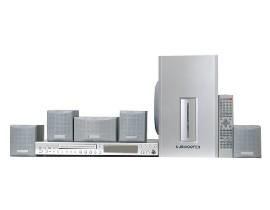
Slika 4.1: konecview of the Sunstech XD TH-35 Home Cinema 5.1 Subwoofer System, showing the main unit, subwoofer, five satellite speakers, and remote control.
4.1 Main Unit (DVD/CD/DivX Player)
This unit serves as the central control hub, featuring disc playback capabilities for CD, DVD, and DivX formats. It includes various input/output ports for connecting to your television and other audio sources.
4.2 Nizkotonec
The subwoofer is responsible for reproducing low-frequency sounds, adding depth and impact to your audio experience. It connects directly to the main unit.
4.3 satelitska zvočnika
Five satellite speakers (Front Left, Front Right, Center, Rear Left, Rear Right) provide the surround sound experience, distributing audio across your listening area for immersive soundscapes.
4.4 Daljinski upravljalnik
The included remote control allows for convenient adjustment of volume, input selection, playback controls, and other system settings from a distance.
5. Nastavitev
5.1 Postavitev zvočnikov
Optimal speaker placement is crucial for achieving the best 5.1 surround sound experience.
- Sredinski zvočnik: Place directly above or below your television, centered.
- Sprednji levi/desni zvočnik: Position these speakers equidistant from the television, forming an equilateral triangle with your primary listening position.
- Zadnji levi/desni zvočniki: Place these speakers to the sides or slightly behind your primary listening position, at ear level or slightly above.
- Nizkotonski zvočnik: The subwoofer can be placed anywhere in the room, but typically performs well in a corner or near a wall to enhance bass response. Experiment with placement for best results.
5.2 Priključitev zvočnikov
- Identify the speaker output terminals on the main unit and the corresponding input terminals on each speaker.
- Connect the Front Left speaker to the "FL" terminal, Front Right to "FR", Center to "CEN", Rear Left to "RL", and Rear Right to "RR".
- Connect the subwoofer to the dedicated "SUBWOOFER OUT" port on the main unit.
- Ensure all connections are secure and the correct polarity (+ to + and - to -) is observed for each speaker wire.
5.3 Connecting to a Television/Display
Use the provided audio/video cables to connect the main unit to your television. Common connection types include:
- Kompozitni video: Connect the yellow video output from the main unit to the yellow video input on your TV.
- Stereo zvok: Connect the red and white audio outputs from the main unit to the corresponding red and white audio inputs on your TV.
- (Note: Depending on your TV and the system's capabilities, other connections like S-Video or Component Video might be available for better picture quality. Refer to your TV's manual for input options.)
5.4 Napajalni priključek
- Once all audio/video and speaker connections are made, plug the main unit's power cord into a wall outlet.
- Turn on the main unit using the power button on the front panel or the remote control.
6. Navodila za uporabo
6.1 Osnovno predvajanje
- Vklop: Pritisnite MOČ gumb na glavni enoti ali daljinskem upravljalniku.
- Vstavite disk: Gently insert a CD, DVD, or DivX disc into the disc tray. The tray will automatically close, and playback should begin.
- Izberite vnos: If the system does not automatically switch to disc playback, press the VNOS or VIR gumb na daljinskem upravljalniku, da izberete pravilen vhod.
- Nadzor glasnosti: Uporabite GLASNOST + in GLASNOST - buttons on the remote to adjust the master volume.
- Nadzor predvajanja: Uporaba IGRAJ, PREMOR, STOP, PRESKOČI, in HITRO PREVIJANJE NAPREJ/NAZAJ buttons for disc navigation.
6.2 Nastavitve zvoka
Access the system's on-screen menu (usually by pressing NASTAVITEV or MENI on the remote) to adjust audio settings such as:
- Glasnost zvočnikov: Adjust the individual volume levels for each speaker (Front, Center, Rear, Subwoofer) to balance the sound.
- Nastavitve zamika: Compensate for different distances of speakers from the listening position.
- Zvočni načini: Select from various preset sound modes (e.g., Movie, Music, Game) or customize equalizer settings.
6.3 Funkcije daljinskega upravljalnika
The remote control provides full functionality for the system. Familiarize yourself with the button layout for easy operation.
(Note: A detailed diagram of the remote control with button descriptions would typically be included here in a physical manual.)
7. Vzdrževanje
7.1 Čiščenje enote
To maintain the appearance and performance of your system:
- Zunanjost: Zunanje površine obrišite z mehko, suho krpo. Ne uporabljajte abrazivnih čistil, voskov ali topil.
- Pladenj za disk: Keep the disc tray clean and free of dust. Avoid touching the lens inside the disc tray.
- Prezračevanje: Prepričajte se, da so prezračevalne odprtine čiste od prahu in umazanije, da preprečite pregrevanje.
7.2 Nega diska
Handle discs by their edges. Store discs in their cases when not in use to prevent scratches and dust accumulation. Clean discs with a soft, lint-free cloth, wiping from the center outwards.
7.3 Baterije daljinskega upravljalnika
If the remote control's range decreases or it becomes unresponsive, replace the batteries with new ones of the specified type (e.g., AAA). Ensure correct polarity when inserting new batteries.
8. Odpravljanje težav
If you encounter problems with your system, refer to the following table for common issues and solutions.
| Težava | Možen vzrok | rešitev |
|---|---|---|
| Brez moči | Napajalni kabel ni priključen; vtičnica je okvarjena | Preverite priključek napajalnega kabla; poskusite z drugo vtičnico |
| Brez zvoka | Volume too low; Incorrect input selected; Speaker wires loose/incorrectly connected | Increase volume; Select correct input; Check all speaker connections and polarity |
| Brez slike | Video cable loose/incorrectly connected; Incorrect TV input selected | Check video cable connections; Select correct input on TV |
| Disk se ne predvaja | Disc inserted incorrectly; Disc is dirty or scratched; Disc format not supported | Re-insert disc correctly; Clean or replace disc; Check disc compatibility (CD, DVD, DivX) |
| Daljinski upravljalnik ne deluje | Baterije so prazne ali nepravilno vstavljene; Ovira med daljinskim upravljalnikom in enoto | Replace batteries, check polarity; Remove obstructions; Ensure remote is pointed at the unit's sensor |
If the problem persists after trying these solutions, please contact Sunstech customer support or a qualified service technician.
9. Specifikacije
| Funkcija | Podrobnost |
|---|---|
| Ime modela | TH-XD 35 |
| Znamka | Sunstech |
| Konfiguracija prostorskega zvoka | 5.1 (5 Speakers + 1 Subwoofer) |
| Wattage | 170 vatov |
| Podprte vrste medijev | CD, DVD, DivX |
| ASIN | B0044ALAEM |
| Prvi razpoložljivi datum | 21. februar 2020 |
10. Garancija in podpora
For warranty information and customer support, please refer to the warranty card included with your product or visit the official Sunstech webspletnega mesta. Shranite dokazilo o nakupu za uveljavljanje garancije.
Spletna podpora: www.sunstech.com/support (This is a placeholder link, please replace with the actual support URL če je na voljo)
Kontakt: Refer to your regional Sunstech contact information for service inquiries.


