1. Uvod
This instruction manual provides essential information for the proper installation, operation, and maintenance of the HP 512MB Battery Backed Write Cache (BBWC) module, model 462975-001. This module is designed to enhance the performance and data integrity of HP SmartArray controllers by providing a temporary storage area for data before it is written to disk, and protecting this data during power outages.
Please read this manual thoroughly before proceeding with installation or operation to ensure safe and effective use of the product.
2. Varnostne informacije
Za preprečevanje poškodb in škode na opremi upoštevajte naslednje varnostne ukrepe:
- Always power off the server and disconnect all power cords before installing or removing any internal components.
- Nosite antistatično zapestnico in delajte na antistatični podlogi, da preprečite poškodbe občutljivih elektronskih komponent zaradi elektrostatične razelektritve (ESD).
- Handle the module by its edges only. Avoid touching the gold connectors or integrated circuits.
- Ensure proper ventilation around the server to prevent overheating.
3. Vsebina paketa
Preverite, ali vaš paket vsebuje naslednje predmete:
- HP 512MB Battery Backed Write Cache Module (462975-001)
If any components are missing or damaged, contact your vendor or HP support immediately.
4. Nastavitev in namestitev
This section details the steps for installing the 512MB BBWC module into a compatible HP SmartArray controller.
4.1 Kontrolni seznam pred namestitvijo
- Ensure the server is powered off and disconnected from all power sources.
- Open the server chassis according to the server's service manual.
- Locate the HP SmartArray controller where the BBWC module will be installed. Refer to your server's documentation for the exact location.
- Prepare an anti-static workspace.
4.2 Namestitev modula
- Carefully remove the BBWC module from its anti-static packaging.
- Identify the BBWC slot on the SmartArray controller. This slot is typically a dedicated memory slot.
- Align the module with the slot, ensuring the gold connectors are correctly oriented. The module is keyed to fit in only one direction.
- Apply even pressure to both ends of the module until it is fully seated in the slot. You may hear a click as the retention clips engage.
- If your SmartArray controller uses a separate battery pack for the BBWC, connect the battery cable to the designated port on the controller or module. Ensure the connection is secure.

Slika 1: Zgornji del view of the HP 512MB BBWC module (462975-001) showing connectors and labels.
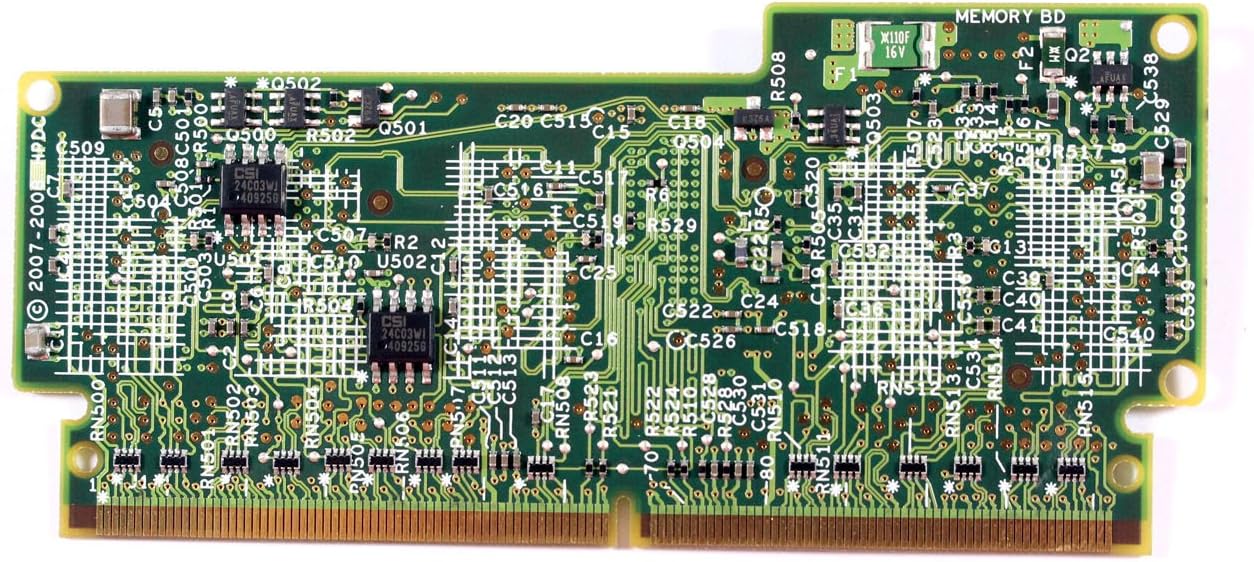
Slika 2: Spodaj view of the HP 512MB BBWC module (462975-001) showing the circuit board.
4.3 Naknadna namestitev
- Zaprite ohišje strežnika.
- Reconnect all power cords and power on the server.
- During server boot, observe the POST messages for any errors related to the SmartArray controller or BBWC module.
5. Upravljanje modula
The HP 512MB BBWC module operates automatically once installed and recognized by the SmartArray controller. Its primary function is to provide a non-volatile cache for write operations, improving disk I/O performance and protecting data in the event of a power failure.
5.1 Verifying Operation
To verify the module's operational status:
- Access the SmartArray controller's configuration utility (e.g., during server boot via a key press, or through HP's management software like HP System Management Homepage).
- Navigate to the controller's cache settings. The 512MB BBWC should be detected and reported as active.
- Check the battery status within the utility. A newly installed battery may require a full charge cycle.
6. Vzdrževanje
The BBWC module itself is generally maintenance-free. However, the associated battery pack has a finite lifespan and requires periodic monitoring and eventual replacement.
6.1 Nadzor baterije
- Regularly check the battery status through the SmartArray controller's management utility.
- Look for warnings or errors indicating a low charge, failed battery, or battery nearing end-of-life.
- The typical lifespan of a BBWC battery varies but is generally several years.
6.2 Zamenjava baterije
If the battery requires replacement:
- Obtain a compatible replacement battery pack from HP or an authorized reseller.
- Follow the safety precautions outlined in Section 2.
- Power off the server and disconnect power.
- Locate and disconnect the old battery pack.
- Connect the new battery pack, ensuring proper orientation and secure connection.
- Staro baterijo odvrzite odgovorno v skladu z lokalnimi predpisi.
- Power on the server and verify the new battery status in the controller utility.
7. Odpravljanje težav
V tem razdelku so navedeni osnovni koraki za odpravljanje pogostih težav.
7.1 Module Not Detected
- Preverite sedeže: Power off the server, open the chassis, and ensure the BBWC module is fully and correctly seated in its slot.
- Preverite združljivost: Confirm that the module (462975-001) is compatible with your specific SmartArray controller model and server.
- Preverite glede poškodb: Visually inspect the module and controller slot for any physical damage or bent pins.
- Posodobitev vdelane programske opreme: Ensure your SmartArray controller's firmware is up to date. Outdated firmware can sometimes cause detection issues.
7.2 Battery Errors
- Preverite povezave: Ensure the battery cable is securely connected to both the battery pack and the controller/module.
- Allow Charge Cycle: A new battery may take several hours to fully charge. Monitor its status over time.
- Zamenjajte baterijo: If errors persist after checking connections and allowing a charge cycle, the battery pack may be faulty and require replacement.
For more complex issues, refer to your SmartArray controller's documentation or contact HP technical support.
8. Specifikacije
| Funkcija | Opis |
|---|---|
| Številka modela | 462975-001 |
| Znamka | HEWLETT PACKARD (HP) |
| Velikost pomnilnika | 512 MB |
| Vrsta | Battery Backed Write Cache (BBWC) Module |
| Združljivost | Designed for HP SmartArray controllers (e.g., DL380 G6 cto) |
| Teža predmeta | 3.52 unč (približno 100 gramov) |
9. Garancija in podpora
This HP product is covered by a limited warranty. For specific warranty terms and conditions, please refer to the documentation included with your original server or SmartArray controller, or visit the official HP support webmesto.
For technical assistance, product information, or to report issues, please contact HP customer support through their official channels. Have your product model number (462975-001) and server serial number ready when contacting support.
HP-jeva podpora Webspletno mesto: www.hp.com/support


