1. Uvod
Thank you for choosing the Craftsman Digital 400A AC Clamp-On Ammeter, Model 82372. This instrument is designed for safe and accurate measurement of AC current without breaking the circuit, as well as AC/DC voltage, resistance, frequency, capacitance, continuity, diode, and temperature. Please read this manual thoroughly before use to ensure proper operation and to prevent potential hazards.
2. Varnostne informacije
WARNING: To avoid electric shock or personal injury, read and understand all safety information before using this meter.
- Vedno upoštevajte lokalne in nacionalne varnostne predpise.
- Merilnika ne uporabljajte, če je videti poškodovan ali če so merilni kabli poškodovani.
- Ne nanašajte več kot nazivna voltage, kot je označeno na števcu, med sponkama ali med katero koli sponko in ozemljitvijo.
- Bodite previdni pri delu z voltagnad 30 V AC RMS, 42 V vrhom ali 60 V DC. Te vol.tagpredstavljajo nevarnost električnega udara.
- Med meritvami držite prste za ščitniki za prste na merilnih kablih.
- Ne uporabljajte merilnika v bližini eksplozivnih plinov, hlapov ali prahu.
- Pred merjenjem toka se prepričajte, da je merilnik nastavljen na pravilno funkcijo in območje.
- Disconnect the test leads from the circuit before changing functions.
- Baterijo takoj zamenjajte, ko se prikaže indikator nizke napolnjenosti baterije.
- This meter is rated for Category III - 600V.
3. Izdelek je končanview
The Craftsman Digital 400A AC Clamp-On Ammeter features a compact design for measurements in tight locations and an extra-large 4000 count LCD screen for clear readings.
3.1 Meter Components

Figure 1: Top Section of the Ammeter
This image displays the upper portion of the Craftsman Digital 400A AC Clamp-On Ammeter. Visible components include the clamp jaw for non-contact current measurement, the rotary function dial with settings for AC current (2A, 20A, 200A, 400A), resistance (Ω), DC voltage (VDC), AC voltage (VAC), and OFF. The yellow 'MAX' button and 'HOLD' button are also shown, along with the 'AUTO POWER OFF' indicator.
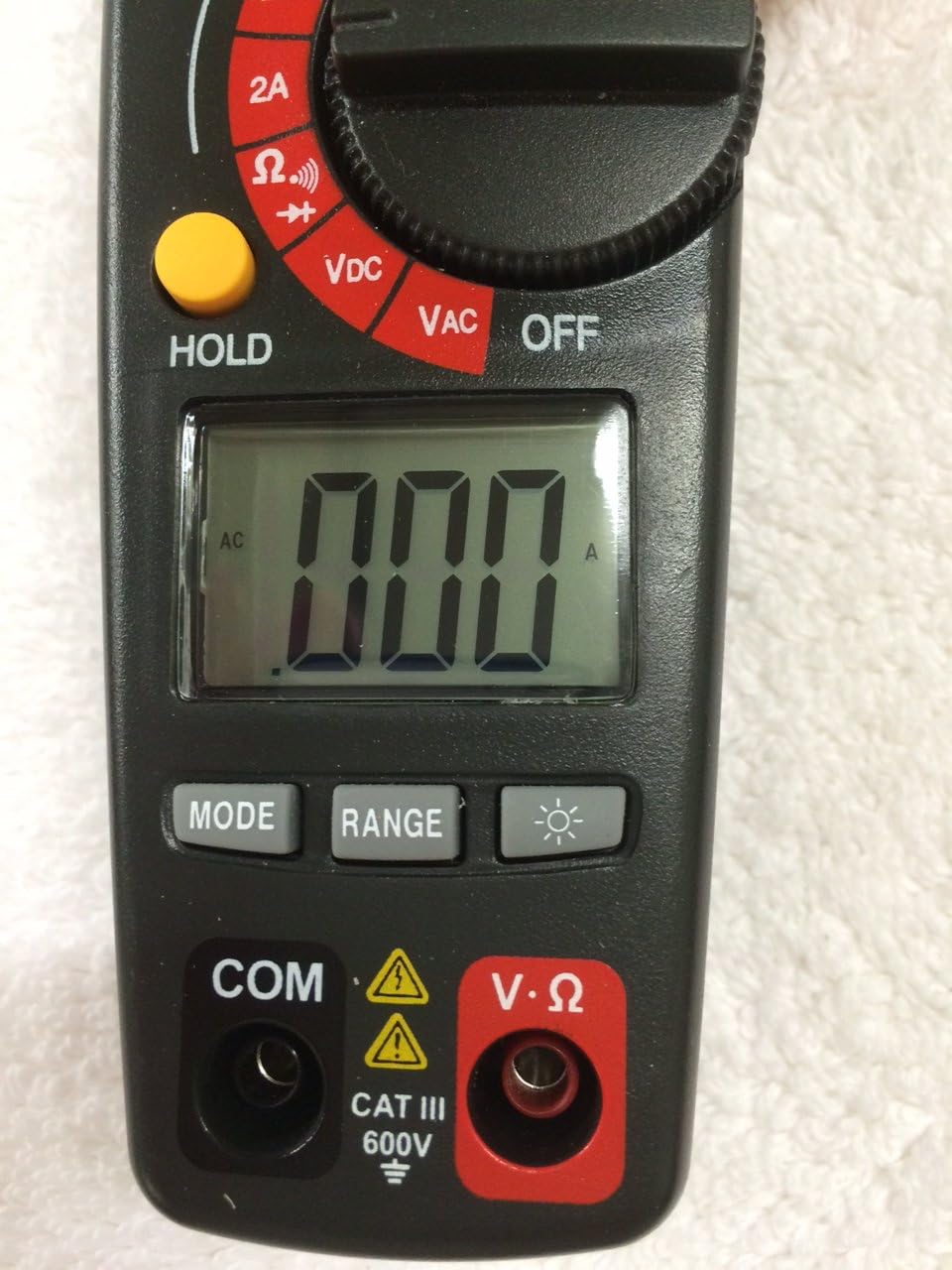
Figure 2: Bottom Section of the Ammeter
This image shows the lower part of the Craftsman Digital 400A AC Clamp-On Ammeter. Key features include the large LCD display, the 'MODE' button, 'RANGE' button, and the backlight button (indicated by a light bulb icon). Below the display are the input jacks: 'COM' (common) and 'V·Ω' (voltage/resistance) with a CAT III 600V safety rating warning.
- Clamp čeljust: Used for non-contact AC current measurements.
- Številčnica funkcij: Selects the desired measurement function (AC Current, Voltage, Resistance, etc.) and turns the meter ON/OFF.
- LCD zaslon: Prikazuje odčitke meritev, enote in indikatorje funkcij.
- Gumb MAX: Toggles between maximum value hold and normal operation.
- Gumb HOLD: Zamrzne trenutno odčitavanje na zaslonu.
- Gumb MODE: Selects between different functions within a dial setting (e.g., AC/DC voltage, continuity/diode).
- Gumb RANGE: Manually selects measurement range or returns to auto-ranging.
- Gumb za osvetlitev ozadja: Aktivira osvetlitev ozadja zaslona za boljšo vidljivost pri šibki svetlobi.
- Input Jacks (COM, V·Ω): Za priključitev merilnih vodnikov za volumentage, resistance, continuity, diode, capacitance, and frequency measurements.
4. Nastavitev
4.1 Namestitev baterije
The meter requires batteries for operation. To install or replace batteries:
- Ensure the meter is OFF and disconnect any test leads.
- Poiščite pokrov predalčka za baterije na zadnji strani merilnika.
- Odvijte pritrdilni vijak (vijake) in odstranite pokrov.
- Vstavite nove baterije in pri tem upoštevajte pravilno polarnost (+ in -).
- Namestite pokrov predalčka za baterije in ga pritrdite z vijakom(-i).
Note: The meter features auto power off to conserve battery life.
5. Navodila za uporabo
Before taking any measurements, ensure the meter is in good condition and the test leads are properly connected (if applicable).
5.1 Measuring AC Current (Clamp Funkcija)
This function allows non-contact measurement of AC current up to 400A.
- Turn the function dial to the desired AC current range (2A, 20A, 200A, or 400A).
- Pritisnite clamp trigger to open the clamp čeljust.
- V ohišje vstavite en sam prevodnik (ne snop žic).amp čeljust. Prepričajte se, da je čeljust popolnoma zaprta.
- Vrednost izmeničnega toka odčitajte na LCD-zaslonu.
Note: For accurate readings, ensure only one conductor is inside the clamp čeljust.
5.2 Merjenje AC/DC Voltage
The meter measures AC/DC voltage do 600V.
- Insert the black test lead into the COM jack and the red test lead into the V·Ω jack.
- Turn the function dial to the VDC or VAC position.
- If measuring DC voltage, press the MODE button to select DC if necessary.
- Merilne sonde priključite na vezje ali komponento, ki jo želite izmeriti.
- Preberite zvtage vrednost na LCD zaslonu.
5.3 Merjenje upornosti (Ω)
Measures resistance in Ohms (Ω).
- Insert the black test lead into the COM jack and the red test lead into the V·Ω jack.
- Turn the function dial to the Ω position.
- Pred merjenjem upornosti se prepričajte, da je vezje ali komponenta izklopljena iz napetosti.
- Merilne sonde priključite na komponento.
- Odčitajte vrednost upora na LCD-zaslonu.
5.4 Preizkus prevodnosti in diod
These functions are typically accessed via the Ω setting using the MODE button.
- Insert the black test lead into the COM jack and the red test lead into the V·Ω jack.
- Turn the function dial to the Ω position.
- Press the MODE button repeatedly until the continuity symbol (a speaker icon) or diode symbol (a triangle with a line) appears on the display.
- For continuity: Connect probes across the circuit. A continuous beep indicates a complete circuit.
- For diode: Connect probes across the diode. A forward bias voltage drop will be displayed. Reverse bias should show OL (open loop).
5.5 Measuring Frequency and Capacitance
The meter supports frequency and capacitance measurements, typically accessed through the V·Ω input and MODE button.
- Insert the black test lead into the COM jack and the red test lead into the V·Ω jack.
- Turn the function dial to the appropriate setting (often shared with voltage or resistance, requiring MODE selection).
- Press the MODE button until the frequency (Hz) or capacitance (F) symbol appears.
- Connect the test probes to the circuit or component.
- Preberite vrednost na LCD zaslonu.
5.6 Temperature Measurement (Type K Thermometer)
The meter includes a Type K thermometer for surface or air temperature measurements.
- Ensure the meter is OFF and disconnect any test leads.
- Insert the Type K thermocouple probe into the designated input jacks (usually marked with 'TEMP' or shared with V·Ω, check meter markings).
- Turn the function dial to the temperature setting (often marked with °C or °F).
- Place the thermocouple tip on or near the object whose temperature is to be measured.
- Odčitajte temperaturo na LCD zaslonu.
5.7 Data Hold and Max Hold
- Gumb HOLD: Pritisnite gumb HOLD, da zamrznete trenutno odčitavanje na zaslonu. Ponovno pritisnite za sprostitev.
- Gumb MAX: Press the MAX button to capture and display the maximum measured value. Press again to exit MAX hold.
6. Vzdrževanje
6.1 Čiščenje
Obrišite števec z oglasomamp cloth and mild detergent. Do not use abrasives or solvents. Keep the clamp jaw free of dust and debris.
6.2 Zamenjava baterije
Refer to Section 4.1 for battery installation/replacement instructions. Replace batteries when the low battery indicator appears on the display to ensure accurate readings.
6.3 Shranjevanje
Če merilnika ne uporabljate dlje časa, odstranite baterije, da preprečite puščanje. Merilnik shranjujte na hladnem in suhem mestu, stran od neposredne sončne svetlobe.
7. Odpravljanje težav
| Težava | Možen vzrok | rešitev |
|---|---|---|
| Merilnik se ne vklopi. | Prazne ali nepravilno vstavljene baterije. | Preverite polarnost baterij; zamenjajte baterije. |
| Prikazano je "OL" (preobremenitev). | Meritev presega izbrano območje ali največjo zmogljivost merilnika. | Select a higher range or ensure measurement is within meter's specifications. |
| Netočni odčitki. | Low battery, incorrect function/range, poor test lead connection, external interference. | Replace batteries, verify function/range, ensure secure connections, move away from strong magnetic fields. |
| No reading for AC current. | Več vodnikov v clamp jaw, DC current being measured. | Ensure only one AC conductor is in the clamp. This meter measures AC current only. |
8. Specifikacije
| Funkcija | Specifikacija |
|---|---|
| Znamka | Obrtnik |
| Model | 82372 |
| Vrsta meritve | Ammeter (Clamp-Vklopljeno) |
| Območje izmeničnega toka | Do 400A |
| AC/DC Voltage Območje | Do 600V |
| Odpornost | ja |
| Pogostost | ja |
| Kapacitivnost | ja |
| Test kontinuitete | ja |
| Diodni test | ja |
| Merjenje temperature | Termometer tipa K |
| Zaslon | 4000 Count LCD |
| Accuracy (AC Current) | 3.0% (VAC) - Note: Product description states 3.0% (VAC) for AC/DC current, which is unusual. Assuming it refers to AC current accuracy. |
| Ocena varnosti | Category III - 600V |
| Vir napajanja | Napajanje na baterije |
| Posebne lastnosti | One-touch auto zero, belt holster, molded rubber holster, auto on/off, Data Hold, Max Hold. |
9. Garancija in podpora
For warranty information and technical support, please refer to the official Craftsman webspletno mesto ali se obrnite na njihovo službo za stranke. Račun shranite kot dokazilo o nakupu za morebitne garancijske zahtevke.
Craftsman Customer Service: Prosim obiščite www.craftsman.com/support za najnovejše informacije o podpori in kontaktne podatke.


