1. Uvod
This manual provides instructions for the safe installation, operation, and maintenance of the Leviton 8200-LW 15-Amp, 125-Volt, Hospital Grade Duplex Receptacle. Please read these instructions thoroughly before beginning installation and retain them for future reference.
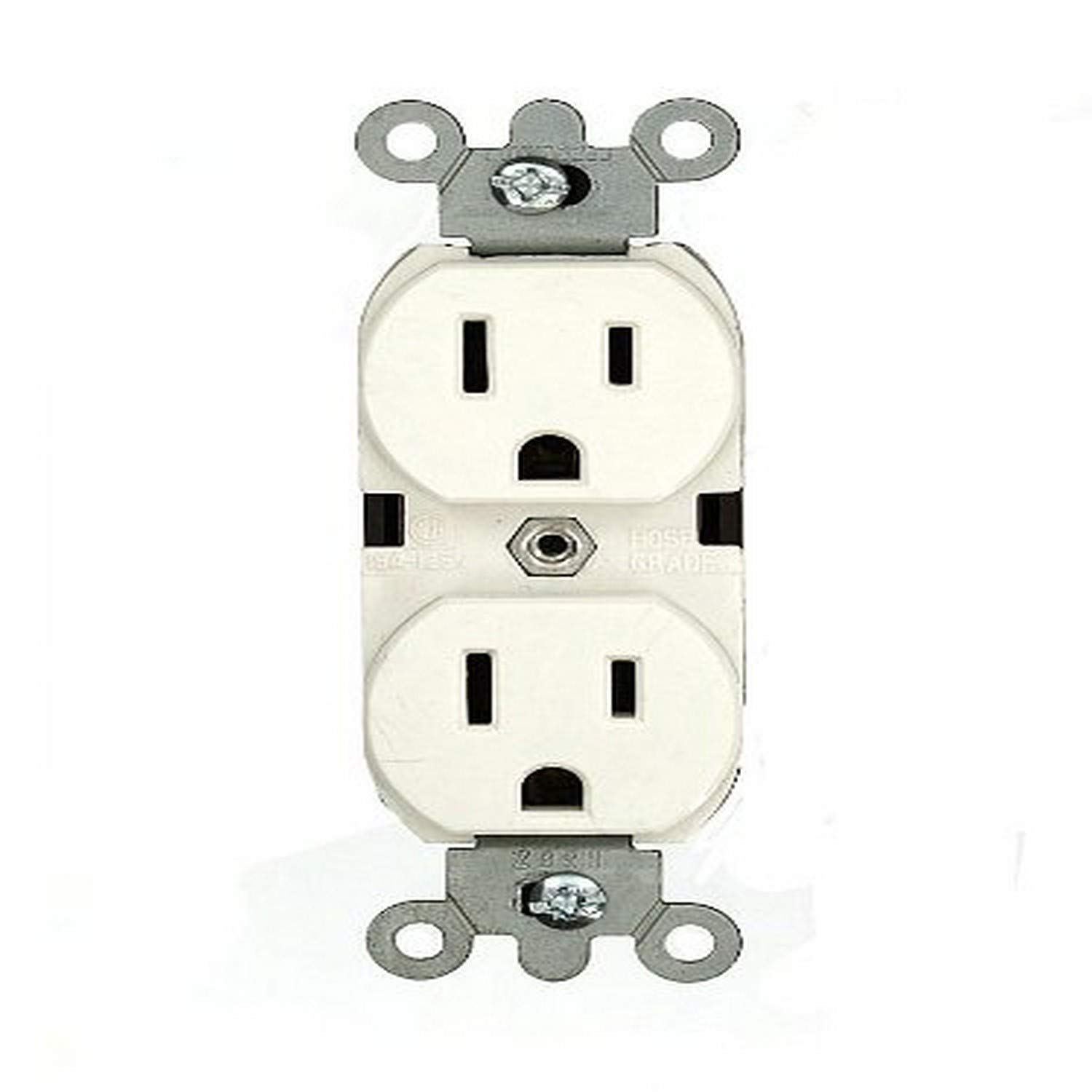
Slika 1: Spredaj view of the Leviton 8200-LW Hospital Grade Duplex Receptacle in White.
2. Pomembne varnostne informacije
OPOZORILO: V IZOGNITE POŽAR, ŠOK ALI SMRT; IZKLOPITE NAPAJANJE NA ODKLOPALNIKU ALI VAROVALKI IN PRED PRIKLOPOM PREIZKUSITE, DA JE NAPAJANJE IZKLOPLJENO!
- Installation must be performed by a qualified electrician in accordance with all national and local electrical codes and regulations.
- Always disconnect power at the main service panel before working with electrical wiring.
- Use only copper or copper-clad wire. Do not use aluminum wire with this device.
- Prepričajte se, da so vse žične povezave varne in pravilno izolirane.
- Ta naprava je zasnovana samo za uporabo v zaprtih prostorih.
- Ne prekoračite navedenih električnih nazivnih vrednosti naprave.
3. Vsebina paketa
The package for the Leviton 8200-LW Duplex Receptacle typically includes:
- One (1) Leviton 8200-LW 15-Amp, 125-Volt, Hospital Grade Duplex Receptacle (White)
4. Specifikacije izdelka
| Številka modela: | 8200-LW |
| Ampstarost: | 15 Amps |
| voltage: | 125 volta |
| Konfiguracija: | 5-15R |
| Ožičenje: | 3-Wire, Self-Grounding (Back and Side Wiring) |
| Poljaki: | 2-polni |
| Material: | Nylon (Body/Face) |
| barva: | Bela |
| Odobritve: | UL, CSA C22.2, NOM 057 |
| Tip: | Heavy Duty, Hospital Grade |
5. Nastavitev in namestitev
Potrebna orodja: Screwdriver (Phillips and/or Flathead), Wire Strippers, Electrical Tape, Voltage Tester.
- Izklopite napajanje: Locate the circuit breaker or fuse that controls the outlet you are replacing or installing. Turn off the power and verify it is off using a voltage tester.
- Odstranite staro vtičnico (če je primerno): Unscrew the wall plate and then the mounting screws holding the old receptacle in the electrical box. Carefully pull the old receptacle out of the box.
- Odklopite žice: Note the position of each wire before disconnecting. Typically:
- Green or Bare Copper Wire: Ozemljitvena žica.
- Bela žica: Nevtralna žica.
- Black or Red Wire: Hot (live) wire.
- Pripravite žice: If necessary, strip approximately 1/2 inch (12.7 mm) of insulation from the ends of the wires. Ensure the wire ends are clean and straight.
- Connect Wires to New Receptacle: The Leviton 8200-LW supports both back and side wiring.
- Ozemljitvena žica (zelena ali gola bakrena): Connect to the green hexagonal ground screw.
- Nevtralna žica (bela): Connect to the silver terminal screws.
- Vroča žica (črna ali rdeča): Connect to the brass terminal screws.
For Side Wiring: Loop the wire clockwise around the screw terminal and tighten securely. Ensure no bare wire is exposed outside the terminal.
For Back Wiring: Insert the stripped wire end into the appropriate hole on the back of the receptacle and tighten the corresponding screw on the side. The V-shaped, serrated back-wiring clamps ensure superior contact.
- Varna posoda: Carefully fold the wires into the electrical box. Insert the new receptacle into the box and secure it with the mounting screws.
- Namestite stensko ploščo: Stensko ploščo pritrdite čez vtičnico.
- Obnovi moč: Turn the power back on at the circuit breaker or fuse.
- Test: Test the receptacle with a known working device.
6. Navodila za uporabo
The Leviton 8200-LW Duplex Receptacle functions as a standard electrical outlet. Once properly installed and powered, simply insert the plug of your electrical device into one of the two available outlets. Ensure the plug is fully inserted for a secure connection.
7. Vzdrževanje
- Čiščenje: To clean the receptacle, ensure power is off at the circuit breaker. Wipe the surface with a soft, damp krpo. Ne uporabljajte abrazivnih čistil ali topil.
- Pregled: Periodically inspect the receptacle for any signs of damage, such as cracks, discoloration, or loose connections. If any damage is observed, disconnect power and have the device inspected or replaced by a qualified electrician.
- "Green Dot" Marking: This hospital-grade receptacle features a permanent "Green Dot" marking on its face, indicating its compliance with hospital-grade standards for enhanced durability and reliability.
8. Odpravljanje težav
| Težava | Možen vzrok | rešitev |
|---|---|---|
| Na vtičnici ni moči. | Circuit breaker tripped or fuse blown. Loose wiring connection. | Check and reset the circuit breaker or replace the fuse. Turn off power and check all wire connections for tightness. |
| Plug feels loose in the receptacle. | Worn receptacle contacts (unlikely for new hospital-grade). Incorrect plug type. | Ensure the plug is fully inserted. If the issue persists with multiple devices, consult a qualified electrician for inspection. |
| Receptacle is hot to the touch. | Overload on the circuit. Loose connection. Faulty device. | Immediately disconnect power. Reduce the load on the circuit. Have a qualified electrician inspect the wiring and device. |
9. Garancija in podpora
Leviton products are manufactured to the highest quality standards. For specific warranty information and customer support, please refer to the documentation included with your purchase or visit the official Leviton webspletno mesto. Shranite račun kot dokazilo o nakupu.
Leviton Customer Support:
- Visit Leviton Support Webmesto
- Refer to the contact information provided on the product packaging.


