Uvod
This manual provides instructions for the setup, operation, and maintenance of your Microsoft Wireless Comfort Desktop 5000. This product combines a wireless keyboard and a wireless mouse designed for comfortable and efficient computer interaction.
The Microsoft Wireless Comfort Desktop 5000 features an ergonomically designed Comfort Curve keyboard and a mouse utilizing BlueTrack Technology for versatile surface tracking. It operates on a 2.4 GHz wireless connection, offering a reliable connection with a range of up to 30 feet.
Vodnik za namestitev
Kaj je v škatli
- Microsoft Wireless Comfort Desktop 5000 Keyboard
- Microsoft Wireless Comfort Desktop 5000 Mouse
- USB Mini-Transceiver
- 2 AA Alkaline Batteries (for keyboard)
- 1 AA Alkaline Battery (for mouse)
Sistemske zahteve
- Operacijski sistem: Windows 8, Windows 7, Windows Vista, Windows XP (excluding Windows XP 64-bit)
- trdi disk: 100 MB free space
- vrata: vrata USB
Namestitev baterije
The keyboard requires two AA alkaline batteries, and the mouse requires one AA alkaline battery. Batteries are included with the product.
- Poiščite predal za baterije na spodnji strani tipkovnice in miške.
- Odprite pokrov prostora za baterije.
- Vstavite baterije AA in pazite na pravilno polarnost (+/-).
- Trdno zaprite pokrov prostora za baterije.
Connecting the Wireless Transceiver
The wireless desktop set connects to your computer via a USB mini-transceiver.
- Locate the USB mini-transceiver. It may be stored in the mouse's battery compartment for transport.
- Insert the USB mini-transceiver into an available USB port on your computer.
- Vaš računalnik bi moral samodejno zaznati in namestiti potrebne gonilnike. Ta postopek lahko traja nekaj trenutkov.
- Ko so gonilniki nameščeni, bi morala biti tipkovnica in miška pripravljena za uporabo.

Figure 1: The compact USB mini-transceiver for wireless connection.

Figure 2: The underside of the mouse showing the storage slot for the USB mini-transceiver.
Navodila za uporabo
Funkcije tipkovnice

Slika 3: Od zgoraj navzdol view of the Comfort Curve keyboard layout.
- Comfort Curve Design: The keyboard features an ergonomist-approved Comfort Curve design that encourages a natural wrist posture, reducing strain during extended use.
- Quiet Touch Keys: Experience comfortable typing with low-profile, quiet-touch keys.
- Naslon za dlani: A soft-touch palm rest is integrated to provide additional comfort and support for your wrists.
- Removable Feet: Adjustable feet on the underside allow you to set the keyboard at a preferred angle for a more comfortable wrist posture.
- Taskbar Favorites for Windows 7: Easily access programs pinned to the Windows Taskbar using dedicated shortcut keys. The keys automatically adapt if you rearrange icons in the Taskbar.
- Media Center Controls: Control media playback directly from your keyboard using dedicated media keys (e.g., play/pause, volume up/down, mute).

Slika 4: Pod kotom view highlighting the integrated palm rest and Comfort Curve design.
Značilnosti miške

Slika 5: Pod kotom view of the wireless mouse.
- Tehnologija BlueTrack: The mouse utilizes Microsoft's BlueTrack Technology, combining the power of optical with the precision of laser for remarkable tracking on virtually any surface, including granite, carpet, and wood.
- Štirismerno drsenje: The tilt wheel allows for four-way scrolling (up, down, left, and right), enhancing efficiency and comfort when navigating documents or web strani.
- Prilagodljivi gumbi: The mouse buttons can be customized for quick access to programs, files, media, and webpages you use most often. Refer to your operating system's mouse settings for customization options.
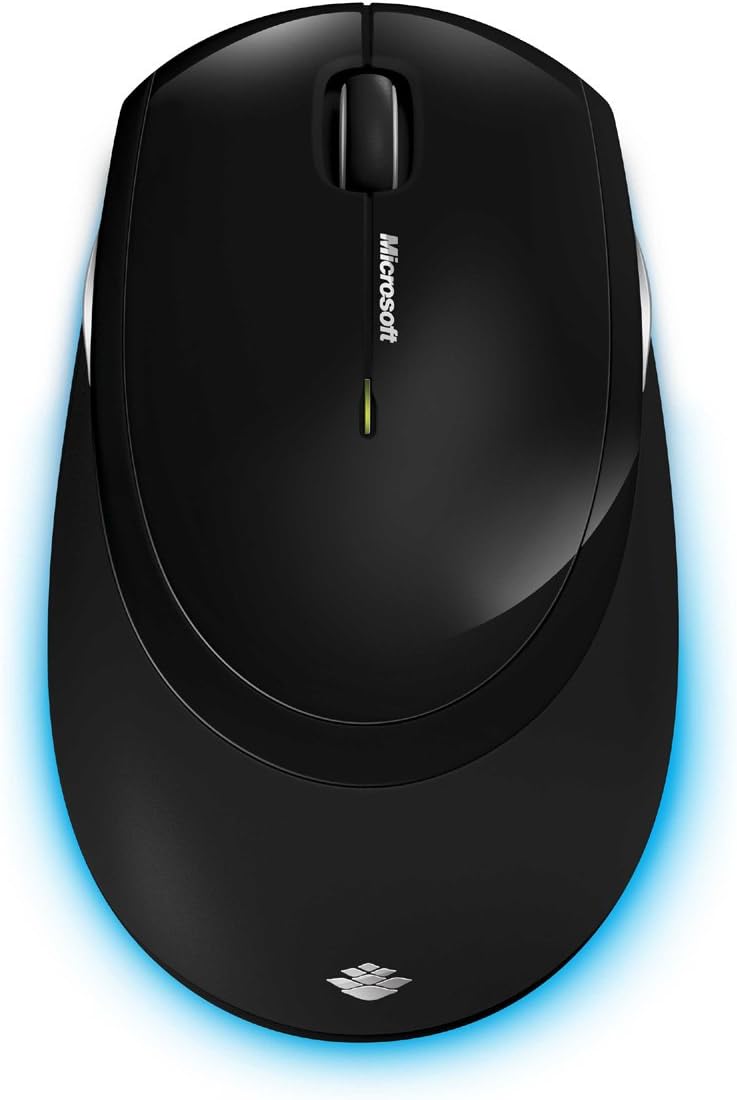
Slika 6: Od zgoraj navzdol view of the wireless mouse.
Vzdrževanje
Čiščenje
To maintain the performance and appearance of your Microsoft Wireless Comfort Desktop 5000, follow these cleaning guidelines:
- Disconnect the USB transceiver from your computer before cleaning.
- Uporabite mehko krpo, ki ne pušča vlaken, dampočistite z vodo ali blago čistilno raztopino.
- Izogibajte se uporabi agresivnih kemikalij, abrazivnih čistil ali topil, saj lahko poškodujejo površine.
- Za tipkovnico lahko s stisnjenim zrakom odstranite prah in umazanijo med tipkami.
- For the mouse, gently wipe the optical sensor area on the bottom to ensure optimal tracking performance.
Zamenjava baterije
When the batteries are low, the indicator light on the keyboard or mouse may flash. Replace the batteries as described in the "Battery Installation" section under Setup Guide.
- Always use new, high-quality AA alkaline batteries.
- Izrabljene baterije zavrzite v skladu z lokalnimi predpisi.
Odpravljanje težav
Težave s povezavo
- No response from keyboard/mouse:
- Ensure the USB mini-transceiver is securely plugged into a working USB port on your computer.
- Check if the batteries in the keyboard and mouse are correctly installed and have sufficient charge. Replace if necessary.
- Poskusite priključiti oddajnik/sprejemnik v drug USB vhod.
- Znova zaženite računalnik.
- Motnje:
- The 2.4 GHz wireless technology can be affected by other wireless devices. Move the transceiver closer to the keyboard and mouse, or move other wireless devices away.
- Avoid placing the transceiver near large metal objects, which can block the wireless signal.
Težave s sledenjem miške
- Erratic or no tracking:
- Ensure the BlueTrack sensor on the bottom of the mouse is clean and free of debris.
- Try using the mouse on a different surface. While BlueTrack is versatile, highly reflective or transparent surfaces (like clear glass) may still cause issues.
Specifikacije
| Funkcija | Podrobnost |
|---|---|
| Znamka | Microsoft |
| Številka modela | CSD-00001 |
| Tehnologija povezljivosti | Wireless (USB Transceiver) |
| Brezžična vrsta | Radijska frekvenca 2.4 GHz |
| Združljive naprave | Osebni računalnik |
| Združljivost operacijskega sistema | Windows 8, Windows 7, Windows Vista, Windows XP (excluding Windows XP 64-bit) |
| barva | Črna |
| Teža predmeta | 2.9 funtov |
| Dimenzije izdelka (DxŠxV) | 8.7 x 2.9 x 18.54 palcev |
| Vir napajanja | Napajanje na baterije |
| Potrebne baterije | 3 AA baterije (2 za tipkovnico, 1 za miško) |
| Prvi razpoložljivi datum | 29. julij 2009 |
Informacije o garanciji
Specific warranty details for the Microsoft Wireless Comfort Desktop 5000 are not provided within this manual. For comprehensive warranty information, including terms, conditions, and duration, please refer to the official Microsoft webspletnega mesta ali garancijskega lista, ki je priložen embalaži izdelka.
Podpora
For further assistance, technical support, or to download the latest drivers and software for your Microsoft Wireless Comfort Desktop 5000, please visit the official Microsoft support webspletno mesto:
You can also visit the Microsoft Store on Amazon for product information and related accessories:
Pomembne informacije
Pravna izjava o omejitvi odgovornosti
Please note that the "Legal Disclaimer" provided with the product pertains to sales terms and conditions, such as return policies and shipping details, and is separate from the operational instructions in this user manual. For specific product usage and safety guidelines, please refer to the relevant sections of this manual.


