Uvod
This manual provides essential information for the safe and efficient installation, operation, and maintenance of your HP ATX 300W Power Supply, Model 366505-001. This power supply is designed to provide reliable power to compatible personal computer systems.
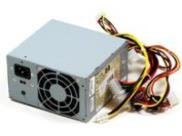
Slika 1: Spredaj view of the HP ATX 300W Power Supply. This image displays the compact form factor and primary connectors of the power supply unit.
Please read this manual thoroughly before attempting any installation or operation. Keep this manual for future reference.
Varnostne informacije
- Električna nevarnost: Power supplies contain high voltage components. Do not open the power supply casing. Nevarnost električnega udara.
- Prezračevanje: Ensure adequate ventilation around the power supply. Do not block air vents. Overheating can cause damage or fire.
- Ozemljitev: Napajalnik vedno priključite na pravilno ozemljeno električno vtičnico.
- Vlaga: Do not expose the power supply to water or excessive moisture.
- Profesionalna namestitev: If you are unsure about the installation process, seek assistance from a qualified technician.
- Združljivost: Use only with compatible personal computer systems as specified.
Nastavitev in namestitev
Follow these steps for proper installation of the HP ATX 300W Power Supply into your personal computer system:
- Priprava:
- Turn off and unplug your computer from the wall outlet.
- Open the computer case according to your computer's manufacturer instructions.
- Preden se lotite dela s komponentami, se spraznite statične elektrike tako, da se dotaknete ozemljenega kovinskega predmeta.
- Remove Old Power Supply (if applicable):
- Disconnect all cables from the existing power supply to the motherboard, graphics card, hard drives, and other components.
- Unscrew the old power supply from the computer case and carefully remove it.
- Install New Power Supply:
- Carefully place the HP ATX 300W Power Supply into the designated power supply bay in your computer case.
- Secure the power supply to the case using the appropriate screws.
- Povežite kable:
- Connect the main 20+4 pin ATX connector to the motherboard.
- Connect the 4-pin or 8-pin CPU power connector to the motherboard.
- Connect SATA power connectors to hard drives, SSDs, and optical drives.
- Connect any necessary PCIe power connectors to graphics cards (if applicable).
- Prepričajte se, da so vse povezave trdne in pravilno nameščene.
- Zadnji koraki:
- Organize cables to improve airflow and prevent interference.
- Zaprite ohišje računalnika.
- Plug the computer's power cord into the power supply and then into a grounded wall outlet.
Delovanje
Once installed, the HP ATX 300W Power Supply operates automatically with your computer system. When you power on your computer, the power supply will deliver stable and consistent power to all connected components.
- Vklop/izklop: The power supply is controlled by your computer's power button. Ensure the main power switch on the back of the power supply (if present) is in the 'ON' position before powering on the computer.
- Hlajenje: The integrated air cooling system will activate automatically to maintain optimal operating temperatures. Ensure the fan intake and exhaust are not obstructed.
- Izhodna moč: This unit provides a maximum output of 300 Watts. Ensure your system's total power requirements do not exceed this limit for stable operation.
Vzdrževanje
Redno vzdrževanje pomaga zagotoviti dolgo življenjsko dobo in optimalno delovanje vašega napajalnika:
- Čiščenje: Periodically clean the exterior of the power supply and its fan vents to prevent dust buildup. Use compressed air to gently clear dust from the fan and internal components (with the computer powered off and unplugged).
- Pregled: Occasionally inspect power cables for any signs of wear, fraying, or damage. Replace damaged cables immediately.
- Okolje: Operate the computer in a clean, dry, and well-ventilated environment to prevent dust accumulation and overheating.
Odpravljanje težav
Če imate težave z napajalnikom, upoštevajte naslednje pogoste korake za odpravljanje težav:
- Brez napajanja:
- Check if the power cord is securely plugged into both the power supply and the wall outlet.
- Ensure the main power switch on the power supply is in the 'ON' position.
- Preverite delovanje stenske vtičnice tako, da vanjo priključite drugo napravo.
- Check all internal power connections (motherboard, CPU, peripherals) are firmly seated.
- Intermittent Power/System Instability:
- Ensure the power supply's wattage (300W) is sufficient for all your computer components. Upgrading components may require a higher wattage napajalnik.
- Check for overheating. Ensure proper airflow and clean any dust from the power supply fan.
- Inspect for loose cable connections.
- Nenavadni zvoki:
- A grinding or loud fan noise may indicate a failing fan. Consider professional inspection or replacement.
If problems persist after attempting these steps, contact HP customer support or a qualified computer technician.
Specifikacije
| Znamka | HP |
| Ime/številka modela | 366505-001 |
| Faktor oblike | ATX |
| Izhodna vattage | 300 vatov |
| Vrsta priključka | ATX |
| Združljive naprave | Osebni računalnik |
| Metoda hlajenja | zrak |
| Mere izdelka (D x Š x V) | 9.5 x 12 x 4 palcev |
| Teža predmeta | 5.59 funtov (2.54 kilograma) |
| ASIN | B001U0ICS6 |
| Prvič na voljo | 16. avgust 2010 |
Garancija in podpora
For information regarding the warranty coverage for your HP ATX 300W Power Supply, please refer to the warranty documentation provided with your original computer system or contact HP customer support directly. Warranty terms and conditions may vary based on region and purchase date.
For technical support, service, or further inquiries, please visit the official HP support website or contact their customer service department. Have your product model number (366505-001) and serial number (if applicable) ready when contacting support.
HP-jeva podpora Webspletno mesto: www.hp.com/support