1. Uvod
This manual provides essential information for the safe and efficient use of your Hama USB 7.1 Surround Sound Card, Model 00051620. Please read these instructions carefully before using the device and keep them for future reference. This external sound card allows you to connect headphones, microphones, or speakers with a 3.5mm jack to your computer or tablet via a USB-A port, enhancing your audio experience with simulated 7.1 surround sound.
2. Varnostna navodila
- Do not open the device. Opening the device voids the warranty and may lead to electric shock.
- Zaščitite izdelek pred umazanijo, vlago in pregrevanjem.
- Izdelek uporabljajte samo za predvideni namen.
- Izdelka ne spuščajte in ga ne izpostavljajte močnim udarcem.
- Ta izdelek, tako kot vse električne izdelke, hranite izven dosega otrok.
- Embalažni material takoj zavrzite v skladu z lokalnimi predpisi.
3. Vsebina paketa
Preverite, ali vaš paket vsebuje naslednje elemente:
- 1x Hama USB 7.1 Surround Sound Card (Model 00051620)
- 1x Navodila za uporabo
4. Izdelek je končanview
The Hama USB 7.1 Surround Sound Card is a compact audio adapter designed to provide enhanced sound capabilities for your computer or tablet. It features a USB-A connector for easy plug-and-play functionality and includes dedicated ports for audio input and output.
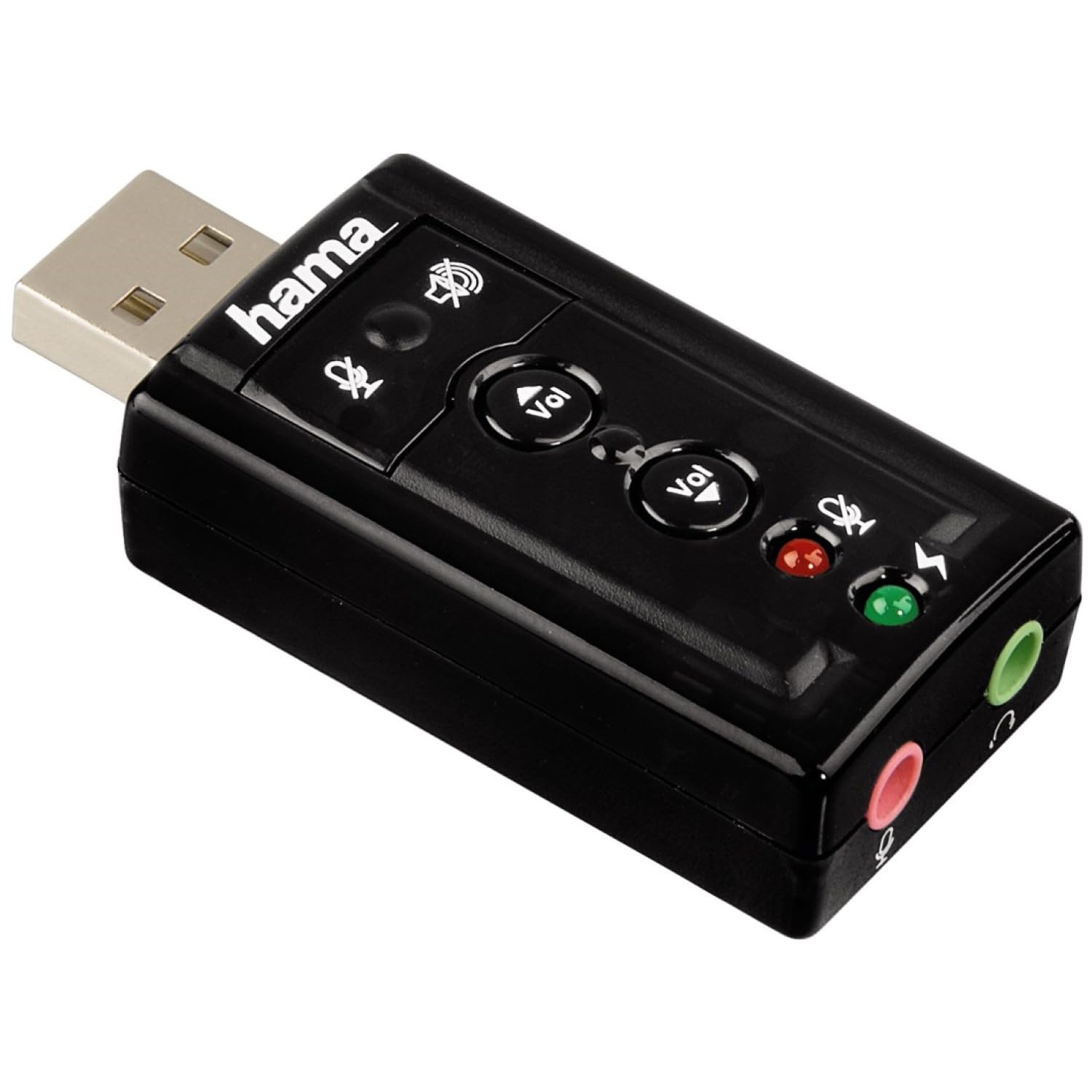
Slika 1: Zgoraj view of the Hama USB 7.1 Surround Sound Card, showing the USB-A connector, volume control buttons, and mute indicators.
Kontrole in vrata:
- Priključek USB-A: For connecting to your computer or tablet.
- Gumbi za povečanje / zmanjšanje glasnosti: Prilagodi glasnost zvočnega izhoda.
- Gumb za izklop mikrofona: Mutes or unmutes the connected microphone.
- Gumb za utišanje zvočnika: Mutes or unmutes the audio output to headphones/speakers.
- 3.5mm Microphone Jack (Red): Za priključitev zunanjega mikrofona.
- 3.5mm Headphone/Speaker Jack (Green): Za priklop slušalk ali zvočnikov.

Slika 2: Konec view of the Hama USB 7.1 Surround Sound Card, highlighting the red microphone input jack and the green headphone/speaker output jack.
5. Sistemske zahteve
- Operating System: Windows, macOS, or compatible tablet OS.
- Razpoložljiva vrata USB-A.
- Headphones, microphone, or speakers with a 3.5mm jack connector.
6. Namestitev in nastavitev
- Connect the Sound Card: Plug the USB-A connector of the Hama USB 7.1 Surround Sound Card into an available USB-A port on your computer or tablet.
- Namestitev gonilnika: The device is typically plug-and-play, and your operating system should automatically detect and install the necessary drivers. If prompted, follow the on-screen instructions.
- Povežite zvočne naprave:
- For headphones or speakers, connect the 3.5mm jack into the zelena port on the sound card.
- For a microphone, connect the 3.5mm jack into the rdeča port on the sound card.
- Konfigurirajte nastavitve zvoka: Access your operating system's sound settings to ensure the Hama USB 7.1 Surround Sound Card is selected as the default playback and recording device.
- Namestitev programske opreme (neobvezno): For advanced features like XeaR-Sound 7.1 surround simulation, 10-band equalizer, and karaoke functions, install the dedicated software. Refer to the manufacturer's website for software downloads and installation instructions.
7. Delovanje
Basic Audio Control:
- Prilagoditev glasnosti: Use the 'Vol +' and 'Vol -' buttons on the sound card to increase or decrease the output volume.
- Mute Audio Output: Press the speaker mute button to temporarily silence the audio output. Press again to unmute.
- Mute Microphone Input: Press the microphone mute button to temporarily disable microphone input. Press again to enable.
Napredne funkcije programske opreme:
If you have installed the optional software, you can access the following features:
- XeaR-Sound Technology: Enables simulated 7.1 crystal-clear surround sound for stereo speakers or headsets.
- 10-pasovni izenačevalnik: Customize your audio experience with various presets (e.g., Jazz, Rock, Classic) or create your own.
- Additional Sound Effects: Apply various sound effects to your audio.
- Adjustable Room Acoustics: Modify the perceived acoustic environment.
- Karaoke Recording: Record karaoke performances with original voice suppression and tone adjustment capabilities.
8. Vzdrževanje
The Hama USB 7.1 Surround Sound Card requires minimal maintenance.
- Napravo očistite le z rahlim damp, krpo, ki ne pušča vlaken. Ne uporabljajte agresivnih čistilnih sredstev.
- Ensure the USB port and audio jacks are free from dust and debris.
9. Odpravljanje težav
Ni zvoka:
- Ensure the sound card is securely plugged into a USB port.
- Check if your headphones/speakers are correctly connected to the green jack.
- Verify that the speaker mute button on the sound card is not active.
- Confirm that the Hama USB 7.1 Surround Sound Card is selected as the default playback device in your operating system's sound settings.
- Adjust the volume using the sound card's buttons and your computer's volume controls.
Mikrofon ne deluje:
- Ensure your microphone is correctly connected to the red jack.
- Verify that the microphone mute button on the sound card is not active.
- Confirm that the Hama USB 7.1 Surround Sound Card is selected as the default recording device in your operating system's sound settings.
- Preverite nastavitve zasebnosti mikrofona v operacijskem sistemu.
Težave s kakovostjo zvoka:
- Zagotovite, da so vse povezave varne.
- Try connecting the sound card to a different USB port.
- If using the optional software, check equalizer settings and disable any sound effects that might be causing distortion.
10. Specifikacije
| Funkcija | Podrobnost |
|---|---|
| Znamka | Hama |
| Številka modela | 00051620 (znan tudi kot 51620) |
| barva | Črna |
| Priključek | USB A male |
| Standard USB | USB 2.0 |
| Povezava zvočnika | 3.5mm female jack |
| Priključek za slušalke | 3.5mm female jack |
| Nadzor glasnosti | Yes, with mute function |
| Način avdio izhoda | Surround |
| Konfiguracija kanala za prostorski zvok | 7.1 (simulated with software) |
| Največji Sampobrestna mera | 48 kHz |
| Združljive naprave | USB (PC, Laptop, Tablets) |
| Proizvajalec | Hama EURL |
11. Informacije o odstranjevanju
Observe the applicable local regulations for the disposal of electronic devices. The product must not be disposed of with normal household waste. Dispose of the product according to the European Directive 2012/19/EU on waste electrical and electronic equipment (WEEE) at a designated collection point for electrical and electronic equipment.
12. Garancija
Hama GmbH & Co KG provides a limited warranty for this product. For detailed warranty terms and conditions, please refer to the official Hama webali se obrnite na lokalnega prodajalca. Shranite dokazilo o nakupu za uveljavljanje garancije.
13. Podpora strankam
If you have any questions about this product or require technical assistance, please contact Hama customer support. You can find contact information on the official Hama webspletno mesto (www.hama.com) or through your local retailer.


