Uvod
This manual provides essential instructions for the safe and efficient operation of your Panasonic DVD-LS83 8.5-Inch Portable DVD Player. Please read this manual thoroughly before using the device and retain it for future reference. This player offers an 8.5-inch diagonal widescreen LCD display and supports multi-format playback including DVD, DivX, DVD-RAM, DVD-R, DVD-RW, CD, CD-R, CD-RW, JPEG, and MPEG4.
Varnostne informacije
Za zagotovitev varnega delovanja in preprečevanje poškodb upoštevajte naslednje varnostne ukrepe:
- Naprave ne izpostavljajte dežju, vlagi ali ekstremnim temperaturam.
- Izogibajte se postavljanju enote v bližino virov toplote, kot so radiatorji ali peči.
- Use only the specified power adapters (AC adapter and Car DC adapter) provided with the unit.
- Ne poskušajte razstavljati ali spreminjati enote. Vsa servisna dela prepustite usposobljenemu osebju.
- Enoto hranite stran od močnih magnetnih polj.
- Zagotovite ustrezno prezračevanje; ne blokirajte prezračevalnih odprtin.
Vsebina paketa
Prosimo, preverite, ali so v vašem paketu vsi elementi:
- Panasonic DVD-LS83 Portable DVD Player
- Akumulatorska baterija
- AC adapter
- Car DC Adapter
- Montažni nosilec za vzglavnik
- Uporabniški priročnik (ta dokument)
Konec izdelkaview
Seznanite se s komponentami vašega prenosnega DVD predvajalnika.
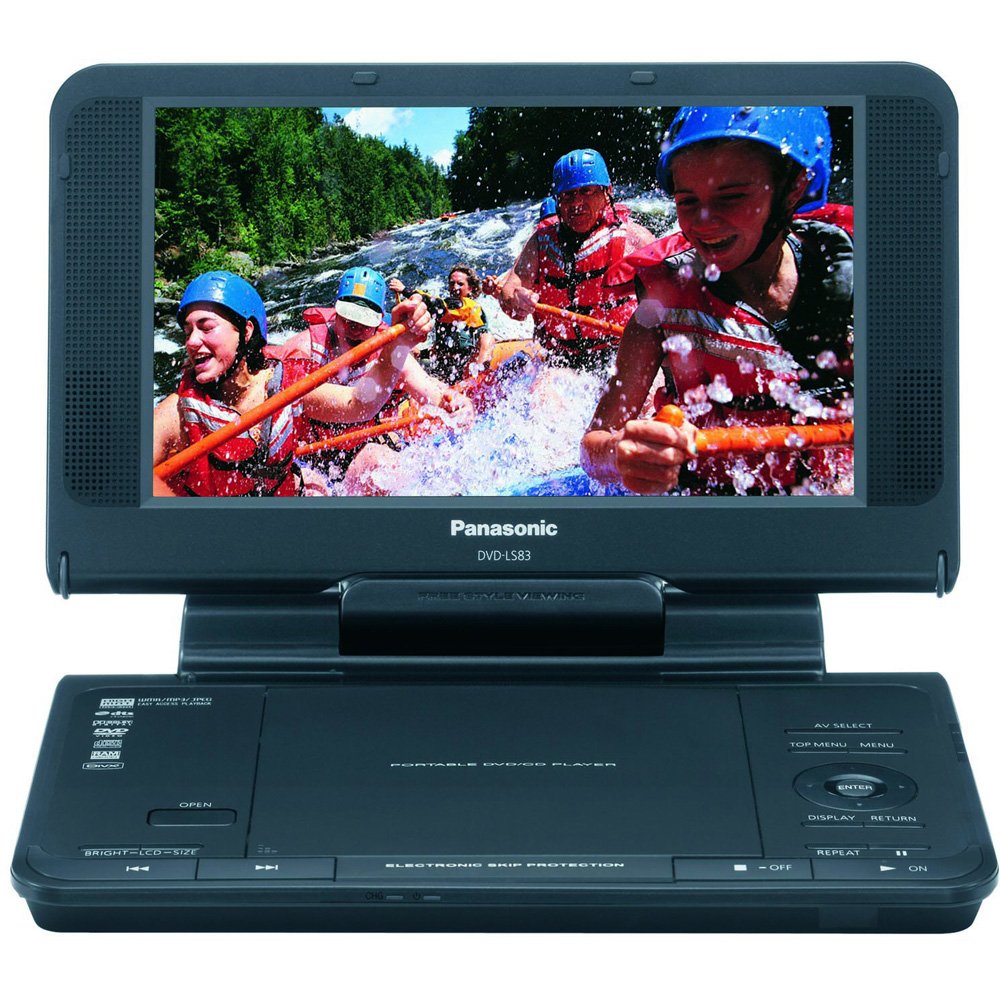
This image displays the Panasonic DVD-LS83 portable DVD player with its 8.5-inch screen open, revealing the disc compartment and control buttons on the main unit. The player features an integrated screen that can swivel for optimal viewing angles. Control buttons for playback, menu navigation, and volume are typically located on the front panel or along the sides of the main unit. Various ports for power, headphones, and AV output are usually found on the side panels.
Nastavitev
Polnjenje baterije
Before initial use, fully charge the included rechargeable battery. Connect the AC adapter to the player's DC IN jack and then to a standard wall power outlet. The battery indicator light will illuminate to show charging status. A full charge provides up to 6 hours of playback time, depending on screen brightness and usage. Alternatively, use the included Car DC Adapter to power or charge the unit while in a vehicle.
Montaža v vozilo
The included headrest mounting bracket allows for secure attachment of the player to a vehicle's headrest. Follow the specific instructions provided with the bracket for proper installation. Ensure the player is securely fastened and does not obstruct the driver's view or interfere with vehicle safety features before driving.
Navodila za uporabo
Vklop/izklop
To turn the player on, press and hold the MOČ button until the screen illuminates. To turn it off, press and hold the MOČ button again until the screen goes dark.
Inserting and Removing Discs
Open the disc compartment cover. Carefully place a compatible disc (DVD, CD, DivX) onto the spindle with the label side facing up. Gently press the disc until it clicks into place. Close the compartment cover firmly. To remove a disc, press the ODPRTO button, gently lift the disc from its edges, and store it in its protective case.
Osnovne kontrole predvajanja
- PREDVAJAJ/PAVZA: Press to start playback or to pause/resume the current content.
- STOP: Press to stop disc playback.
- PRESKOČI (Forward/Backward): Press to skip to the next or previous track/chapter.
- FF / REW (Fast Forward/Rewind): Press and hold to fast forward or rewind through the content.
Prilagoditev glasnosti
Uporabite GLASNOST +/- buttons or the dedicated volume dial, typically located on the side or front panel, to adjust the audio output level.
Nastavitve zaslona
The 8.5-inch widescreen LCD display features an LCD Selector z NORMAL/FULL modes to adjust the aspect ratio of the displayed content. You can also adjust screen brightness and contrast via the on-screen menu or dedicated controls for optimal viewing. Be aware that higher brightness settings may reduce battery life.
Multi-Format Playback
The player supports a wide range of formats including DVD, DivX, DVD-RAM, DVD-R, DVD-RW, CD, CD-R, CD-RW, JPEG, and MPEG4. Ensure discs are clean and free from scratches or damage for optimal performance.
Uporaba slušalk
Two headphone terminals are provided for private listening. Connect standard 3.5mm stereo headphones to either jack. Adjust the volume to a comfortable level to protect your hearing.
Vzdrževanje
Čiščenje enote
Wipe the exterior of the player with a soft, dry cloth. For stubborn dirt, slightly dampen the cloth with water. Do not use abrasive cleaners, solvents, or alcohol, as these can damage the finish. Clean the disc lens periodically with a specialized DVD lens cleaner disc (not included) to maintain optimal playback quality.
Skrb za baterijo
To prolong battery life, fully charge the battery before first use and after long periods of inactivity. Avoid exposing the battery to extreme temperatures (hot or cold), as this can reduce its capacity and lifespan. If storing the unit for an extended period, charge the battery to approximately 50% capacity.
Shranjevanje
When not in use, store the player in a cool, dry place, away from direct sunlight, high humidity, and extreme temperatures. Keep the disc compartment closed to prevent dust accumulation.
Odpravljanje težav
If you encounter problems with your player, refer to the following common issues and solutions:
Brez moči
- Ensure the AC adapter or car adapter is securely connected to both the player and the power source.
- Check if the rechargeable battery is sufficiently charged.
- Pritisnite in nekaj sekund trdno držite gumb za vklop.
Disc Does Not Play
- Prepričajte se, da je disk pravilno vstavljen z nalepljeno stranjo navzgor.
- Check if the disc is clean and free from scratches, smudges, or damage. Clean with a soft, lint-free cloth if necessary.
- Verify that the disc format is supported by the player (e.g., DVD, CD, DivX).
Brez zvoka ali nizka glasnost
- Adjust the volume control on the player.
- If using headphones, ensure they are fully plugged into one of the headphone terminals and are functional.
- Check the audio settings within the player's on-screen menu.
Slaba kakovost slike
- Disk temeljito očistite.
- Adjust screen brightness and contrast settings via the player's controls or menu.
- Ensure the LCD Selector is set appropriately (NORMAL/FULL) for the content being viewizd.
Specifikacije
| Funkcija | Podrobnost |
|---|---|
| Znamka | Panasonic |
| Številka modela | DVD-LS83 |
| Velikost zaslona | 8.5 palcev |
| Vrsta zaslona | LCD |
| Podprte vrste medijev | DVD, DivX, DVD-RAM, DVD-R, DVD-RW, CD, CD-R, CD-RW, JPEG, MPEG4 |
| Playback Time (Battery) | Up to 6 hours (with included rechargeable battery) |
| Dimenzije izdelka | 7.2 x 9.5 x 2.1 palcev |
| Teža predmeta | 2 funtov |
| barva | Črna |
| Prvič na voljo | 21. februar 2008 |
Garancija in podpora
For detailed warranty information, technical support, or service inquiries, please refer to the documentation included with your original purchase. You may also visit the official Panasonic website for the most current support resources and contact information.


