Uvod
This manual provides detailed instructions for the installation, operation, and maintenance of the ECS P4M800-M7 motherboard. The P4M800-M7 is designed to support Socket LGA775 Intel Pentium 4 / Pentium D / Celeron D Processors with FSB 800/533 MHz and Hyper-Threading Technology.
Key features include 64-bit support, FSB 800MHz, RAID0, RAID1, and Serial ATA capabilities.
Konec izdelkaview

Figure 1: ECS P4M800-M7 Motherboard Layout. This image displays the main components of the motherboard, including the CPU socket (LGA 775), two DDR RAM slots, PCI and AGP expansion slots, and various I/O ports.
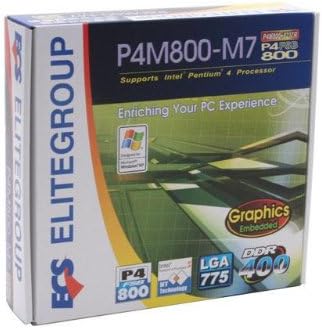
Figure 2: ECS P4M800-M7 Retail Box. The product packaging indicates support for Intel Pentium 4 processors, embedded graphics, and DDR400 memory, along with the LGA 775 socket type.
Nastavitev in namestitev
Follow these steps for proper installation of the ECS P4M800-M7 motherboard into your computer system.
1. Pripravite svoj sistem
- Ensure your power supply is disconnected from the wall outlet.
- Statično elektriko sprostite tako, da se dotaknete ozemljenega kovinskega predmeta.
2. Namestite procesor
- Odprite ročico podnožja procesorja.
- Carefully align the CPU (Intel Pentium 4 / Pentium D / Celeron D) with the socket, ensuring the notches match.
- Procesor previdno spustite v podnožje. Ne silite.
- Zaprite ročico vtičnice, da pritrdite procesor.
- Apply a thin layer of thermal paste to the CPU surface.
- Namestite hladilnik procesorja v skladu z navodili proizvajalca.
3. Install Memory Modules
The motherboard supports DDR memory. Insert DDR modules into the available memory slots (2 slots).
- Odprite sponke na obeh koncih reže DIMM.
- Poravnajte pomnilniški modul z režo in se prepričajte, da se zareza na modulu ujema s ključem v reži.
- Močno pritisnite na oba konca modula, dokler se sponke ne zaskočijo.
4. Namestite matično ploščo
- Install standoffs in your PC case that align with the motherboard's mounting holes.
- Carefully place the motherboard onto the standoffs, aligning the I/O shield with the case opening.
- Pritrdite matično ploščo z vijaki.
5. Priključite napajanje in periferne naprave
Connect the 20-pin ATX main power connector and the 4-pin ATX 12V power connector from your power supply to the motherboard. Connect SATA and IDE devices, front panel connectors, and expansion cards as needed.
Navodila za uporabo
Once the motherboard is installed and all components are connected, you can proceed with system operation.
1. Začetni zagon
After connecting the power supply and monitor, power on your system. The system should display the BIOS POST screen. Press the designated key (usually DEL or F2) to enter the BIOS setup utility.
2. Konfiguracija BIOS-a
In the BIOS, you can configure various system settings, including boot order, date/time, and hardware parameters. Refer to the BIOS section of the full manual for detailed settings. Save changes and exit the BIOS to continue.
3. Namestitev operacijskega sistema
Insert your operating system installation media (e.g., Windows CD/DVD) and follow the on-screen prompts to install the OS. Ensure all necessary drivers (chipset, audio, network, graphics) are installed after the OS installation for optimal performance. Drivers are typically provided on a CD with the motherboard or can be downloaded from the ECS Elitegroup webmesto.
Vzdrževanje
Pravilno vzdrževanje zagotavlja dolgo življenjsko dobo in stabilno delovanje vaše matične plošče.
- Odstranjevanje prahu: Redno čistite prah iz notranjosti ohišja računalnika, zlasti s hladilnikov in ventilatorjev, s stisnjenim zrakom. Pred čiščenjem se prepričajte, da je sistem izklopljen in izklopljen iz električnega omrežja.
- Upravljanje kablov: Ensure internal cables are neatly routed to allow for proper airflow.
- Posodobitve BIOS-a: Periodically check the ECS Elitegroup website for BIOS updates. Only update the BIOS if necessary and follow the instructions precisely to avoid system instability.
- Posodobitve gonilnikov: Keep your device drivers updated to ensure compatibility and performance.
Odpravljanje težav
This section addresses common issues you might encounter with the ECS P4M800-M7 motherboard.
| Težava | Možen vzrok | rešitev |
|---|---|---|
| Sistem se ne vklopi. | Power cables not connected, faulty power supply, or short circuit. | Check all power connections (20-pin ATX, 4-pin 12V). Test power supply. Ensure no metal objects are touching the motherboard. |
| Ni prikaza na monitorju. | Monitor cable loose, faulty graphics card (if external), or RAM not seated correctly. | Verify monitor cable connection. Reseat RAM modules. If using an external graphics card, ensure it is properly seated and powered. |
| Sistem se zamrzne ali se sesuje. | Overheating, unstable drivers, or faulty RAM. | Check CPU and chipset temperatures. Update drivers. Test RAM modules individually. |
| Operacijski sistem ni bil najden. | Incorrect boot order in BIOS, or hard drive not detected. | Enter BIOS and set the correct boot order. Check SATA/IDE cable connections to the hard drive. |
Specifikacije
| Funkcija | Podrobnost |
|---|---|
| Proizvajalec | ECS |
| Številka modela | P4M800-M7 |
| CPU vtičnica | LGA 775 |
| Združljivi procesorji | Intel Celeron D, Intel Pentium 4, Intel Pentium |
| Vrsta čipseta | Intel |
| Na voljo pomnilniške reže | 2 |
| Podprt standard sistemskega vodila | SATA 3 |
| FSB Support | 800/533 MHz |
| Tehnologija Hyper-Threading | Podprto |
| Podpora za RAID | RAID0, RAID1 |
| UPC | 881038001678 |
| Prvič na voljo | 5. april 2006 |
Garancija in podpora
For warranty information and technical support, please refer to the documentation included with your purchase or visit the official ECS Elitegroup webGarancijski pogoji se lahko razlikujejo glede na regijo in prodajalca.
Official ECS Elitegroup Webspletno mesto: ECS Elitegroup Store on Amazon (Note: This link directs to the brand's store page on Amazon, where further support information might be available.)


