1. Uvod
This manual provides comprehensive instructions for the safe and efficient use of your Logisys PS480D 480W ATX Power Supply. Please read this manual thoroughly before installation and operation to ensure proper functionality and to prevent damage to the unit or other components.

Figure 1: Logisys PS480D 480W ATX Power Supply, front view with cables bundled.
2. Varnostne informacije
OPOZORILO: Power supplies contain high voltage components. Do not open the power supply casing. V notranjosti ni delov, ki bi jih lahko uporabnik servisiral.
- Pred namestitvijo ali vzdrževanjem se prepričajte, da je napajalnik izklopljen iz vtičnice z izmeničnim tokom.
- Always ground yourself to prevent electrostatic discharge (ESD) when handling internal computer components.
- Napajalnika ne uporabljajte v mokrem aliamp pogojev.
- Poskrbite za ustrezno prezračevanje okoli napajalnika, da preprečite pregrevanje.
- Use only the provided power cables and connectors.
3. Značilnosti izdelka
The Logisys PS480D is a 480W ATX power supply designed for personal computers. Key features include:
- Visoka učinkovitost
- Low Noise & Ripple
- Preko Voltage Zaščita
- Zaščita pred kratkim stikom
- Built-in EMI Filter
- Insulation Resistance 100MΩ min.
- Complies with FCC part 15J class B 115VAC operation and CISPR 22 230 VAC operation.
- Meets UL 1950, CSA 22.2 LEVEL 3 Requirement.
- 100% Burn-in test / Vibration test / Hi-pot test / Leakage current test.
- MTBF above 100,000 hours at 25 °C.

Figure 2: Rear panel of the power supply with fan, AC inlet, and power switch.
4. Nastavitev in namestitev
Follow these steps to install the Logisys PS480D power supply into your computer system.
- Priprava: Ensure your computer is completely powered off and unplugged from the wall outlet. Open your computer case according to its manufacturer's instructions.
- Remove Old Power Supply (if applicable): Disconnect all cables from the old power supply to the motherboard, drives, and other components. Unscrew and remove the old power supply from the case.
- Install New Power Supply: Carefully place the Logisys PS480D into the power supply bay of your computer case. Secure it with screws.
- Priključite glavno napajanje: Connect the 20+4 pin ATX mainboard connector to your motherboard. If your motherboard uses a 20-pin connector, detach the 4-pin section. If it uses a 24-pin connector, connect both sections.
- Priključite napajanje procesorja: Connect the 4-pin +12V power connector to the corresponding port on your motherboard.
- Connect Peripheral Power:
- Use the 4-pin standard drive connectors for HDDs and CD/DVD-ROM drives.
- Use the 4-pin 3.5" FDD or ZIP connectors for floppy disk drives or similar devices.
- Use the Serial ATA (SATA) connectors for SATA hard drives and SSDs.
- Upravljanje kablov: Route cables neatly to ensure proper airflow within the case.
- Zapri primer: Ko so vse povezave varne, zaprite ohišje računalnika.
- Priključite AC napajanje: Plug the AC power cord into the power supply's AC inlet and then into a wall outlet.
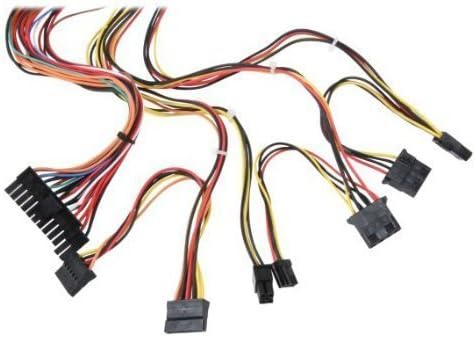
Slika 3: Konecview of power supply connectors.

Figure 4: Power supply dimensions and included AC power cord.
5. Navodila za uporabo
After successful installation, you can power on your computer.
- Ensure the power switch on the rear of the power supply (Figure 2) is in the "ON" (I) position.
- Pritisnite gumb za vklop na ohišju računalnika.
- The power supply will provide stable power to your system components.
- To power off, shut down your operating system normally. For complete power disconnection, switch the power supply to the "OFF" (O) position and unplug the AC cord.
6. Vzdrževanje
Redno vzdrževanje pomaga zagotoviti dolgo življenjsko dobo in optimalno delovanje vašega napajalnika.
- Čiščenje: Periodically clean dust from the power supply's fan and vents using compressed air. Ensure the power supply is unplugged before cleaning.
- Pretok zraka: Ensure that the computer case has adequate airflow and that the power supply's fan is not obstructed.
- Celovitost kabla: Periodically check all power cables for secure connections and signs of wear or damage.
7. Odpravljanje težav
Če imate težave z napajalnikom, si oglejte naslednje pogoste korake za odpravljanje težav:
- Brez napajanja:
- Check if the AC power cord is securely plugged into both the power supply and the wall outlet.
- Ensure the power switch on the rear of the power supply is in the "ON" (I) position.
- Preverite, ali stenska vtičnica deluje, tako da vanjo priključite drugo napravo.
- Check all internal power connections (20/24-pin ATX, 4-pin +12V, peripheral connectors) are firmly seated.
- Nestabilnost sistema/naključni izklopi:
- This could indicate an overloaded or failing power supply. Ensure your system's power requirements do not exceed the PS480D's 480W capacity.
- Check for proper ventilation and ensure the power supply fan is spinning. Overheating can cause instability.
- Nenavaden hrup:
- A loud fan noise might indicate dust buildup or a failing fan bearing. Clean the fan as described in the Maintenance section.
If problems persist after attempting these steps, contact Logisys customer support or a qualified technician.
8. Specifikacije
| Funkcija | Specifikacija |
|---|---|
| Znamka | Logisys |
| Številka modela | PS480D |
| Izhodna vattage | 480 vatov |
| Faktor oblike | ATX |
| Dimenzije (DxŠxV) | 15.24 x 13.97 x 8.25 cm (D) |
| Teža predmeta | 2.06 funtov (0.93 kg) |
| Priključek matične plošče | 1x 20+4 Pin ATX |
| CPU napajalni priključek | 1x 4 Pin +12V |
| Standard Drive Connectors | 4x 4 Pin (Molex) |
| FDD/ZIP Connectors | 1x 4 Pin 3.5" |
| Serijski ATA priključki | 1x SATA |
| Metoda hlajenja | zrak |
| Zaščite | Preko Voltage Zaščita, zaščita pred kratkim stikom |
| Certifikati | FCC part 15J class B, CISPR 22, UL 1950, CSA 22.2 LEVEL 3 |
9. Garancija in podpora
For warranty information, technical support, or service inquiries, please refer to the official Logisys webspletno mesto ali se obrnite na njihovo službo za pomoč strankam. Shranite račun kot dokazilo o nakupu.

