1. Uvod
Welcome to the user manual for your new Singing Machine SMVG-620 CD+G Karaoke System. This system is designed to provide hours of entertainment with its CD+G playback capabilities, built-in camera, 5.5-inch monitor, and AM/FM radio. Please read this manual thoroughly before operating your unit to ensure proper use and to maximize your enjoyment.
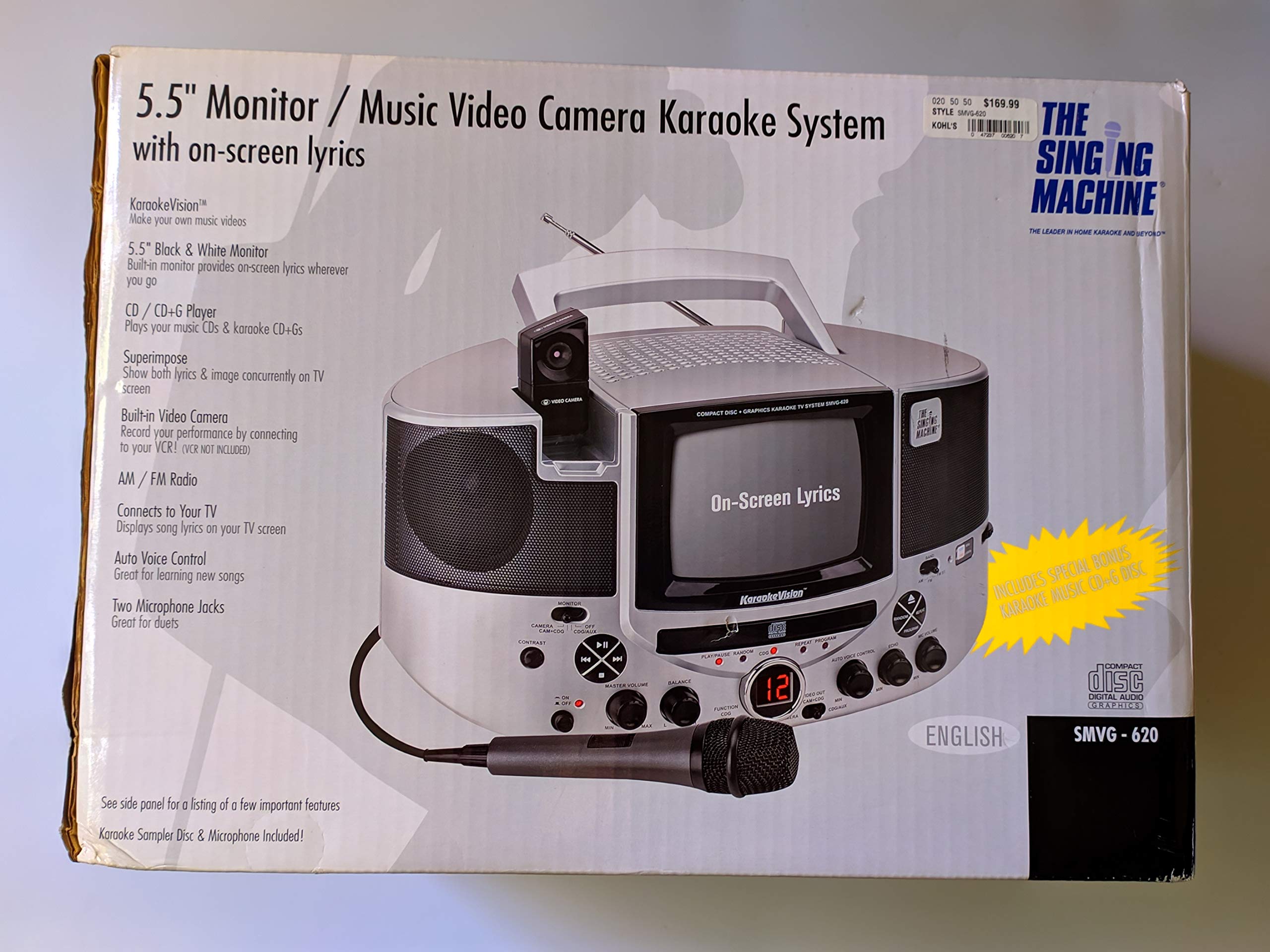
Slika 1.1: The Singing Machine SMVG-620 CD+G Karaoke System.
For optimal performance and safety, always follow the instructions and warnings provided.
2. Pomembne varnostne informacije
- Preberite navodila: Pred uporabo naprave morate prebrati vsa varnostna navodila in navodila za uporabo.
- Shranite navodila: Varnostna navodila in navodila za uporabo shranite za prihodnjo uporabo.
- Upoštevajte opozorila: Upoštevajte vsa opozorila na napravi in v navodilih za uporabo.
- Sledite navodilom: Upoštevati je treba vsa navodila za delovanje in uporabo.
- Voda in vlaga: Te naprave ne uporabljajte v bližini vode.
- Čiščenje: Čistite samo s suho krpo.
- Prezračevanje: Ne blokirajte prezračevalnih odprtin. Namestite v skladu z navodili proizvajalca.
- Toplota: Ne nameščajte v bližini virov toplote, kot so radiatorji, grelniki, peči ali druge naprave (vključno z amplifiers), ki proizvajajo toploto.
- Zaščita napajalnega kabla: Zaščitite napajalni kabel, da se po njem ne pohodi ali stisne, zlasti pri vtičih, vtičnicah in na mestu, kjer izstopa iz naprave.
- Priključki/dodatki: Uporabljajte samo priključke/dodatke, ki jih je določil proizvajalec.
- Strela: Izklopite napravo med nevihtami ali ko je dlje časa ne uporabljate.
- Servisiranje: Vsa servisna dela prepustite usposobljenemu servisnemu osebju. Servis je potreben, če je naprava kakor koli poškodovana.
3. Vsebina paketa
Carefully unpack your Singing Machine SMVG-620 system and ensure all items listed below are present and in good condition.
- SMVG-620 CD+G Karaoke System
- En (1) mikrofon
- Sampler CD+G Disc
- Audio/Video RCA Cables
- AC napajalnik
- Navodila za uporabo

Slika 3.1: Contents of the box, including the microphone, RCA cables, and the instruction manual.
4. Izdelek je končanview
Familiarize yourself with the various parts and controls of your SMVG-620 Karaoke System.

Slika 4.1: Zadaj view of the product packaging highlighting key features and components of the SMVG-620 system.
Ključne značilnosti:
- 5.5" Black & White Monitor: For on-screen lyrics from CD+G discs.
- Built-in Color Camera: Allows you to see yourself on the monitor or connected TV.
- Dual Microphone Jacks: Connect two microphones for duets (one microphone included).
- AM/FM radio: Prisluhnite svojim najljubšim radijskim postajam.
- CD+G predvajalnik: Plays standard audio CDs and CD+Graphics discs.
- Samodejni glasovni nadzor (AVC): Helps maintain vocal balance by automatically reducing the main vocal track when you sing.
- Nadzor odmeva: Adds depth and resonance to your voice.
- Professional Style Microphone: For clear vocal pickup.
- Avdio/video izhod: Connects to your TV for larger screen display and enhanced audio.
5. Nastavitev
5.1 Napajalni priključek
- Prepričajte se, da je enota postavljena na stabilno, ravno površino.
- Connect the AC power adapter to the DC IN jack on the back of the SMVG-620 unit.
- Plug the other end of the AC power adapter into a standard wall outlet (AC 120V ~ 60Hz).
5.2 Priključitev na televizor
Za view lyrics on a larger screen and enhance audio, connect the SMVG-620 to your television using the supplied Audio/Video RCA cables.
- Locate the AUDIO OUT (white and red) and VIDEO OUT (yellow) jacks on the back of the SMVG-620.
- Connect the white plug of the RCA cable to the white AUDIO OUT jack on the karaoke system and to the white AUDIO IN jack on your TV.
- Connect the red plug of the RCA cable to the red AUDIO OUT jack on the karaoke system and to the red AUDIO IN jack on your TV.
- Connect the yellow plug of the RCA cable to the yellow VIDEO OUT jack on the karaoke system and to the yellow VIDEO IN jack on your TV.
- Turn on your TV and select the correct A/V input source (e.g., AV1, Video 1) that corresponds to the jacks you used.
5.3 Povezava mikrofona
Plug the microphone into either the MIC 1 or MIC 2 jack on the front of the SMVG-620 unit.
6. Delovanje
6.1 Vklop/izklop
Pritisnite MOČ button located on the front panel to turn the unit ON or OFF.
6.2 Predvajanje CD-jev in G-plošč
- Open the CD compartment door and carefully place a CD+G disc (or standard audio CD) onto the spindle with the label side facing up. Close the door.
- Izberite CD + G mode using the FUNCTION selector.
- Pritisnite PREDVAJAJ/PAVZA gumb za začetek predvajanja.
- Prilagodite GLAVNA GLASNOST na želeno raven poslušanja.
- Uporabite PRESKOČI gumbi (<< or >>) za navigacijo med skladbami.
- Za premor pritisnite PREDVAJAJ/PAVZA ponovno. Za nadaljevanje pritisnite znova.
- Če želite ustaviti predvajanje, pritisnite STOP gumb.
6.3 Uporaba mikrofona
- Ensure the microphone is connected to a MIC jack.
- Prilagodite GLASNOST MIK gumb za nadzor izhodne ravni mikrofona.
- Obrnite ODMEV knob to add an echo effect to your voice.
- The AVTOMATSKO GLASOVNO UPRAVLJANJE (AVC) switch can be toggled ON/OFF. When ON, the original vocal track on a CD+G disc will be reduced when you sing into the microphone.
6.4 AM/FM radio
- Izberite AM or FM mode using the FUNCTION selector.
- Za boljši sprejem raztegnite FM anteno.
- Obrnite UGLAŠEVANJE gumb za izbiro želene radijske postaje.
- Prilagodite GLAVNA GLASNOST gumb.
6.5 Funkcija kamere
The built-in camera allows you to display your image on the 5.5-inch monitor or a connected TV.
- Ensure the unit is powered on and connected to a TV if you wish to use an external display.
- The camera feed will automatically display when the unit is in CD+G or Video mode, or when no other video source is active.
7. Vzdrževanje
7.1 Čiščenje enote
- Pred čiščenjem enoto vedno izključite iz električne vtičnice.
- Za čiščenje zunanjih površin uporabite mehko, suho krpo.
- Ne uporabljajte abrazivnih čistil, voskov ali topil, saj lahko poškodujejo premaz.
- Za lečo CD-jev uporabite specializiran čistilni disk za leče CD-jev.
7.2 Nega CD-jev
- CD-je prijemajte za robove, da preprečite prstne odtise na površini za predvajanje.
- Keep discs in their cases when not in use to prevent scratches.
- Diske očistite z mehko krpo, ki ne pušča vlaken, in jih brišite od sredine navzven.
8. Odpravljanje težav
If you encounter any issues with your SMVG-620, please refer to the following common problems and solutions.
| Težava | Možen vzrok | rešitev |
|---|---|---|
| Brez moči | Napajalni kabel ni pravilno priključen. | Prepričajte se, da je napajalnik varno priključen na enoto in delujočo stensko vtičnico. |
| Iz zvočnikov ni zvoka | Master Volume is too low. Izbran je napačen način delovanja. | Increase the MASTER VOLUME. Select the correct FUNCTION (CD+G, AM, FM). |
| Ni zvoka iz mikrofona | Microphone not connected. MIC VOLUME is too low. Stikalo za mikrofon je IZKLOPLJENO. | Plug microphone into MIC 1 or MIC 2 jack. Increase the MIC VOLUME. Ensure microphone switch is ON. |
| No video on TV / No lyrics | RCA kabli niso pravilno priključeni. Izbran je napačen TV vhod. Not a CD+G disc. | Check all RCA cable connections (yellow for video). Select the correct A/V input on your TV. Ensure you are playing a CD+G disc for lyrics. |
| Preskakovanje CD-ja | Disk je umazan ali opraskan. Enota je na nestabilni površini. | Clean the disc or try another disc. Place the unit on a stable, vibration-free surface. |
9. Specifikacije
| Številka modela | SMVG-620 (SIN SMVG620) |
| Vir napajanja | AC 120V ~ 60Hz (via AC Adapter) |
| Monitor | 5.5-inch Black & White |
| Število govornikov | 2 |
| Združljive naprave | televizija |
| Vrsta medija | CD, CD+G |
| Dimenzije izdelka (DxŠxV) | 35.8 x 20.8 x 19.3 cm (14.1 x 8.2 x 7.6 palca) |
| Teža predmeta | 3.9 kg (8.6 lbs) |
10. Garancija in podpora
For warranty information and customer support, please refer to the warranty card included with your product or contact The Singing Machine directly. You may also consult your retailer for details regarding their return and warranty policies.
Proizvajalec: POJE STROJ