1. Uvod
Hvala za nakupasing the Pentax Optio W10 Digital Camera. This manual provides essential information for the safe and effective use of your camera. The Optio W10 is a compact 6.0-megapixel digital camera featuring a 3x optical zoom lens, designed for capturing high-quality still images and video. Its robust design makes it suitable for various environments.
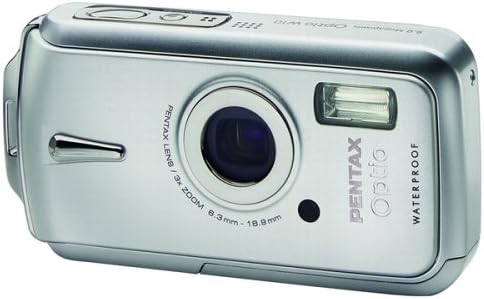
Slika 1.1: Spredaj view of the Pentax Optio W10 Digital Camera, showcasinobjektiv, bliskavica in blagovna znamka.
2. Varnostne informacije
Please read and understand all safety precautions before using the camera. Failure to do so may result in injury or damage to the product.
- Ne poskušajte razstavljati ali spreminjati fotoaparata.
- Keep the camera away from extreme temperatures, direct sunlight, and high humidity.
- Ensure all compartment covers (battery, memory card) are securely closed and locked before exposing the camera to water or dust.
- Use only the specified battery type (Lithium-ion DL-I8) and charger.
- Hraniti izven dosega otrok.
3. Vsebina paketa
Preverite, ali so v paketu s fotoaparatom vsi predmeti:
- Pentax Optio W10 Digital Camera
- Lithium-ion Battery DL-I8
- Polnilec baterij
- AC napajalni kabel
- USB kabel (za povezavo z računalnikom)
- Trak
- CD s programsko opremo
- Navodila za uporabo (ta dokument)
4. Nastavitev
4.1. Namestitev baterije
- Poiščite pokrov predalčka za baterijo/pomnilniško kartico na spodnji strani fotoaparata.
- Slide the lock switch to the 'OPEN' position and open the cover.
- Insert the Lithium-ion battery DL-I8 into the compartment, ensuring the correct orientation as indicated inside the compartment.
- Close the cover and slide the lock switch to the 'LOCK' position until it clicks securely.

Slika 4.1: Spodaj view of the camera, illustrating the battery and SD card compartment with the lock switch.
4.2. Namestitev pomnilniške kartice
The Pentax Optio W10 uses SD memory cards.
- Open the battery/memory card compartment cover as described in Section 4.1.
- Insert the SD memory card into the designated slot with the label facing the correct direction, pushing gently until it clicks into place.
- Close the cover and slide the lock switch to the 'LOCK' position.
4.3. Začetni vklop in nastavitev datuma/ure
- Pritisnite VKLOP/IZKLOP gumb, ki se nahaja na vrhu kamere.
- Upon first power-on, the camera will prompt you to set the date and time. Use the directional buttons on the back of the camera to navigate and the OK gumb za potrditev.
- Sledite navodilom na zaslonu, da dokončate začetno nastavitev.

Slika 4.2: Zgornji del view of the camera, highlighting the ON/OFF button and 6.0 Megapixels branding.
5. Upravljanje kamere
5.1 Osnove fotografije
To take a still picture:
- Vklopite kamero s pritiskom na VKLOP/IZKLOP gumb.
- Kadrirajte posnetek s pomočjo 2.5-palčnega LCD-zaslona.
- Pritisnite sprožilec do polovice, da izostrite sliko. Okvirček za izostritev se bo obarval zeleno, ko bo slika izostrena.
- Pritisnite sprožilec do konca, da posnamete sliko.

Slika 5.1: Zadaj view of the camera, displaying the LCD screen and various control buttons for navigation and settings.
5.2. Načini fotografiranja
The Optio W10 offers various shooting modes accessible via the NAČIN button. Refer to the on-screen menu for specific options such as Program Auto, Scene Modes, and Movie Mode.
5.3. Video snemanje
Za snemanje videa:
- Switch to Movie Mode using the NAČIN gumb.
- Press the shutter button to start recording. The camera can capture QuickTime motion JPEG videos at 640 x 480 resolution at 30 frames per second.
- Ponovno pritisnite sprožilec, da ustavite snemanje.
5.4. Predvajanje
Za view posnete slike in videoposnetki:
- Pritisnite Predvajanje gumb (običajno označen z ikono trikotnika).
- Use the directional buttons to scroll through your photos and videos.
- Pritisnite OK gumb za view videoposnetek ali povečavo fotografije.
5.5. Povezovanje z računalnikom
Za prenos slik in videoposnetkov v računalnik:
- Prepričajte se, da je fotoaparat izklopljen.
- Povežite fotoaparat z računalnikom s priloženim kablom USB.
- Turn on the camera. It should be recognized as a removable disk or a PTP device.
- Follow your computer's operating system instructions to access and transfer files.
6. Vzdrževanje
6.1. Čiščenje
- Telo kamere: Obrišite z mehko, suho krpo. Za trdovratno umazanijo uporabite rahloamp krpo in nato temeljito posušite.
- Objektiv: Use a lens brush or a soft, clean lens cloth. Avoid touching the lens surface with your fingers.
- LCD monitor: Nežno obrišite z mehko, suho krpo. Izogibajte se močnemu pritiskanju na zaslon.
- Vodotesna tesnila: Regularly inspect the rubber seals around the battery/memory card compartment for dirt, sand, or damage. Clean gently with a soft cloth. Do not use sharp objects.
6.2. Shranjevanje
When not in use for extended periods, store the camera in a cool, dry, and well-ventilated place. Remove the battery to prevent leakage. Avoid storing in areas with high humidity or extreme temperature fluctuations.
7. Odpravljanje težav
If you encounter issues with your Pentax Optio W10, refer to the following common solutions:
| Težava | Možen vzrok/rešitev |
|---|---|
| Fotoaparat se ne vklopi | Battery is depleted or incorrectly inserted. Recharge the battery or reinsert it correctly. |
| Ne morem fotografirati | Memory card is full, locked, or not inserted. Delete unnecessary files, odklenite kartico ali jo pravilno vstavite. |
| Slike so zamegljene | Lens is dirty, camera shake, or incorrect focus. Clean the lens, hold the camera steady, or ensure proper focus. |
| Water inside compartment | Compartment cover not securely closed or seal is damaged. Ensure cover is locked. If seal is damaged, contact service. |
For further assistance, please refer to the official Pentax support webspletno mesto ali se obrnite na službo za stranke.
8. Specifikacije
Key technical specifications for the Pentax Optio W10 Digital Camera:
- Učinkovita ločljivost fotografije: 6.0 milijonov slikovnih pik
- Tehnologija foto senzorja: CCD (1/2.5-palčni)
- Optični zoom: 3x
- Digitalni zoom: 4x
- Največja goriščna razdalja: 114 mm
- Najmanjša goriščna razdalja: 38 mm
- Velikost LCD zaslona: 2.5 palcev
- Stabilizacija slike: Digitalni, optični
- Ločljivost videa: 640 x 480, 30/15 fps (QuickTime Motion JPEG)
- Podprto File Oblika: JPEG (Still Images), MJPEG (Video)
- Mediji za shranjevanje: SD/MMC card, Internal Memory
- Vrsta baterije: Lithium-ion (DL-I8)
- Posebna lastnost: Waterproof (Note: Ensure all seals are properly closed before water exposure)
- Najmanjša hitrost zaklopa: 4 sekund
- Največja hitrost zaklopa: 1/2000 sekunde
- Območje ISO: Samodejno, 64, 100, 200, 400, 800
- Teža artikla: 5.6 unč
- Številka modela: 19033
9. Garancija in podpora
For information regarding warranty coverage, service, or technical support for your Pentax Optio W10 camera, please refer to the warranty card included with your product or visit the official Pentax webspletnega mesta. Shranite dokazilo o nakupu za uveljavljanje garancije.
Spletna podpora: Ricoh Imaging Global Support (Pentax is a brand of Ricoh Imaging)


