Uvod
Welcome to the KODAK EasyShare Z7590 Digital Camera user manual. This guide provides detailed instructions for setting up, operating, and maintaining your camera. The EasyShare Z7590 is a 5.0-megapixel digital camera featuring a 10x optical zoom Schneider-Kreuznach Variogon lens, designed to capture high-quality images and videos. Its intuitive design and advanced features make it suitable for various photography needs.
The camera is equipped with a 2.2-inch high-resolution indoor/outdoor display, capable of recording continuous VGA (640 x 480) video with audio. It supports SD/MMC memory cards for expanded storage and includes a 32MB internal memory.
Kaj je v škatli
Preverite, ali so v paketu s fotoaparatom vsi predmeti:
- KODAK EasyShare Z7590 Zoom Digital Camera
- High-capacity KODAK EasyShare Li-Ion Rechargeable Battery (1700mAh)
- Rapid Battery Charger Kit
- Audio-Video Cable
- USB kabel
- Ovratni trak
- Pokrovček objektiva s trakom
- Getting Started Kit (with KODAK EasyShare Software)
- Custom Camera Insert (for optional KODAK EasyShare camera and printer docks)
Nastavitev
1. Polnjenje baterije
Before initial use, fully charge the provided Li-Ion rechargeable battery using the rapid battery charger.
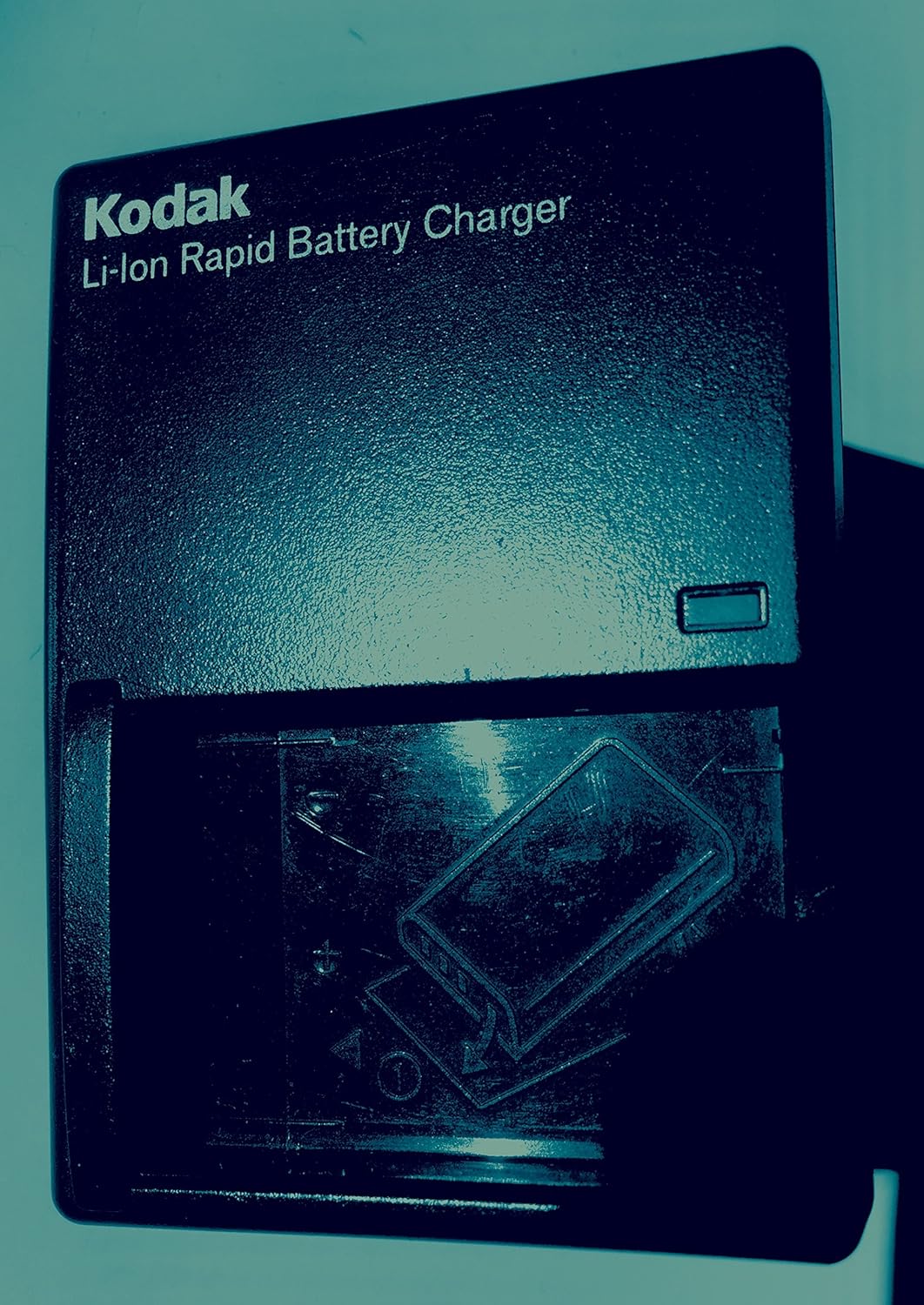
Slika: KODAK Li-Ion Rapid Battery Charger. Insert the battery into the charger as indicated by the diagram on the charger.
- Insert the KODAK Li-Ion battery into the rapid battery charger.
- Polnilnik priključite v električno vtičnico.
- The charging indicator light will show the charging status. Refer to the charger's specific instructions for light indications.
- Once fully charged, remove the battery and insert it into the camera.
2. Vstavljanje pomnilniške kartice
The camera has 32MB of internal memory. For extended shooting, insert an SD or MMC memory card.

Slika: SD and MMC Memory Cards. The camera supports both SD and MMC card types.
- Locate the memory card slot on the camera (typically on the side or bottom).
- Insert the SD or MMC card with the metal contacts facing the correct direction, as indicated by a diagram near the slot.
- Kartico potisnite navznoter, dokler se ne zaskoči.
3. Pritrditev vratnega traku in pokrovčka objektiva
Attach the neck strap for secure handling and the lens cap to protect the lens when not in use.

Slika: KODAK EasyShare Z7590 Digital Camera. The camera is shown with the neck strap attached and the lens cap covering the lens.
Upravljanje kamere
Camera Controls Overview
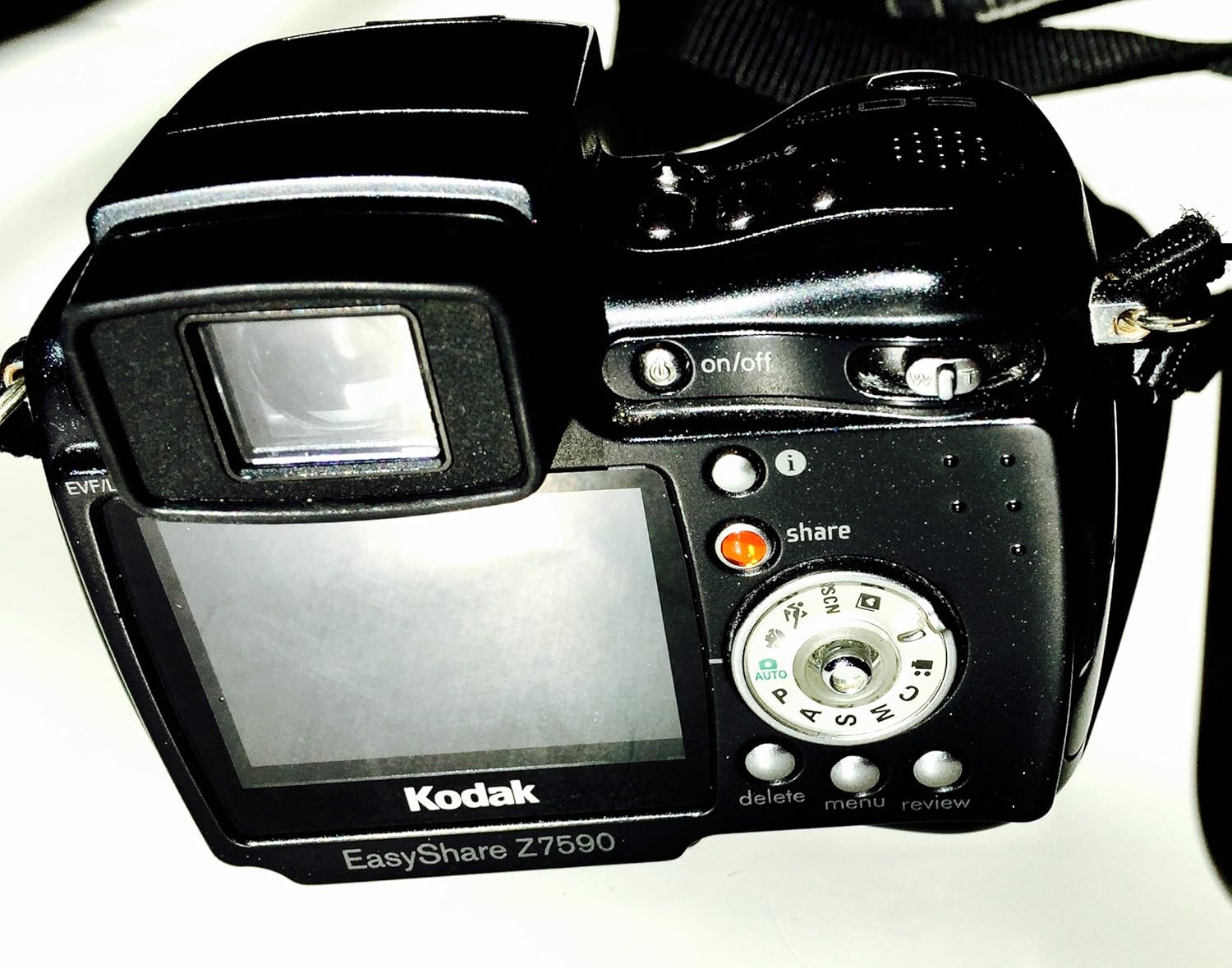
Slika: Zadaj view of the KODAK EasyShare Z7590 Digital Camera. This image highlights the LCD screen, control dial, and various buttons such as 'on/off', 'share', 'delete', 'menu', and 'review'.
- Gumb za vklop: Located on the top of the camera, used to turn the camera on or off.
- Sprožilec: Pritisnite do polovice za izostritev, do konca za fotografiranje.
- Ročica za zoom: Controls the 10x optical zoom and 3x advanced digital zoom.
- Izbirnik načina: Selects shooting modes (Auto, Program, Aperture Priority, Shutter Priority, Manual, Scene, Movie).
- LCD zaslon: 2.2-inch high-resolution screen for composing shots and reviewnalaganje slik.
- Gumb za skupno rabo: Za tagging photos for printing or emailing.
- Gumb menija: Dostopa do nastavitev in možnosti fotoaparata.
- Gumb za izbris: Removes unwanted photos or videos.
- Review Gumb: Vklopi način predvajanja za view zajeti mediji.
Načini fotografiranja
The mode dial allows selection of various shooting modes to suit different photographic situations.
- Samodejni način (AUTO): Fotoaparat samodejno nastavi optimalno osvetlitev.
- Programski način (P): Fotoaparat nastavi optimalno kombinacijo hitrosti zaklopa in zaslonke.
- Način prioritete zaslonke (A): Izberete zaslonko, fotoaparat pa nastavi čas zaklopa.
- Način prioritete zaklopa (S): Izberete čas zaklopa, fotoaparat pa nastavi zaslonko.
- Ročni način (M): Popoln nadzor nad zaslonko in hitrostjo zaklopa.
- Način po meri: Allows you to create and save your own capture settings.
- Scenski načini (SCN): Pre-programmed settings for specific scenarios (e.g., Portrait, Landscape, Sport, Night).
- Način filma: For recording video with audio.
Fotografiranje
- Vklopite fotoaparat z gumbom za vklop.
- Z gumbom za izbiro načina izberite želeni način fotografiranja.
- Frame your shot using the LCD display or electronic viewiskalec.
- Za nastavitev goriščne razdalje uporabite ročico za zoom.

Slika: Spredaj view of the KODAK EasyShare Z7590 Digital Camera, highlighting the Schneider-Kreuznach Variogon lens with 10x optical zoom.
- Press the shutter button halfway to focus. The focus indicator will confirm focus.
- Za zajem slike do konca pritisnite sprožilec.
Snemanje videoposnetkov
- Turn the mode dial to Movie Mode.
- Za začetek snemanja pritisnite sprožilec.
- Ponovno pritisnite sprožilec, da ustavite snemanje.
- Videos are recorded in VGA (640 x 480) at 12 frames per second or QVGA (320 x 240) at 20 frames per second, with audio.
Napredne funkcije
Ročne kontrole
For experienced users, the Z7590 offers extensive manual controls:
- Izravnava izpostavljenosti: +/- 2.0 EV in 0.3 EV steps.
- Zaslonka: Wide (f2.8-8.0) and Tele (f3.7-8.0).
- Hitrost zaklopa: Automatic: 1/8-1/1700 sec.; Manual: 16-1/1000 sec.
- ISO ekvivalenti: Automatic: 80-160; Selectable: 80, 100, 200, 400, 800.
- Samodejno ostrenje: Multi-zone, center weighted, selectable: left, center, right.
- Vrsta merjenja osvetlitve: Auto: TTL-AE matrix metering; Selectable: multi-pattern, center-weighted, center spot.
- Ravnovesje beline: Auto, daylight, tungsten, fluorescent, open shade.
- Flash Compensation: 1.0 EV in 1/2 EV steps.
- Način bliskavice: Auto, red-eye, fill, off.
Continuous Shooting and Bracketing
- First Burst Mode: Captures up to 5 frames in rapid succession at 2 frames per second.
- Last Burst Mode: Captures up to 30 frames at 2 frames per second, saving the last 4 frames.
- Autoexposure Bracketing: 3 images with user-selectable brackets (+/-0.3, +/-0.7 or +/-1.0 EV).
Scenski načini
The camera includes 16 programmed scene modes for optimized shooting in various conditions:
- Portrait Modes: Portrait, Self-portrait, Night Portrait, Backlight.
- Landscape Modes: Landscape, Night Landscape, Fireworks.
- Bright Scene Modes: Beach and Snow.
- Action Modes: Sport and Children.
- Close-up Modes: Macro and Flower.
- Način zabave: For indoor settings with lower light.
- Text/Documents Mode: Ensures sharp text when photographing documents.
- Manner/Museum Mode: Use when sound or flash are not desired.
Barvni načini
Adjust the color output of your images with 5 available color modes:
- High Color
- Low Color
- Naravna barva
- Sepia
- Črno-belo
Povezovanje in deljenje
The KODAK EasyShare Z7590 is designed for easy sharing of your photos and videos.
Uporaba gumba za skupno rabo
Ekskluzivni gumb za deljenje na fotoaparatu vam omogoča, da tag favorite pictures for later printing or emailing directly from the camera when connected to a computer with KODAK EasyShare Software.
KODAK EasyShare Software
The included KODAK EasyShare Software works seamlessly with your camera to enable one-button transferring and sharing. It provides tools to view, edit, organize, print, or create slide shows from your computer. The "One Touch to Better Pictures" feature automatically adjusts inkjet printer settings for optimal photo quality on KODAK Inkjet Photo Papers.
Povezovanje z računalnikom
Use the provided USB cable to connect your camera to a computer for transferring files.
Povezava s televizorjem
Use the provided Audio-Video cable to connect your camera to a television for viewpredvajanje fotografij in videoposnetkov na večjem zaslonu.
Vzdrževanje
Proper care and maintenance will ensure the longevity and optimal performance of your KODAK EasyShare Z7590 Digital Camera.
- Čiščenje leče: Use a soft, lint-free cloth specifically designed for camera lenses. Avoid using abrasive materials or harsh chemicals. Gently wipe the lens in a circular motion.
- Čiščenje ohišja fotoaparata: Ohišje fotoaparata obrišite z mehko, suho krpo. Za trdovratno umazanijo rahloampen the cloth with water. Do not use solvents or alcohol.
- Vzdrževanje baterije: Baterije shranjujte na hladnem in suhem mestu. Ne izpostavljajte jih ekstremnim temperaturam. Če fotoaparata dalj časa ne boste uporabljali, odstranite baterijo.
- Shranjevanje: Store the camera in a dry, dust-free environment, preferably in a camera bag or case. Avoid direct sunlight and high humidity. Ensure the lens cap is on when storing.
- Skrb za pomnilniško kartico: Handle memory cards carefully. Avoid bending or exposing them to static electricity. Format memory cards periodically within the camera to maintain performance.
Odpravljanje težav
This section addresses common issues you might encounter with your KODAK EasyShare Z7590 Digital Camera.
| Težava | Možen vzrok/rešitev |
|---|---|
| Kamera se ne vklopi. |
|
| Slike so zamegljene. |
|
| Bliskavica se ne sproži. |
|
| Napaka pomnilniške kartice. |
|
| Povezave z računalnikom ni mogoče. |
|
Specifikacije
Key technical specifications for the KODAK EasyShare Z7590 Digital Camera:
| Funkcija | Podrobnost |
|---|---|
| Ime modela | Kodak Easyshare Z7590 |
| Znamka | KODAK |
| Učinkovita še vedno ločljivost | 5 MP |
| Tehnologija foto senzorja | CCD |
| Optični zoom | 10x |
| Digitalni zoom | 3x |
| Vrsta objektiva | Variogonska leča Schneider-Kreuznach |
| Najmanjša goriščna razdalja | 38 milimetrov |
| Največja goriščna razdalja | 380 milimetrov |
| Velikost zaslona | 2.2 palcev |
| Vrsta zaslona | High-resolution Indoor/Outdoor LCD |
| Stabilizacija slike | Digitalni, optični |
| Podprto File Oblika | JPEG (Still), MPEG-4 (Video) |
| Video ločljivost | VGA (640 x 480) at 12 fps, QVGA (320 x 240) at 20 fps |
| Notranji pomnilnik | 32 MB |
| Vrsta bliskovnega pomnilnika | SD/MMC card expansion slot |
| Najmanjša hitrost zaklopa | 16 sekund |
| Največja hitrost zaklopa | 1/1700 Seconds (Auto), 1/1000 Seconds (Manual) |
| Razpon ISO | Auto (80-160), Selectable (80, 100, 200, 400, 800) |
| Tehnologija povezljivosti | USB |
| Vir napajanja | Li-Ion Rechargeable Battery (1700mAh) |
| Teža predmeta | 0.88 funta |
Garancija in podpora
Za informacije o garancijskem kritju glejte garancijski list, ki je priložen izdelku, ali obiščite uradno podporo KODAK. webmesto.
For technical assistance, troubleshooting beyond this manual, or service inquiries, please contact KODAK customer support.
- Proizvajalec: Kodak Digital
- Trgovina z blagovno znamko: Visit the KODAK Store on Amazon


