Uvod
This manual provides essential information for the safe and efficient operation of your Thomson TM 9850 Radio. Please read it thoroughly before using the device and keep it for future reference.
Varnostne informacije
- Naprave ne izpostavljajte dežju ali vlagi, da preprečite požar ali električni udar.
- Ne blokirajte prezračevalnih odprtin. Zagotovite dovolj prostora okoli enote za pravilen pretok zraka.
- Uporabljajte samo napajalnik, ki je predpisan za to napravo.
- Ne odpirajte casing. Vsa servisna dela prepustite usposobljenemu osebju.
- Napravo hranite stran od neposredne sončne svetlobe, virov toplote in močnih magnetnih polj.
Konec izdelkaview
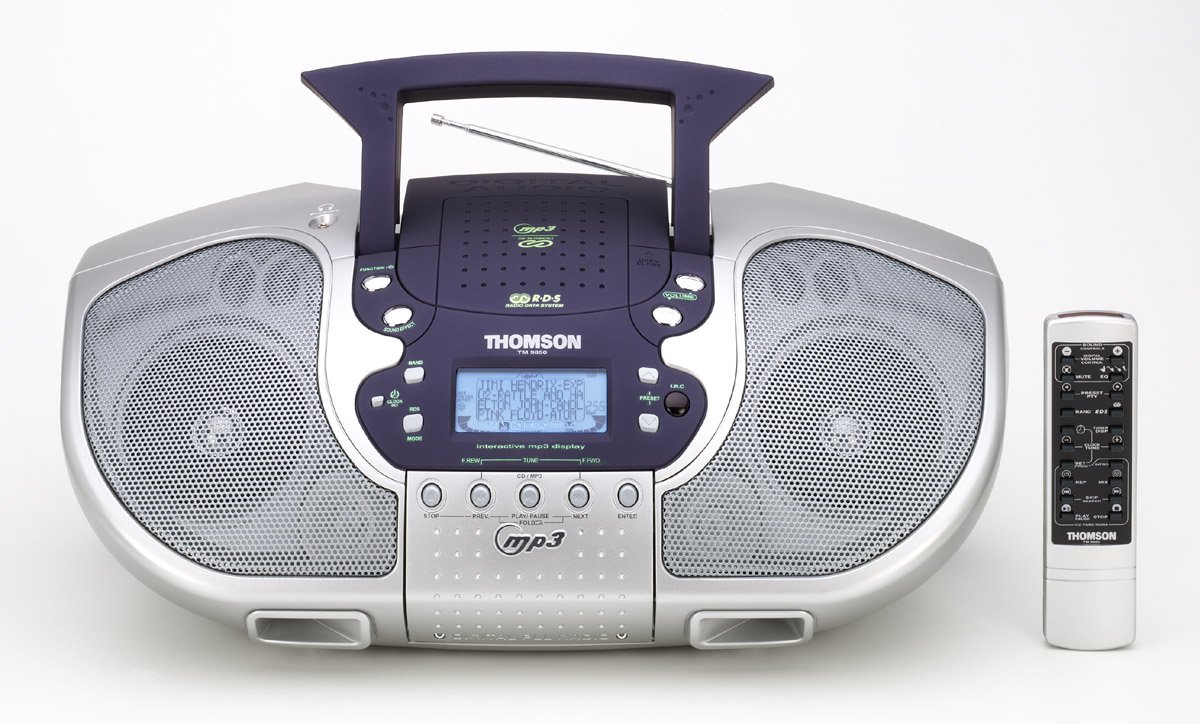
Slika 1: Spredaj view of the Thomson TM 9850 Radio with its accompanying remote control. The radio features dual speakers, a central control panel with an LCD display, and a top-mounted handle and telescopic antenna. The remote control is slender and white with various function buttons.
The Thomson TM 9850 is a portable radio designed for versatile audio playback. It features an integrated CD/MP3 player, an FM/AM radio tuner, and a clear LCD display for easy navigation. The unit also includes a remote control for convenient operation from a distance.
Nastavitev
Napajalni priključek
- Prepričajte se, da je enota postavljena na stabilno, ravno površino.
- Priključite napajalni kabel AC v vtičnico AC IN na zadnji strani enote.
- Drugi konec napajalnega kabla priključite v standardno stensko vtičnico (AC 230 V ~ 50 Hz).
- Alternatively, for portable use, insert 8 x "C" size batteries (not included) into the battery compartment located on the bottom of the unit, observing correct polarity.
Prilagoditev antene
- For FM reception, extend the telescopic antenna fully. Adjust its position for optimal signal reception.
- Za sprejem AM ima enota vgrajeno feritno anteno. Za najboljši sprejem zavrtite enoto.
Navodila za uporabo
Osnovno delovanje
- Vklop/izklop: Pritisnite MOČ gumb za vklop ali izklop enote.
- Nadzor glasnosti: Zavrtite GLASNOST v smeri urinega kazalca za povečanje glasnosti, v nasprotni smeri urinega kazalca za zmanjšanje.
- Izbira funkcije: Pritisnite FUNKCIJA button to switch between CD/MP3, FM, and AM modes.
Delovanje radia (FM/AM)
- Select FM or AM mode using the FUNKCIJA gumb.
- Pritisnite BAND button to select the desired frequency band (FM or AM).
- Uporabite TUNE +/- gumbe za ročno iskanje postaje. Pritisnite in držite za samodejno iskanje.
- To store a preset station: Tune to the desired station, press PROGRAM, nato uporabite PREDNASTAVITEV +/- , da izberete prednastavljeno številko, in pritisnite PROGRAM ponovno za potrditev.
- To recall a preset station: Press PREDNASTAVITEV +/- to cycle through stored stations.
Predvajanje CD/MP3
- Odprite pokrov predala za CD-je.
- Place a CD or MP3 CD with the label side facing up.
- Zaprite pokrov predala za CD.
- Select CD/MP3 mode using the FUNKCIJA button. The display will show "READING" then the total number of tracks/folders.
- Pritisnite PREDVAJAJ/PAVZA to start playback. Press again to pause.
- Pritisnite NASLEDNJI to skip to the next track/file. Pritisnite PREJ to go to the beginning of the current track or the previous track.
- Pritisnite STOP za ustavitev predvajanja.
- For MP3 CDs, use MAPA +/- buttons to navigate between folders.
Vzdrževanje
- Čiščenje: Napravo obrišite z mehko, suho krpo. Ne uporabljajte abrazivnih čistil ali topil.
- Nega CD leč: If the CD lens gets dirty, use a commercially available CD lens cleaner. Do not touch the lens.
- Shranjevanje: If not using the unit for an extended period, remove the batteries and store it in a cool, dry place.
Odpravljanje težav
| Težava | Možen vzrok | rešitev |
|---|---|---|
| Brez moči | Napajalni kabel ni priključen; Baterije so prazne ali nepravilno vstavljene. | Preverite priklop napajalnega kabla; zamenjajte baterije ali pazite na pravilno polarnost. |
| Brez zvoka | Volume too low; Mute function activated. | Increase volume; Deactivate mute. |
| Slab radijski sprejem | Antena ni iztegnjena/nastavljena; Slab signal. | Extend and adjust telescopic antenna (FM); Rotate unit (AM); Try moving the unit to a different location. |
| CD/MP3 not playing | Disc inserted incorrectly; Disc dirty or scratched; Incorrect function mode. | Insert disc with label side up; Clean or replace disc; Select CD/MP3 function mode. |
Specifikacije
- Model: TM 9850
- vir energije: AC 230V ~ 50Hz or 8 x "C" size batteries (UM-2)
- Frekvenčno območje: FM 87.5–108 MHz, AM 522–1620 kHz
- Podprti formati diskov: CD-ji, CD-R/RW, MP3-CD-ji
- Avdio izhod: Stereo
- Dimenzije (Š x V x G): (Approximate, based on typical boombox size) 400 mm x 200 mm x 250 mm
- Teža: (Approximate, based on typical boombox weight) 2.5 kg
Opomba: Specifikacije se lahko spremenijo brez predhodnega obvestila zaradi izboljšav.
Garancija in podpora
This Thomson TM 9850 Radio comes with a standard manufacturer's warranty. Please refer to the warranty card included in the original packaging for detailed terms and conditions. For technical support, service, or inquiries, please contact Thomson customer service through their official webspletno mesto ali kontaktne podatke, ki ste jih prejeli ob nakupu.
For the latest information and support resources, please visit the official Thomson webspletno mesto: www.thomsonconsumer.com


