Uvod
Hvala za nakupasing the GPX C3960 Personal CD/MP3 Player. This manual provides detailed instructions for the proper setup, operation, and maintenance of your device. Please read this manual thoroughly before use and retain it for future reference.
Vsebina paketa
Prepričajte se, da so v paketu prisotni vsi elementi:
- GPX C3960 Personal CD/MP3 Player
- Stereo ušesne slušalke
- Uporabniški priročnik (ta dokument)
Konec izdelkaview
Familiarize yourself with the components and features of your GPX C3960 player.
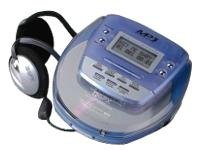
Image: The GPX C3960 Personal CD/MP3 Player, shown in a translucent blue casing, with a pair of silver over-ear headphones connected. The player features a small LCD screen and control buttons on its top surface.
Ključne značilnosti:
- CD-R/RW and MP3 disc playback compatibility
- Anti-skip protection: 45 seconds for audio CDs, 120 seconds for MP3 CDs
- Dynamic Bass Boost (DBB) for enhanced audio output
- 24-track programmable memory
- Low battery alert indicator
- Deluje na 2 AA baterije
Nastavitev
1. Namestitev baterije
- Locate the battery compartment on the bottom of the player.
- Odprite pokrov predalčka za baterije.
- Vstavite dve (2) bateriji AA in pri tem pazite na pravilno polarnost (+ in -), kot je označeno v notranjosti predala.
- Trdno zaprite pokrov prostora za baterije.
- Opomba: Replace batteries when the low battery indicator appears on the display or when playback performance degrades.
2. Priključitev slušalk
- Plug the stereo earbuds or your preferred headphones into the TELEFONI jack located on the side of the player.
Navodila za uporabo
1. Vklop/izklop
- Za vklop pritisnite PLAY/PAUSE (►/‖‖) gumb.
- Za izklop pritisnite STOP (■) button twice, or wait for the auto-power off feature to activate after a period of inactivity.
2. Loading a CD/MP3 Disc
- Pritisnite ODPRTO gumb za odpiranje pokrova predalčka za disk.
- Carefully place a CD or MP3 disc onto the center spindle with the label side facing up.
- Gently press the disc down until it clicks into place.
- Close the disc compartment lid firmly until it latches.
3. Osnovno predvajanje
- Predvajanje/pavza: Pritisnite PLAY/PAUSE (►/‖‖) za začetek ali začasno ustavitev predvajanja.
- Ustavite: Pritisnite STOP (■) za ustavitev predvajanja.
- Preskoči skladbe: Pritisnite SKIP FORWARD (►►) or SKIP BACKWARD (◄◄) to move to the next or previous track.
- Iskanje: Pritisnite in držite SKIP FORWARD (►►) or SKIP BACKWARD (◄◄) during playback to fast-forward or rewind within a track.
4. Nadzor glasnosti
- Prilagodite GLASNOST dial located on the side of the player to increase or decrease the audio output level.
5. Dynamic Bass Boost (DBB)
- Pritisnite DBB button to activate or deactivate the dynamic bass boost feature, which enhances low-frequency sounds.
6. Zaščita pred preskakovanjem
The GPX C3960 features electronic anti-skip protection to prevent audio interruptions during movement. This provides approximately 45 seconds of protection for standard audio CDs and 120 seconds for MP3 CDs.
7. Programske skladbe
- With the player stopped, press the PROG button. The program indicator will flash.
- Uporabite SKIP FORWARD (►►) or SKIP BACKWARD (◄◄) gumbe za izbiro želene skladbe.
- Pritisnite PROG again to add the selected track to the program memory.
- Repeat steps 2 and 3 for up to 24 tracks.
- Pritisnite PLAY/PAUSE (►/‖‖) to start playback of the programmed sequence.
- To clear the program, open the disc compartment or press STOP (■) dvakrat.
Vzdrževanje
Čiščenje enote
- Wipe the exterior of the player with a soft, slightly damp krpo. Ne uporabljajte abrazivnih čistil ali topil.
- Never open the disc compartment while the player is operating.
- Keep the lens clean. If the lens becomes dirty, use a soft camera lens brush to gently remove dust.
Skrb za baterijo
- Če enote ne boste uporabljali dlje časa, odstranite baterije, da preprečite puščanje.
- Ne mešajte starih in novih baterij ali različnih vrst baterij.
Ravnanje z diskom
- Diske prijemajte za robove, da se izognete prstnim odtisom in praskam.
- Ko diskov ne uporabljate, jih shranite v škatle.
- Diske očistite z mehko krpo, ki ne pušča vlaken, in jih brišite od sredine navzven.
Odpravljanje težav
| Težava | Možen vzrok | rešitev |
|---|---|---|
| Brez moči | Baterije so prazne ali nepravilno vstavljene. | Baterije zamenjajte z novimi in pri tem pazite na pravilno polarnost. |
| Disc not playing / "NO DISC" error | Disk je umazan, opraskan ali nepravilno vstavljen. | Clean the disc. Reinsert the disc with the label side up. Try a different disc. |
| Sound skipping or distorted | Disc is dirty, scratched, or player is subjected to excessive vibration. | Clean the disc. Ensure the player is on a stable surface or reduce movement. |
| Iz slušalk ni zvoka | Headphones not properly connected or volume too low. | Ensure headphones are fully plugged in. Increase volume. Test with different headphones. |
Specifikacije
- Znamka: GPX
- Model: C3960
- Podprti mediji: CD-ji, CD-R, CD-RW, MP3-CD-ji
- Zaščita proti preskoku: 45 seconds (CD), 120 seconds (MP3-CD)
- vir energije: 2 x AA baterije
- Posebna lastnost: Prenosni
- Teža artikla: Približno 726 g
- Dimenzije: Približno 40.64 x 38.1 x 30.48 cm (dimenzije paketa)
Garancija in podpora
For warranty information or technical support, please refer to the documentation included with your purchase or visit the official GPX webspletnega mesta. Shranite dokazilo o nakupu za uveljavljanje garancije.


