Uvod
This manual provides detailed instructions for the proper use and care of your Audiovox CE-145G Personal CD Player. Please read this manual thoroughly before operating the device to ensure optimal performance and longevity.
Lastnosti izdelka
- 40-Second Anti-Skip Protection: Ensures continuous audio playback even during movement, utilizing a digital buffer.
- Multi-Directional Anti-Roll Sensors: Provides additional protection against playback interruption from various movements.
- 22-Track Programmable Memory: Allows customization of CD playback order.
- Bass Boost System: Izboljša nizkofrekvenčni avdio izhod.
- 3-Beam Laser Pickup: Designed for accurate CD tracking and clear sound reproduction.
- Več načinov predvajanja: Includes random play and various repeat functions.
- Stikalo za zadrževanje: Prevents accidental button presses and program changes.
- Samodejni izklop: Conserves battery life by automatically shutting down the player when not in use.
- Line-Out Jack: For connecting to external audio systems or power adapters.
- Built-in Rechargeable Circuitry: Supports the use of rechargeable Ni-Cad batteries (not included).
- Stereo slušalke: Included for immediate listening.
Nastavitev
1. Namestitev baterije
The Audiovox CE-145G operates on two (2) AA batteries (not included) or an optional AC/car adapter (not included) connected via the line-out jack. For rechargeable Ni-Cad batteries, the unit features built-in charging circuitry.
- Locate the battery compartment on the underside of the CD player.
- Odprite pokrov predalčka za baterije.
- Vstavite dve (2) bateriji AA in pri tem pazite na pravilno polarnost (+/-), kot je označeno v notranjosti predala.
- Trdno zaprite pokrov prostora za baterije.

Image: The Audiovox CE-145G Personal CD Player in translucent green, shown with included stereo headphones. This image illustrates the overall product design and the headphones that come with the unit.
2. Priključitev slušalk
Insert the stereo headphone plug into the headphone jack located on the side of the CD player.

Image: A close-up of the stereo headphones included with the Audiovox CE-145G CD player, showing the earcups and the 3.5mm audio jack.
Navodila za uporabo
1. Basic CD Playback
- Open the CD compartment lid by pressing the "OPEN" button or sliding the latch.
- Postavite CD na sredinsko vreteno z nalepko navzgor.
- Pokrov predala za CD-je trdno zaprite, dokler ne klikne.
- Pritisnite PREDVAJAJ/PAVZA button to begin playback. The track number and elapsed time will display.
- Če želite začasno ustaviti predvajanje, pritisnite PREDVAJAJ/PAVZA ponovno. Za nadaljevanje pritisnite še enkrat.
- Če želite ustaviti predvajanje, pritisnite STOP gumb.
- Če želite preskočiti na naslednjo skladbo, pritisnite PRESKUSITE NAPREJ gumb (►►|).
- To return to the beginning of the current track or go to the previous track, press the PRESKOČI NAZAJ gumb (|◄◄).
- Za hitro previjanje naprej ali nazaj znotraj skladbe pritisnite in držite PRESKUSITE NAPREJ or PRESKOČI NAZAJ gumb oz.
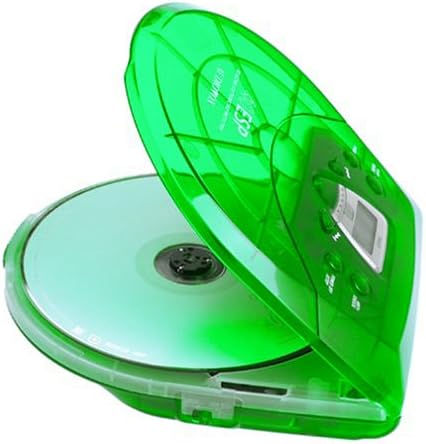
Image: The Audiovox CE-145G Personal CD Player with its translucent green lid open, revealing a compact disc placed inside the compartment.
2. Anti-Skip Protection (ESP)
The CE-145G features a 40-second Electronic Skip Protection (ESP) buffer. This system stores up to 40 seconds of audio data, allowing for uninterrupted playback even if the player experiences minor shocks or vibrations. This feature is automatically active during playback.
3. Programmable Memory (22 Tracks)
Programirate lahko do 22 skladb, ki se predvajajo v določenem vrstnem redu.
- V načinu STOP pritisnite PROGRAM button. The display will show "PROG" and "01".
- Uporabite PRESKUSITE NAPREJ or PRESKOČI NAZAJ buttons to select the desired first track.
- Pritisnite PROGRAM again to confirm the track. The display will show "02".
- Ponovite koraka 2 in 3, da v program dodate do 22 skladb.
- After programming the last track, press PREDVAJAJ/PAVZA to start playback of your programmed sequence.
- Za brisanje programa pritisnite STOP gumb dvakrat.
4. Ojačitev nizkih tonov
To enhance the bass frequencies, locate the Bass Boost. switch (or button) on the unit and activate it. Deactivate it to return to standard audio output.
5. Funkcija zadrževanja
The PRIDRŽI switch prevents accidental button presses. Slide the PRIDRŽI switch to the "ON" position to disable all control buttons. Slide it to "OFF" to re-enable controls.
6. Auto Power-Off
To conserve battery life, the CD player will automatically power off after a period of inactivity (e.g., when a CD finishes playing and no buttons are pressed). To restart, press the PREDVAJAJ/PAVZA gumb.
Vzdrževanje
- Čiščenje enote: Wipe the exterior of the player with a soft, damp krpo. Ne uporabljajte abrazivnih čistil ali topil.
- Čiščenje leče CD-ja: If playback issues occur due to a dirty lens, use a specialized CD lens cleaning kit. Do not touch the lens directly.
- Skrb za CD: CD-je prijemajte za robove. Poskrbite, da bodo čisti in brez prask. Ko jih ne uporabljate, jih shranite v ovitke.
- Vzdrževanje baterije: Če enote ne boste uporabljali dlje časa, odstranite baterije, da preprečite puščanje.
Odpravljanje težav
| Težava | Možen vzrok | rešitev |
|---|---|---|
| Brez moči | Baterije so prazne ali nepravilno vstavljene; napajalnik ni priključen ali je pokvarjen. | Replace batteries, check polarity, or ensure AC adapter is properly connected and functional. |
| CD skips or stops | CD is dirty or scratched; unit is subjected to excessive shock; lens is dirty. | Clean CD, use a different CD, avoid strong impacts, clean the CD lens. |
| Brez zvoka | Headphones not connected properly; volume too low; headphones faulty. | Ensure headphones are fully plugged in, increase volume, try different headphones. |
| Gumbi se ne odzivajo | Stikalo HOLD je vklopljeno. | Slide the HOLD switch to the "OFF" position. |
Specifikacije
- Model: CE-145G
- Znamka: Audiovox
- Zaščita proti preskoku: 40 seconds (Electronic Skip Protection)
- Programmable Tracks: 22
- vir energije: 2 x AA batteries (not included) or optional AC/car adapter
- Avdio izhod: 3.5mm headphone jack, Line-out jack
- Dimenzije (pribl.): 11.8 x 8.3 x 2.6 palcev (dimenzije paketa)
- Teža (pribl.): 1.35 funta (teža artikla)
- barva: Prosojno zelena
Garancija in podpora
The Audiovox CE-145G Personal CD Player is backed by a 90-day parts-and-labor warranty od datuma nakupa. Prosimo, shranite dokazilo o nakupu za uveljavljanje garancije.
For technical support or warranty service, please refer to the contact information provided with your product packaging or visit the official Audiovox webmesto.


