1. Introduction to European Air War
European Air War is a World War II flight simulator that places players in the cockpit of authentic fighter aircraft over the European theater. This game allows you to experience aerial combat during the most critical periods of the war, offering a blend of historical accuracy and engaging gameplay. Players can pilot 20 different fighter aircraft from the United States, Great Britain, and Germany, participating in various missions from defending airspaces to escorting bomber formations.
The game features detailed aircraft flight models, realistic cockpits, and dynamic campaigns that evolve based on player actions. It supports large-scale aerial engagements with up to 256 planes simultaneously, providing an immersive combat experience.

Figure 1.1: European Air War PC Standard game box art.
2. System Requirements and Setup
2.1 Minimalne sistemske zahteve
- Operacijski sistem: Windows 95, Windows 98, Windows Me, or Windows XP. Compatibility with newer operating systems (Windows Vista, 7, 8.1, 10) may require specific patches or compatibility mode settings.
- Procesor: Pentium 166 MHz or equivalent (higher recommended).
- RAM: 32 MB (priporočeno 64 MB).
- Grafična kartica: DirectX 6 compatible graphics card (3Dfx support available, note for 12MB 3Dfx cards: a batch file from MicroProse's website may be required to fix startup issues).
- Prostor na trdem disku: Approximately 200 MB free space.
- Zvočna kartica: Zvočna kartica, združljiva z DirectX.
- Vnos: Keyboard, Mouse, Joystick (recommended for optimal flight control).
- DirectX: DirectX 6.0 or later. Note that newer DirectX versions (e.g., DirectX 9.0c) might cause display issues in certain game sections.
2.2 Postopek namestitve
- Insert the European Air War game CD into your computer's CD-ROM drive.
- The installer should launch automatically. If not, navigate to the CD-ROM drive in "My Computer" or "This PC" and run
Autorun.exeorSetup.exe. - Follow the on-screen instructions to complete the installation. Choose your preferred installation directory.
- After installation, it is highly recommended to install the latest official patches. For Windows 8.1 and newer, patch 1.26 is often necessary. Patch 1.28e may also be available but has been reported to cause issues for some users.
- For optimal performance and compatibility, ensure your graphics and sound drivers are up to date.
Opomba: Some users have reported issues with video playback during game startup on newer operating systems. Clicking the screen may allow you to bypass these sequences.
3. Operating the Game (Gameplay)
3.1 načini igre
- Hiter začetek: Jump directly into instant dogfighting combat.
- Single Mission: Select from a variety of pre-defined missions.
- Pilot Career: Embark on a long-term career as a pilot in the U.S. Army Air Force, British Royal Air Force, or German Luftwaffe. Improve your skills and assume greater leadership over your squadron.
- CampNačin označevanja: Engage in dynamic campaigns such as the Battle of Britain (1940) and Battle for Europe (1943-1944). Missions are generated dynamically, and your actions have persistent effects on the game world.
3.2 Mission Types
Combat missions include:
- Fighter Sweep: Engage enemy fighters.
- Bomb Target: Attack ground targets.
- Escort Flight: Protect friendly bombers or transport planes.
- Prestrezanje: Intercept enemy bomber formations.
- Interdiction: Disrupt enemy supply lines or movements.
3.3 Krmilniki in vmesnik
The game supports keyboard, mouse, and joystick input. For flight control, a joystick is highly recommended.
- Kontrole leta: Configure your joystick for primary flight controls (pitch, roll, yaw). The keyboard can be used for throttle and rudder control.
- Zavedanje situacije: Use the keypad to quickly snap your view in various directions. A virtual cockpit mode and padlock mode are available to track targets.
- Targeting Aids: Optional target identification boxes and descriptive text tags can assist in distinguishing friendly from enemy aircraft, especially at lower resolutions.

Figure 3.1: In-game cockpit view during aerial combat.

Figure 3.2: A Focke-Wulf Fw 190 aircraft in flight, showing a smoke trail.

Figure 3.3: A formation of bombers flying over a landscape, with some showing damage or smoke trails.

Figure 3.4: Naval combat scene with ships under attack and emitting smoke.
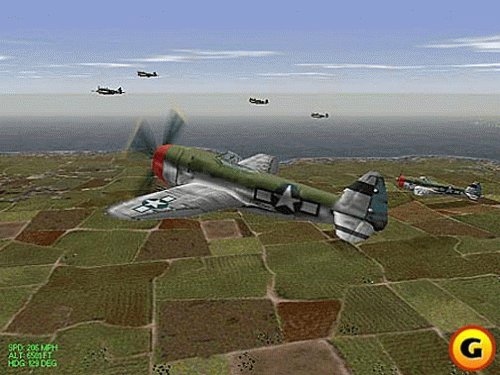
Figure 3.5: A P-47 Thunderbolt aircraft flying over a detailed rural landscape.
3.4 Realism Settings
The game allows you to fine-tune realism by toggling various options:
- Stalls and Spins
- Torque effects
- Structural limits
- Blackouts
- Pregrevanje motorja
Realistic audio cues provide indications of impending stalls or overheating engines.
4. Vzdrževanje
To ensure the longevity and optimal performance of your European Air War game, consider the following maintenance tips:
- Keep Game Disc Clean: Handle the game CD by its edges and store it in its case when not in use. Clean with a soft, lint-free cloth if necessary.
- Sistemske posodobitve: Ensure your operating system and hardware drivers (especially graphics and sound) are updated to their latest stable versions. This can resolve compatibility issues and improve performance.
- Game Patches: Regularly check the official Atari or MicroProse support websites (if available) for any new patches or updates for European Air War. Patches often address bugs, improve compatibility, and enhance gameplay.
- Prostor na disku: Ensure sufficient free hard drive space for the game and any temporary files it may create during operation.
5. Odpravljanje težav
This section addresses common issues encountered during installation or gameplay.
5.1 Installation and Startup Issues
- "Invalid Win/32" Error: This error often indicates a compatibility issue with your operating system. Try running the game installer and the game executable in compatibility mode for Windows 98/Me or Windows XP.
- Game Not Launching on Newer Windows (Vista, 7, 8.1, 10): European Air War was designed for older Windows versions.
- Install patch 1.26. Some users report success with this patch on Windows 8.1 and 10.
- Right-click the game's executable file (npr.
EAW.exe), select "Properties," go to the "Compatibility" tab, and enable "Run this program in compatibility mode for:" selecting an older Windows version (e.g., Windows XP Service Pack 3). - Ensure you have administrative privileges when installing and running the game.
- 12MB 3Dfx Card Bug: If you have a 12MB 3Dfx graphics card and the game shuts down at startup, you may need to download a specific batch file from MicroProse's legacy website (if still available) to fix this issue.
- Video Playback Errors: During intro sequences or in-game videos, you might experience slow playback or errors. Clicking the screen can often skip these videos and proceed to gameplay.
5.2 In-Game Issues
- Graphics Resolution (640x480): The game's graphics engine is limited to 640x480 resolution. This can make distant aircraft appear as small dots. While there is a magnify mode, its field of view is restrictive. The game may use optional target ID boxes to assist in identification.
- DirectX Version Conflicts: If your system has a newer DirectX version (e.g., DirectX 9.0c), certain in-game elements, such as pilot career briefings, might display incorrectly. The game was optimized for DirectX 6. There is no direct solution other than ensuring your system's DirectX is configured correctly for older applications.
- AI Behavior: While AI pilots use historically accurate tactics, they may not push their planes to the limit (e.g., rarely spinning or stalling). This can make one-on-one dogfights less challenging, but large engagements with many aircraft maintain difficulty.
- Landing Gear Damage/Belly Landings: The game models damage to landing gear, but belly landings may not be fully implemented or visually represented.
6. Specifikacije
| Funkcija | Podrobnost |
|---|---|
| Naslov izdelka | European Air War - PC Standard |
| Znamka | Atari |
| Številka modela | 49347 |
| ASIN | B00000K4LL |
| UPC / GTIN | 019703493477 |
| Datum izdaje | 8. junij 2001 |
| Proizvajalec | Atari |
| Dimenzije paketa | 5.5 x 4.8 x 0.4 palcev |
| Teža predmeta | 3.2 unč |
| Ocenjeno | Vsi |
7. Informacije o garanciji
Specific warranty information for the European Air War - PC Standard game is not provided in the available product details. For details regarding product warranties, please refer to the documentation included with your original purchase or contact the retailer.
8. Podpora
Official direct support contact information for European Air War - PC Standard is not provided in the available product details. For technical assistance or inquiries, it is recommended to consult online communities, fan forums, or archived support resources related to MicroProse or Atari PC games from the era. Patches and community-driven solutions are often available for older titles.


