1. Uvod
Hvala za nakupasing the AIWA BBTC-550 Portable Radio Cassette Player. This versatile device combines classic audio formats with modern connectivity, allowing you to enjoy your music from various sources. Please read this manual carefully before using the unit to ensure proper operation and to maximize your listening experience. Keep this manual for future reference.
Ključne značilnosti:
- Portable Radio Cassette with CD reader, USB, and Bluetooth 5.0 connection.
- Cassette player and recorder with Auto-Stop function.
- Vrata USB za predvajanje glasbe v formatu MP3.
- AUX IN input (3.5mm) for connecting external audio devices.
- Headphone socket (3.5mm).
- Compatible with CD/CD-R/MP3 discs with 20 programmable memories.
- FM PLL Radio with 40 programmable station presets.
- Digital clock with 24-hour display.
- High-frequency range dynamic speakers with super bass and amplified treble.
- Panoramic LCD screen with soft tonality backlight.
2. Izdelek je končanview
The AIWA BBTC-550 is designed for ease of use and portability. Below are images illustrating the device's main components and features.

Slika 2.1: Spredaj view of the AIWA BBTC-550, showing the display, control buttons, and speakers.

Slika 2.2: Od zgoraj navzdol view of the AIWA BBTC-550 with the CD compartment lid open.

Slika 2.3: stran view of the AIWA BBTC-550 with the cassette compartment door open and the telescopic antenna extended.

Figure 2.4: Close-up of the side panel showing the 3.5mm headphone jack, 3.5mm AUX IN port, and USB/MP3 port.
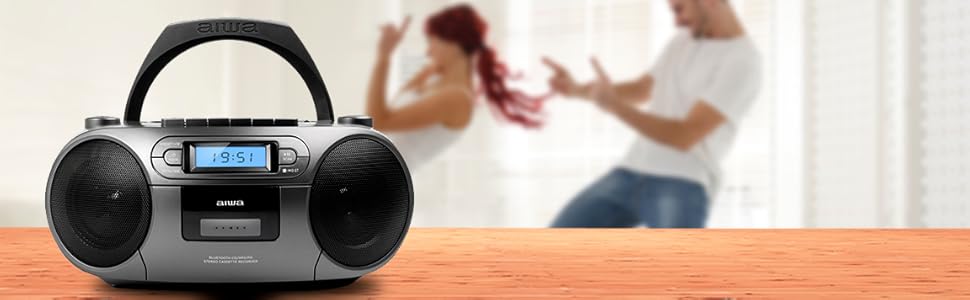
Figure 2.5: Promotional image highlighting the multi-functionality of the AIWA BBTC-550.
3. Nastavitev
3.1 Napajalnik
The AIWA BBTC-550 can be powered by either AC mains electricity or batteries for portable use.
- AC napajanje: Connect the provided AC power cord to the AC IN socket on the unit and then to a standard 230V/50Hz wall outlet.
- Moč baterije: For portable use, insert 6 x 1.5V LR14/UM2/C batteries into the battery compartment located on the bottom of the unit. Ensure correct polarity (+/-) when inserting batteries.
3.2 Nastavitev antene
For optimal FM radio reception, fully extend the telescopic antenna. Adjust its position and angle to achieve the clearest signal.
4. Navodila za uporabo
4.1 Splošni nadzor
- Gumb za prižig: Pritisnite za vklop ali izklop enote.
- Gumb MODE: Press to switch between CD, USB, Bluetooth, Radio, and Cassette modes.
- GUMB VOLUME: Rotate to adjust the sound level.
- LCD zaslon: Prikazuje trenutni način, številko skladbe, frekvenco in čas.
4.2 Predvajanje CD-ja
- Pritisnite NAČIN gumb za izbiro načina CD -ja.
- Open the CD compartment lid and place a CD (CD/CD-R/MP3 compatible) with the label side facing up. Close the lid securely.
- The unit will read the disc, and the total number of tracks will appear on the display.
- Pritisnite PLAY/PAUSE (►/❚❚) gumb za začetek predvajanja.
- Pritisnite PLAY/PAUSE (►/❚❚) again to pause, and press once more to resume.
- Pritisnite SKIP (►►| / |◄◄) gumbe za preskok na naslednjo ali prejšnjo skladbo.
- Pritisnite STOP (■) za ustavitev predvajanja.
- Predvajanje programa: Medtem ko ste v načinu zaustavitve, pritisnite PROG./ČAS gumb. Uporabite PRESKOČI buttons to select a track, then press PROG./ČAS again to add it to the program list. Repeat for up to 20 tracks. Press IGRAJ za začetek programiranega predvajanja.
4.3 Cassette Operation
- Pritisnite NAČIN button to select Cassette mode.
- Odprite vratca predalčka za kaseto in vstavite kaseto. Zaprite vratca.
- Predvajanje: Pritisnite PREDVAJAJ (►) button to start playing the tape.
- Hitro previjanje naprej/nazaj: Pritisnite FF (►►) or REW (◄◄) gumbi. Pritisnite STOP (■) to stop winding.
- Ustavite: Pritisnite STOP (■) button to stop playback or winding. The unit features an Auto-Stop function at the end of the tape.
- snemanje: Insert a blank cassette. Select the desired audio source (CD, USB, Bluetooth, Radio, or AUX IN). Press the ZAPIS (●) button on the cassette deck. The unit will start recording from the selected source. Press STOP (■) končati snemanje.
4.4 Predvajanje prek USB-ja
- Pritisnite NAČIN gumb za izbiro načina USB.
- Vstavite USB-ključ z zvočno datoteko MP3 files v vrata USB.
- The unit will automatically detect and start playing the MP3 files.
- Uporabite PLAY/PAUSE (►/❚❚) in SKIP (►►| / |◄◄) buttons for control, similar to CD playback.
4.5 Povezava Bluetooth
- Pritisnite NAČIN button to select Bluetooth mode. The display will show 'BT' and start flashing, indicating it's in pairing mode.
- V napravi, ki podpira Bluetooth (pametni telefon, tablični računalnik itd.), omogočite Bluetooth in poiščite razpoložljive naprave.
- Select 'AIWA BBTC-550' from the list of devices.
- Once paired, the unit will emit a confirmation sound, and 'BT' on the display will stop flashing.
- You can now play audio from your connected device through the AIWA BBTC-550. Use your device or the unit's controls for playback.
4.6 FM radio
- Pritisnite NAČIN gumb za izbiro načina FM radia.
- Za boljši sprejem raztegnite teleskopsko anteno.
- Samodejno skeniranje: Pritisnite in držite SCAN button to automatically scan and save available FM stations. The unit can store up to 40 presets.
- Ročna nastavitev: Na kratko pritisnite SCAN button to manually tune up or down the frequency.
- Izberite prednastavitve: Uporabite PRESET (+10) za preklapljanje med shranjenimi postajami.
4.7 AUX IN
- Pritisnite NAČIN gumb za izbiro načina AUX IN.
- Connect an external audio device (e.g., MP3 player, smartphone) to the 3.5mm AUX IN port using a 3.5mm audio cable (not included).
- Play audio from your external device. The sound will be output through the AIWA BBTC-550 speakers.
- Adjust the volume using the unit's VOLUME knob and/or your external device's volume control.
4.8 Uporaba slušalk
To listen privately, plug 3.5mm stereo headphones into the HEADPHONES socket. The speakers will automatically mute when headphones are connected.
4.9 Nastavitev ure
The unit features a digital clock with a 24-hour display.
- V stanju pripravljenosti pritisnite in držite PROG./ČAS gumb.
- Uporabite SKIP (►►| / |◄◄) gumbe za nastavitev ure. Pritisnite PROG./ČAS za potrditev.
- Uporabite SKIP (►►| / |◄◄) gumbe za nastavitev minut. Pritisnite PROG./ČAS to confirm and exit clock setting mode.
5. Specifikacije
| Funkcija | Specifikacija |
|---|---|
| Blagovna znamka | AIWA |
| Številka modela | BBTC-550 |
| Vrsta | AM / FM Radio Cassette Player |
| Slog | Namizni / Prenosni |
| Material telesa | Plastika |
| Dimenzije (ŠxVxG) | 38 x 38 x 26 cm |
| Teža (izdelek) | Pribl. 2.04 kg |
| Bluetooth | Da (Različica 5.0) |
| WIFI | št |
| zaslon | Yes (Panoramic LCD with backlight) |
| Združljivost s CD-ji | CD/CD-R/MP3 |
| USB predvajanje | MP3 files |
| AUX IN. | 3.5 mm vtičnica |
| Izhod za slušalke | 3.5 mm vtičnica |
| Radijske prednastavitve | 40 (FM PLL) |
| Napajalnik (izmenični tok) | 230V/50Hz |
| Napajalnik (enosmerni tok) | 6 x 1.5V LR14/UM2/C batteries |
| Certificiranje | CE, RoHS |
| Izvor | Kitajska |
| Dimenzije paketa | 36.7 x 29 x 17.7 cm |
| Teža paketa | 2.5 kg |
6. Vzdrževanje
6.1 Čiščenje enote
- Pred čiščenjem enoto vedno odklopite iz vira napajanja.
- Za čiščenje zunanjih površin uporabite mehko, suho krpo.
- Za trdovratne madeže rahlo obrišiteampKrpo navlažite z vodo in blagim detergentom, nato pa jo takoj obrišite do suhega.
- Ne uporabljajte abrazivnih čistil, voskov ali topil, saj lahko poškodujejo premaz.
6.2 CD Lens Care
- Never touch the CD lens.
- If the CD lens gets dirty, use a commercially available CD lens cleaner to clean it.
6.3 Cassette Deck Care
- Regularly clean the tape heads, capstan, and pinch roller with a cotton swab lightly moistened with tape head cleaner or isopropyl alcohol.
- Demagnetize the tape heads periodically to prevent sound degradation.
6.4 Zamenjava baterije
- When the unit's performance diminishes or the display dims, it's time to replace the batteries.
- Open the battery compartment, remove old batteries, and insert new ones, ensuring correct polarity.
- Stare baterije zavrzite odgovorno v skladu z lokalnimi predpisi.
- Če enote ne boste uporabljali dlje časa, odstranite baterije, da preprečite puščanje.
7. Odpravljanje težav
If you encounter any issues with your AIWA BBTC-550, please refer to the following common problems and solutions:
| Težava | Možen vzrok | rešitev |
|---|---|---|
| Brez moči | AC cord not properly connected; Batteries depleted or incorrectly inserted. | Check AC cord connection; Replace batteries, ensuring correct polarity. |
| Brez zvoka | Glasnost je prenizka; Slušalke so priključene; Izbran je napačen način. | Increase volume; Disconnect headphones; Select the correct mode (CD, USB, BT, Radio, AUX). |
| CD preskakuje ali se ne predvaja | CD is dirty or scratched; CD inserted incorrectly; Lens is dirty. | Clean or replace CD; Insert CD with label side up; Clean CD lens. |
| Kaseta se ne predvaja/snema | Tape heads/capstan dirty; Cassette damaged; Incorrect mode. | Clean tape heads/capstan; Try a different cassette; Ensure Cassette mode is selected. |
| Bluetooth se ne povezuje | Unit not in pairing mode; Bluetooth disabled on external device; Device too far. | Ensure unit is in Bluetooth pairing mode; Enable Bluetooth on your device; Move device closer (within 10m). |
| Slab FM radijski sprejem | Antena ni iztegnjena/nastavljena; Območje šibkega signala. | Popolnoma izvlecite in nastavite teleskopsko anteno; poskusite premakniti enoto na drugo mesto. |
| USB ni prepoznan | USB drive formatted incorrectly; Files not MP3; USB drive damaged. | Ensure USB is FAT32 format; Check files are MP3; Try a different USB drive. |
8. Garancija in podpora
The AIWA BBTC-550 comes with a standard manufacturer's warranty. Please refer to the warranty card included in your product packaging for specific terms and conditions, including the warranty period and coverage details.
Podpora strankam:
If you experience any problems with your unit that are not covered in the troubleshooting section, or if you require further assistance, please contact your retailer or the AIWA customer support service in your region. Keep your purchase receipt as proof of purchase for warranty claims.
For the latest information and support, you may also visit the official AIWA webmesto.


