
1. Uvod
This manual provides detailed instructions for the safe and effective use of your DIGIERA DGW100BL 5K Digital Camera. Please read this manual thoroughly before operating the camera and retain it for future reference.
The DIGIERA DGW100BL is a versatile digital camera designed for high-quality photography and videography, featuring 5K video recording, 80MP photo resolution, a 3.0-inch IPS LCD flip screen, and advanced autofocus capabilities.
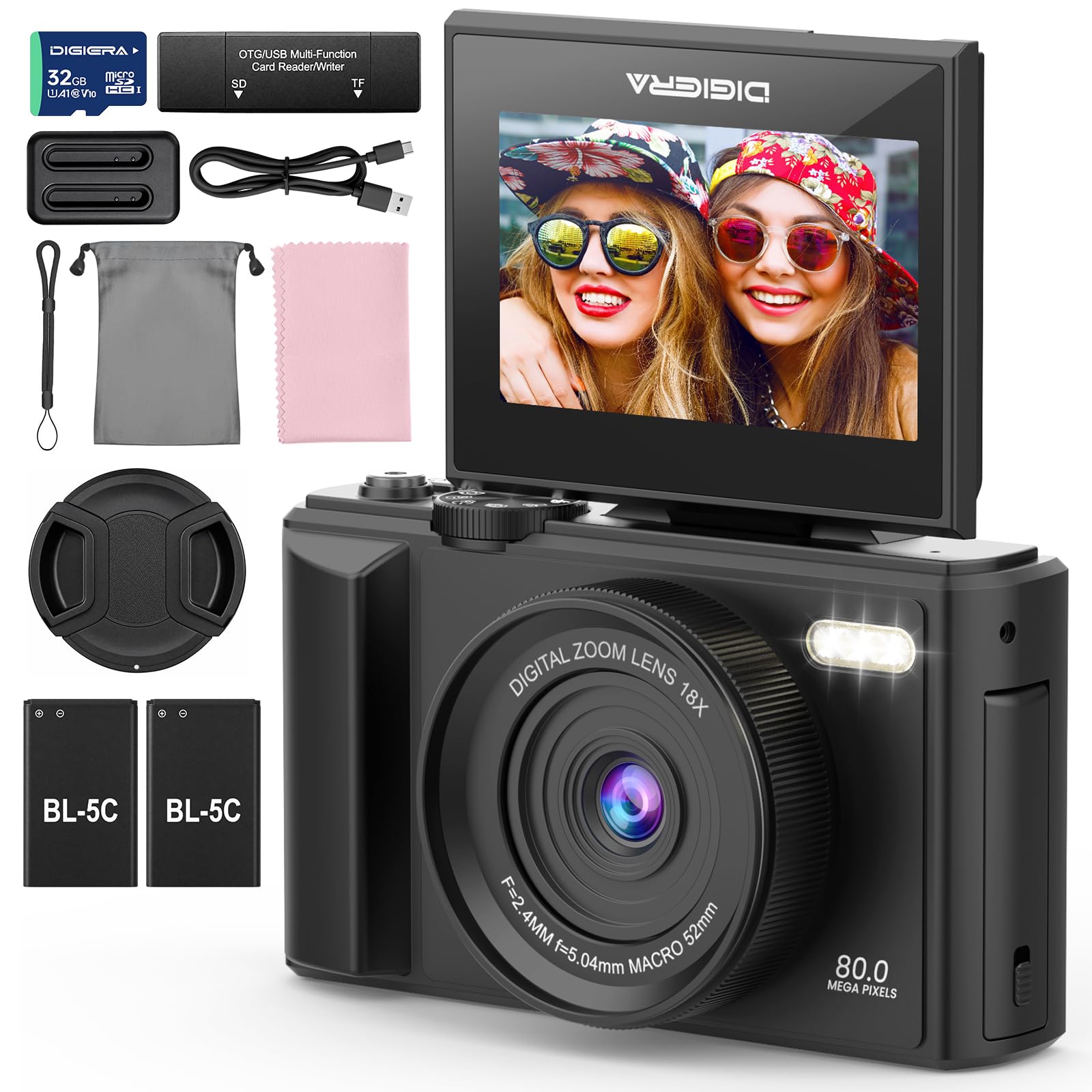
Image 1.1: The DIGIERA DGW100BL 5K Digital Camera.
2. Vsebina paketa
Preverite, ali so v paketu vsi elementi:
- DIGIERA DGW100BL Camera Body
- 2 x Detachable Rechargeable Lithium-ion Batteries
- Polnilec baterij
- 32 GB SD kartica
- USB kabel
- Uporabniški priročnik
- Zapestni trak
3. Nastavitev
3.1. Namestitev in polnjenje baterije
- Odprite pokrov predalčka za baterije, ki se nahaja na spodnji strani fotoaparata.
- Insert a rechargeable lithium-ion battery, ensuring the contacts align correctly. Close the cover.
- To charge the battery, insert it into the provided external charger. Connect the charger to a power source using the USB cable. The indicator light on the charger will show charging status.
- A fully charged battery provides approximately 80 minutes of 4K video recording.
3.2. Namestitev kartice SD
- Poiščite režo za SD kartico, običajno na strani ali na dnu fotoaparata.
- Insert the included 32GB SD card with the metal contacts facing the correct direction (refer to the diagram near the slot). Push until it clicks into place.
- Za odstranitev nežno potisnite kartico SD navznoter, dokler ne izskoči.
3.3. Vklop/izklop
- Za vklop pritisnite in držite gumb za vklop, dokler se zaslon ne prižge.
- To power off, press and hold the Power button again until the screen shuts down.
3.4. Začetne nastavitve
Upon first power-on, you may be prompted to set the date, time, and language. Use the navigation buttons to select and confirm your preferences.
4. Upravljanje kamere
4.1. Osnove fotografiranja in snemanja videoposnetkov
The camera supports 80MP still images and 5K video recording.

Image 4.1: Demonstrating 5K video and 80MP photo capabilities.
- Preklopni načini: Use the mode dial or menu options to switch between photo, video, and playback modes.
- Fotografirati: In photo mode, frame your shot and press the Shutter button halfway to focus, then fully to capture the image.
- Snemanje videoposnetkov: In video mode, press the Record button to start and stop recording.
- Snapshot While Recording: You can capture still photos during video recording by pressing the Shutter button.
4.2. Focus Modes
The camera offers flexible focusing options:
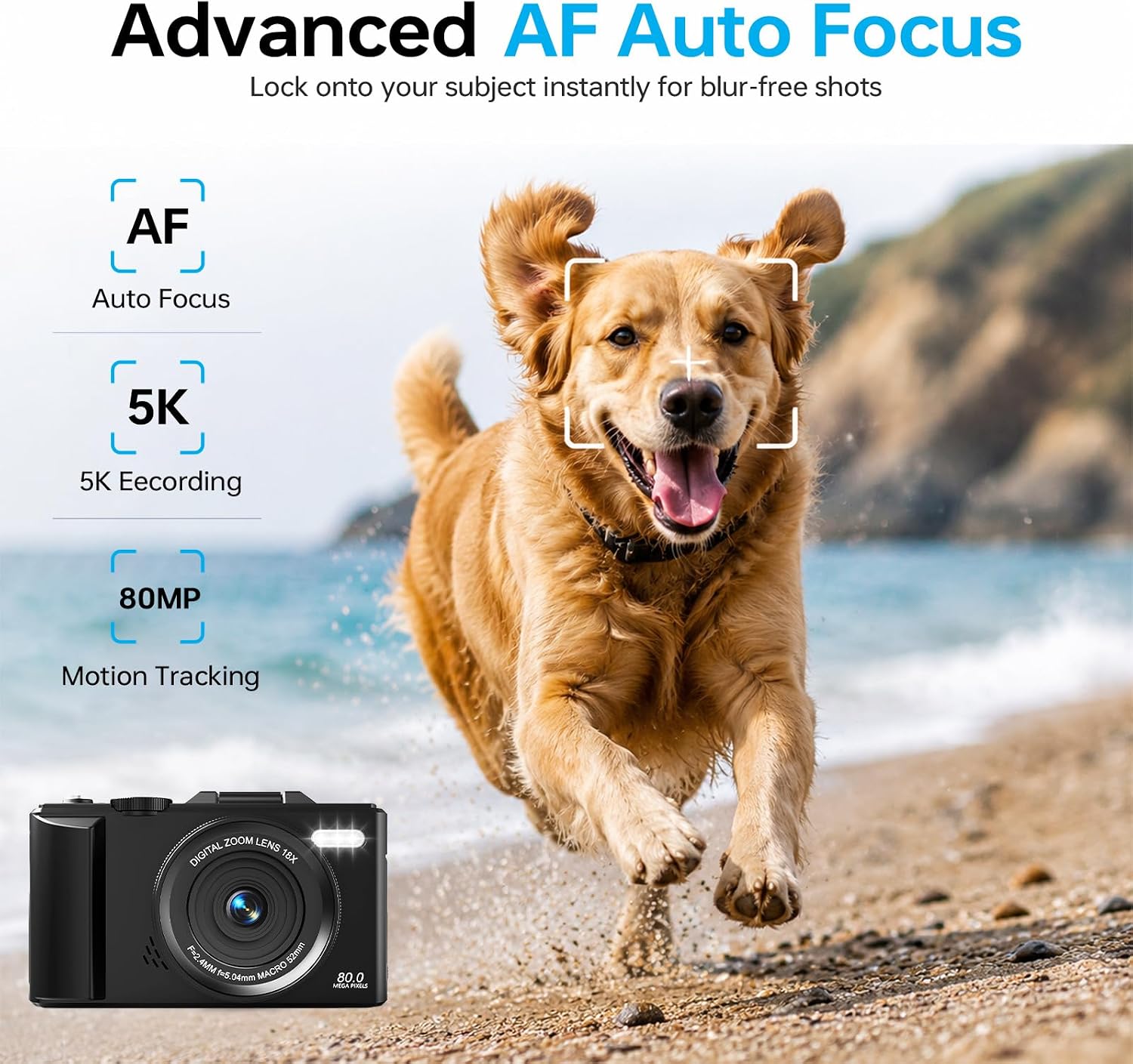
Image 4.2: Advanced Autofocus for sharp images.
- Samodejno ostrenje (AF): The camera automatically detects and focuses on subjects. This is ideal for most situations, including moving subjects.
- Fiksni fokus: Maintains a fixed focus distance, suitable for specific scenarios where manual adjustment is not desired.
- Ročno ostrenje (MF): Allows you to manually adjust the focus for precise control.
4.3. Using the Flip Screen and Digital Zoom

Image 4.3: The 180° flip screen for easy selfies and vlogging.
- Flip Screen: The 3.0-inch IPS LCD screen can be flipped 180 degrees, making it convenient for self-portraits, vlogging, and monitoring your shots from various angles.
- 18-kratni digitalni zoom: Use the zoom controls (usually 'W' for wide and 'T' for telephoto) to digitally zoom in or out on your subject. Note that digital zoom may reduce image quality compared to optical zoom.
4.4. Tehnologija proti tresljajem
The built-in anti-shake technology helps to stabilize your footage and photos, reducing blur caused by camera movement, especially useful during handheld shooting or when using digital zoom.
4.5. Posebne lastnosti
- Časovni zamik: Capture sequences of images over time to create time-lapse videos. Access this feature through the camera's menu. For extended sessions, consider connecting a power bank.
- Počasni posnetek: Snemajte videoposnetke z višjo hitrostjo sličic za predvajanje v počasnem posnetku.
- Kreativni filtri: Apply various artistic filters and effects directly to your photos and videos.

Slika 4.4: Primeramples of built-in creative filters.
4.6. Povezljivost Wi-Fi in upravljanje prek aplikacij

Image 4.5: Wi-Fi transfer for instant sharing.
The camera features built-in Wi-Fi for seamless transfer of photos and videos to your smartphone via a dedicated mobile app. This also enables remote control for convenient selfies and group shots.
- Download the official DIGIERA camera app from your device's app store.
- Enable Wi-Fi on your camera and connect your smartphone to the camera's Wi-Fi network.
- Use the app to browse, transfer, and share your media, or to control the camera remotely.
4.7. External Lens Support

Image 4.6: The camera supports external 52mm wide-angle lenses (sold separately).
The camera supports external 52mm wide-angle lenses (not included) to expand your field of view, ideal for capturing landscapes or group photos.
5. Vzdrževanje
5.1. Čiščenje fotoaparata
- Objektiv: Za nežno odstranjevanje prahu uporabite mehko krpo, ki ne pušča vlaken, ali krtačko za leče. Za madeže uporabite specializirano čistilno raztopino za leče, naneseno na krpo in ne neposredno na lečo.
- zaslon: Wipe the LCD screen with a soft, dry microfiber cloth. Avoid harsh chemicals.
- Telo: Use a dry, soft cloth to clean the camera body. Do not use water or cleaning solvents.
5.2. Skrb za baterijo
- Ko baterije ne uporabljate, jih hranite na hladnem in suhem mestu.
- Izogibajte se pogostemu popolnemu praznjenju baterij, da podaljšate njihovo življenjsko dobo.
- Baterij ne izpostavljajte ekstremnim temperaturam.
5.3. Shranjevanje
When storing the camera for extended periods, remove the battery and SD card. Store the camera in a protective case in a dry, dust-free environment.
6. Odpravljanje težav
Če imate težave s fotoaparatom, si oglejte naslednje pogoste težave in rešitve:
| Težava | Možen vzrok | rešitev |
|---|---|---|
| Kamera se ne vklopi. | Baterija je prazna ali nepravilno vstavljena. | Ensure battery is fully charged and correctly inserted. Try a different charged battery. |
| Fotografiranje/snemanje videoposnetkov ni mogoče. | SD kartica je polna, zaklenjena ali ni vstavljena. | Check SD card status. Ensure it is unlocked, has sufficient space, and is inserted correctly. Format the SD card if necessary (this will erase all data). |
| Slike so zamegljene. | Nepravilno ostrenje, tresenje fotoaparata ali umazan objektiv. | Check focus mode. Ensure anti-shake is enabled. Clean the lens. Hold the camera steady. |
| Težave z Wi-Fi povezavo. | Napačne nastavitve omrežja Wi-Fi ali težave z aplikacijo. | Ensure Wi-Fi is enabled on both camera and phone. Reconnect to the camera's Wi-Fi network. Restart the camera and the app. |
| Kratka življenjska doba baterije. | Frequent use of power-intensive features or old battery. | Reduce screen brightness, limit continuous recording. Ensure batteries are fully charged. Consider replacing old batteries. |
Če težava po poskusu teh rešitev še vedno obstaja, se obrnite na podporo strankam.
7. Specifikacije
| Funkcija | Podrobnost |
|---|---|
| Ime modela | DGW100BL |
| Tehnologija foto senzorja | CMOS |
| Največ Webcam ločljivost slike | 80 MP |
| Video ločljivost | 5K |
| Digitalni zoom | 18X |
| Velikost zaslona | 3.0 palcev |
| Vrsta zaslona | IPS LCD (Flip Screen) |
| Stabilizacija slike | Digital (Anti-Shake) |
| Načini ostrenja | Autofocus, Fixed Focus, Manual Focus |
| Podprto File Oblika | JPEG (Photos) |
| Zmogljivost pomnilnika | 32 GB (vključena SD kartica) |
| Compatible Flash Memory Type | microSD |
| Tehnologija povezljivosti | USB, Wi-Fi |
| Vrsta baterije | Detachable Rechargeable Lithium-ion |
| Povprečna življenjska doba baterije | Approx. 80 minutes (4K recording) |
| Posebne lastnosti | Anti-Shake, Slow Motion, Wi-Fi Control, Time-Lapse, Snapshot While Recording, 5K Ultra-HD |
| Proizvajalec | Shenzhen Kerun E-commerce Co.,Ltd |
8. Informacije o garanciji
This DIGIERA DGW100BL camera comes with a 1-letna garancija proizvajalca od datuma nakupa. Ta garancija krije proizvodne napake in napake v izdelavi pri normalni uporabi. Ne krije škode, ki jo povzročijo nepravilna uporaba, nesreče, nepooblaščene spremembe ali naravne nesreče.
Za garancijske zahtevke shranite dokazilo o nakupu.
9. Podpora strankam
For technical assistance, troubleshooting not covered in this manual, or warranty inquiries, please contact DIGIERA customer support. We offer 4/7 after-sale support to assist you.
- E-pošta: Refer to your product packaging or the official DIGIERA webspletno mesto za kontaktne podatke.
- Webspletno mesto: Visit the DIGIERA Store on Amazon