
1. Uvod
The QCY MeloBuds A30 are advanced wireless earbuds designed to deliver a superior audio experience. They feature active noise cancellation, high-resolution audio support, and a robust wireless connection, making them suitable for various listening environments.
2. Izdelek je končanview
Familiarize yourself with the components of your QCY MeloBuds A30 earbuds.

Image: QCY MeloBuds A30 earbuds and charging case.
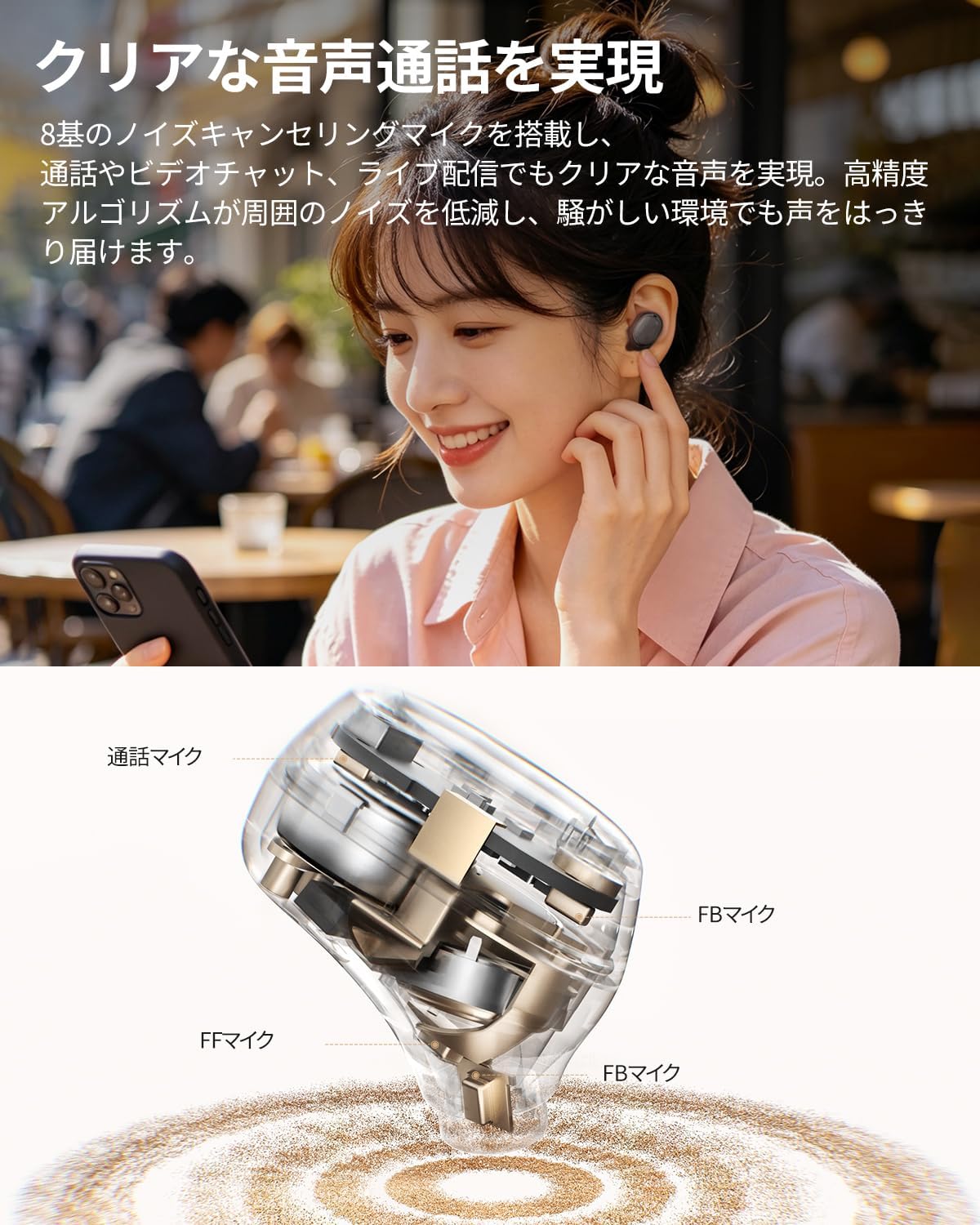
Slika: Podrobna notranjost view of a QCY MeloBuds A30 earbud, highlighting microphone components.
3. Nastavitev
3.1 Začetno seznanjanje
- Odprite polnilno ohišje. Slušalke bodo samodejno prešle v način seznanjanja.
- V napravi (pametnem telefonu, tablici, računalniku) omogočite Bluetooth.
- Iskanje "QCY MeloBuds A30" in the list of available Bluetooth devices and select it to connect.
- Ko je povezava vzpostavljena, bo glasovni poziv potrdil uspešno seznanitev.
3.2 Povezava več naprav
The MeloBuds A30 supports simultaneous connection with up to 3 devices. To switch between connected devices, simply play audio on the desired device. The earbuds will automatically switch to the active audio source.

Image: Man playing game with phone and QCY MeloBuds A30 earbuds, illustrating multi-device connection.
3.3 Namestitev aplikacije QCY
For full customization and advanced features, download the dedicated QCY app from your device's app store. The app allows for EQ adjustments, firmware updates, and personalized control settings.

Image: Smartphone displaying the QCY app interface for MeloBuds A30, showing various customization options and settings.
4. Navodila za uporabo
4.1 Kontrole na dotik
The MeloBuds A30 feature intuitive touch controls on each earbud. You can customize these controls via the QCY app.
- Predvajanje/pavza: Dvakrat tapnite katero koli slušalko.
- Naslednja skladba: Trikrat tapnite desni ušesni čep.
- Prejšnja skladba: Trikrat tapnite levi ušesni čep.
- Sprejmi/končaj klic: Dvakrat tapnite katero koli slušalko.
- Zavrni klic: Pritisnite in držite katero koli slušalko 1.5 sekundi.
- Glasovni asistent: Trikrat tapnite levi ušesni čep.
- ANC Mode Cycle: Press and hold the right earbud for 1.5 seconds to cycle through ANC ON → ANC OFF → Transparency Mode.

Image: Diagram illustrating touch controls for QCY MeloBuds A30 earbuds.
4.2 Aktivno odpravljanje hrupa (ANC)
The MeloBuds A30 feature up to 60dB hybrid ANC and 5.5kHz wideband noise cancellation. Adaptive ANC automatically adjusts to your environment and wearing conditions. AI scene-adaptive ANC and wind noise-adaptive ANC provide optimal noise cancellation, ensuring a clear listening experience even in windy conditions.

Image: Person wearing QCY MeloBuds A30 earbuds, demonstrating active noise cancellation.

Image: Diagram illustrating the effect of Active Noise Cancellation (ANC) on and off with sound waves around a person wearing QCY MeloBuds A30.
4.3 Klicne funkcije
Equipped with 8 noise-cancelling microphones and a high-precision algorithm, the MeloBuds A30 effectively reduce ambient noise during calls, video chats, and live streaming. This ensures your voice is clearly transmitted even in noisy environments.

Image: Woman talking on phone while wearing QCY MeloBuds A30 earbuds in an outdoor setting.
5. Polnjenje
The earbuds provide approximately 11 hours of continuous playback on a single charge (ANC off), and up to 50 hours with the charging case. With ANC on, the earbuds offer about 6 hours of playback, extending to 27 hours with the charging case.

Image: QCY MeloBuds A30 earbuds and charging case, illustrating battery life with and without ANC.
To charge the earbuds, place them back into the charging case. To charge the case, connect it to a power source using the provided USB-C cable.
6. Vzdrževanje
- Slušalke in polnilno ohišje redno čistite z mehko, suho krpo.
- Izogibajte se uporabi abrazivnih materialov ali močnih kemikalij.
- Ensure the charging contacts on both the earbuds and case are clean and dry to prevent charging issues.
- Slušalke shranite v polnilno škatlico, ko jih ne uporabljate, da jih zaščitite pred prahom in poškodbami.
6.1 Vodoodpornost
The MeloBuds A30 are IPX5 water resistant, protecting them from sweat and water splashes. This makes them suitable for workouts and commuting. However, they are not designed for submersion in water.

Image: QCY MeloBuds A30 earbuds with water droplets, demonstrating IPX5 water resistance.
7. Odpravljanje težav
- Slušalke se ne morejo seznaniti: Ensure both earbuds are in the charging case, then open the lid to activate pairing mode. Check your device's Bluetooth settings and try reconnecting.
- Iz ene slušalke ni zvoka: Obe slušalki vstavite nazaj v polnilno ohišje, zaprite pokrov, počakajte nekaj sekund in ga nato ponovno odprite. To pogosto ponovno sinhronizira slušalki.
- Težave s polnjenjem: Clean the charging contacts on both earbuds and the case. Ensure the charging cable is securely connected and the power source is working.
- Slaba kakovost klica: Ensure the microphones are not obstructed. Try adjusting the earbuds' position in your ears.
- Težave s povezavo aplikacije: Ensure Bluetooth is enabled and the earbuds are connected to your device. Restart the QCY app or reinstall it if problems persist.
8. Specifikacije
| Znamka | QCY |
| Ime modela | MeloBuds A30 |
| Številka modela | BH26HT22A |
| barva | Črna |
| Tehnologija povezljivosti | Brezžično |
| Različica Bluetooth | 6.0 |
| Bluetooth obseg | 10 metrov |
| Nadzor hrupa | Active Noise Cancellation, Adaptive Noise Cancellation, Environmental Noise Cancellation |
| Avdio kodeki | LDAC, Hi-Res Audio Wireless |
| Mikrofon | 8-mic system with AI Call Noise Cancelling |
| Čas predvajanja (slušalke) | Approx. 11 hours (ANC off), Approx. 6 hours (ANC on) |
| Skupni čas predvajanja (z ohišjem) | Do 50 ur (izklopljeno ANC), do 27 ur (vklopljeno ANC) |
| Vodoodpornost | IPX5 |
| Nadzorna metoda | Nadzor na dotik |
| Združljive naprave | Windows/Macbook Air/Pro PCs, iPads, iPhones, Android devices (Galaxy, Huawei, Xiaomi, OPPO, Xperia, Nexus, ASUS, Fujitsu, etc.) |
9. Garancija in podpora
QCY products come with a standard manufacturer's warranty. For detailed warranty information, please refer to the warranty card included in your product packaging or visit the official QCY webmesto.
For technical support, troubleshooting assistance, or any product-related inquiries, please contact QCY customer service through their official webspletnega mesta ali kontaktnih podatkov, navedenih v dokumentaciji izdelka.