
1. Uvod
Hvala za nakupasing the Audizio Laredo Bluetooth Turntable. This manual provides essential information for the safe and correct operation of your device. Please read it thoroughly before use and keep it for future reference.
Ključne značilnosti:
- Integrated HiFi speakers with 160W total power output.
- Bidirectional Bluetooth for wireless audio streaming (in and out).
- High-quality Audio Technica cartridge for precise playback.
- Supports 7, 10, and 12-inch vinyl records at 33 and 45 RPM.
- Adjustable counterweight on the aluminum tonearm.
- RCA Line Out for external amplifier/zvočniki.
- AUX Input for connecting external audio sources.
- Elegant bamboo finish.
Kaj je v škatli:
- Audizio Laredo Turntable Unit
- Navodila za uporabo
- Napajalni adapter
- 45 RPM Adapter for singles
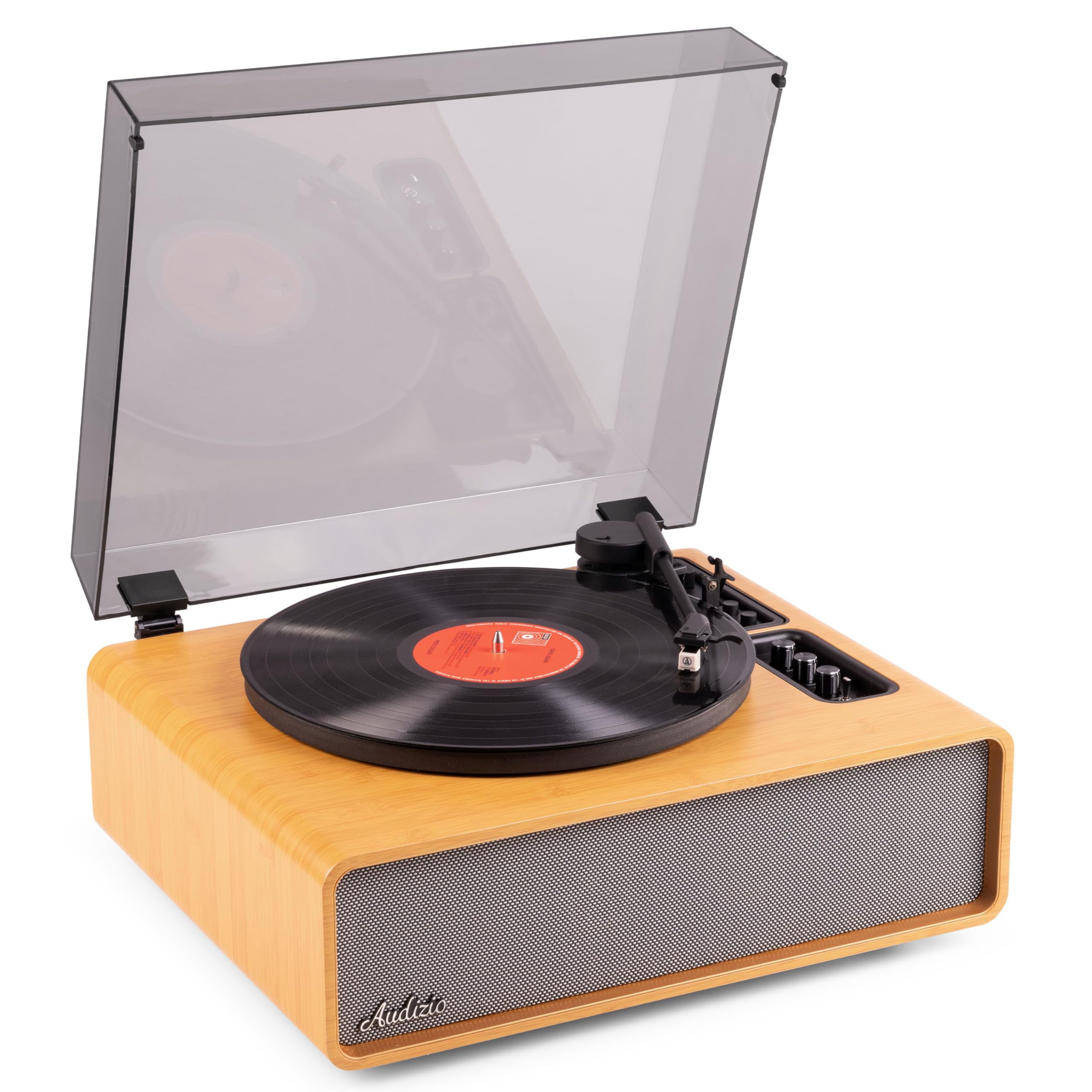
Figure 1.1: Audizio Laredo Turntable, overall view.
2. Varnostna navodila
Please read and follow these safety instructions carefully to prevent damage to the unit and ensure your safety.
- Naprave ne izpostavljajte dežju ali vlagi, da preprečite požar ali električni udar.
- Ne odpirajte casing. V notranjosti ni delov, ki bi jih lahko uporabnik popravil. Vsa servisna dela prepustite usposobljenemu osebju.
- Place the unit on a stable, level surface to prevent it from falling.
- Napravo hranite stran od neposredne sončne svetlobe, virov toplote in prekomernega prahu.
- Zagotovite ustrezno prezračevanje okoli enote. Ne blokirajte prezračevalnih odprtin.
- Uporabljajte samo priloženi napajalnik.
- Izključite enoto med nevihtami ali ko je ne uporabljate dlje časa.
3. Izdelek je končanview
Familiarize yourself with the components and controls of your Audizio Laredo turntable.
Glavne komponente:
- Krožnik: Podpira vinilne plošče.
- Tonar: Drži kartušo in pisalo.
- Cartridge & Stylus: Reads the grooves of the record. (Audio Technica ATN-3600)
- Pokrov proti prahu: Ščiti krožnik in ročico pred prahom.
- Integrirani zvočniki: Za neposredno predvajanje zvoka.
- Nadzorna plošča: For power, volume, tone, and mode selection.
- Zadnji priključki: RCA Line Out, AUX In, Power Input.

Slika 3.1: Zgornji del view of the turntable with key components visible.

Figure 3.2: Control Panel for volume, bass, and treble adjustments.

Figure 3.3: Audio Technica ATN-3600 Cartridge and Stylus.

Figure 3.4: Tonearm base with speed and auto-stop controls.

Figure 3.5: Rear connection panel.
4. Nastavitev
4.1 Razpakiranje
- Previdno vzemite gramofon iz embalaže.
- Remove all protective materials, including the stylus guard.
- Embalažo shranite za kasnejši transport ali shranjevanje.
4.2 Namestitev
- Place the turntable on a stable, level surface to prevent vibrations and ensure proper playback.
- Avoid placing the unit near strong magnetic fields, heat sources, or areas with high humidity.
4.3 Namestitev protiprašnega pokrova
- Align the hinges of the dust cover with the slots on the back of the turntable.
- Gently push down until the cover is securely in place.
- The dust cover can be removed for playback if desired.

Figure 4.1: Turntable with dust cover.
4.4 Napajalni priključek
- Connect the power adapter to the DC IN port on the rear of the turntable.
- Plug the adapter into a suitable wall outlet (220V).
4.5 Nastavitev ročice in kartuše
- The Audio Technica cartridge is pre-installed.
- The tonearm features an adjustable counterweight. Refer to the detailed instructions in the included manual for precise counterweight adjustment to optimize tracking force.
5. Navodila za uporabo
5.1 Predvajanje plošče
- Place a vinyl record on the platter. If playing a 7-inch single, use the included 45 RPM adapter.
- Select the appropriate speed (33 or 45 RPM) using the speed selector switch near the tonearm base.
- Nežno dvignite ročico tona z ročico za nastavitev tona.
- Position the tonearm over the desired track of the record.
- Počasi spustite ročico za nastavitev tona. Igla se bo dotaknila plošče in predvajanje se bo začelo.
- At the end of the record, the auto-stop function will automatically stop the platter rotation. Lift the tonearm and return it to its rest.

Figure 5.1: Playing a vinyl record.
5.2 Bluetooth Operation (Bidirectional)
The Laredo turntable supports both Bluetooth input (receiving audio from a device) and Bluetooth output (sending audio to a Bluetooth speaker/headphones).
Vhod Bluetooth (BT IN):
- Press the MODE/POWER button to select Bluetooth mode. The LED indicator will flash.
- On your smartphone or tablet, enable Bluetooth and search for 'Audizio Laredo'.
- Select the turntable to pair. Once connected, the LED will glow solid.
- You can now stream audio from your device to the turntable's integrated speakers.
Bluetooth Output (BT OUT):
- Prepričajte se, da so vaše slušalke ali zvočnik Bluetooth v načinu seznanjanja.
- Set the BT OUT switch (located near the tonearm base) to 'ON'.
- The turntable will automatically search for and connect to the nearest Bluetooth audio device.
- Once connected, the audio from your vinyl record will be transmitted to your Bluetooth device.

Figure 5.2: Bidirectional Bluetooth functionality.
5.3 AUX vhod
- Connect an external audio device (e.g., MP3 player, CD player) to the AUX IN port on the rear of the turntable using a 3.5mm audio cable.
- Press the MODE/POWER button to select AUX mode.
- Audio from the external device will play through the turntable's speakers.
5.4 RCA Line Out
- To connect the turntable to an external amplifier or powered speakers, use an RCA cable (not included) to connect the LINE OUT ports on the rear of the turntable to the corresponding input on your audio system.
- Ensure the 'Speaker ON/OFF' switch on the rear is set to 'OFF' if you only want sound from external speakers.
5.5 Nadzor glasnosti in tona
- Use the VOLUME knob on the control panel to adjust the overall playback volume.
- Adjust the BASS and TREBLE knobs to fine-tune the audio output to your preference.
6. Vzdrževanje
6.1 Čiščenje enote
- Pokrov za prah in ohišje obrišite z mehko, suho krpo.
- Ne uporabljajte abrazivnih čistil, voskov ali topil.
- For the platter, use a slightly damp krpo in temeljito posušite.
6.2 Stylus Care and Replacement
- The stylus is a delicate component. Handle it with care.
- Clean the stylus regularly using a soft brush designed for stylus cleaning, brushing from back to front.
- A stylus typically lasts for approximately 300-500 hours of playback. If you notice a decrease in sound quality or increased skipping, it may be time to replace the stylus.
- Replacement styli (e.g., Audio Technica ATN-3600L or compatible) can be purchased from authorized dealers. Refer to the detailed instructions provided with the replacement stylus for installation.
7. Odpravljanje težav
Če imate težave z gramofonom, si pred stikom s podporo oglejte naslednjo tabelo.
| Težava | Možen vzrok | rešitev |
|---|---|---|
| Brez moči | Napajalnik ni priključen; vtičnica ne deluje. | Prepričajte se, da je napajalnik varno priključen na enoto in delujočo vtičnico. |
| Iz zvočnikov ni zvoka | Volume too low; Speaker ON/OFF switch is OFF; Incorrect mode selected. | Increase volume; Set 'Speaker ON/OFF' switch to ON; Select correct input mode (Phono, BT IN, AUX). |
| Preskakovanje zapisov | Record is dirty or damaged; Stylus is worn or dirty; Turntable not level; Tracking force incorrect. | Clean record; Clean or replace stylus; Place turntable on a level surface; Adjust tonearm counterweight. |
| Težave s povezovanjem Bluetooth | Device too far; Turntable not in pairing mode; Interference. | Ensure devices are within range; Re-enter pairing mode; Turn off other Bluetooth devices. |
| Popačenje zvoka | Volume too high; Stylus worn; Record damaged. | Reduce volume; Replace stylus; Try a different record. |
8. Specifikacije
Technical specifications for the Audizio Laredo Turntable.
| Funkcija | Specifikacija |
|---|---|
| Ime modela | Laredo (101.537) |
| Dimenzije (D x Š x V) | 43.2 x 43.2 x 21 cm (17 x 17 x 8.3 palca) |
| Teža izdelka | 7.65 kg (16.86 lbs) |
| Material | Wood (Bamboo finish) |
| Hitrosti vrtenja | 33 RPM, 45 RPM |
| Vrsta kartuše | Audio Technica (ATN-3600) |
| Vrsta motorja | Pogon na jermen |
| Format signala | Analogni |
| Vgrajeni zvočniki | Yes, 160W total output |
| Različica Bluetooth | 5.4 (Bidirectional) |
| Povezljivost | Bluetooth (In/Out), RCA Line Out, AUX In |
| Vir napajanja | Žično električno |
| voltage | 220 volta |
| Združljive naprave | Speakers, Headphones, Smartphone, Tablet |
9. Garancija in podpora
9.1 Informacije o garanciji
This Audizio Laredo Turntable comes with a 2-letna garancija from the date of purchase. This warranty covers manufacturing defects and faults under normal use. It does not cover damage caused by misuse, accidents, unauthorized modifications, or normal wear and tear (e.g., stylus wear).
Za garancijske zahtevke shranite dokazilo o nakupu.
9.2 Podpora strankam
If you have any questions, require technical assistance, or need to make a warranty claim, please contact your retailer or visit the official Audizio webspletno mesto za vire podpore in kontaktne podatke.
Official Audizio Webspletno mesto: www.audizio.com