
1. Uvod
This manual provides instructions for the safe and effective use of your LK-027 Mini Camera. Please read this manual thoroughly before using the product and retain it for future reference. The LK-027 is a compact and portable camera designed for daily recording, travel, and outdoor activities, featuring a 180-degree rotating lens and HD720P video capabilities.
2. Izdelek je končanview
The LK-027 Mini Camera is designed for ease of use and portability. It includes a 180-degree rotatable lens, a flip-up screen, and comes with a 64GB SD card for immediate use.

Image: The LK-027 Mini Camera, highlighting its 180-degree rotating lens and beauty filter capabilities.

Image: Two LK-027 Mini Cameras, one with its flip-up screen open, demonstrating its design.
2.1 Vsebina paketa
- LK-027 Mini Camera
- 64 GB SD kartica
- USB Type-C kabel
- Uporabniški priročnik (angleščina)
3. Začetek uporabe (Nastavitev)
3.1 Polnjenje fotoaparata
- Connect the included USB Type-C cable to the camera's charging port.
- Drugi konec kabla priključite na napajalnik USB (ni priložen) ali na vrata USB računalnika.
- Indikatorska lučka polnjenja bo zasvetila. Ko je naprava popolnoma napolnjena, lahko lučka spremeni barvo ali ugasne.
Opomba: The camera does not include a built-in battery. It operates when connected to a power source or a portable power bank.
3.2 Vstavljanje SD-kartice
- Poiščite režo za SD kartico na strani fotoaparata.
- Insert the provided 64GB SD card into the slot with the metal contacts facing down until it clicks into place.
- To remove, gently push the SD card until it pops out.
4. Navodila za uporabo
4.1 Vklop/izklop
- Vklop: Press and hold the power button for a few seconds until the screen illuminates.
- Ugasniti: Ponovno pritisnite in držite gumb za vklop, dokler se zaslon ne izklopi.
4.2 Fotografiranje
- Ensure the camera is powered on and in photo mode (indicated on the screen).
- Kadrirajte posnetek z uporabo LCD-zaslona.
- Pritisnite sprožilec, da posnamete fotografijo.
4.3 Snemanje videoposnetkov
- Prepričajte se, da je kamera vklopljena in v video načinu.
- Press the record button to start recording. A red indicator or timer on the screen will confirm recording is active.
- Ponovno pritisnite gumb za snemanje, da ustavite snemanje.

Image: A user demonstrating selfie and vlog recording with the LK-027 Mini Camera.
4.4 Using the 180° Rotating Lens and Flip Screen
The camera features a lens that can rotate 180 degrees and a flip-up screen, allowing for versatile shooting angles, including selfies and vlogging.
- Gently rotate the lens to your desired angle.
- Adjust the flip-up screen for optimal viewing, especially for self-portraits or vlogging.

Slika: Bližnji posnetek view of the LK-027 Mini Camera's 180-degree flip screen, enabling multi-angle shooting.
4.5 Prilagajanje nastavitev
The camera offers basic settings adjustments. Navigate through the menu using the directional buttons and confirm selections with the OK button.
- Photo/Video Mode Switch: Use the mode button to switch between photo and video recording.
- Resolucija: Set video resolution to HD720P (1280x720).
- Ravnovesje beline: Samodejna prilagoditev.
- Izpostavljenost: Samodejni nadzor osvetlitve.
- Beauty Filters: Apply various beauty filters for enhanced photos.

Slika: Razstava kolaževasing various beauty filter effects achievable with the LK-027 Mini Camera.

Image: The LK-027 Mini Camera, illustrating the difference in lighting with and without flash.
5. Vzdrževanje
5.1 Čiščenje
- Za čiščenje ohišja fotoaparata uporabite mehko, suho krpo.
- For the lens, use a specialized lens cleaning cloth and solution. Avoid harsh chemicals.
5.2 Shranjevanje
- Fotoaparat shranjujte na hladnem in suhem mestu, stran od neposredne sončne svetlobe in ekstremnih temperatur.
- Remove the SD card if storing for extended periods.
6. Odpravljanje težav
| Težava | Možen vzrok | rešitev |
|---|---|---|
| Kamera se ne vklopi. | Brez napajanja. | Connect the camera to a power source using the USB Type-C cable. |
| Fotografiranje/snemanje videoposnetkov ni mogoče. | SD card full or not inserted correctly. | Preverite vstavljeno SD kartico. Izbrišite nepotrebne files or replace the SD card. |
| Slaba kakovost slike/videoposnetka. | Insufficient lighting, dirty lens. | Ensure adequate lighting. Clean the lens with a soft cloth. |
| Kamera se zamrzne. | Začasna težava s programsko opremo. | Pritisnite in držite gumb za vklop, da prisilno izklopite kamero, nato pa jo znova zaženite. |
7. Specifikacije
| Funkcija | Podrobnost |
|---|---|
| Ime modela | LK-027 |
| Znamka | Generično |
| Posebna funkcija | 180° Rotating Lens |
| Ločljivost zajema videa | 720p (1280 x 720) |
| Tehnologija foto senzorja | CMOS |
| Velikost zaslona | 2 palcev |
| Optični zoom | 1X |
| Maks. Zaslonka | F2.8 |
| Ločljivost foto senzorja | 8 MP |
| Združljiv nosilec | Posnetek |
| Razmerje stranic | 16:9 |
| File Oblika | MP4 |
| Stabilizacija slike | Noben |
| Nadzor izpostavljenosti | Avto |
| Faktor oblike | Kompaktni digitalni fotoaparat |
| Velikost slikovnega senzorja | 1/3 palca |
| Funkcija bliskavice | Noben |
| Vodotesen | št |
| Hitrost sličic | 24, 30, 60 sličic na sekundo |
| Samosprožilec | št |
| Razpon ISO | 100-3200 |
| Povezljivost | USB Type-C |
| Fokusna funkcija | Autofocus (AF-A) |
| Included Memory | 64 GB SD kartica |
| Baterija priložena | No (Requires external power via USB-C) |
| Izvor | Kitajska |
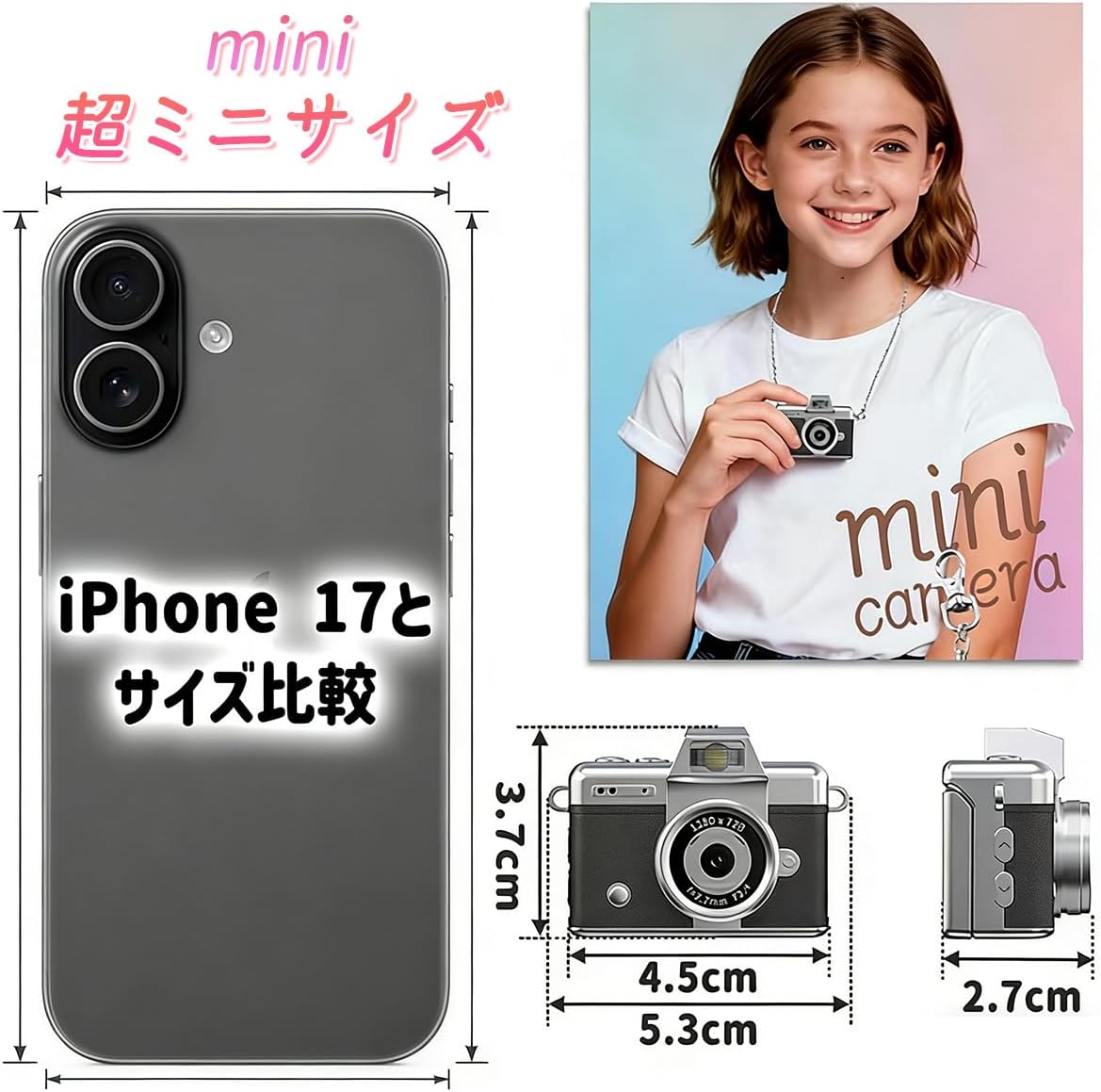
Image: A visual comparison of the LK-027 Mini Camera's compact size relative to a smartphone.

Image: The LK-027 Mini Camera shown being worn as a pendant and attached to a backpack, demonstrating its portability.
8. Garancija in podpora
Za informacije o garanciji in podporo strankam glejte dokumentacijo, ki ste jo prejeli ob nakupu, ali se obrnite na prodajalca. Račun shranite kot dokazilo o nakupu.