
1. Uvod
This manual provides detailed instructions for the setup, operation, and maintenance of your Eyoyo EYH2 Handheld USB 2D Barcode Scanner and Eyoyo EY-045 2-in-1 Wireless Mouse Barcode Scanner. Please read this manual thoroughly before using the devices to ensure proper functionality and to prevent damage.
2. Izdelek je končanview
2.1 Eyoyo EY-H2 Handheld USB 2D Barcode Scanner
The Eyoyo EY-H2 is a wired USB 2D barcode scanner designed for efficient data capture. It offers plug-and-play functionality, requiring no software or driver installation. This scanner is suitable for various environments including retail, warehouses, libraries, and inventory management.

Slika 2.1.1: The Eyoyo EY-H2 2D Barcode Scanner demonstrates superior decoding capabilities compared to traditional laser scanners, accurately reading various 1D and 2D barcodes, including those with damage or complex formats.

Slika 2.1.2: The EY-H2 scanner offers plug-and-play connectivity via USB, compatible with Windows, macOS, Linux, and POS systems, requiring no additional drivers or software.

Slika 2.1.3: The EY-H2 scanner features adjustable sound settings, allowing users to turn the beep sound on or off as needed for different working environments.

Slika 2.1.4: The EY-H2 scanner is designed with drop resistance, capable of sustaining drops from up to 1.5 meters (5 feet) without damage.
2.2 Eyoyo EY-045 2-in-1 Wireless Mouse Barcode Scanner
The Eyoyo EY-045 combines the functionality of a high-precision optical mouse with a powerful 2D barcode scanner. This device aims to streamline workflows by integrating two essential tools into one, reducing desk clutter and improving efficiency. It supports multiple connection methods and features a long-lasting battery with a visual indicator.

Slika 2.2.1: The EY-045 offers a 2-in-1 design, functioning as both a wireless mouse for office tasks and a barcode scanner for data entry, activated by a dedicated button.

Slika 2.2.2: The mouse-style barcode scanner facilitates faster data entry, particularly in retail Point-of-Sale (POS) environments, by allowing seamless transition between mouse and scanning functions.

Slika 2.2.3: The EY-045 supports two wireless connection methods: Bluetooth Mode for laptops, tablets, and phones, and 2.4G Mode via a USB dongle for PCs.
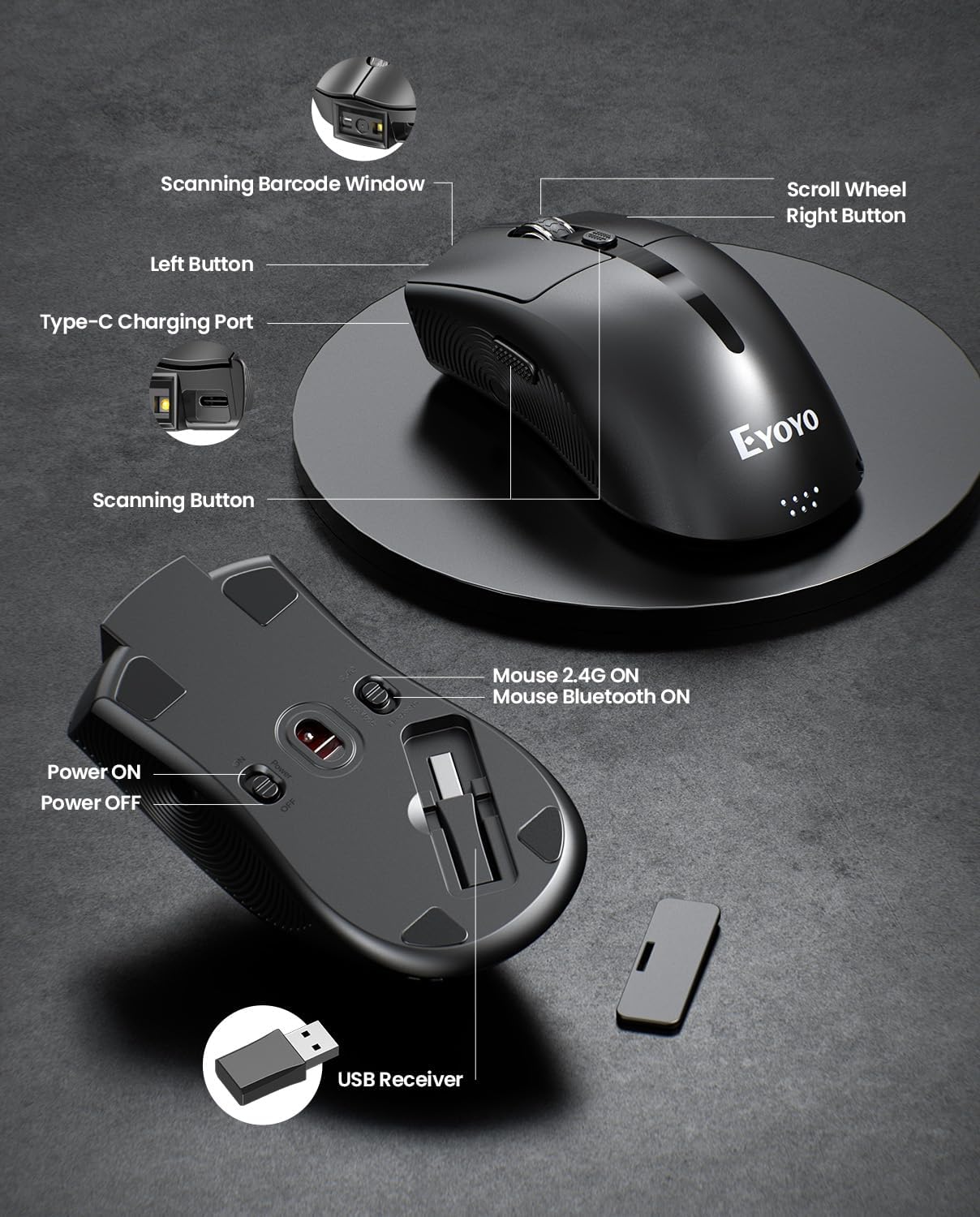
Slika 2.2.4: This diagram highlights the key components of the EY-045, including the Scanning Barcode Window, Scroll Wheel, Left/Right Buttons, Type-C Charging Port, Scanning Button, Power ON/OFF switch, Mouse 2.4G/Bluetooth ON switches, and the USB Receiver storage slot.
3. Nastavitev
3.1 Eyoyo EY-H2 Handheld Scanner Setup
- Priključite USB kabel: Plug the USB cable from the EY-H2 scanner into an available USB port on your computer or POS system.
- Prepoznavanje sistema: The operating system (Windows, macOS, Linux, or POS) will automatically detect and install the necessary drivers. No manual driver installation is required.
- Pripravljeno za uporabo: Once recognized, the scanner is ready to use. Open any application where you want to input scanned data (e.g., Notepad, Word, Excel, POS software).
3.2 Eyoyo EY-045 Mouse Scanner Setup
The EY-045 offers three connection methods:
3.2.1 2.4G Wireless Connection (for PC)
- Pridobi USB sprejemnik: Locate the 2.4G USB receiver stored in the bottom slot of the EY-045 mouse.
- Vstavi sprejemnik: Plug the USB receiver into an available USB port on your PC.
- Vklop: Slide the power switch on the bottom of the EY-045 to the 'ON' position.
- Izberite način 2.4G: Ensure the mode switch on the bottom is set to 'Mouse 2.4G ON'. The device will automatically connect.
3.2.2 Bluetooth 5.0 Connection (for Laptops/Tablets/Phones)
- Vklop: Slide the power switch on the bottom of the EY-045 to the 'ON' position.
- Izberite način Bluetooth: Ensure the mode switch on the bottom is set to 'Mouse Bluetooth ON'. The device will enter pairing mode (indicator light may flash).
- Enable Bluetooth on Host Device: On your laptop, tablet, or phone, go to Bluetooth settings and turn Bluetooth on.
- Seznani napravo: Iskanje available devices and select 'Eyoyo EY-045' (or similar name) to pair.
3.2.3 USB-C Wired Connection (for Charging and Working)
- Priključite kabel USB-C: Plug the provided USB-C charging cable into the Type-C charging port on the front of the EY-045.
- Poveži se z gostiteljem: Plug the other end of the USB-C cable into a USB port on your computer.
- Funkcionalnost: The device will charge and function as a wired mouse and scanner simultaneously.
4. Navodila za uporabo
4.1 Using the Eyoyo EY-H2 Handheld Scanner
- Cilj in skeniranje: Usmerite okno skenerja na črtno kodo, ki jo želite prebrati.
- Press Trigger: Press the trigger button on the handle. A red scanning line or light will appear.
- Potrditev: A successful scan will typically be indicated by a beep sound (if enabled) and the data appearing in your active application.
- Prilagodi zvok: To adjust the sound, scan the appropriate configuration barcodes provided in the full user manual (e.g., 'Turn On Sound' or 'Turn Off Sound' barcodes).
4.2 Using the Eyoyo EY-045 Mouse Scanner
- Funkcija miške: When connected, the EY-045 functions as a standard optical mouse for navigation and clicking.
- Switch to Scanner Mode: To scan a barcode, press the dedicated scanning button located on the side of the mouse. The scanning light will activate.
- Scan Barcode: Aim the scanning window at the barcode and press the scanning button. The scanned data will be transmitted to your connected device.
- Indikator baterije: Monitor the 4-level LED power indicator (25%-50%-75%-100%) on the tail of the mouse to check the battery status. Recharge when the indicator shows low power.
- Shramba brez povezave: The EY-045 can store up to 100,000 barcodes when operating away from a computer. To upload stored data, connect the scanner to your computer and follow the instructions in the full user manual for data transfer.
5. Vzdrževanje
- Čiščenje: Za čiščenje zunanjosti skenerja uporabite mehko, suho krpo. Za okno za skeniranje uporabite krpo, ki ne pušča vlaken, rahlo obrišiteampz blagim, neabrazivnim čistilom. Izogibajte se agresivnim kemikalijam ali abrazivnim materialom.
- Shranjevanje: Skenerje shranjujte na hladnem in suhem mestu, stran od neposredne sončne svetlobe in ekstremnih temperatur.
- Skrb za kabel: Avoid bending or twisting the USB cables excessively to prevent internal damage.
- Battery Care (EY-045): For optimal battery life, avoid fully discharging the battery frequently. Recharge the device regularly. If storing for an extended period, charge the battery to about 50% before storage.
6. Odpravljanje težav
- Skener ne bere črtnih kod:
- Prepričajte se, da je črtna koda čista in ne preveč poškodovana.
- Preverite razdaljo in kot skenerja do črtne kode.
- Verify that the scanner is properly connected (EY-H2: USB cable; EY-045: 2.4G dongle, Bluetooth, or USB-C cable).
- For EY-045, ensure it is in scanner mode by pressing the dedicated scan button.
- Brez izhodnih podatkov:
- Preverite, ali je optični bralnik uspešno povezan z vašo napravo.
- Ensure an application (e.g., Notepad, Word, POS software) is open and active to receive input.
- Restart the computer and reconnect the scanner.
- EY-045 Not Connecting Wirelessly:
- Check if the EY-045 is powered on and the correct wireless mode (2.4G or Bluetooth) is selected.
- Za 2.4 G se prepričajte, da je USB-sprejemnik varno priključen na računalnik.
- For Bluetooth, ensure Bluetooth is enabled on your host device and the EY-045 is paired. Try unpairing and re-pairing if issues persist.
- Prepričajte se, da je baterija napolnjena.
- EY-045 Battery Drains Quickly:
- Prepričajte se, da je naprava izklopljena, ko je ne uporabljate.
- Check the battery indicator for its current level.
- Napravo popolnoma napolnite s priloženim kablom USB-C.
7. Specifikacije
7.1 Eyoyo EY-H2 Handheld USB 2D Barcode Scanner
- Povezljivost: Žični USB
- Zmogljivost dekodiranja: 1D and 2D barcodes (including QR codes)
- Namestitev: Plug and Play, gonilniki niso potrebni
- Združljivost: Windows, macOS, Linux, POS systems
- Vzdržljivost: Drop resistance up to 1.5m (5ft)
- Dolžina kabla: 1.8M / 5.9 ft
- Lastnosti: Adjustable sound (on/off)
7.2 Eyoyo EY-045 2-in-1 Wireless Mouse Barcode Scanner
- Oblikovanje: 2-in-1 (Optical Mouse + 2D Barcode Scanner)
- Povezljivost: Bluetooth 5.0, 2.4G Wireless (via USB dongle), USB-C Wired
- Zmogljivost dekodiranja: 1D, 2D, and QR codes (including from digital screens)
- Baterija: 1200mAh polnilna baterija
- Življenjska doba baterije: 10+ hours continuous scanning, 20 days daily mouse use
- Indikator baterije: 4-level LED (25%-50%-75%-100%)
- Shramba brez povezave: Do 100,000 črtnih kod
- Združljivost: Windows (XP/7/8/10/11), macOS, Android, iOS
- Lastnosti: Adjustable beep sounds, dedicated scan button
8. Garancija in podpora
Eyoyo products are designed for reliability and performance. For specific warranty information, please refer to the warranty card included with your product or visit the official Eyoyo website. For technical support, troubleshooting assistance, or further inquiries, please contact Eyoyo customer service through the contact information provided on the product packaging or the official webmesto.