
Konec izdelkaview
The AT&T EL2131-11 is a DECT 6.0 cordless landline phone designed for reliable communication. It features a powerful call blocker, caller ID, a full-duplex speakerphone, and a backlit display and keypad for enhanced visibility. This model includes one handset.
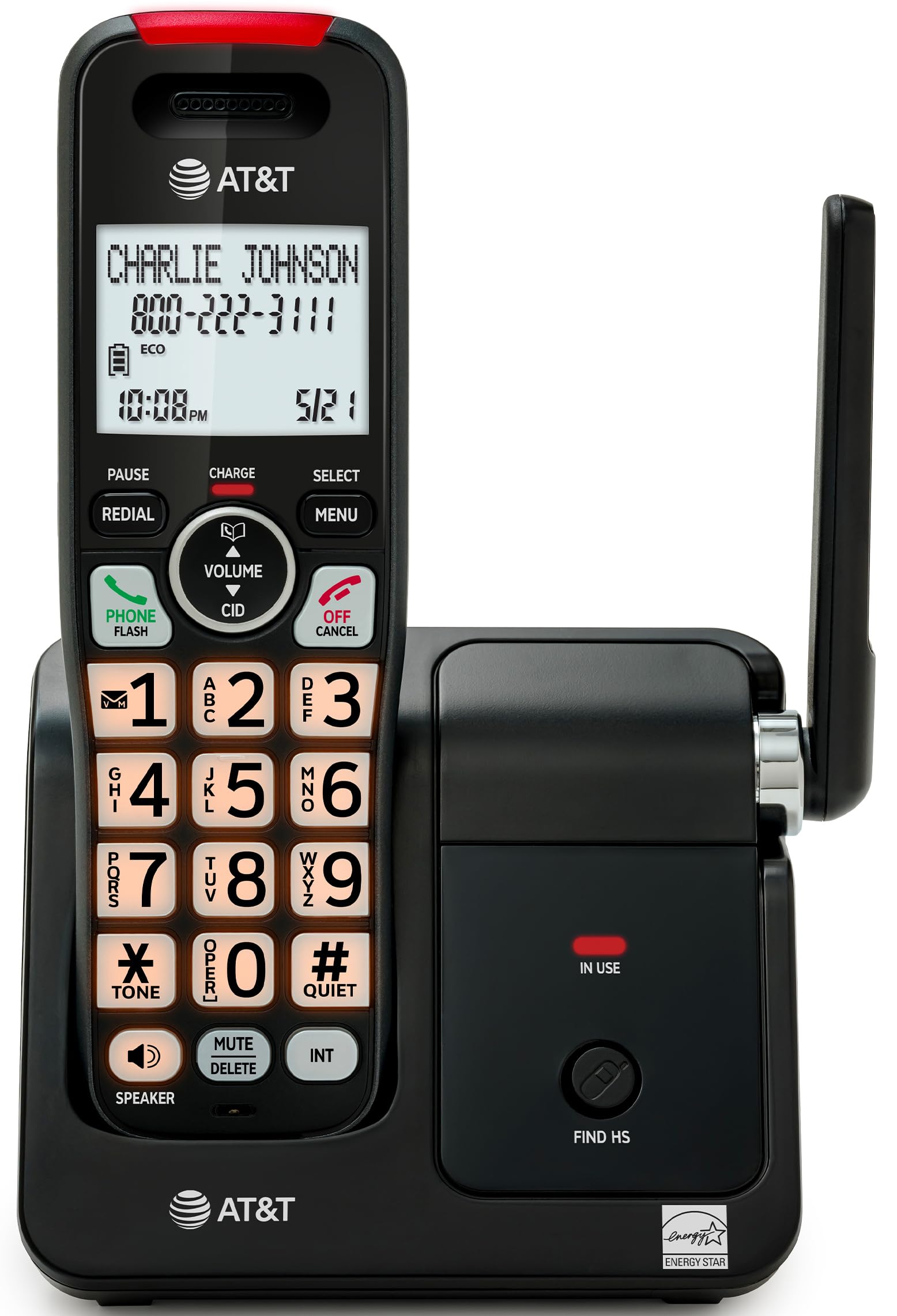
Image: The AT&T EL2131-11 cordless phone, showing the handset docked in its base unit.
Ključne značilnosti:
- Call Blocker: Blokira do 50 neželenih številk.
- ID klicatelja: Shrani do 50 klicev, prikaže ime, številko, čas in datum.
- Full-Duplex zvočnik: Allows both parties to speak and listen simultaneously.
- Osvetljen zaslon in tipkovnica: Zagotavlja jasno vidljivost v slabih svetlobnih pogojih.
- Tihi način: Silences the ringer instantly.
- ECO način: Reduces power consumption and extends battery life.
- Tehnologija DECT 6.0: Ensures interference-free communication and extended range.
Nastavitev
Kaj je v škatli:
- Osnovna enota
- 1 brezžična slušalka
- 1 Napajalnik
- Telefonski kabel
- 2 baterijskih celic
- Vodnik za hiter začetek
- Stenski nosilec
1. Namestitev baterije
- Poiščite predal za baterije na zadnji strani slušalke.
- Insert the two supplied battery cells, ensuring correct polarity (+ and -).
- Trdno zaprite pokrov prostora za baterije.
2. Priključitev osnovne enote
- Connect the small end of the power adapter to the power jack on the back of the base unit.
- Večji konec napajalnika priključite v standardno električno vtičnico.
- En konec telefonskega kabla priključite v vtičnico TEL LINE na zadnji strani osnovne enote.
- Drugi konec telefonskega kabla priključite v telefonsko stensko vtičnico.
3. Začetno polnjenje
Place the handset in the base unit with the display facing forward. The handset will begin charging. Allow the handset to charge for at least 16 hours before initial use to ensure optimal battery performance.

Image: The handset charging in its base, with an overlay indicating a 5-day battery life on a single charge.
Navodila za uporabo
Klicanje in sprejemanje klicev
- Za klic: Pritisnite TELEFON / FLASH, nato pa pokličite številko.
- Če želite odgovoriti na klic: Ko telefon zazvoni, pritisnite TELEFON / FLASH or any dialing key (0-9, * or #).
- Če želite končati klic: Pritisnite IZKLOP/PREKLIC or place the handset back in the base unit.
Uporaba zvočnika
Med klicem pritisnite tipko ZVOČNIK button to activate the full-duplex speakerphone. Press it again to switch back to the handset earpiece.

Image: A man holding a small dog, speaking hands-free using the phone's speakerphone function. The phone's base unit is visible on a table.
ID klicatelja
When a call comes in, the caller's information (name and number) will appear on the handset display if you subscribe to Caller ID service. The phone stores up to 50 caller ID records.

Image: A close-up of the phone's display showing a caller's name and number, along with the time and date.
Blokator klicev
The call blocker feature allows you to block up to 50 unwanted numbers. To block a number:
- During a call or from the Caller ID log, press MENI.
- Scroll to 'Call Blocker' and press IZBERI.
- Sledite navodilom na zaslonu, da številko dodate na seznam blokiranih.

Image: A visual representation of the call blocker feature, showing a list of blocked numbers on the phone's display.
Tihi način
To temporarily silence the ringer, press and hold the #TIH button on the handset. The ringer will be silenced for a set period, typically 1 to 12 hours, which can be adjusted in the settings.

Image: A close-up of the phone's display indicating that 'Quiet mode' is active.
ECO način
The ECO mode automatically adjusts power consumption to conserve battery life. This mode is typically active by default and indicated by an 'ECO' icon on the display.

Image: The phone's display showing the 'ECO' icon, indicating power-saving mode is active.
Ponovni poziv
Če želite ponovno poklicati zadnjo klicano številko, pritisnite PONOVNI POKUS gumb.

Image: The phone's display showing the 'Redial' function with a previously dialed number.
Osvetljen zaslon in tipkovnica
The handset features a backlit LCD display and illuminated keypad for easy readability and operation in various lighting conditions.

Image: A hand holding the phone, demonstrating its bright backlit screen and illuminated keypad in a low-light environment.
Vzdrževanje
Čiščenje telefona
- Uporabite mehak, rahlo damp cloth to clean the surfaces of the phone and base unit.
- Do not use cleaning sprays or harsh chemicals, as they may damage the finish or electronic components.
- Ensure the phone is unplugged from the power outlet before cleaning.
Skrb za baterijo
- For optimal battery life, keep the handset in the base unit when not in use.
- If the phone will be unused for an extended period, remove the batteries to prevent leakage.
- Replace batteries when they no longer hold a charge effectively. Use only the specified battery type.
Odpravljanje težav
If you experience issues with your AT&T EL2131-11 phone, refer to the following common troubleshooting steps:
| Težava | rešitev |
|---|---|
| Ni znaka centrale |
|
| Slušalka se ne polni |
|
| Ne morem klicati/sprejemati klicev |
|
| Slaba kakovost zvoka/statika |
|
Specifikacije
| Funkcija | Podrobnost |
|---|---|
| Znamka | AT&T |
| Številka modela | EL2131-11 |
| Vrsta telefona | Brezžično |
| tehnologija | DECT 6.0 |
| barva | Črna in srebrna |
| Material | Plastika |
| Vir napajanja | Napajanje na baterije |
| Mere predmeta (D x Š x V) | 5.06 x 4.65 x 7.23 palca (osnovna enota) |
| Čas pogovora po telefonu | 10 ur |
| Čas pripravljenosti telefona | 5 dni |
| Identifikacija klicatelja | ja |
| Večvrstično delovanje | Enovrstično delovanje |
| Vrsta telefonskega odzivnika | št |
| UPC | 650530034510 |

Image: The AT&T EL2131-11 base unit with handset, showing its height (7.23 inches), length (5.06 inches), and width (4.65 inches).
Informacije o garanciji
This AT&T EL2131-11 Cordless Landline Phone comes with a 1-letna omejena garancija from the manufacturer. Please retain your proof of purchase for warranty claims. For specific terms and conditions, refer to the warranty card included in your product packaging or visit the official AT&T support webmesto.
Podpora uporabnikom
For further assistance, technical support, or to inquire about replacement parts, please contact AT&T customer service. You can typically find contact information on the official AT&T website or in the quick start guide provided with your phone.
Online resources may include FAQs, detailed user manuals, and support forums.