
1. Izdelek je končanview
The ULANZI MA93 is a versatile 10000mAh battery grip designed to extend the operational time of your camera and provide stable handheld or tabletop support. It features an integrated tripod, a real-time LCD battery display, and a universal 1/4-inch screw mount for broad compatibility.
Ključne značilnosti:
- 10000mAh Kapaciteta: Provides extended power for long shooting sessions.
- LCD-zaslon v realnem času: Shows the exact remaining battery percentage (1-100%).
- Integrated Hidden Tripod: Fold-out legs provide instant tabletop stability.
- Universal 1/4"-20 Mount: Compatible with action cameras, mirrorless cameras, and smartphone rigs.
- Ergonomska oblika: Comfortable for handheld use, reducing fatigue during extended vlogging or shooting.
- Vgrajen polnilni kabel: Allows for effortless charging of connected devices.
- Pripravljeno na potovanja: 10000mAh (approx. 37 Wh) capacity is within FAA carry-on limits for U.S. domestic flights.
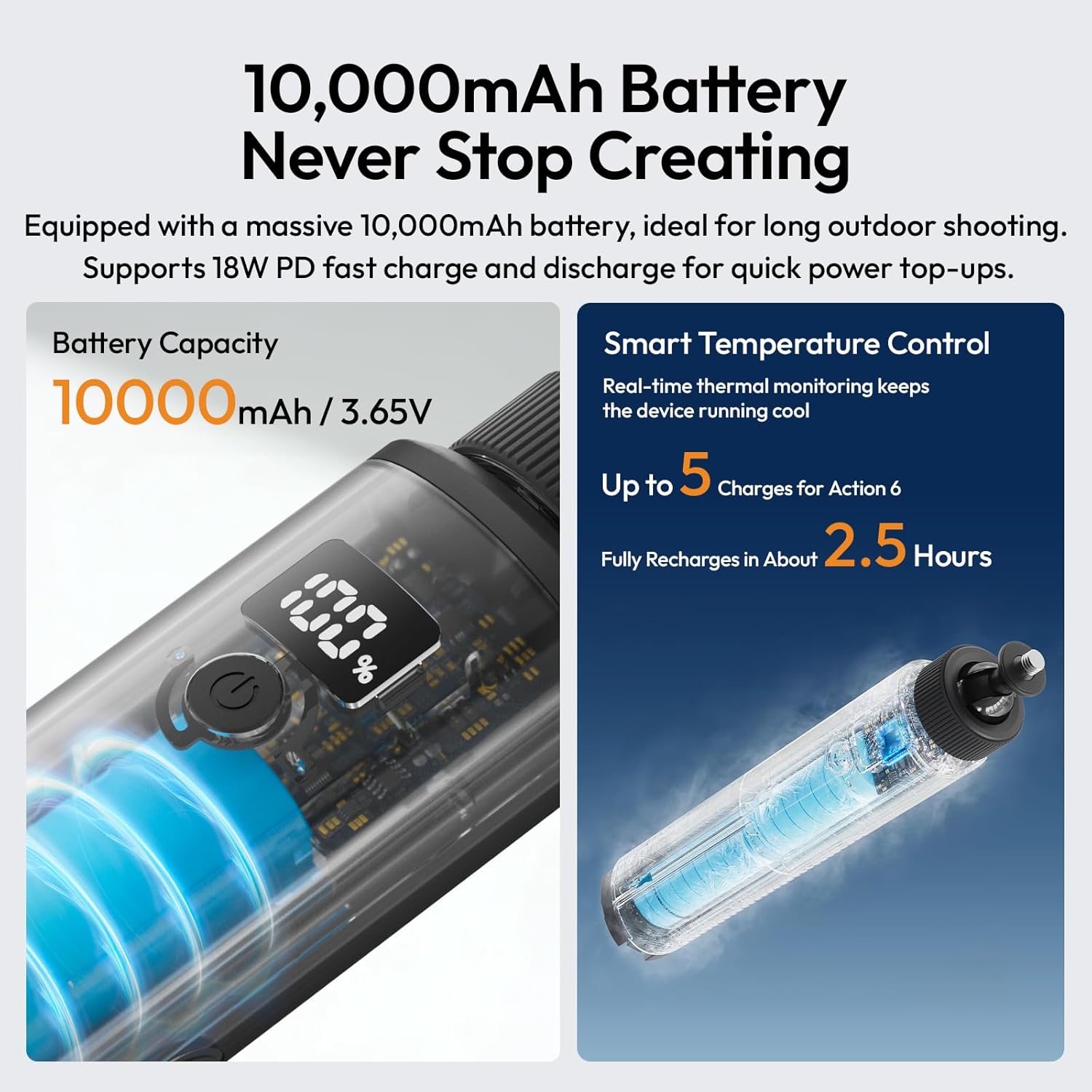
Image 1.1: The ULANZI MA93 Battery Grip with a camera attached, demonstrating its use as a handheld power source.
2. Vsebina paketa
Preverite, ali so v paketu prisotni vsi elementi:
- ULANZI MA93 Handheld Battery Grip x 1
- (Dodatna oprema se lahko razlikuje glede na posamezne pakete izdelkov)
3. Identifikacija sestavnih delov

Image 3.1: Diagram showing the ULANZI MA93 Battery Grip with its main features highlighted, including the LCD display, power button, and integrated cable.
- 1/4"-20 Screw Mount: Located at the top for attaching cameras and accessories.
- LCD zaslon: Prikazuje odstotek baterijetage.
- Gumb za vklop: Aktivira zaslon in začne polnjenje.
- Vgrajen kabel USB-C: For connecting to devices for power.
- Vhodna vrata USB-C: For charging the MA93 battery grip.
- Hidden Tripod Legs: Fold out from the base for tabletop stability.
- 1/4"-20 Navojna luknja: Located at the bottom for mounting on larger tripods or stands.
4. Navodila za nastavitev
4.1 Charging the Battery Grip
- Locate the USB-C input port on the side of the MA93 Battery Grip.
- Connect a USB-C charging cable (not included) to this port and to a compatible USB power adapter (e.g., 18W PD fast charger).
- LCD-zaslon bo prikazal stanje polnjenja in trenutni odstotek baterijetage.
- A full charge takes approximately 2.5 hours with an 18W PD charger.

Image 4.1: The LCD screen displaying battery percentage during charging, indicating the 10000mAh capacity and fast charging capability.
4.2 Attaching a Camera or Device
- Ensure your camera or device has a standard 1/4"-20 threaded hole.
- Align the 1/4"-20 screw mount on top of the MA93 with the threaded hole on your device.
- Rotate the camera or the grip until it is securely fastened. Do not overtighten.
- For devices requiring power, connect the integrated USB-C cable from the grip to your device's charging port.
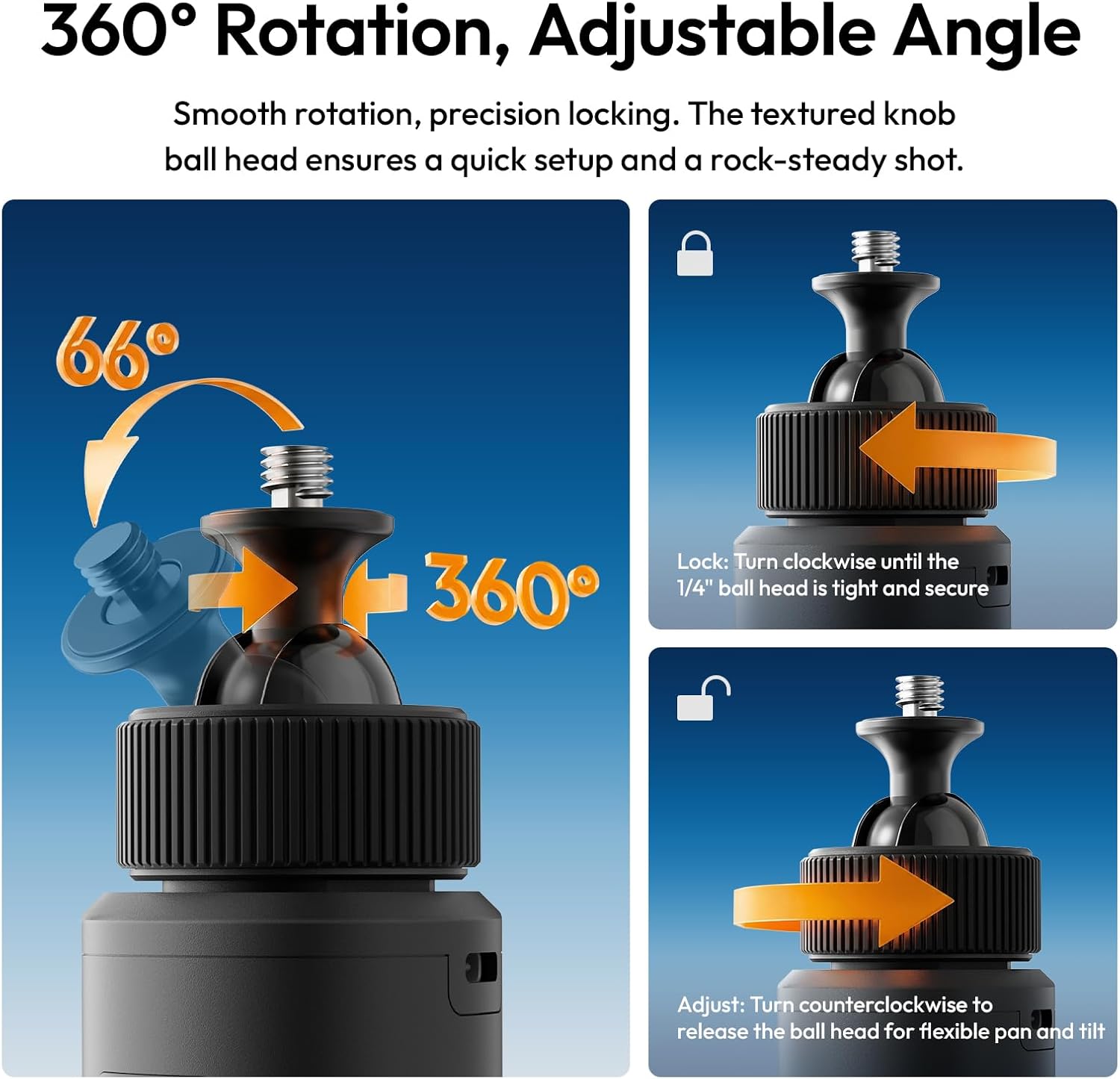
Image 4.2: A camera securely mounted on the ULANZI MA93 Battery Grip, ready for use.
4.3 Deploying the Integrated Tripod
- Locate the three hidden legs at the bottom of the grip.
- Gently pull the three support feet outwards until they are fully extended and locked into position.
- Place the grip on a flat, stable surface for tabletop use.
- To retract, push the legs back into the grip until they are flush.

Image 4.3: The ULANZI MA93 Battery Grip with its integrated tripod legs extended, supporting a camera on a flat surface.
5. Navodila za uporabo
5.1 Preverjanje ravni baterije
Tap the power button once to activate the LCD display. The screen will show the exact remaining battery percentage (1-100%). The display will automatically turn off after a few seconds to conserve power.

Image 5.1: Close-up of the MA93's LCD screen indicating a full 100% charge.
5.2 Powering/Charging External Devices
- Connect your camera, smartphone, or other compatible device to the MA93 using the integrated USB-C cable.
- Press the power button on the MA93 to initiate power delivery. The grip will begin charging the connected device.
- The MA93 supports pass-through charging, allowing it to be charged while simultaneously powering an external device.
5.3 Adjusting the Camera Angle (360° Rotation)
The top 1/4"-20 mount features a ball head for flexible positioning:
- Za prilagoditev: Turn the textured knob counter-clockwise to loosen the ball head. Adjust your camera to the desired angle (360° pan, 66° tilt).
- Zakleniti: Turn the textured knob clockwise until the ball head is tight and secure, preventing movement.

Image 5.2: Illustration of the 360-degree rotation and adjustable angle feature of the MA93's ball head mount.
6. Vzdrževanje
- Napravo hranite čisto in suho. Izogibajte se izpostavljanju vodi ali prekomerni vlagi.
- Za čiščenje zunanjosti uporabite mehko, suho krpo. Ne uporabljajte agresivnih kemikalij ali abrazivnih materialov.
- Store the grip in a cool, dry place when not in use.
- Izogibajte se padcem naprave in je ne izpostavljajte močnim udarcem.
- Naprave ne poskušajte razstavljati ali popravljati sami, saj boste s tem razveljavili garancijo.
7. Odpravljanje težav
| Težava | Možen vzrok | rešitev |
|---|---|---|
| Device not charging from MA93. |
|
|
| MA93 not charging. |
|
|
| LCD-zaslon ne deluje. |
|
|
| Tripod legs not deploying/retracting smoothly. |
|
|
8. Specifikacije
| Funkcija | Podrobnost |
|---|---|
| Ime modela | MA93 Battery Grip |
| Kapaciteta baterije | 10000mAh (approx. 37 Wh) |
| Vhod/izhod | 18W PD Fast Charge/Discharge (USB-C) |
| Montažni vmesnik | Universal 1/4"-20 Screw Mount (top), 1/4"-20 Threaded Hole (bottom) |
| Zaslon | Real-time LCD Percentage Zaslon |
| Integrirane funkcije | Hidden Tripod, Built-in USB-C Cable |
| Dimenzije izdelka | 8.86"D x 1.66"Š x 2.29"V |
| Teža predmeta | 12 unč |
| Združljive naprave | Cameras, Action Cameras, MagSafe Phones (with adapter) |
| Proizvajalec | Shenzhen Vijim Technology Co.,Ltd. |
9. Garancija in podpora
9.1 Informacije o garanciji
The ULANZI MA93 Battery Grip comes with a 12-mesečna garancija od datuma nakupa. Ta garancija krije proizvodne napake in okvare pri normalni uporabi. Ne krije škode, ki jo povzročijo nepravilna uporaba, nesreče, nepooblaščene spremembe ali naravne nesreče.
Za garancijske zahtevke shranite dokazilo o nakupu.
9.2 Podpora strankam
For technical assistance, warranty claims, or product inquiries, please contact ULANZI customer support through the official ULANZI webspletno mesto ali vaše nakupno mesto.
You can also visit the official ULANZI Store on Amazon for more information and products: ULANZI Official US Store
10. Videoposnetki izdelkov
ULANZI MA93 Handheld Battery Grip Overview
Video 10.1: An official video from ULANZI demonstrating the features and usage of the MA93 Handheld Battery Grip.