
1. Pomembne varnostne informacije
Pred sestavljanjem in uporabo preberite in razumite vsa navodila. Ta priročnik shranite za poznejšo uporabo.
- Pred sestavljanjem se prepričajte, da so vsi deli prisotni in nepoškodovani. Ne uporabljajte, če kateri koli deli manjkajo ali so poškodovani.
- Sestavite na mehki, čisti površini, da preprečite praske.
- Do not overtighten screws during assembly to avoid damaging the product.
- TV-stojalo postavite na ravno površino, da preprečite prevračanje.
- Do not exceed the maximum load capacity of 110 lbs (50 kg) for the TV stand.
- Otroci in hišni ljubljenčki naj ne bodo v bližini območja zbiranja.
- For the rolling TV stand, ensure casters are locked when stationary to prevent accidental movement.
- Route power cords safely to avoid tripping hazards and damage.
2. Izdelek je končanview
This bundle includes two distinct entertainment units: the HOOBRO TV Stand (BB122UDDS01) and the HOOBRO Rolling TV Stand (BB37DS01).
HOOBRO TV Stand (BB122UDDS01)
A stationary TV console designed for TVs up to 55 inches, featuring open storage shelves, a power center with outlets and USB ports, and an adjustable LED light strip.

Image: The HOOBRO TV Stand (BB122UDDS01) in a living room setting, showcasing its LED lighting, charging station, and storage capabilities.
HOOBRO Rolling TV Stand (BB37DS01)
A mobile TV stand with an adjustable mount for TVs ranging from 23 to 50 inches. It includes multiple storage shelves and offers the flexibility of casters for mobility or adjustable feet for stationary use.

Image: The HOOBRO Rolling TV Stand (BB37DS01) with a TV mounted, highlighting its compact design and storage options.
3. Nastavitev in montaža
Both TV stands are designed for straightforward assembly. An illustrated manual and necessary tools are included with your product. Follow the step-by-step instructions provided in the separate assembly guide for each unit.
Koraki generalne skupščine:
- Razpakirajte vse komponente in preverite seznam delov v priročniku za sestavljanje.
- Identify and separate hardware (screws, bolts, etc.).
- Follow the numbered steps in the assembly guide, attaching components as instructed.
- Prepričajte se, da so vse povezave varne, vendar jih ne zategnite preveč.
Specific Setup for HOOBRO TV Stand (BB122UDDS01):
- Power Center Installation: The integrated power strip with 2 outlets and 2 USB ports can be positioned at the front or back of the central compartment for convenient access. Secure it firmly once its location is chosen.
- LED svetlobni trak: Attach the LED light strip as per the assembly guide. Ensure the connection to the power center is secure.

Image: The smart controller for the RGB LED light strip, showing options for 21 colors, 8 brightness levels, and 8 lighting modes.
Specific Setup for HOOBRO Rolling TV Stand (BB37DS01):
- Casters or Adjustable Feet: Decide whether to install the four casters (two lockable) for mobility or the four adjustable feet for stationary use. Install only one set.
- Adjustable TV Mount: Assemble the TV mount according to the instructions. This mount is designed to fit 23-50 inch TVs. Ensure the TV is securely attached to the mount.
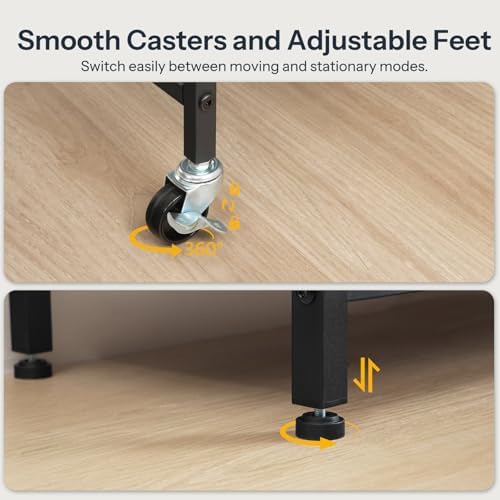
Image: Detail of the smooth casters and adjustable feet, illustrating how to switch between mobile and stationary modes.
4. Navodila za uporabo
HOOBRO TV Stand (BB122UDDS01):
- Center moči: Plug the TV stand's power cord into a wall outlet. Use the 2 AC outlets and 2 USB ports to power and charge your devices.
- LED svetlobni trak: Use the provided smart controller to adjust the LED light strip. You can select from 21 colors, 8 brightness levels, and 8 lighting modes to create your desired ambiance.
- Postavitev naprave: The open bottom shelf features a mesh design for improved heat dissipation, ideal for game consoles and other media devices.
HOOBRO Rolling TV Stand (BB37DS01):
- Mobilnost: If casters are installed, unlock the two lockable casters to move the stand smoothly. Lock them when the stand is in its desired position to prevent accidental movement.
- Stacionarna uporaba: If adjustable feet are installed, ensure they are properly adjusted to level the stand and provide stability.
- TV postavitev: This stand is designed for 23-50 inch televisions. Ensure your TV is securely mounted and balanced.
5. Vzdrževanje in nega
- Čiščenje: Površine obrišite z mehko, damp krpo. Izogibajte se agresivnim kemikalijam ali abrazivnim čistilom, ki lahko poškodujejo površino.
- Odstranjevanje prahu: Regularly dust the stand and shelves to prevent buildup.
- Preverjanje strojne opreme: Občasno preverite vse vijake in matico, da se prepričate, da so trdno priviti. Po potrebi jih privijte, vendar ne premočno.
- Upravljanje kablov: Keep cables tidy and organized to prevent damage and ensure safety.
- Nega LED trakov: Avoid bending or pulling the LED strip excessively. If the strip malfunctions, contact customer support.
6. Odpravljanje težav
TV Stand (BB122UDDS01) Issues:
- LED Light Strip Not Working:
- Prepričajte se, da je napajalni kabel varno priključen v delujočo vtičnico.
- Check the connection between the LED strip and the power center.
- Preverite, ali baterije daljinskega upravljalnika delujejo.
- Polnilna vrata ne delujejo:
- Confirm the TV stand's power cord is plugged in.
- Test with a different device or cable.
Rolling TV Stand (BB37DS01) Issues:
- Stojalo je nestabilno:
- If using adjustable feet, ensure they are all making firm contact with the floor and are adjusted to level the stand.
- If using casters, ensure the lockable casters are engaged when stationary.
- Verify all assembly hardware is tightened.
- Difficulty Moving (with casters):
- Prepričajte se, da so zaklepi kolesc odklopljeni.
- Check for any obstructions on the floor.
7. Specifikacije
HOOBRO TV Stand (BB122UDDS01)
- Dimenzije: 47.2"D x 11.8"Š x 17.7"V (120 cm D x 30 cm Š x 45 cm V)
- TV združljivost: Do 55 palcev
- Nosilnost: 110 lbs (50 kg)
- Center moči: 2 vtičnici za izmenični tok, 2 vhoda USB
- Osvetlitev: Adjustable RGB LED Light Strip (21 colors, 8 brightness, 8 modes)
- Lastnosti: Ventilated mesh shelves for heat dissipation

Image: Detailed dimensions of the HOOBRO TV Stand (BB122UDDS01), including length, width, height, and load capacity.
HOOBRO Rolling TV Stand (BB37DS01)
- Dimenzije: Approximately 20.5"W x 14.6"D x 46.7"H (52cm W x 37cm D x 118.5cm H)
- TV združljivost: 23-50 palcev
- Mobilnost: 4 casters (2 lockable) or 4 adjustable feet
- Lastnosti: Adjustable TV mount, multiple storage shelves
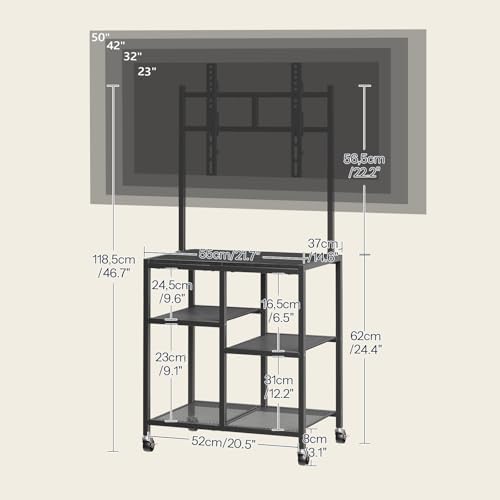
Image: Detailed dimensions of the HOOBRO Rolling TV Stand (BB37DS01), including width, depth, height, and compatible TV sizes.

Image: Features overview, including load capacity, ventilated mesh shelves, sturdy construction, and adjustable feet, applicable to both units where relevant.
8. Garancija in podpora
For warranty information, missing parts, or technical support, please refer to the contact information provided with your purchase or visit the official HOOBRO website. Please have your model number (BB122UDDS01 or BB37DS01) and purchase details ready when contacting support.