
1. Uvod
Welcome to the user manual for your ATTACK SHARK R68 HE Carbon Fiber 8000Hz Rapid Trigger Keyboard. This manual provides detailed instructions for setting up, operating, customizing, and maintaining your keyboard to ensure optimal performance and a superior gaming experience.

Image: The ATTACK SHARK R68 HE Wired Forged Carbon Fiber Keyboard, showcasing its design and vibrant RGB lighting.
2. Ključne značilnosti
The ATTACK SHARK R68 HE keyboard is engineered for high-performance gaming and typing, incorporating advanced technologies:
- Vrhunska gradnja: Features a compact 60% layout with CNC-machined aluminum alloy side trims and advanced carbon fiber composite materials for durability and aesthetics.
- Magnetna stikala: Equipped with Hall effect magnetic switches for ultra-sensitive operation and a silky smooth feel.
- Rapid Trigger (RT) Functionality: Adjustable 0.005mm RT accuracy with a global actuation range of 0.005mm to 3.4mm, allowing for precise and instant key responses.
- Visoka stopnja glasovanja: An 8000Hz polling rate delivers 8x faster response times than traditional gaming keyboards, with ultra-low 0.08ms latency.
- Advanced Key Functions: Supports Dynamic Keystroke (DKS), Mod Tap (MT), Toggle Key (TGL), and Snap Tap (SOCD) for enhanced gaming precision.
- Prilagodljiva RGB osvetlitev: Dual-sided dynamic RGB light strips and individual key RGB lighting with 16.8 million colors, featuring 20+ preset light effects.
- QMK Web-Gonilnik na osnovi: Offers comprehensive customization for key remapping, macros, lighting effects, and magnetic switch settings.
- C01 Ultra RGB Coiled Cable: Designed for stable data transfer and fast charging.
- Združljivost: Fully compatible with Windows and Mac operating systems.

Image: Visual representation of the keyboard's high performance metrics, including 8000Hz polling rate and 256K scan rate, emphasizing instant response and precision.
3. Vsebina paketa
Preverite, ali so v paketu vsi elementi:
- ATTACK SHARK R68 HE Keyboard
- C01 Ultra RGB Coiled Cable
- 2-in-1 Key Puller
- Ovitek za tipkovnico
- 2 x Spare Magnetic Switches
- 2 x ATTACK SHARK Stickers
- Uporabniški priročnik (ta dokument)

Slika: Prekoview of all items included in the ATTACK SHARK R68 HE keyboard retail box, neatly arranged.
4. Nastavitev
4.1 Priključitev tipkovnice
The R68 HE is a wired keyboard. Connect it to your computer using the provided C01 Ultra RGB Coiled Cable.
- Insert the USB-C end of the coiled cable into the port on the back of the keyboard.
- Connect the USB-A end of the coiled cable to an available USB port on your computer.
- The keyboard will automatically be recognized by your operating system (Windows or Mac).

Image: The keyboard connected to a coiled USB-C cable, emphasizing the wired connection and high polling rate for stable data transfer.
4.2 Začetna kalibracija
For optimal performance, especially with Rapid Trigger features, it is recommended to perform an initial calibration using the web programsko opremo gonilnika.
- Open the QMK web-based driver (www.qmk.top) or the downloaded software.
- Navigate to the "Keyboard Setting" panel.
- Locate and click "Travel calibration" on the right side.
- In the pop-up window, select "Start Calibration."
- Follow the on-screen instructions, then click "Calibration Complete" to finish.
Image: A visual guide demonstrating the steps for performing a quick calibration using the keyboard's web driver software interface.
5. Navodila za uporabo
5.1 Osnovne funkcije tipkovnice
The R68 HE features a 68-key ANSI layout. Standard key functions operate as expected. Utilize the Function (Fn) key for secondary key actions, typically indicated by legends on the keycaps.
5.2 Nadzor osvetlitve RGB
The keyboard features dynamic RGB backlighting and side light bars. You can control these directly from the keyboard or through the customization software.
Keyboard Backlight Controls:
- Fn + \ |: Switch Light Effects
- Fn + Enter: Preklopi barvo svetlobe
- Fn + Vračalka: Vklop/izklop luči
- Fn + Tab: Bela svetloba
- Fn + + / -: Prilagodi hitrost osvetlitve ozadja
- Fn + ↑ / ↓: Prilagodite osvetlitev ozadja
Side Light Bar Controls:
- Fn + Z: Switch Side Light Effects
- Fn + X: Switch Side Light Color
- Fn + C: Side Light On/Off

Image: The keyboard displaying various RGB lighting effects, accompanied by a guide to onboard lighting controls for both key backlights and side light bars.
5.3 Magnetic Switch Features (Rapid Trigger, DKS, MT, TGL, SOCD)
The magnetic switches allow for advanced functionalities crucial for competitive gaming:
- Hitri sprožilec (RT): Allows a key to activate and deactivate based on movement rather than a fixed actuation point. This means a key can register a press as soon as it moves down and reset as soon as it moves up, enabling extremely fast repeated inputs.
- Nastavljivo aktiviranje: Customize the actuation point for each key individually from 0.005mm to 3.4mm via the software, tailoring sensitivity to your preference.
- Dinamični pritisk tipke (DKS): Assign up to four different actions to a single key based on how far it is pressed.
- Mod Tap (MT): A key can perform one action when tapped and a different action when held.
- Preklopna tipka (TGL): Press and hold a key to activate a continuous action, release to stop.
- Snap Tap (SOCD - Simultaneous Opposite Cardinal Directions): Optimizes directional inputs in games by neutralizing opposing inputs (e.g., pressing both 'A' and 'D' simultaneously results in no horizontal movement).

Image: A detailed explanation of magnetic Hall Effect switches and the Rapid Trigger mechanism, comparing its dynamic actuation to standard switches.

Image: Visual guides for advanced magnetic switch features including Toggle Key (TGL), Snap Tap (SOCD), and Dynamic Keystroke (DKS).
6. Prilagajanje
The ATTACK SHARK R68 HE keyboard offers extensive customization through its QMK web-based driver or downloadable software. This allows you to personalize your keyboard experience to a high degree.
Možnosti prilagajanja:
- Preslikava ključev: Dodelite katero koli tipko drugi funkciji.
- Nastavitve makra: Create and assign complex macros for single-key execution.
- RGB Lighting Settings: Fine-tune lighting effects, colors, and brightness beyond onboard controls.
- Magnetic Switch Settings: Adjust actuation points, Rapid Trigger sensitivity, and configure DKS, MT, TGL, and SOCD functions.
- Music Visualization: Synchronize lighting with audio output.
- Zone Wake-up & Screen Lighting Rhythm: Advanced lighting synchronization features.
Dostop do web driver at: www.qmk.top

Image: The user interface of the QMK web driver, demonstrating options for customizing lighting, magnetic switch behavior, and key functions.
7. Vzdrževanje
Pravilno vzdrževanje zagotavlja dolgo življenjsko dobo in delovanje vaše tipkovnice.
- Čiščenje: Use a soft, dry cloth to wipe the keyboard surface. For deeper cleaning, use the provided key puller to remove keycaps and clean dust or debris with compressed air. Avoid using harsh chemicals or abrasive materials.
- Shranjevanje: When not in use, store the keyboard in a clean, dry environment. The included keyboard cover can help protect it from dust.
- Skrb za kabel: Avoid sharp bends or excessive pulling on the coiled cable to prevent damage.
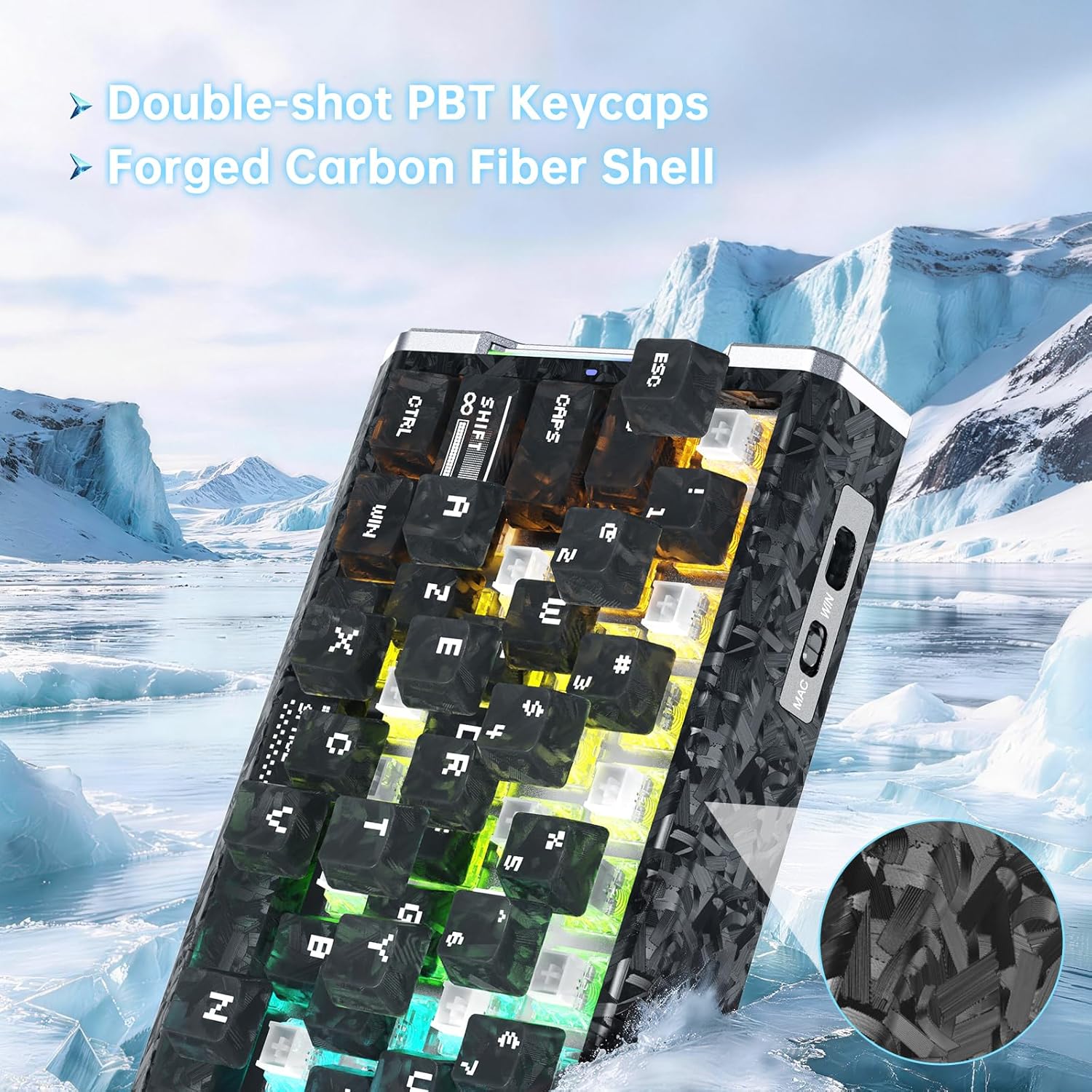
Slika: Podrobna view of the keyboard's forged carbon fiber keycaps and shell material, alongside accessories like spare switches and a key puller, relevant for maintenance.
8. Odpravljanje težav
If you encounter issues with your ATTACK SHARK R68 HE keyboard, refer to the following common solutions:
| Težava | Možen vzrok | rešitev |
|---|---|---|
| Tipkovnica se ne odziva | Ohlapna kabelska povezava, napačna vrata USB, težava z gonilnikom. | Ensure the USB-C cable is securely connected to both the keyboard and the computer. Try a different USB port. Restart your computer. Check device manager for driver issues. |
| RGB osvetlitev ne deluje ali je nepravilna | Lighting settings misconfigured, software conflict. | Use the onboard Fn key combinations to cycle through effects and colors (see Section 5.2). Check the QMK web driver for detailed lighting settings. Ensure no other lighting software is conflicting. |
| Tipke se ne registrirajo ali tipkajo dvakrat | Dust/debris under keycap, magnetic switch calibration needed, software issue. | Remove the keycap and clean the switch area. Perform a "Travel calibration" using the QMK web driver (see Section 4.2). Update or reinstall the keyboard software/driver. |
| Advanced features (RT, DKS, etc.) not working | Features not enabled or configured in software. | Ensure these features are properly configured and enabled within the QMK web driver software (see Section 6). |
| Computer lagging or freezing after connecting keyboard | Potential software conflict or system resource issue (rare). | Ensure your operating system and drivers are up to date. Try connecting the keyboard to a different computer to isolate the issue. If the problem persists, contact customer support. |
9. Specifikacije
Detailed technical specifications for the ATTACK SHARK R68 HE Keyboard:
| Funkcija | Podrobnost |
|---|---|
| Znamka | NAPAD MORSKI PES |
| Model | R68 HE |
| Tehnologija povezljivosti | USB-C (žični) |
| Razporeditev tipkovnice | 68-Key ANSI (60% Layout) |
| Tip stikala | Magnetic Hall Effect Switches (Linear) |
| Območje aktiviranja | 0.005mm to 3.4mm (Adjustable) |
| Hitra natančnost sprožilca | 0.005 mm |
| Polling Rate | 8000Hz |
| Zakasnitev | 0.08ms |
| Stopnja skeniranja | 256 kHz |
| Material ključavnice | PC Matte Forged Carbon |
| Material ohišja | Ogljikova vlakna, aluminijeva zlitina |
| RGB osvetlitev | 16.8 Million Colors, Dynamic Backlight & Side Strips |
| Združljivi operacijski sistemi | Windows, Mac OS 14 Sonoma and above |
| Dimenzije | 325 mm x 122 mm x 20 mm (približno 12.8 palca x 4.8 palca x 0.79 palca) |
| UPC | 707630517426 |
Image: A technical diagram illustrating the ANSI layout and physical dimensions of the R68 HE keyboard.
10. Garancija in podpora
10.1 Garancija proizvajalca
The ATTACK SHARK R68 HE keyboard comes with a 1-letna garancija proizvajalca od datuma nakupa. Ta garancija krije napake v materialu in izdelavi pri normalni uporabi. Ne krije škode, ki jo povzroči nepravilna uporaba, nesreče, nepooblaščene spremembe ali običajna obraba.
Za garancijske zahtevke shranite dokazilo o nakupu.
10.2 Podpora strankam
For technical assistance, warranty claims, or any questions regarding your ATTACK SHARK R68 HE keyboard, please contact ATTACK SHARK customer support through their official channels or the retailer where the product was purchased.
You may also refer to the official brand store on Amazon: Trgovina ATTACK SHARK
11. Videoposnetki izdelkov
ATTACK SHARK R68 HE Carbon Fiber 8000Hz Rapid Trigger Keyboard Overview
Video: Uradnik nadview of the ATTACK SHARK R68 HE Carbon Fiber 8000Hz Rapid Trigger Keyboard, highlighting its features and design.
R68HE Carbon Fiber Rapid Trigger Keyboard with Magnetic Switch Features
Video: A demonstration of the R68HE Carbon Fiber Rapid Trigger Keyboard, focusing on its magnetic switch technology and rapid trigger capabilities.